

Customer Satisfaction Survey: Types, Questions, and Steps to Create

Most businesses lose customers without knowing why, because their feedback forms are too long and too easy to abandon. When surveys go unfinished, the problems stay invisible.
This guide shows you how to build a focused customer satisfaction survey in WordPress that people will actually complete.
- A customer satisfaction survey helps you measure how people feel after a purchase, a support reply, an onboarding step, or a product experience.
- CSAT is the score you get from a customer satisfaction survey, NPS measures recommendation, and CES measures effort.
- In Fluent Forms, you can build a CSAT survey from scratch or start with a template.
- You can use a rating field, a follow-up question, conversational forms, styling controls, the Gutenberg block styler, and the landing page feature.
- Keep the survey short and tied to one moment in the customer journey.
What is a Customer Satisfaction Survey?
A customer satisfaction survey is a form that collects feedback from people about a product, service, support interaction, or overall brand experience. It helps you see where people are happy, where they get stuck, and where the process needs work.
CSAT is the score you get from a satisfaction survey after a recent interaction. NPS measures how likely someone is to recommend your company. CES measures how much effort the customer needs to get something done.
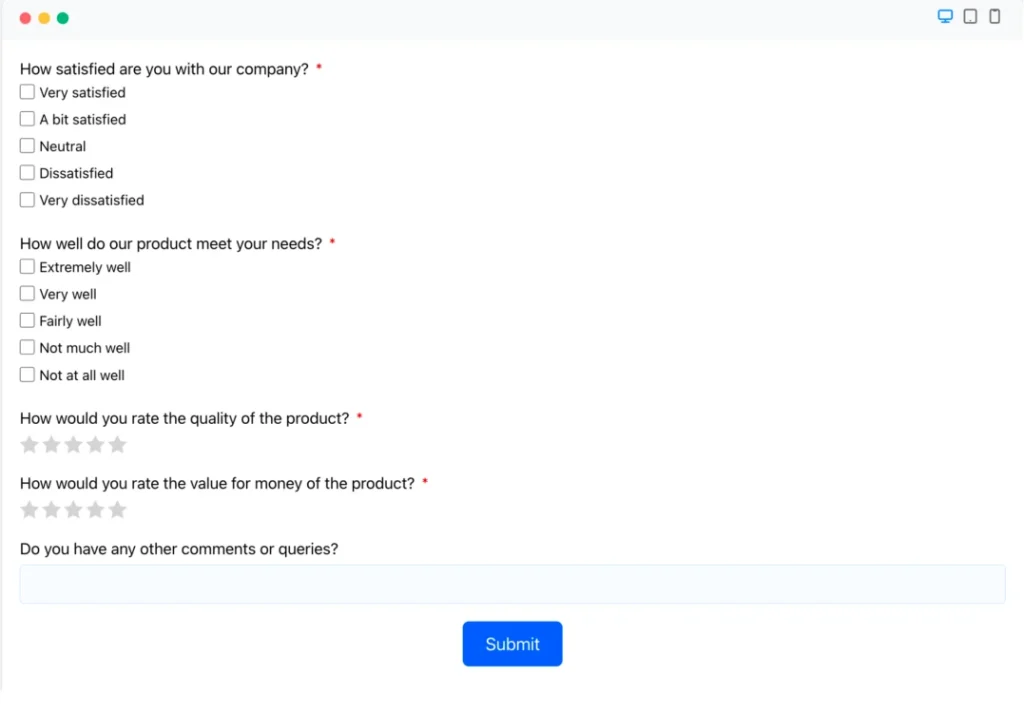
Here is a small example of a customer satisfaction survey form:
Types of Customer Satisfaction Surveys
Each survey type answers a different question, so the format should match the moment you want to measure.
CSAT survey
A CSAT survey measures how satisfied someone was with a single, finished interaction. Use it right after support, checkout, onboarding, or delivery, while the experience is still fresh.
Here is what that looks like in practice: a customer buys a plugin, installs it, and rates the experience immediately after setup. A low score tells you the friction is somewhere in checkout, the download flow, or the setup steps. You know where to look.
NPS survey
An NPS (Net Promoter Score) survey measures loyalty, not satisfaction at one moment. Use it when you want to know whether a customer would recommend your brand to someone else.
A long-term customer gets a quarterly check-in asking how likely they are to recommend your product. If the score drops, the cause is usually support quality, pricing, or a missing feature. One bad transaction rarely moves it.
CES survey
A CES (Customer Effort Score) survey measures effort. Use it when you want to identify friction in a process before it shows up in satisfaction scores.
Say a customer tries to reset a password, locate a refund policy, or finish checkout. A high effort score means the flow has too many steps, unclear labels, or weak guidance. CES tells you this early, before customers quietly leave.
Relationship survey
A relationship survey covers the customer’s full experience with your brand, not a single touchpoint. Use it for account health checks, retention work, or periodic feedback on how the relationship is holding up over time.
A subscription customer gets a survey every few months about their overall experience. That kind of check-in surfaces patterns that a single-transaction survey would miss: slow support, missing documentation, or a product that no longer fits how they work.
Product or service survey
A product or service survey focuses on one specific feature, release, or service line. Use it when you want feedback tied directly to something you shipped or changed.
After rolling out a new onboarding flow, you ask users what helped, what confused them, and what still feels clumsy. That feedback is easier to act on than a vague satisfaction score because it points to something concrete.
How to Create a Customer Satisfaction Survey on WordPress
The fastest way to build a customer satisfaction survey in WordPress is to start with a blank form or a template in Fluent Forms and shape it around one clear goal.
You can use the Fluent Forms templates or start from scratch by selecting your preferred input fields.
Start with a blank form or a template
In WordPress, go to Dashboard > Fluent Forms > New Form. When you click on Add New Form, you’ll find options to add a new form, including New Blank Form, and Choose a Template.
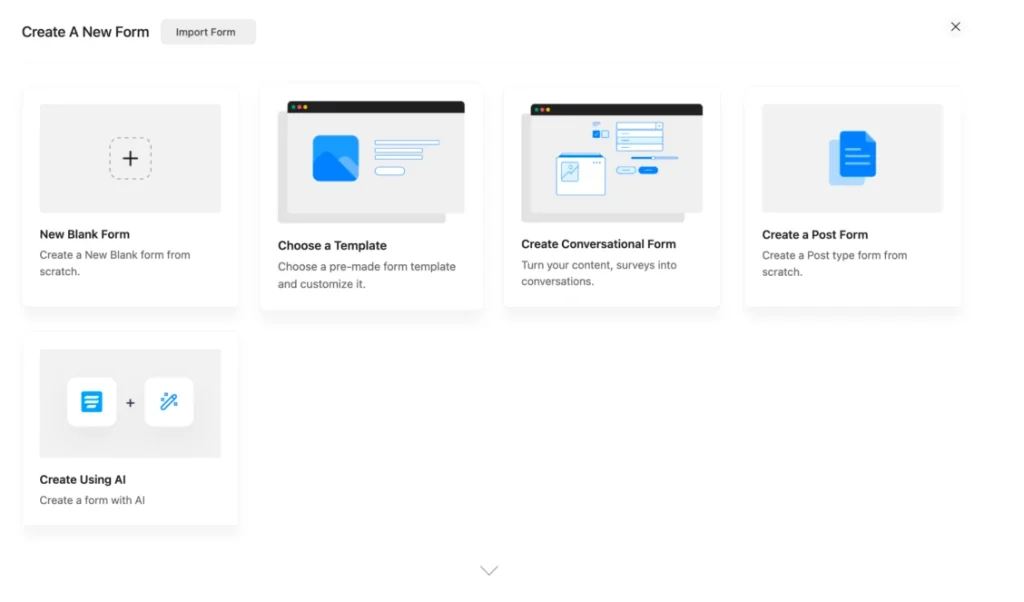
If you want speed, pick a survey or feedback template from the library and trim it down. If you want a clean build, start with a blank form and add only the fields you need.
A simple CSAT form usually needs one rating field, one short follow-up question, and one optional text field for comments.
Choose the required fields based on the survey goals
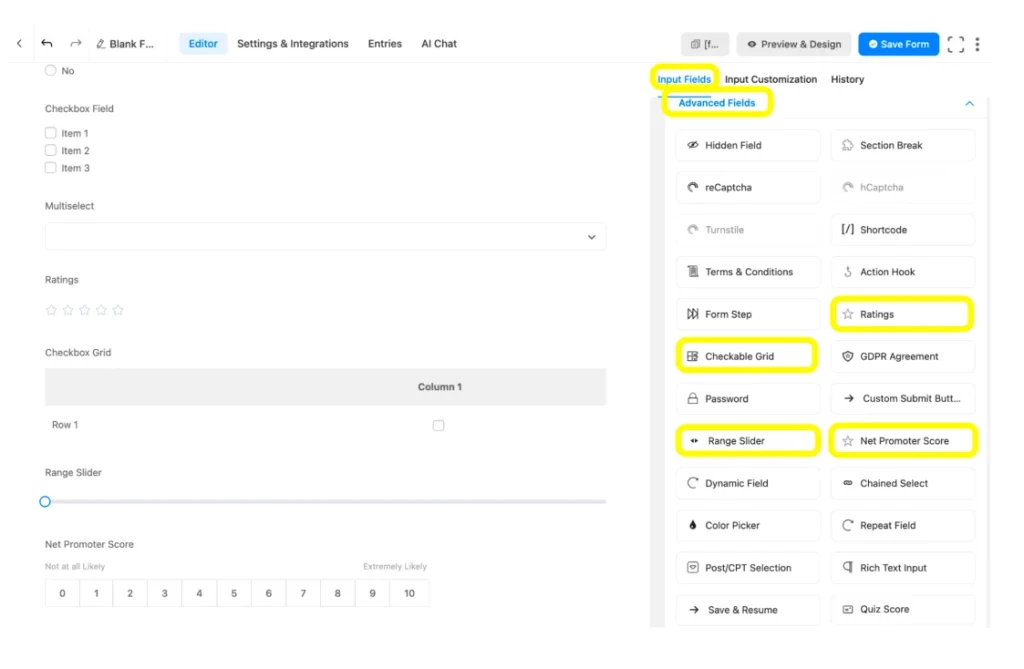
In the Fluent Forms editor page, you’ll find the fields on the right side of the page, which you can select by clicking or you can drag and drop your preferred fields.
You will see many fields, such as radio field, checkbox, ratings, range slider, net promoter score, multiselect, and checkable grid, which you can fully use in a survey.
Customize the fields as per your survey style
In terms of making a survey form, the main part is putting the questions and the options to answer. So, the main point is where you are going to put which questions. That’s all.
To put the questions, you need to go to the Input Customization, choose the Element Label, and paste the question. In terms of extendable fields like checkbox, radio field, or checkable grid, you can maximize or minimize the number of grids/boxes.
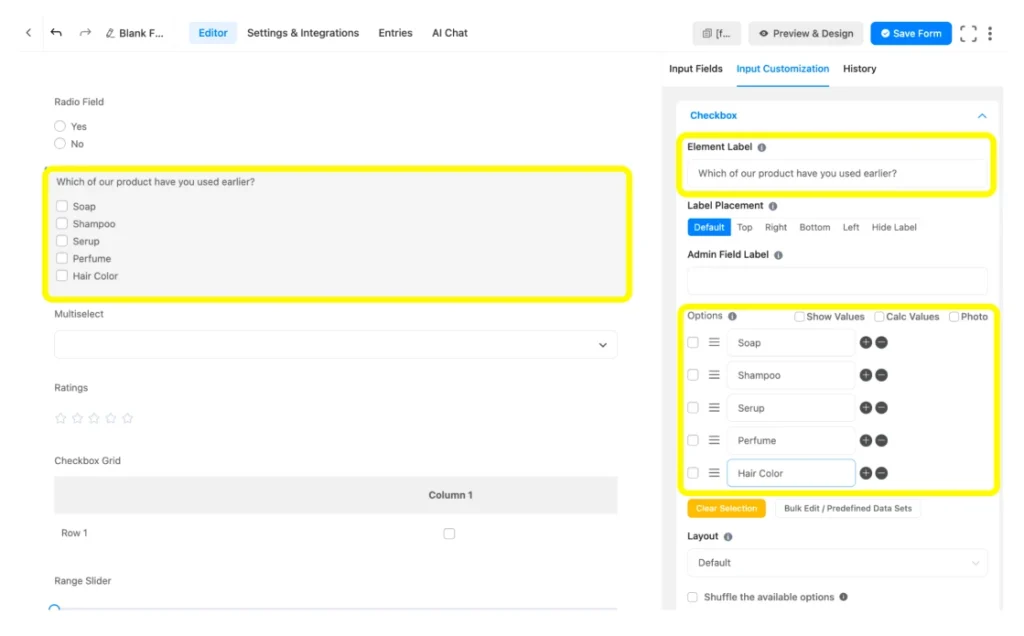
I’ve shown one field here as an instance. I’ll also add other fields, which you can check on the preview page.
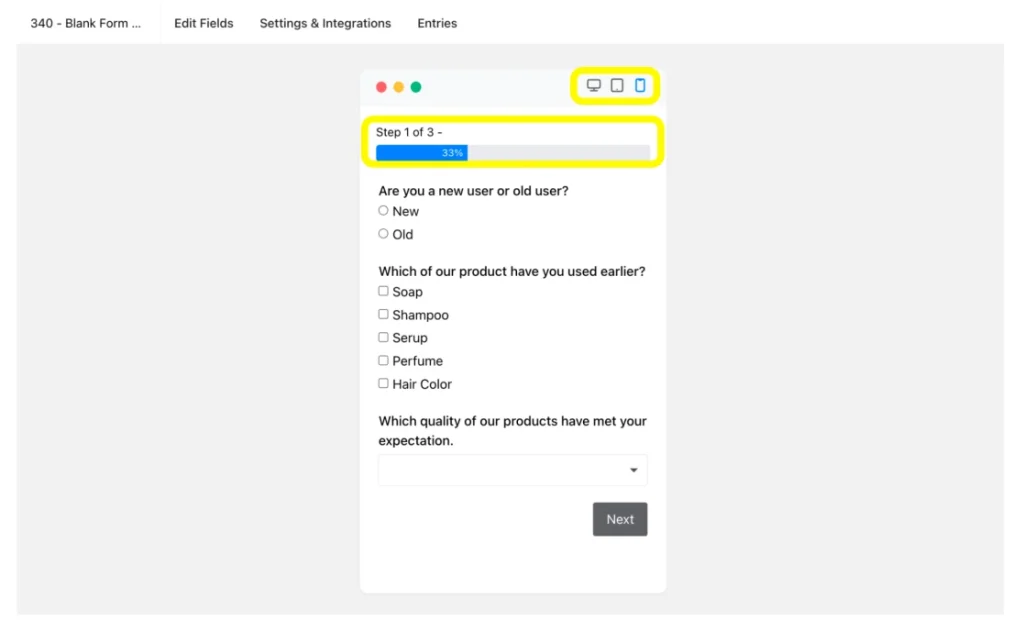
As most of the surveys tend to be multi-step, I am also adding the Form Step field to make sure the user doesn’t get bothered with too many fields. You can also check the device responsiveness and the progress bar, as it’s a multi-step form.
Bring your brand tone using the stylers
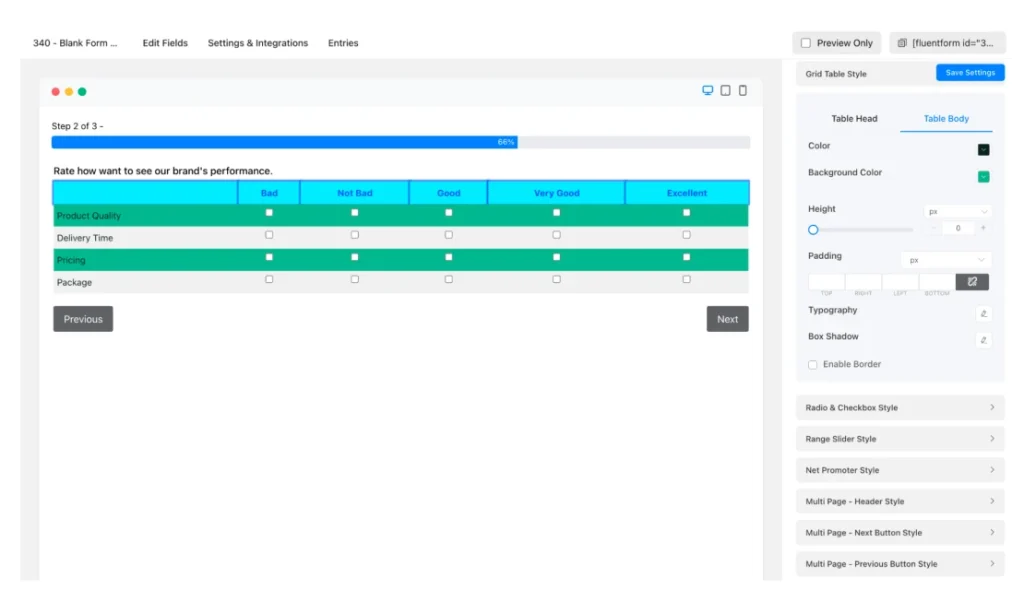
When you are on the preview page, you can use the built-in Advanced Form Styler of Fluent Forms to bring brand-specific freedom in your form design.
Use to control form width, label color, button style, border radius, and font family.
If you are placing the form inside a WordPress layout, use the Gutenberg block styler styling options too, so the survey matches the page around it instead of looking dropped in.
With the Advanced Form Styler, you can manually set your form UX preferences.
Turn it into a conversation
If you want the survey to feel lighter, use Fluent Forms’ Conversational Form flow. The customer sees one question at a time instead of a full wall of fields.
Using Fluent Forms, you can directly create a conversational form or convert an existing one to a new conversational form.
Publish the form
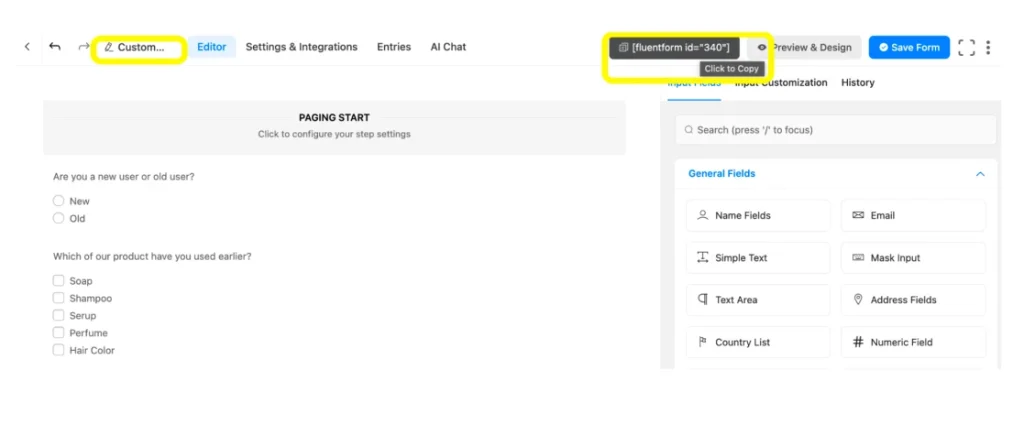
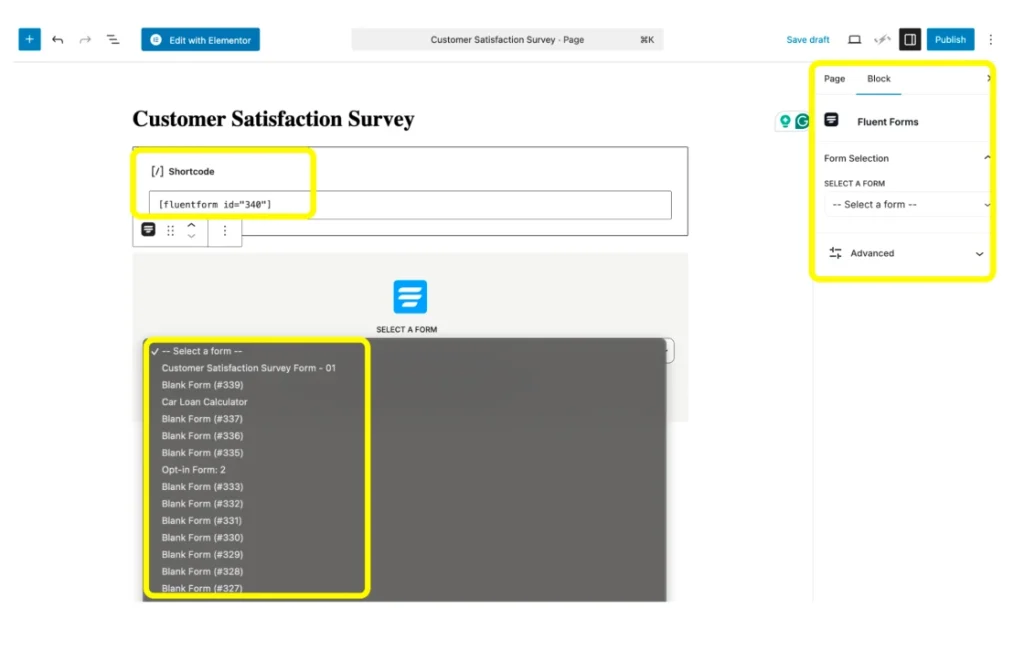
Using Fluent Forms, publishing a form is simple: add a block to the page. You can easily copy the shortcode from the Forms or the form editor; besides, you can use the Fluent Forms block, which gets easier when you rename the respective form.
Now just embed the form or paste the shortcode to the page you want the form to appear.
To bring your survey form to a different page, use the landing page module of Fluent Forms, and ensure full focus on the form.
To create a landing page using Fluent Forms, go to the form’s Settings and Integrations, and Enable Form Landing Page Mode. You will get different options to articulate the form landing page.
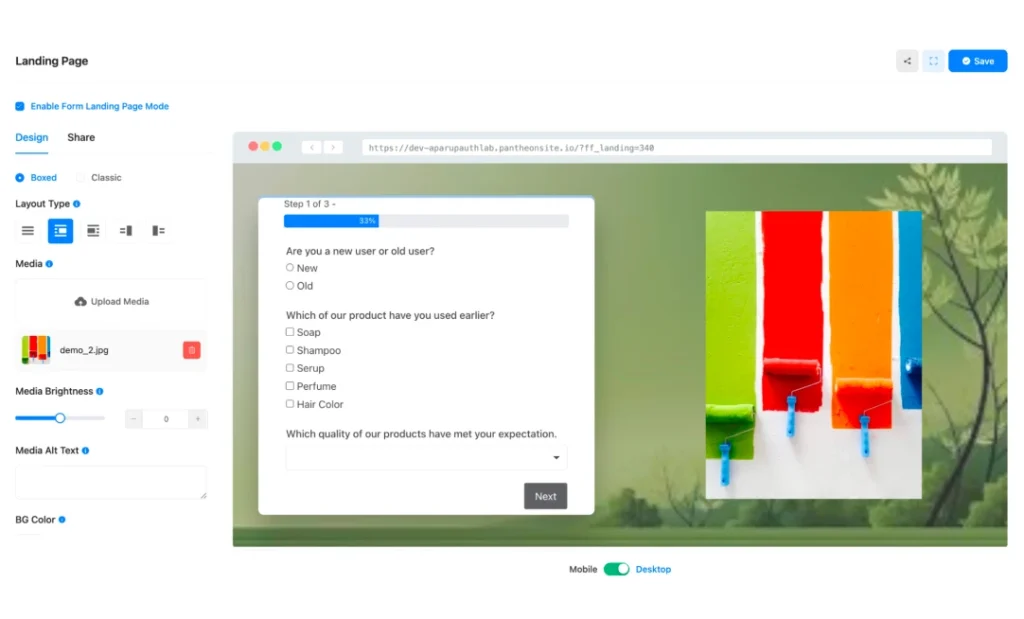
This is how you can accomplish the steps to add a customer satisfaction survey on your WordPress site.
Examples of Customer Survey Questions
Use these question sets as a starting point, then trim them to fit your survey goal. Each type needs a different angle, so the questions should match the experience you are measuring.
CSAT survey questions
- How satisfied were you with your recent experience?
- How would you rate the support or service you received?
- Did we meet your expectations?
- How satisfied are you with the resolution of your issue?
- What could we have done better?
NPS survey questions
- How likely are you to recommend us to a friend or colleague?
- What is the main reason for your score?
- What would make you more likely to recommend us?
- How do we compare with other tools or services you use?
- What should we improve to earn a higher recommendation?
CES survey questions
- How easy was it to complete your task?
- How much effort did you need to solve your issue?
- Was anything confusing during the process?
- What slowed you down the most?
- What would have made this easier?
Relationship survey questions
- How satisfied are you with your overall experience with us?
- How has your experience changed over time?
- What is the biggest reason you stay with us?
- What would make our relationship stronger?
- Is there anything we should change to support you better?
Product or service survey questions
- How satisfied are you with the product or service overall?
- Which feature or service helped you most?
- What is missing from the current experience?
- What part of the product or service feels frustrating?
- What should we improve first?
Tips to Distribute Your Customer Satisfaction Survey
Every survey comes with a particular vision, and the strategy gets set according to the outcome you are looking for. Anyway, a customer satisfaction survey requires a few workarounds:
- Send the survey immediately after the experience, while feedback is still accurate and fresh.
- Keep the survey short by asking only the number of questions you actually need.
- Match the delivery channel to the moment so the survey feels connected, not random.
- Use plain, simple language, so respondents understand what you’re asking without having to think too hard.
- Close the loop by following up with respondents so they know their feedback actually led to something.
Put Your Survey to Work
Building the form and distributing it is only the starting point. You now know how to strip the survey down to a single goal, place it at the right moment, and reach respondents through the right channel. The next step is to publish, then open your results and sort them. That is where the real fixes are hiding. Start there.

Hi, I’m Aparup. With a background in Literature and experience in tech, I combine creativity and practicality to go beyond generic AI output. I’m a content marketer helping users navigate and solve WordPress challenges.
-
Styling Beautiful CSS Forms with Fluent Forms’ Advanced Form Styler
Learn styling Fluent Forms using built-in templates, Gutenberg, custom CSS, -

Holiday Email Marketing Campaigns: Ideas, Mistakes, Dos & Don’ts
Discover 10 holiday email marketing campaign ideas for 2026, plus -

10 Best jQuery Table Plugins for Best Data Visualization in 2026
Discover the 10 best jQuery table plugins for 2026. Compare


Comments
-
This sounds awesome, thanks !
-
[…] spread perception is the unawareness of the power that the internet has. So, here are some of the advantages of conducting a survey online and how you can do it […]
-
I agree it is a wonderful answer
-
Very useful message
-
[…] Customer satisfaction survey guide […]



Leave a Reply
You must be logged in to post a comment.