

How to Master Customer Onboarding and Keep Customers Coming Back
Customer onboarding is everything you do after someone buys to help them get their first result. Get it right and customers settle in, use what they bought, and stay. Get it wrong and they quietly leave.
This guide gives you a simple process, nine best practices, and a checklist you can use whether you sell a plugin, a service, or a course.
Let’s dive in!
Key Takeaways
- Start with a clear first win. Define what success looks like for each customer and guide them toward that result.
- Make a strong first impression. Send a welcome email immediately, set clear expectations, and offer one simple next step.
- Personalize the onboarding experience. Use a short survey to understand customer goals and recommend the right resources.
- Automate without losing the human touch. Use email sequences, helpful guides, and timely check-ins to keep customers moving forward.
- Spot struggling customers early. Track onboarding progress, identify inactive customers, and reach out before they give up.
- Measure, learn, and improve. Monitor time to first win, onboarding completion, support tickets, and early cancellations to find what needs fixing.
What Is Customer Onboarding and Why Does It Matter?
Customer onboarding is the set of steps that take a new customer from “I just bought” to “I got my first result.” It covers the welcome, the setup, the first lessons, and the first check-in. What it looks like depends on what you sell:
- A plugin or product: install it, set it up, use it for the first time.
- A service or agency: hold the kickoff call, share access, deliver the first piece of work.
- A course or membership: join, find the first lesson, finish it.
The first days set the tone. A customer who gets an early win has a reason to keep going. One who gets stuck opens a support ticket, asks for a refund, or stops opening your emails. Good onboarding is one of the simplest ways to improve customer retention, because you are helping people who already chose you.
The Customer Onboarding Process in 5 Stages
Every good onboarding process follows the same five stages. The details change with your product, but the order does not.
Here is what to do at each stage.
| Stage | Goal | What to Send or Do |
|---|---|---|
| Handoff at Purchase | Your team knows a new customer arrived | Create a record and a tracking card |
| Welcome | Confirm the purchase and set expectations | Welcome email within minutes |
| Setup and First Win | Customer reaches the first result | Short guide, setup help, optional kickoff call |
| Adoption | Customer keeps going | Follow-up emails, tips, course lessons |
| Review | Find out what worked | Feedback request and a short check-in |
9 Customer Onboarding Best Practices to Follow
These habits work for any business and set the tone for the customer experience from day one.
1. Define the first result for each customer type
Before you send a single email, decide what a good first week looks like. For a plugin, it might be the first form published. For an agency, the kickoff call done. For a course, the first lesson finished. Write it down for each customer type, then build every step toward it.
If you cannot name the first win, your customer cannot reach it.
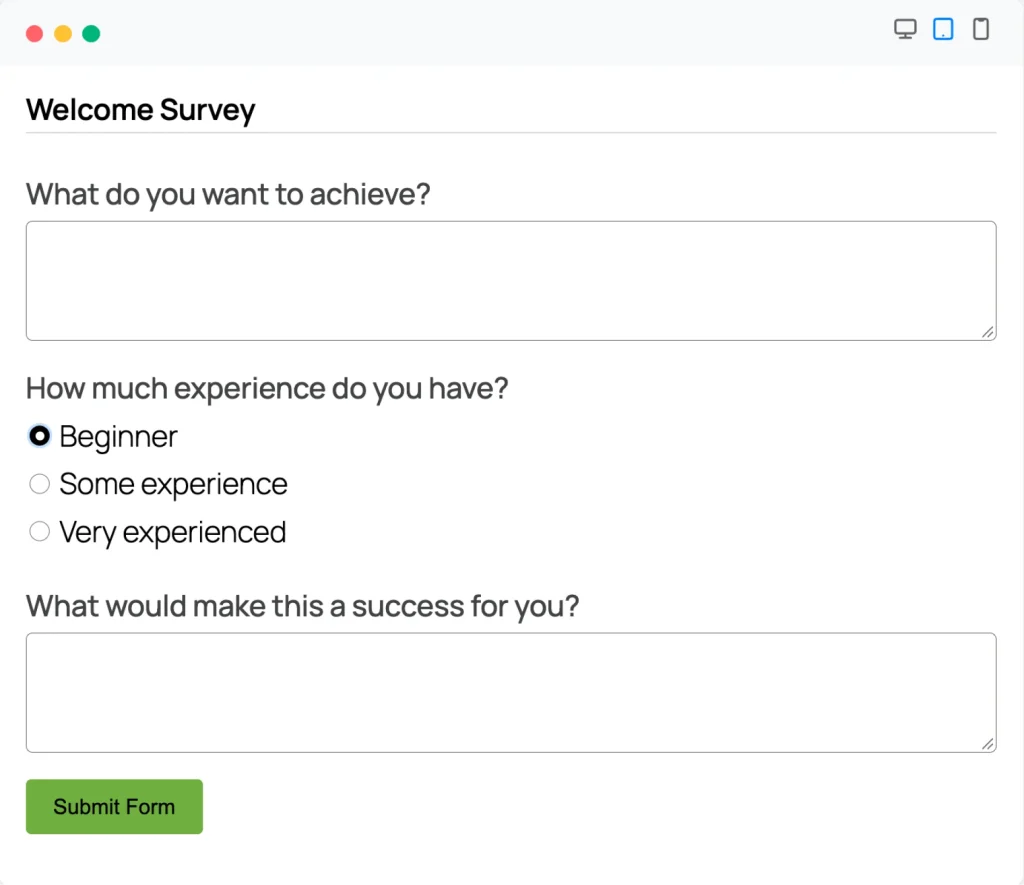
2. Learn the customer’s goal with a short welcome survey
Ask two or three questions right after purchase.
- What do you want to achieve?
- How much experience do you have?
- What would make this a success for you?
The answers tell you which welcome email, guide, or call to send, so you stop guessing.
Keep it short. A long form at the start feels like homework.
In WordPress: build the survey with Fluent Forms and connect it to FluentCRM, so each new submission adds the person to a list or tag.
3. Set clear expectations before and after purchase
Tell customers what they get, how long setup takes, and when they will hear from you. Keep your marketing promises the same as what the product does. Then repeat the plan in your order confirmation so nobody has to dig for it.
When the first days match what you promised, you meet customer expectations and earn trust early. Customers who feel let down in week one are hard to win back.
4. Send the welcome email and video fast
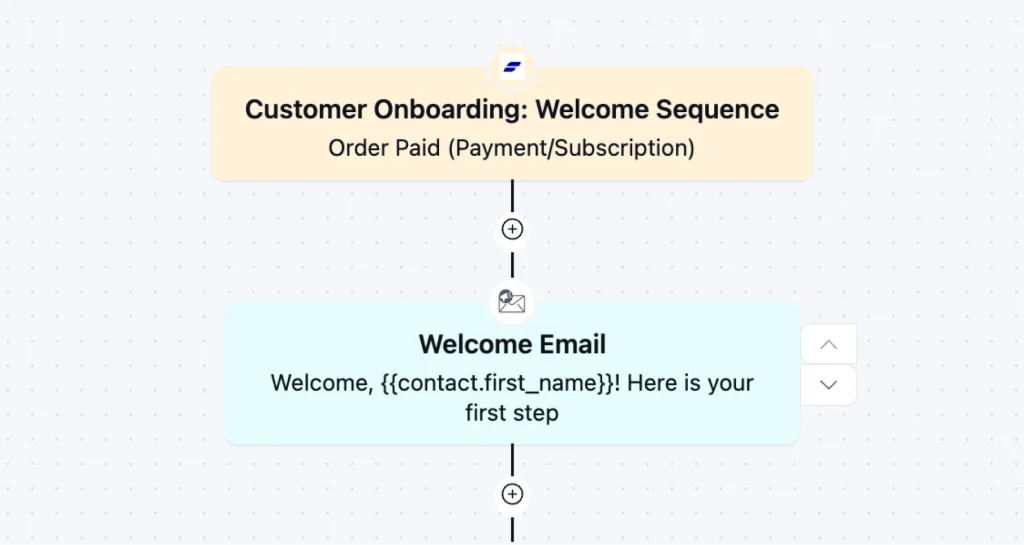
Send the welcome email right after purchase. Use the customer’s name, say thanks, and give one clear next step, not five.
If you sell higher-priced products or services, add a short personal video. A face and a friendly voice go further than a block of text. You can also offer a one-to-one call to start the relationship.
In WordPress: Trigger: Order Paid (Payment/Subscription) from FluentCart → Action: Send Custom Email in FluentCRM.
5. Automate the follow-up sequence
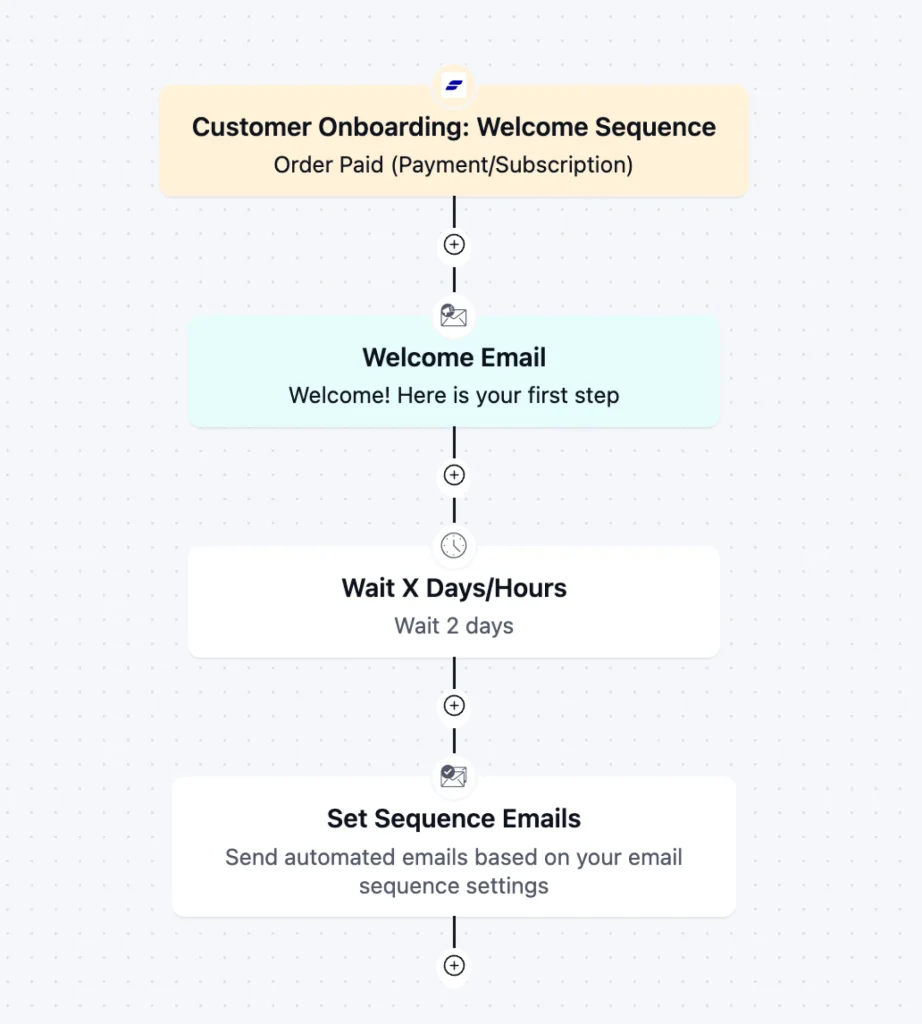
After the welcome email, plan three to five short follow-ups spread over the first weeks. Each one should help the customer take the next step toward the first result: a quick tip, a short guide, or a link to the right lesson.
In WordPress: build the series as an email sequence in FluentCRM. Trigger: Order Paid (Payment/Subscription) → Action: Wait → Action: Set Sequence Emails.
Need ideas for the emails themselves? This tutorial shows four email sequence examples you can adapt.
6. Build a self-service education hub
Most customers prefer to learn on their own first. A small hub of courses, guides, and a place to ask questions answers most early questions without a single support ticket.
Offer it from day one and let customers skip any guided tour, so it never feels forced. Link the right guide at each step so nobody has to search.
When answers are easy to find, people stay engaged instead of giving up.
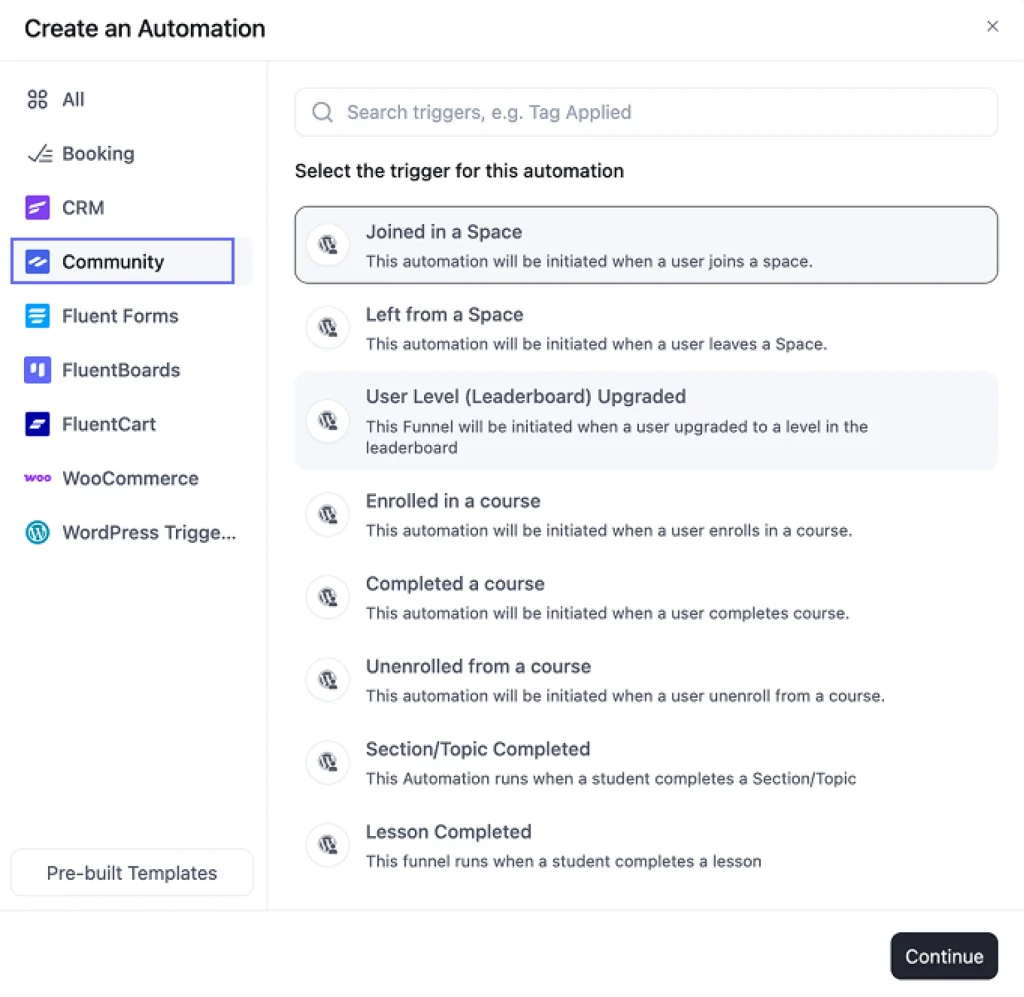
In WordPress: FluentCommunity gives you courses and spaces inside WordPress. It also connects to FluentCRM, so events like joining a space, enrolling in a course, or completing a lesson can start automations.
A student who finishes lesson one can get a congratulations email, and a student who joins your help space can get a short guide to using it.
7. Offer proactive support and a live kickoff call
Some customers will always need a person. Make that easy before they ask. Give them one obvious place to get help, and offer a short kickoff call for higher-value customers.
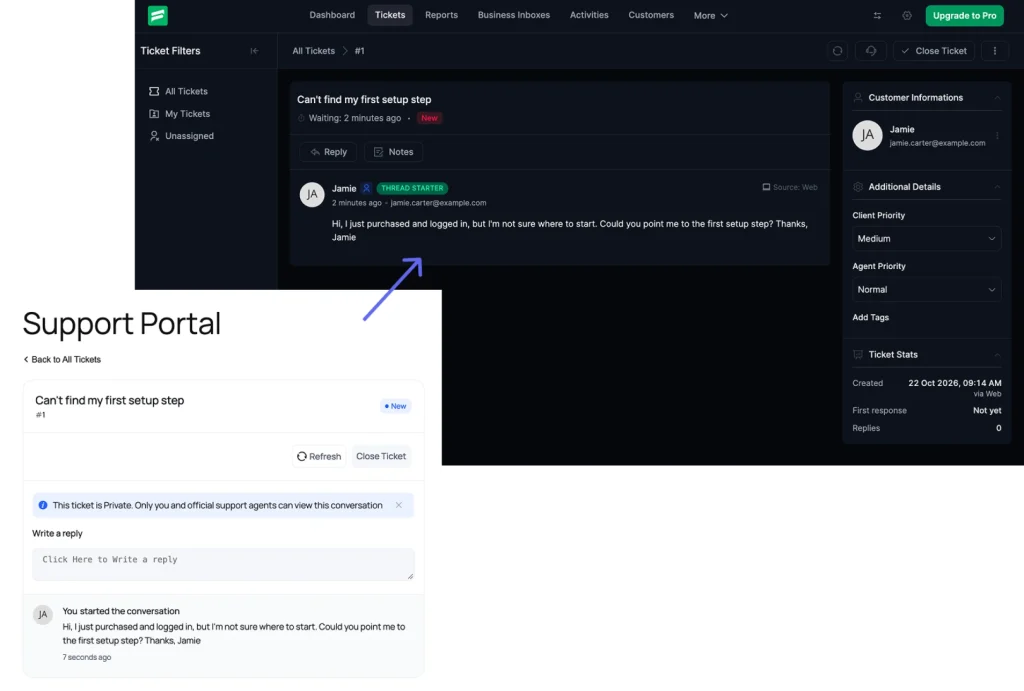
In WordPress: Fluent Support gives customers a portal to open tickets and review past ones. Check it often in the first weeks so no early question sits waiting.
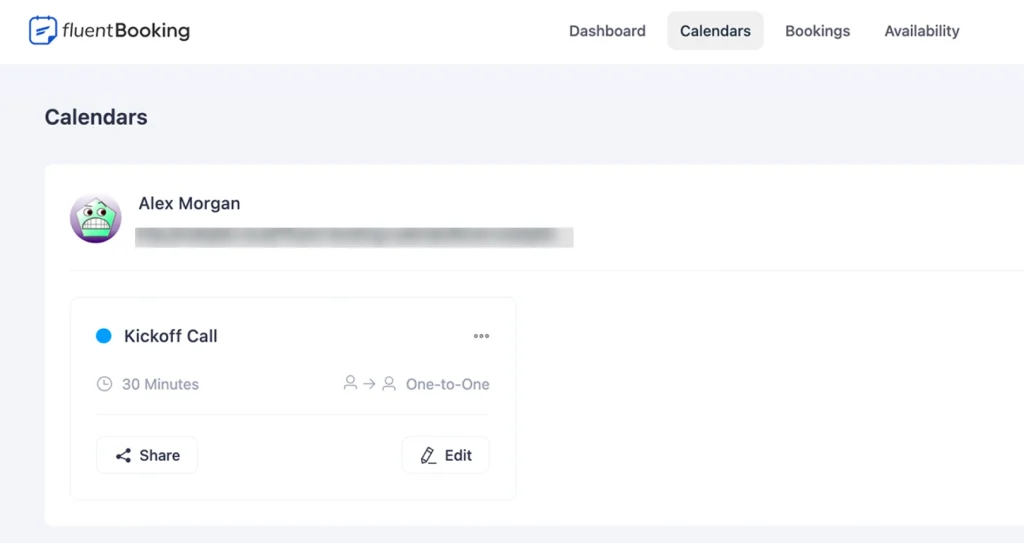
For the kickoff call, use FluentBooking. Customers pick a time from your booking page, and you can send a prep email when someone books.
8. Catch stalled customers early
A customer who goes quiet in week one is the easiest to lose, and the easiest to save. The signals are simple: no login, no first lesson finished, no reply to the welcome email.
In WordPress:
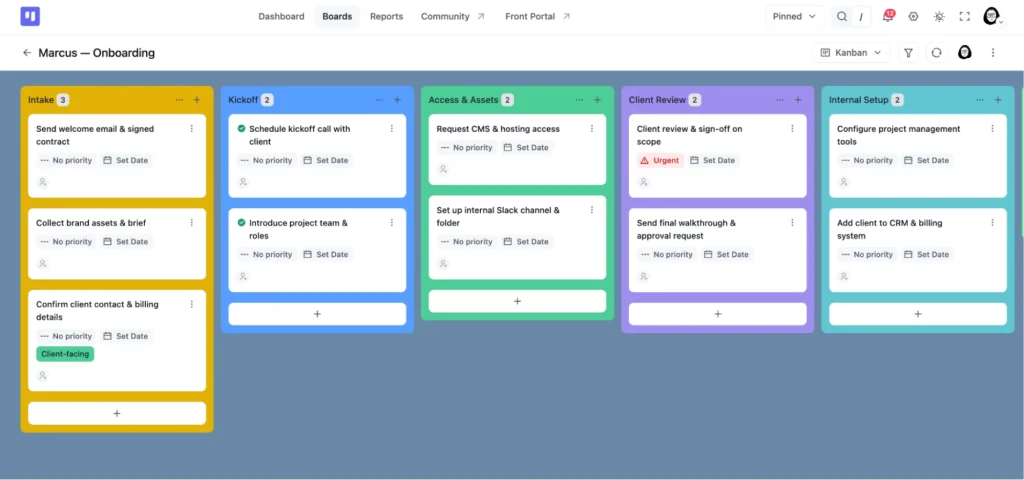
- Make one onboarding board in FluentBoards and save it as a template.
- When someone buys, FluentCRM creates a board for them from that template, so your team starts work right away.
- When their board moves to a new stage, FluentCRM emails them an update.
- If they get stuck, a tag shows who hasn’t reached their first win. Those people get a friendly check-in email.
9. Collect feedback and keep adjusting
Ask for feedback after setup, around day 7, and around day 30. Keep each ask to two or three questions, and fix the step where people get stuck most. Then measure, change one thing, and measure again.
Not sure what to ask? Learn how to write customer feedback surveys with ready-to-use questions. [LINK: add the feedback surveys post URL]
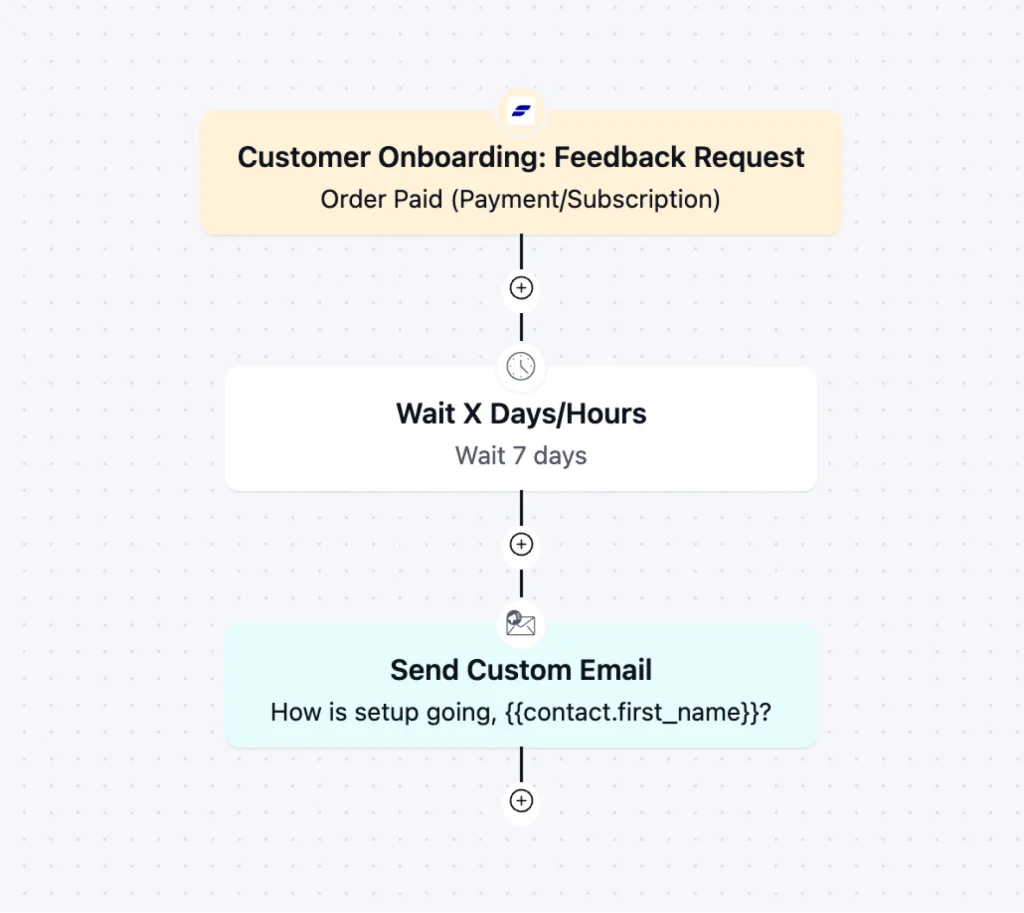
In WordPress: build the form with Fluent Forms and send the request with FluentCRM. Trigger: Order Paid (Payment/Subscription) → Action: Wait X Days/Hours → Action: Send Custom Email with your survey link.
How to Measure Customer Onboarding Success
You do not need a dashboard full of numbers. Start with these four:
- Time to first win: how long a new customer takes to reach the first result you defined.
- Onboarding completion: the share of new customers who finish the steps you set.
- Early support tickets: how many tickets new customers open in their first 30 days. A spike points to a confusing step.
- Early cancellations and refunds: how many customers leave in the first weeks.
If you collect feedback at each milestone, add a score to track customer satisfaction. Track one or two numbers, check them every month, and compare before and after each change.
Avoid numbers that look good but tell you little. This guide on vanity metrics versus actionable metrics shows how to tell them apart.
Customer Onboarding Checklist
Use this list for each new customer or each new product.
Customer Onboarding Checklist
Follow these steps to give every new customer a great start.
Before Purchase
First Day
First Week
First 30 Days
Before purchase
- Write the first result for each customer type.
- State the setup time and the support path on the sales page.
- Build the welcome email and the first follow-up.
First day
- Send the welcome email within minutes.
- Create the customer record and tracking card.
- Send the welcome survey or goal question.
First week
- Send a short guide for the first result.
- Invite the customer to your help space or course.
- Offer a kickoff call to customers who need one.
- Check who has not reached the first result.
First 30 days
- Send the follow-up sequence and tips.
- Reach out personally to stalled customers.
- Ask for feedback and read the answers.
- Review your four numbers and fix one step.
Frequently Asked Questions
Short answers to the questions people ask most.
How do you onboard a customer?
Welcome them quickly, help them reach a first result, check in, and ask for feedback. The five stages above cover each step. If you handle many customers, build a customer support team with clear roles so no one is left waiting.
What are the stages of customer onboarding?
Purchase, welcome, setup and first win, adoption, and review. Each stage has one goal, and the table above lists them.
How long should customer onboarding take?
It depends on what you sell. A simple plugin may take a day, while a service project can take a few weeks. Onboarding is done when the customer reaches the first result you defined and you have checked in once.
What should a welcome email include?
A thank-you, what happens next, one clear next step, and a way to reach you. Keep it short and use the customer’s name.
Your Next Step: Build the Welcome Email
Strong customer onboarding is not complicated. Define the first result, guide customers to it, and watch for the ones who go quiet. Start small: fix one stage, then move to the next. Keep your messages short, ask for feedback often, and change what is not working.
If you want to run this in WordPress, start with FluentCRM. Build the welcome email first, add one follow-up, and improve from there. See all WPManageNinja products to find the right fit for the other steps.

Hi there! I’m Mahjabin, a content writer at WPManageNinja. I write about project management and love helping teams find smarter solutions to everyday work challenges.
-
How to Create a Conversational Survey in WordPress
Build a conversational survey in WordPress with Fluent Forms step-by-step, -
How to Create a Beautiful Online Course Website with WordPress
Creating online course has become easier with WordPress. Are you -
Styling Beautiful CSS Forms with Fluent Forms’ Advanced Form Styler
Learn styling Fluent Forms using built-in templates, Gutenberg, custom CSS,


Leave a Reply
You must be logged in to post a comment.