

What Is Bounce Rate? How to Reduce Bounce Rate?
Imagine having a website where people are finding your pages. Once they land there, they don’t stay. They don’t explore. They don’t take the next step. They simply leave!
If this story resembles your situation, bounce rate is probably the metric that can give the full picture.
When people land, then disappear in a flash, it can be a problem, but not always. Sometimes a high bounce rate is normal. Sometimes it is a sign that the page is doing its job. You need to know the difference.
In this guide, we will break down this entire concept of bounce rate and how you can identify what issues are and what are not.
- Bounce rate is the percentage of visitors who leave your page without doing anything
- A high bounce rate (70%) is not always bad; context and page type decide that
- People bounce because of slow pages, poor UX, bad mobile experience, and mismatched content
- Speed, clarity, CTAs, and content that matches search intent are the quick fixes
- The cross-industry average bounce rate is around 50%, but it’s not a hard target
- GA4 changed how bounce rate is measured; your numbers may look different now
What Is Bounce Rate?
Bounce rate is the percentage of visitors who land on a page and leave without taking any further action.
- No clicks.
- No second page.
- No interaction.
It’s like meeting someone for the first time and losing interest within seconds. No conversation, no follow-up, just a quick thought that crosses the mind: “This isn’t for me.”
That doesn’t always mean something is wrong with your website.
Sometimes visitors find exactly what they came for. They get their answer, feel satisfied, and leave. In that case, the page actually did its job.
But when it happens on pages where you want people to explore, click, or take action, but they do not, that’s usually a sign that something didn’t connect.
Bounce Rate vs Exit Rate
These two terms get mixed up often, but they measure different things.
Exit rate shows which page visitors leave from after exploring your site, while bounce rate shows when visitors leave without interacting or moving beyond the first page.
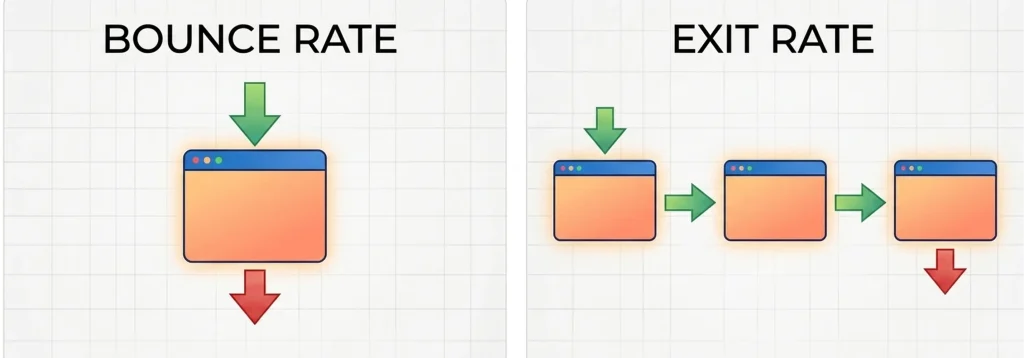
Take a look at this example: A visitor reads your blog post, clicks on a second article, then closes the browser. That is not a bounce because they visited two pages. But that second article gets recorded as the exit page. On the flip side, if someone lands on your homepage and closes the tab within seconds, that is a bounce.
Remember: Every bounce is an exit, but not every exit is a bounce.
How is Bounce Rate Calculated
The overall calculation is straightforward. But, before that, it will be helpful to understand the terms first.
- Single-page Visits: Sessions where a visitor lands on a page and leaves without interacting or visiting another page.
- Total Visits: The total number of visitors who came to your website.
- Bounce Rate: The percentage of total visits that end after just one page without any interaction.
Once you are familiar with these, the formula becomes easy to follow:
Bounce rate = (Single-page visits / Total visits) × 100For example, if your website receives 1,000 visits in a day and 500 of those visitors leave without going beyond the first page, your bounce rate would be:
Bounce rate = (500 / 1000) × 100 = 50%This means 50% of your visitors didn’t engage beyond the page they landed on.
What is Good Bounce Rate?
Sometimes, a high bounce rate is a normal thing. You just need to identify what rate we refer to as “good”.
Most people want a single number they can compare against, and that makes sense. But good depends heavily on what your page is supposed to do.
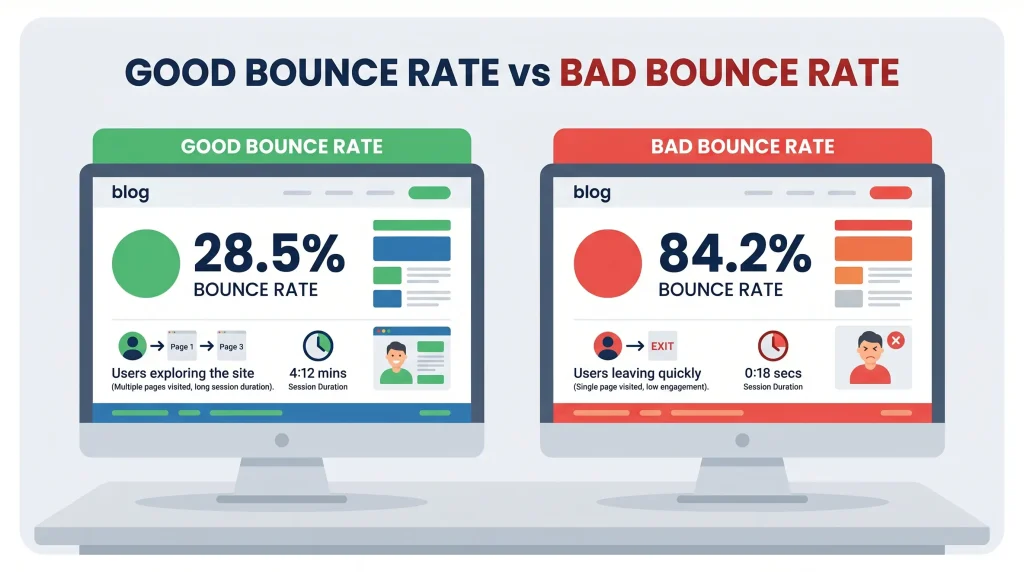
A 75% bounce rate on a blog post means most readers got their answer. That is a win. The same 75% on a product page, where visitors should be browsing and buying, means something is pushing them away. Same number, opposite outcomes.
Moreover, a good bounce rate might vary depending on the industry. Take a closer look at these numbers:
| Industry | Bounce Rate |
| Apparel & Footwear | 35.76% |
| Automotive | 40.1% |
| Construction | 45.28% |
| Consulting & Professional Services | 47.84% |
| Ecommerce & Marketplaces | 38.61% |
| Education | 46.28% |
| Food | 38.93% |
| Health & Wellness | 39.41% |
| SaaS, IT & Services | 48.38% |
| Travel & Leisure | 38.84% |
Source: Databox
General guide: Under 40% bounce rate is excellent, 41–55% is average, 56–70% is worth investigating, and above 70% on pages usually signals a real problem.
Why Do People Bounce?
People don’t leave your website randomly. They leave when something breaks the flow of their visit. And that usually happens faster than you think.
So, before we jump into fixes, it is important to know why people leave in the first place.
Most of the time, it comes down to one of these reasons:
Slow Page Load Speed
How quickly do you personally give up on a slow website?
Most people wait no more than 3 seconds before moving on. If your pages take longer than that to load, especially on a phone, a large portion of visitors will leave before they even see your content.
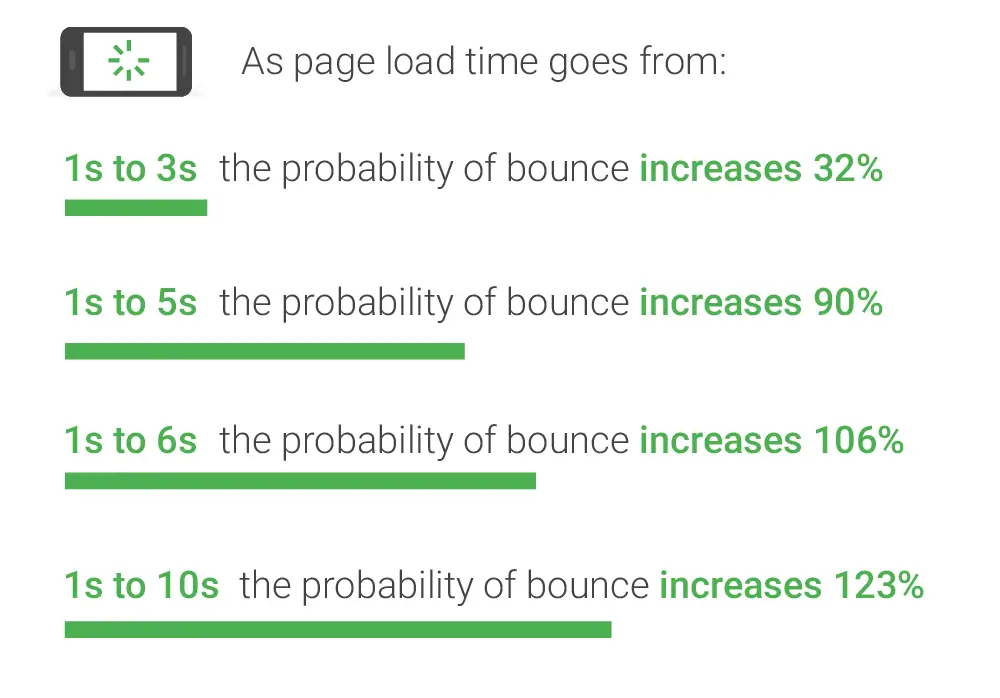
Slow sites lose visitors silently, and you never find out they were there. Because if the page feels slow, visitors assume the rest of the experience will be the same, and they move on.
Mismatch Between Content & Search Intent
Every visit starts with an expectation. When someone clicks, they already have an idea of what they’re going to find. If the page doesn’t match that expectation, they disconnect immediately.
How would you feel if you visited “how to reduce bounce rate,” but it didn’t give you a clear answer?
You can rank well on Google and still have a high bounce rate if your page does not give people what they were looking for. And even when your content is a perfect match, overwhelming pop-ups, ads, or banners can cause distractions and push visitors back to search results.
Poor UX and Navigation
A page should feel easy to move through. When it doesn’t, users notice it instantly. If visitors cannot figure out where to go next, or if clicking around your site feels like solving a puzzle, they will give up.
When using a website feels like effort, most visitors won’t spend time trying to understand how a page works. Good navigation makes the user experience effortless and let people find out what they need effortlessly.
Weak First Impression
Visitors will land on the above-the-fold area first. Whatever you put in here, visitors will see that first before they scroll down.
Think of it as your website’s front door. If that first glimpse is confusing, cluttered, or does not immediately tell the visitor they are in the right place, they will leave before giving the rest of your page a chance.
So, what can kill the first impression:
- A wall of text
- A vague headline
- Or a whole screen covering hero image
Mobile Experience Issues
More than 62% of all website visits now happen on a phone. If your site does not work well on smaller screens, then bounce rate creeps up!
A page might look fine on a desktop, but can be a mess on mobile with tiny text, broken spacing, buttons too close together, and awkward popups.
Since so much traffic is mobile now, you can not just ignore mobile responsiveness; it’s no longer optional.
How to Reduce Bounce Rate
Now that you know the root causes of the issue, fixing the issue is pretty straightforward.
Here are a few practical strategies to keep visitors on your site longer and meaningfully reduce bounce rate.
Align Content with Search Intent
Before you start optimizing design, speed, or layout, fix the user intent first.
Look at the pages already ranking and take a moment to analyze them. Instead of guessing, ask yourself a few simple questions:
- What did the visitor expect when they clicked?
- What questions are these pages answering?
- What format or structure are they using?
If your page takes a completely different direction from what’s already working, that’s usually a sign that something is off.
Go a step further and check the “People also ask” section on Google or browse community platforms like Reddit. These places reveal what real users are actually asking. If your page isn’t answering those questions, that’s a clear gap that needs to be fixed.
When your content aligns with what visitors expect, everything else becomes easier; people stay longer, explore more, and the bounce rate naturally reduces.
Improve Page Speed
Page speed is one of the most controllable factors in bounce rate, and fortunately, it is also one of the most fixable.
First, start by testing your page speed with free tools like Google’s PageSpeed Insights or GTmetrix. No technical knowledge is needed to get a score and act on the recommendations.
Common fixes include:
- Compress large images before uploading
- Use a caching plugin on WordPress
- Switch to a faster hosting provider
- Remove unnecessary tools and add-ons
- Use a CDN server so your site loads fast for visitors anywhere
Note: Speed buys you attention. Test it out. If the page feels slow to you, it feels slow to everyone else, too.
Fix Above-the-fold Content
The top of your page decides everything. So, your above-the-fold content must do the heavy lifting to decrease bounce rate.
It should quickly answer three simple questions:
- What is this page about?
- Is it relevant?
- What should I do next?
If these answers aren’t clear within the first few seconds, visitors won’t scroll to find them; they’ll leave.
Also, speed matters here more than anywhere else. Whatever sits above the fold, text, images, or video, everything needs to load quickly. Because if the most important part of your page appears last, there’s a good chance the visitor is already gone.
Clear Internal linking & CTA
Every page on your site should answer one question for the visitor: Where do I go from here?
Internal links are links that give answers to that question. Your content should have a clear next step in the form of a CTA or interlinking. It should guide visitors to other pages on your own website.
But make sure you put a relevant CTA so that it gives visitors a natural reason to keep exploring.
Example:
- A blog post can link to a related guide
- A product page can link to a feature breakdown
- An FAQ page can link to a setup tutorial
Aim for at least three to five relevant internal links and write self-explanatory anchor text so people know exactly what they will find.
Remember: When people visit additional pages, they move further away from bouncing.
Improve Content Readability
Cluttering all information in one place terrifies the visitors; they don’t bother reading.
Making your information easier to scan, read, and follow is one of the quickest wins for keeping people on your page.
A few simple fixes can make a big difference:
- Short paragraphs
- Clear subheadings
- Useful bullet points
- Jargon-free language
- Comfortable font size
Optimize for Mobile Experience
Design for how people actually browse. You can inspect responsiveness from any browser, but the simplest process is: open your own website on your actual phone, not a desktop preview, and go through it like a first-time visitor.
- Can you read the text comfortably?
- Are the buttons easy to tap?
- Does anything look broken or awkward?
- Are the pop-ups blocking the whole screen?
If anything feels clunky, those are your priorities to fix.
Also, check the load speed since phone connections are often slower than home internet, and it takes longer for pages to load on a mobile screen.
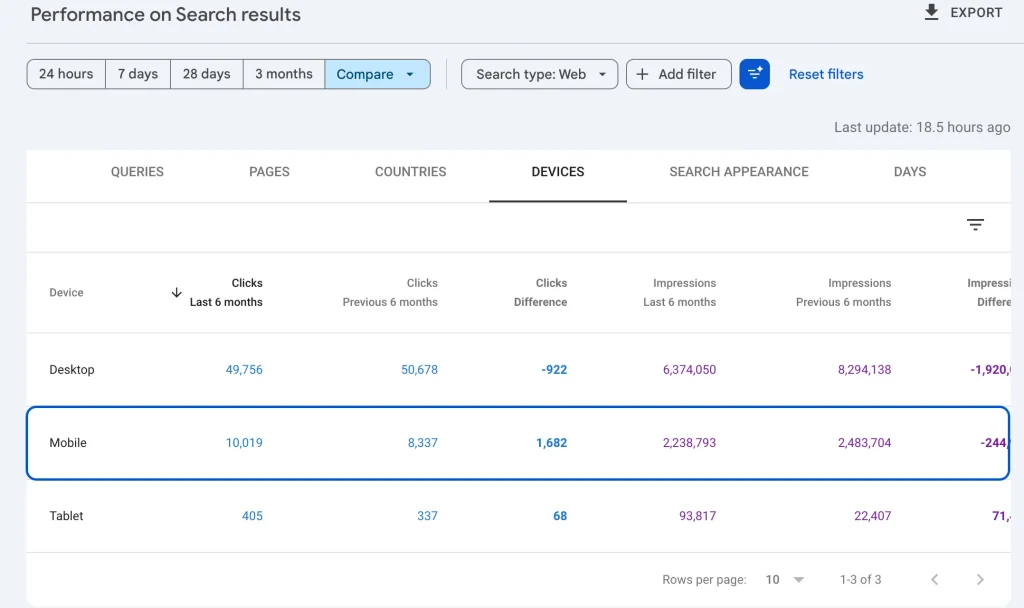
And, if you’re familiar with Google Search Console, which is free to use, it shows you how your pages are performing on mobile devices.
When a High Bounce Rate Is Actually Normal
Not every bounce is a failure. Some pages are designed for quick answers.
Let’s have a quick look at some of the page type that typically generates a high bounce rate, but it shouldn’t be your concern:
- Contact or Information Pages
- Single-Answer Blog Posts or FAQs
- Single-Page Websites (Portfolio or Brochure)
- Thank You or Confirmation Pages
- Promotional or Affiliate Landing Pages
Track Bounce Rate & Engagement Rate in GA4 (Google Analytics)
If you’re familiar with Google Analytics, you probably know it tracks bounce rate. But modern analytics have evolved. Now you can also measure engagement rate alongside bounce rate.
You can think of these two metrics as opposite sides of the same coin. When one increases, the other tends to decrease. Let’s take a closer look at how they differ:
| Parameters | Bounce Rates | Engagement Rates |
| What it counts | Visitors who left without doing anything | Visitors who stayed, clicked, or took action |
| What you want | Lower is better | Higher is better |
| Example | 40% bounce rate | 60% bounce rate |
| Together | Always add up to 100% | Always add up to 100% |
How to Enable & Monitor Both Metrics
In GA4, engagement rate is the primary metric, so it appears by default in the dashboard. Bounce rate, on the other hand, isn’t shown automatically; you need to add it manually.
To do that, go to Reports > Engagement > Pages and screens.
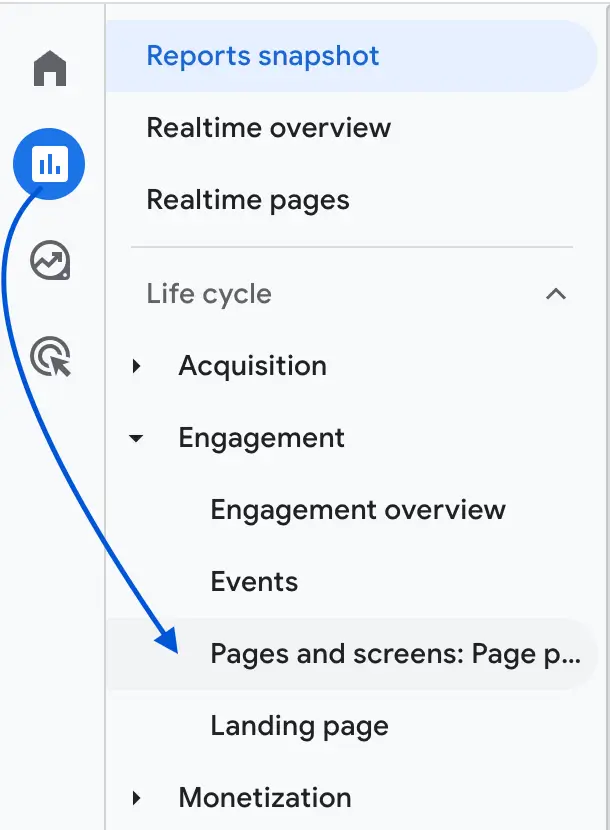
Then click the pen icon in the top-right corner to open the customization panel. From there,
Select Metrics > Add Metric > Select Bounce Rate, and save your changes.
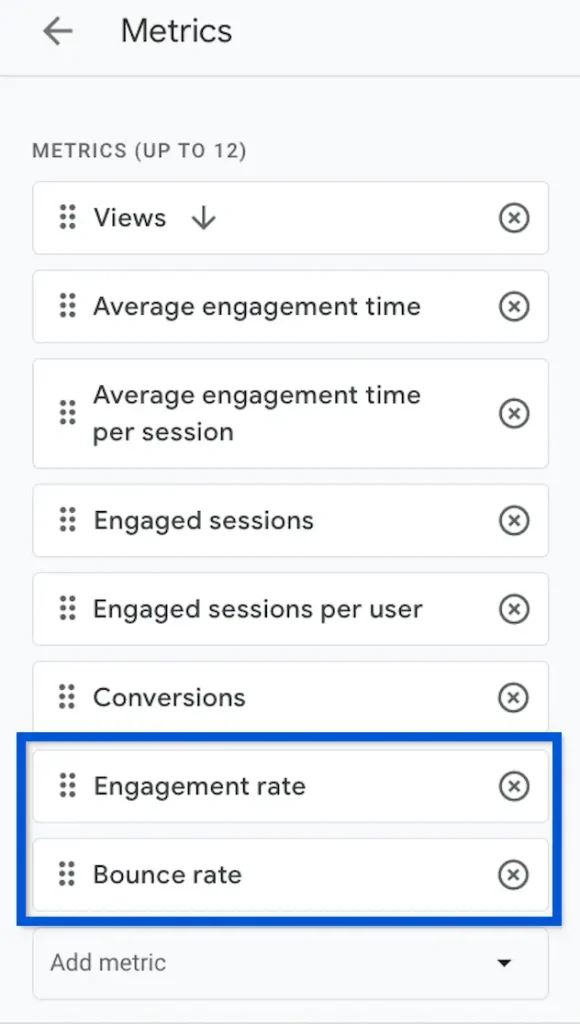
Once added, the bounce rate column will appear in your report, allowing you to track both engagement rate and bounce rate together.
Give Your Visitors a Reason to Stay
Visitors do not leave because they are in a hurry. They leave because something on the page did not earn their attention.
So, the best bounce rate fix is simply a page that delivers what it promised. And, you now know what to look for and where to start. Pick one page, make it better, and go from there.

Words are my favorite playground. As a Creative Writer at WPManageNinja, I don’t just produce content; I tell stories. By mixing fiction and metaphors with real-life examples, I turn my writing into a creative journey that’s easy for readers to digest and relate to.
-
10 Best jQuery Table Plugins for Best Data Visualization in 2026
Discover the 10 best jQuery table plugins for 2026. Compare -

Black Friday Marketing Strategies for 2026: Core and Advance Move
Black Friday is the most celebrated shopping season worldwide. Discover -
How Much Can You Earn With Amazon Affiliate Marketing? Rates & Niches
How much can you earn with Amazon affiliate marketing? Dive


Comments
-
We are glad that you liked the design. This theme was uniquely designed and developed by our team for wpmanageninja.com exclusively.
-
Wonderful article! We will be linking to this great content on our site.
Keep up the great writing. -
Very good article. I will be going through some of
these issues as well..



Leave a Reply
You must be logged in to post a comment.