

Ecommerce SMS Marketing: Strategies, Examples & Best Practices
Your customers’ email inboxes are crowded. Promotions land next to newsletters, receipts, and a hundred other brands competing for the same click. Text messages give you another way to reach customers when timing matters, with a short message that can put your offer, reminder, or update directly in front of them.
But sending more texts isn’t the goal. The real opportunity is using SMS at the right moments, with the right message, to help customers take the next step.
This guide covers how ecommerce SMS marketing works, seven campaigns you can use to drive sales, best practices for keeping subscribers engaged, and how to manage SMS marketing from your WordPress store with FluentCRM.
Key Takeaways
- SMS works best when timing matters. Use it for abandoned carts, flash sales, restock alerts, order updates, and other moments when customers are already close to taking action.
- Automation can outperform one-off campaigns. Behavior-triggered SMS reaches customers at more relevant moments and can generate stronger engagement and revenue.
- Consent comes first. Collect proper opt-ins, make your brand clear, provide an easy way to unsubscribe, and keep records of customer consent.
- Segmentation makes every message more relevant. Target customers based on purchase history, engagement, lifecycle stage, order value, or product interest instead of texting everyone.
- Keep SMS short, useful, and focused on one action. Every message should give customers a clear reason to read and a single next step.
- SMS and email work better together. Use email for detailed content and SMS for timely reminders, updates, and targeted follow-ups.
- WordPress stores can manage SMS inside FluentCRM. With FluentCart data, you can segment customers, send campaigns, and automate SMS workflows based on order activity.
What Is Ecommerce SMS Marketing?
Ecommerce SMS marketing is the practice of sending text messages to customers who have opted in to receive them, with the goal of driving store visits, purchases, and repeat orders.
It includes promotional campaigns such as sales, product launches, and discount offers, as well as automated messages triggered by shopper behavior, such as an abandoned cart or a product coming back in stock.
It helps to separate two types of texts:
- Promotional SMS: Campaigns you send to a list or segment, such as a weekend flash sale or new collection launch.
- Transactional SMS: Messages tied to a specific order or customer action, such as an order confirmation or shipping update.
Both can be part of an ecommerce SMS strategy, but they serve different purposes and may be subject to different consent requirements.
Promotional texts create opportunities to sell. Transactional texts keep customers informed and can build trust throughout the buying journey.
Why SMS Works So Well for Online Stores
SMS isn’t a replacement for email. It’s the channel you use when timing and attention matter most. The numbers explain why.
- Clicks are far higher than email: SMS campaign click-through rates are 12.39% across more than 246 million sends, compared to 0.74% for email campaigns. Automated SMS performs even better, at 20.34% CTR.
- Automations are where the money is: Automated SMS earns about $0.74 per send on average, versus $0.15 for one-off SMS campaigns. Triggered messages reach people at the moment they’re already thinking about your store.
- Shoppers are open to it within limits: In EZ Texting’s 2026 Consumer Texting Behavior Report, 59% of US consumers said they were open to receiving two or more business texts per day. But message frequency was also the number one reason people opt out, cited by 40%.
The takeaway: SMS gets attention email can’t, but that attention is easy to lose. The stores that win with SMS treat it as a premium channel. Fewer messages, better timing, and something worth reading every time.
Before You Send: Consent and Compliance Basics
This is the section many SMS guides rush through, but it’s one of the most important parts of running an SMS program.
Texting customers without the appropriate consent can result in carrier filtering, blocked numbers, and legal problems. In the US, businesses may also need to comply with requirements under the Telephone Consumer Protection Act (TCPA).
This isn’t legal advice, and SMS rules vary by country, state, message type, and sending practice. Check the requirements that apply to each market you serve.
Here are some important practices to follow:
- Get appropriate opt-in for marketing texts: A customer buying from your store isn’t automatically the same as a customer agreeing to receive promotional SMS. Use a clear marketing consent mechanism where required.
- Explain what subscribers are signing up for: Tell people what types of messages they can expect and, where applicable, how frequently you may send them.
- Identify your brand: Make it clear which business is sending the message.
- Make opting out easy: Include appropriate opt-out instructions in marketing messages and honor unsubscribe requests promptly.
- Respect applicable sending-hour restrictions: Consider the subscriber’s time zone and the rules that apply in the market you’re messaging. Don’t assume one universal “safe window” applies everywhere.
- Keep consent records: Store information about when and how each subscriber opted in so you have a record of their permission.
Good compliance is also good marketing. Subscribers who knowingly opt in are more likely to understand why they’re receiving your messages and what they can expect.
How to Run Ecommerce SMS Marketing From WordPress With FluentCRM
If your store runs on WordPress and FluentCart, you can manage SMS alongside your email marketing and customer data with FluentCRM.
Instead of moving customer information into a separate CRM, you can use your existing WordPress, FluentCart, and FluentCRM data to build segments, send campaigns, and create automated SMS workflows.
Here’s how it works:
1. Connect an SMS Provider
FluentCRM’s SMS module is available with FluentCRM Pro and lets you connect a supported SMS provider.
Go to FluentCRM → Settings → Messaging, turn on the Message Module, then open the SMS tab and enable the SMS Module. From there, select your SMS provider and enter the required credentials.
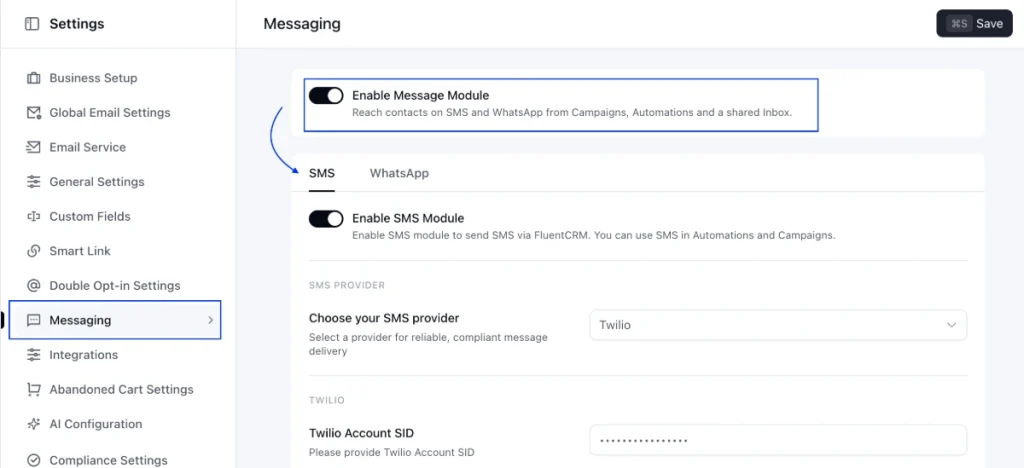
FluentCRM currently supports Twilio and Amazon End User Messaging (SNS) for SMS delivery. Your SMS provider’s own sending costs apply.
For the complete setup process, see the FluentCRM SMS module documentation.
2. Build Segments From Your Store Data
Before sending SMS campaigns, define which customers should receive each message.
FluentCart integrates with FluentCRM so you can use customer and purchase data to build targeted segments and trigger automations based on order activity. No additional FluentCart integration settings are required after both plugins are installed and activated.
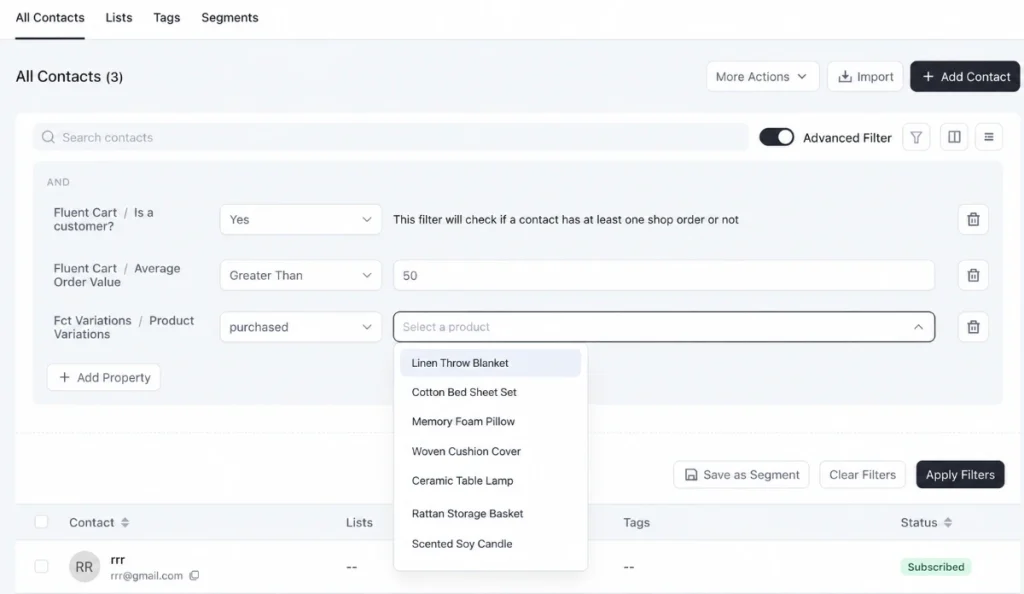
You can create segments based on information such as:
- First-time customers
- Repeat buyers
- Customers who purchased a specific product
- High-value customers
- Customers who haven’t purchased recently
- Engaged subscribers
For example, you could create a segment of customers who have purchased a particular product and send them a related offer instead of sending the same message to your entire customer base.
3. Send SMS Campaigns
Once your audience is segmented and your SMS provider is connected, you can create targeted SMS campaigns directly from FluentCRM.
Navigate to FluentCRM → Messaging → SMS Campaigns → Create New Campaign.
You can use SMS campaigns for:
- Flash sales
- Product launches
- Seasonal offers
- VIP early access
- Special announcements
FluentCRM’s SMS campaign builder guides you through three steps: Start, Recipients, and Review. You can choose recipients using Lists & Tags, Dynamic Segments, or Advanced Filters, then review the message before sending it immediately or scheduling it for later.
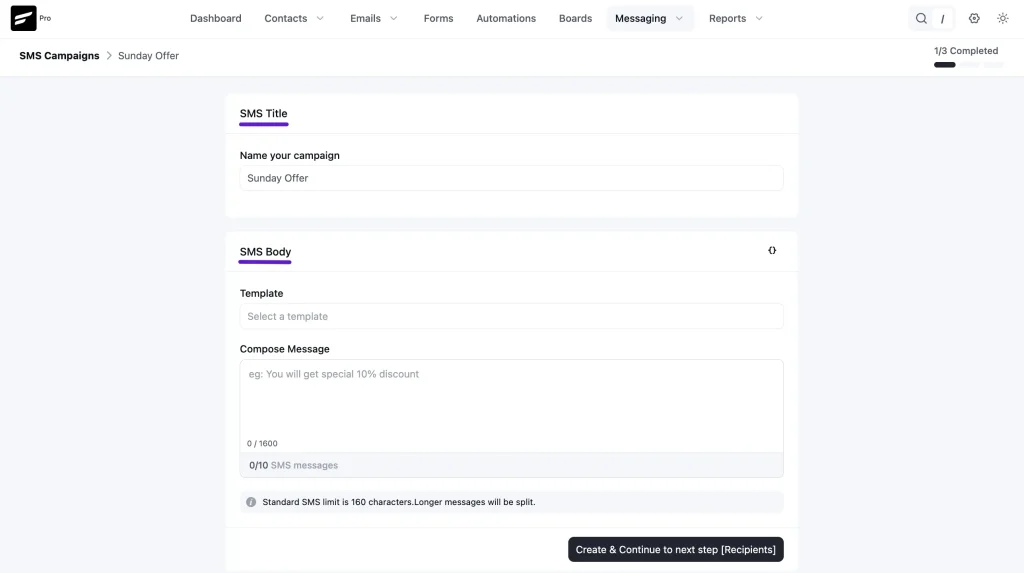
You can also use SmartCodes to personalize messages with contact information, such as a customer’s first name.
4. Automate SMS Based on Customer Activity
This is where SMS becomes especially useful.
With FluentCart and FluentCRM, you can trigger automated workflows based on customer activity, such as when an order is paid, shipped, delivered, refunded, or canceled.
To create a FluentCart-based SMS automation:
- Go to FluentCRM → Automations from your WordPress dashboard.
- Click + New Automation.
- Select a FluentCart trigger, such as Order Paid, Order Shipped, or Order Delivered.
- Configure the trigger and, if needed, target a specific product or product category.
- In the Automation Editor, click the + icon and add the Send a SMS action.
- Write your SMS message and use SmartCodes to personalize it.
- Save the workflow and Publish the automation.
For example:
Customer places an order → FluentCart triggers “Order Paid” → FluentCRM starts the automation → Send a SMS → Customer receives the message
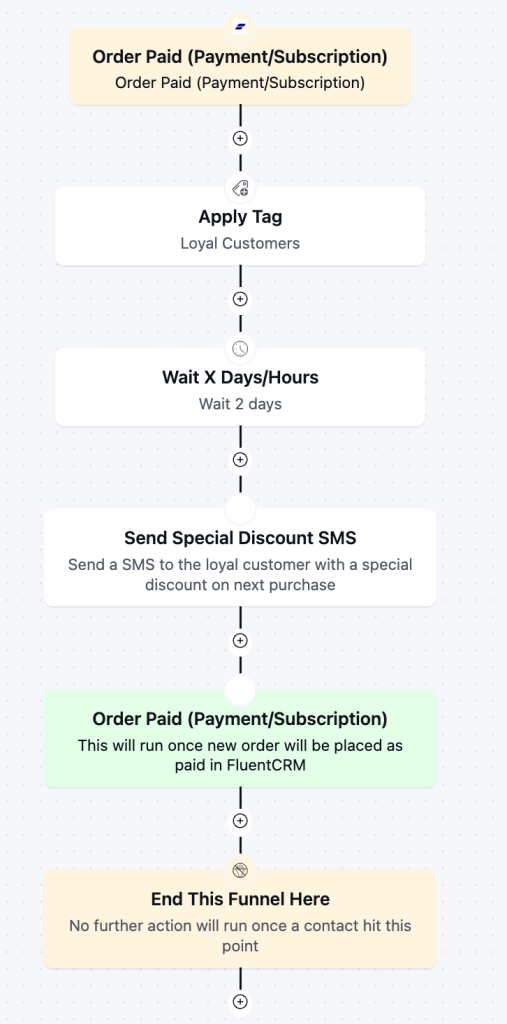
You can use the same approach for order confirmations, shipping updates, post-purchase follow-ups, product-specific campaigns, and other customer journeys. FluentCart provides the trigger, while FluentCRM’s automation actions handle what happens next.
5. Stay on Top of Consent
Your SMS strategy should always start with proper consent.
FluentCRM can respect SMS opt-outs and provides safeguards when sending to one-time recipients outside your existing audience. However, your store is still responsible for collecting the appropriate consent before sending marketing messages.
You can collect SMS consent through a signup form and connect it with your marketing workflow. For example, Fluent Forms integrates with Twilio for SMS notifications.
For a full walkthrough, see the FluentCRM guide to getting started with SMS marketing.
How to Measure Your SMS Marketing Performance
Track these metrics for every campaign and automation:
- Click-through rate (CTR): The share of recipients who clicked your link. It’s the clearest signal that your message and offer landed.
- Conversion rate: The share of recipients who completed a purchase.
- Revenue per message: Total attributed revenue divided by messages sent. This is the best way to compare SMS against email and other channels.
- Opt-out rate: The share of recipients who unsubscribed after a send. A rising opt-out rate usually means you’re sending too often or the content isn’t relevant enough.
- List growth rate: How quickly you’re adding new, consenting subscribers.
Use UTM parameters on your SMS links so sales from texts show up clearly in your analytics.
7 SMS Campaigns That Can Drive Ecommerce Sales
You don’t need dozens of campaigns to get started. These seven are practical options for most ecommerce stores, and each one includes a sample message you can adapt.
1. Welcome Message and First-Order Offer
The moment someone subscribes is one of the best opportunities to start the relationship.
A welcome SMS can confirm the subscription, introduce your brand, explain what subscribers can expect, and give them a reason to make their first purchase.
Discount offers are particularly popular. EZ Texting’s 2026 consumer research found that 56% of US consumers were interested in receiving discount offers from businesses.
Sample: “Hi Sara, welcome to Loom & Leaf! 🌿 Here’s 10% off your first order: WELCOME10. Valid for 48 hours → [link]. Reply STOP to opt out.”
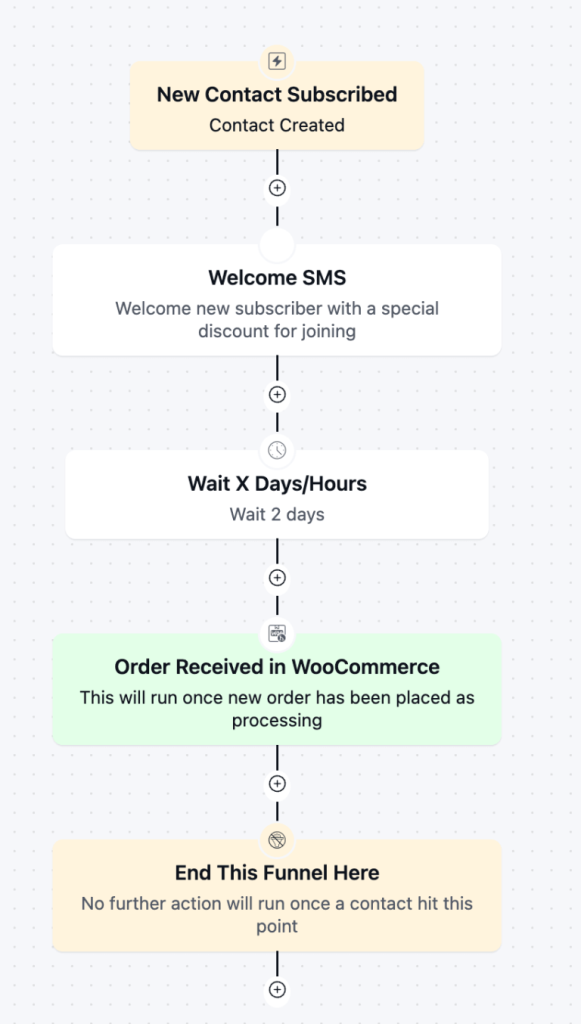
The discount doesn’t have to be the entire experience. Use the welcome message to establish expectations and show subscribers why staying on your list is worthwhile.
2. Abandoned Cart Recovery
A customer adds products to their cart but doesn’t complete the purchase. That’s a clear sign of interest, making abandoned cart recovery a natural use case for SMS.
A timely reminder can bring shoppers back while the product and purchase decision are still fresh.
Sample: “Hey Sara, you left something behind! Your Linen Throw is still in your cart. Complete your order here → [link]”
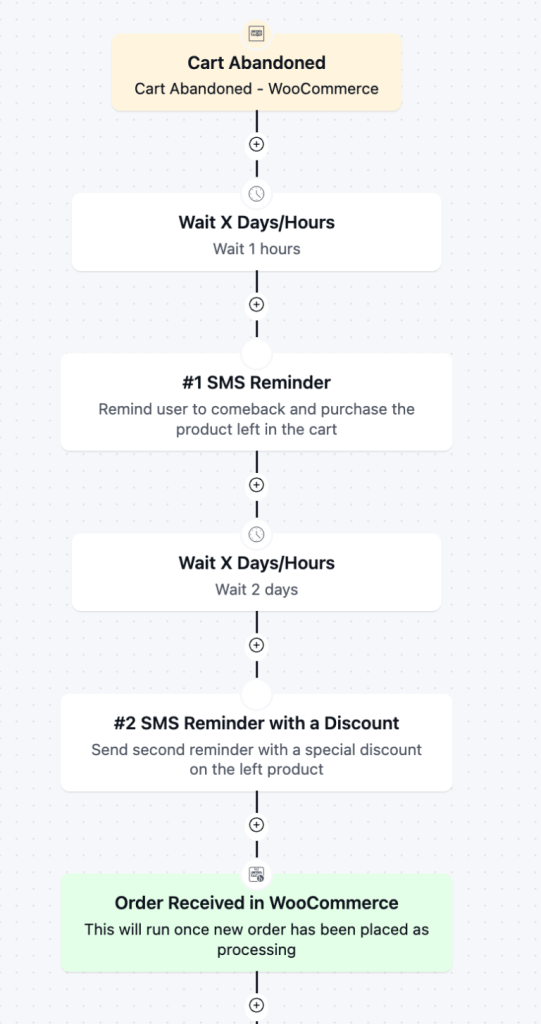
If the first reminder doesn’t convert, you can follow up when appropriate with another message or a small incentive, such as free shipping.
Just don’t automatically discount every abandoned cart. If shoppers learn that abandoning their cart always leads to a coupon, some may deliberately wait for one.
3. Flash Sales and Limited-Time Offers
SMS is useful when your offer has a genuine deadline.
A short message can announce a flash sale, limited product drop, seasonal promotion, or other time-sensitive offer.
Sample: “Loom & Leaf: 24-HOUR FLASH SALE ⚡ 25% off all bedding, today only. Shop before midnight → [link]”
Use urgency carefully. If every campaign is presented as a flash sale, customers will eventually stop treating your messages as urgent.
4. Back-in-Stock and Price-Drop Alerts
A customer who asks to be notified when a product returns is already showing purchase intent.
That’s why back-in-stock alerts are a natural fit for SMS.
Sample: “Good news, Sara! The Oat Knit Blanket is back in stock. Quantities are limited → [link]”
You can also use SMS for price-drop notifications when customers have opted into those alerts.
The closer the message is to the customer’s original interest, the more useful it becomes.
5. Order and Shipping Updates
Transactional SMS isn’t traditional marketing, but it plays an important role in the customer experience.
Order confirmations, shipping updates, and delivery notifications keep customers informed and can reduce uncertainty after a purchase.
Sample: “Loom & Leaf: Your order #10482 has shipped! Track it here → [link]”
Keep these messages focused on the transaction. Adding heavy promotional content can blur the line between transactional and marketing messages, which may affect the applicable consent requirements.
6. Post-Purchase Review Requests and Cross-Sells
The relationship doesn’t end when the order is delivered.
A short review request can encourage customers to share feedback while the experience is still fresh. Later, you can recommend products that genuinely complement their purchase.
Sample review: “Hi Sara, how are you liking your Linen Throw? We’d love a quick review → [link]”
Sample cross-sell: “Sara, the Linen Throw pairs perfectly with our matching cushion covers. Take a look → [link]”
The key is relevance. Recommend products based on what the customer actually purchased or interacted with rather than sending generic promotions.
7. Win-Back for Lapsed Customers
Some customers buy once and then disappear.
A win-back campaign gives you a way to reconnect with customers who haven’t purchased or engaged with your store for a while.
Sample: “We miss you, Sara! It’s been a while, so here’s 15% off anything in store this week: COMEBACK15 → [link]”
You can combine a personal message with an offer, a new product announcement, or a reminder of what makes your store useful.
Just make sure the audience and timing make sense. Someone who purchased last week probably doesn’t need a win-back message.
Ecommerce SMS Marketing Best Practices
The campaigns above only work if subscribers continue to find your messages useful.
These SMS marketing best practices can help you build a strategy that generates engagement without overwhelming your audience.
Keep Messages Short and Clear
SMS isn’t the place for a long product description.
Lead with the most important information: the offer, update, or reason to click. Then remove anything that doesn’t add value.
SMS length and message segmentation can depend on factors such as character encoding and your provider, so don’t treat 160 characters as a hard rule. Focus instead on keeping messages concise and avoiding unnecessary message segments.
Always Include One Clear Call to Action
Every promotional text should have one primary job.
For example:
- Shop now
- Complete your order
- Claim your discount
- View the product
- Leave a review
Multiple competing calls to action can make a short message harder to act on.
Personalize Beyond the First Name
A first name is a start, but useful personalization goes further.
Reference what someone browsed, bought, or left in their cart when that information is available and relevant.
For example, a message about a product someone actually viewed is more useful than a generic promotion sent to everyone.
Segment Your Audience
Not every subscriber should receive every campaign.
Consider segments based on:
- Purchase history
- Order value
- Product category
- Location
- Customer lifecycle stage
- Engagement
- VIP status
For example, VIP customers can receive early access while first-time buyers receive onboarding offers.
Smaller, relevant sends can be more useful than sending every campaign to your entire list.
Get the Timing and Frequency Right
More messages don’t necessarily mean more sales.
Send during reasonable hours in the subscriber’s time zone and choose a frequency you can sustain.
Monitor your opt-out rate after each campaign. If unsubscribes increase, review your frequency, targeting, timing, and message content.
EZ Texting’s 2026 research found that excessive frequency was the leading opt-out trigger among surveyed US consumers, making frequency an important part of your SMS strategy.
Make Every Text Worth Opening
Give subscribers a reason to stay on your list.
That could mean:
- Early access
- Exclusive offers
- Restock alerts
- Useful order updates
- Personalized recommendations
- Limited-time promotions
If every message provides something useful, subscribers are more likely to continue paying attention.
Coordinate SMS With Email
SMS and email have different strengths.
Use email for:
- Storytelling
- Product education
- Longer explanations
- Multiple products
- Detailed newsletters
Use SMS for:
- Time-sensitive offers
- Short reminders
- Restock alerts
- Order updates
- Targeted follow-ups
For example, you could announce a new collection by email and then follow up by SMS with subscribers who have shown interest in the collection.
Rather than treating SMS and email as competing channels, use them together as part of the same customer journey.
Start Turning Texts Into Sales
SMS marketing works for ecommerce because it reaches customers where they already pay attention. But the results come from how you use it, not just from sending texts.
Start with consent, set up the automations that catch shoppers at the right moment: welcome, abandoned cart, post-purchase, and add campaigns sparingly, when you have something worth announcing.
If your store runs on WordPress, you can manage all of it in one place. Explore FluentCRM’s SMS marketing features and start building your first SMS automation today.
Frequently Asked Questions
Is SMS marketing legal?
Yes, as long as you follow the rules. In the US, the TCPA requires express written consent for marketing texts, and other countries have their own regulations. Get explicit opt-in, identify your brand, include opt-out instructions, and respect quiet hours.
How often should an online store send marketing texts?
There’s no universal number, but most stores do well with a few promotional texts per month plus automated, behavior-triggered messages. Excessive frequency is the leading reason people unsubscribe, so watch your opt-out rate and adjust.
What’s the difference between SMS marketing and transactional SMS?
Marketing SMS promotes products or offers, such as sales, launches, and discount codes. Transactional SMS relates to a specific order or account action, like confirmations and shipping updates. Marketing texts need explicit opt-in consent.
How much does ecommerce SMS marketing cost?
Costs depend on your SMS provider, message volume, and destination country, since providers charge per message segment. With a tool like FluentCRM, you pay the provider’s sending costs directly instead of a per-contact platform fee.

I enjoy making complex ideas simple and engaging through my writing and designs. With a strong knowledge of content writing and SEO, I create technical content that’s both easy to understand and interesting.
-
Omnichannel Marketing: 7 Steps to a Connected Shopping Experience
It’s never too late to upgrade your marketing plan. Whether -
7 Best Ecommerce Plugins for WordPress in 2026 (Tested And Compared)
Compare the 7 best ecommerce plugins for WordPress in 2026 -
WooCommerce vs Wix: Pros, Cons, and Which One Actually Fits Your Store
One platform gives you control. The other gives you convenience.


Leave a Reply
You must be logged in to post a comment.