

The Best AI Plugins for WordPress (2026 Picks by Use Case)
Most lists of AI plugins for WordPress offer too many options but not enough reason to choose between them. But you don’t need 5 tools for the same job, just the right one for the task ahead of you.
This guide is organized around what you actually want AI to do: write content, improve SEO, support customers, automate work, build pages, handle email, or work with form data. Every pick below has a clear job, is in active development, and gives you a way to test the fit before you commit.
Key Takeaways
- The best plugin depends on the job: writing, SEO, support, automation, page building, email, or forms.
- For writing inside the editor, Jetpack AI Assistant is the easiest, and AI Engine gives you model control.
- For SEO, Rank Math Content AI brings 40+ writing and research tools into the editor, including topic research and one-click fixes.
- For support, Tidio Lyro answers visitors, and Fluent Support speeds up your own agents.
- For automation, Uncanny Automator runs tasks through automated workflows.
- For agentic control, FluentHub MCP lets you manage your Fluent tools from a chat.
- For page building, Angie handles structure, and Elementor AI helps with copy and images.
- Almost every pick has a free tier or trial, so you can test the fit before spending money.
What AI Plugins for WordPress Actually Do
An AI plugin for WordPress connects your dashboard to a model like OpenAI’s GPT, Anthropic’s Claude, or Google Gemini, then wraps that connection in a task-specific interface. The point is to keep the work inside WordPress instead of copying text back and forth with a chat window.
These tools cover a handful of jobs:
- Writing and editing content in the block editor.
- Optimizing that content for search.
- Answering visitors and support tickets.
- Automating repetitive tasks and, more recently, taking actions for you.
- Building pages and full sites from a prompt.
- Writing and personalizing marketing emails.
- Creating forms and reading submissions.
No single plugin does all of this well. That’s why you should pick them by job.
How These Tools Are Picked
- It solves a real job: An AI connection is not enough. The plugin has to help you do something useful inside WordPress, whether that is writing, answering tickets, optimizing a page, automating a workflow, or building a layout.
- It is actively developed: Providers and APIs change fast, and an unmaintained plugin becomes a liability just as fast. Tools with recent updates and an active changelog are favored here.
- You can actually try it: A useful free tier, a free plugin, or a clear way to test the feature. You should learn whether a tool fits before committing.
- The setup and data handling are clear: You should know whether it uses its own credits or your API key, where your content goes, and how to switch the AI off.
- The pricing makes sense: AI costs get confusing when subscriptions, credits, and model usage are billed separately. These tools have understandable pricing, with several bring-your-own-key costs.
Where two tools did nearly the same job, the one with the clearer use case is kept, with the difference explained.
What Changed for You in 2026
Two changes reshaped how AI works on WordPress, and both affect which tool you should pick.
1. AI can now take actions, not just write
This runs on the Model Context Protocol (MCP), an open standard that lets assistants like Claude and ChatGPT connect to WordPress and do approved tasks with your own data. In plain terms, the job moved from “help me write” to “look this up and do it for me.” For example:
- “Summarize this week’s form entries.”
- “Find the urgent support tickets that need attention today.”
- “Show me customers who have not opened the last three campaigns.”
Several picks below are agentic for this reason, and each one stays off until you turn it on.
2. AI search changes how content gets found
AI answers now sit between your page and a lot of readers. You get visibility from content that is clear, well-structured, and worth quoting. This is why the SEO pick focuses on search-ready structure and metadata, not keyword density.
The Shortlist at a Glance
| Plugin | Choose it if | Skip it if | Cost |
|---|---|---|---|
| Jetpack AI Assistant | You want AI directly in Gutenberg | You need to switch models or build a bot | Free (20 requests), starts from $119.40/yr |
| AI Engine | You want control over models and cost | You dislike API-key setup | Free (bring your own key), $79/yr Pro |
| Rank Math Content AI | SEO is a major traffic channel | You only need basic AI drafting | Free core, Pro starts at $71.88/yr |
| Tidio Lyro | You want a bot for website visitors | You need to help internal agents | Free plan, from ~$39/mo |
| Fluent Support | You want AI to speed up your agents | You want a visitor-facing bot | Free core (MCP only), AI helpdesk in Pro, from $123/yr |
| Uncanny Automator | You want AI inside real workflows | You only need one-off drafting | Free (250 credits), AI from $300/yr |
| FluentHub MCP | You run Fluent tools and want chat control | You do not use Fluent products | Free |
| Novamira | You want an AI agent to build features in code | You are non-technical or on a live site | Free (open source); Pro from €49/yr |
| Angie by Elementor | You want an agent that builds assets | You only need copy and images | Free (beta), daily credits |
| Elementor AI | You want copy and images on the canvas | You need structural or code changes | Paid Elementor plans |
| FluentCRM | You run email in-house | Your email lives on another platform | Free core, from $123/yr |
| Fluent Forms | You build forms and want to query entries | You need a visitor chatbot | Free core, starts at $79/yr |
Prices reflect current published rates and can change. Check each plugin’s pricing page before you decide.
Best for Writing Content Inside the Editor
If your main job is publishing, you want AI that lives in the block editor so you never break your flow. Two picks stand out for different reasons.
1. Jetpack AI Assistant
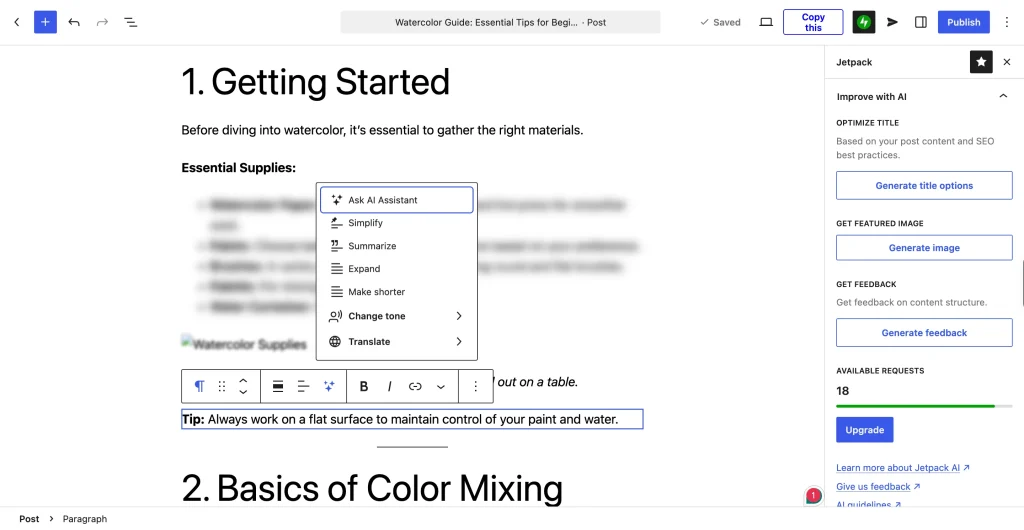
Jetpack AI Assistant comes from Automattic, the company behind WordPress.com, so it feels like a built-in block rather than an add-on. You add the AI Assistant block, describe what you want in plain language, and it drafts, rewrites, or summarizes right where you are working.
Why it’s picked
It is the easiest way to get AI inside Gutenberg for people who do not want to manage API keys or another dashboard.
Best for
Bloggers and content creators who want AI writing as a native part of the editor, with the least setup.
Skip it if
You want to switch between AI providers or build your own chatbot. AI Engine fits that better.
Standout features:
- Generates content, lists, tables, and forms in the editor through the AI block.
- Creates images, including illustrations and logos, from prompts or your existing content.
- Changes tone, translates, summarizes, or expands text from the block toolbar.
- Corrects spelling and grammar and flags long or unclear sentences to improve readability.
- Optimizes post titles and generates featured images with one-click actions.
Pros:
- feels more built-in than anything else here.
- Natural-language prompts, no learning curve.
- Part of the wider Jetpack toolkit, many sites already run.
Cons:
- It does not go as deep into SEO as a dedicated tool.
- The free 20 requests run out inside a single editing session.
2. AI Engine by Meow Apps
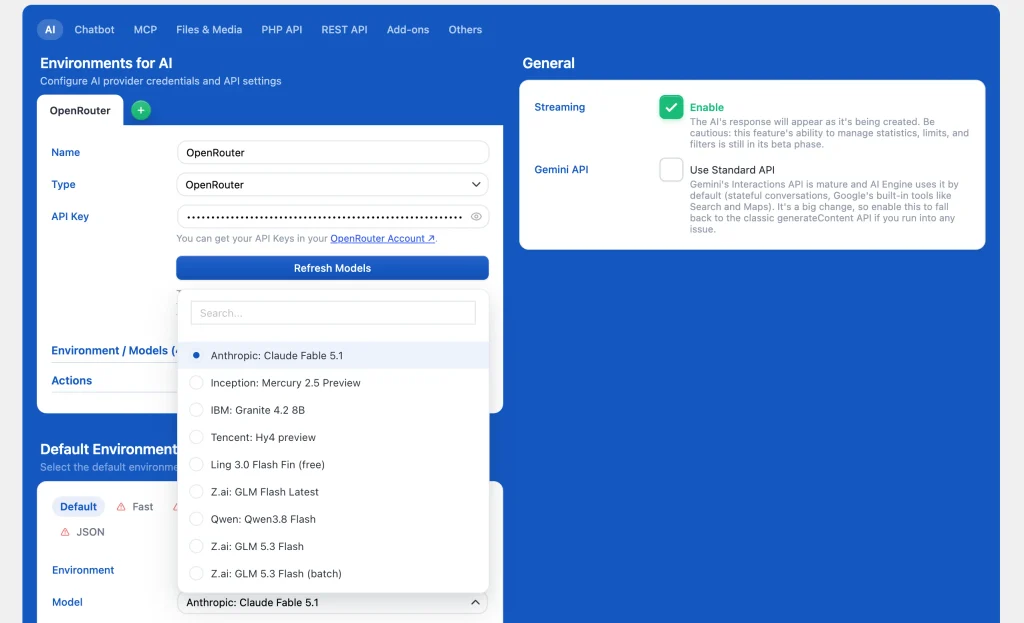
AI Engine connects WordPress to models through your own API key, so you pay the provider directly and switch models without rebuilding anything. With more than 100,000 active installations, it is the reliable choice for automated content writing, custom chatbots, and backend task automation.
Why it’s picked
It gives you the most control over which model you use and what you pay, and one plugin covers writing, chat, and images.
Best for
Creators and small agencies who want to choose their own model and, optionally, build a chatbot on their own content.
Skip it if
You want something plug-and-play with no API keys to wire up. Jetpack is the smoother start.
Standout features:
- Chatbots you can place as a popup, inline, or fullscreen, with voice and file uploads.
- Content and image generation, plus an AI copilot inside the editor.
- Connects to OpenAI, Anthropic, Google, Mistral, Perplexity, and OpenRouter with your own keys.
- Turns your site into an MCP server so agents like Claude and ChatGPT can manage it.
- Embeddings that ground chatbots in your own content and PDFs (Pro).
- A REST API and usage insights that track tokens and cost.
Pros:
- You control the model and the cost.
- One plugin covers writing, chat, and images.
- A capable free version before you upgrade to the paid version.
Con: You need an API key from each provider, which adds a setup step.
Best for SEO and Content Optimization
3. Rank Math Content AI
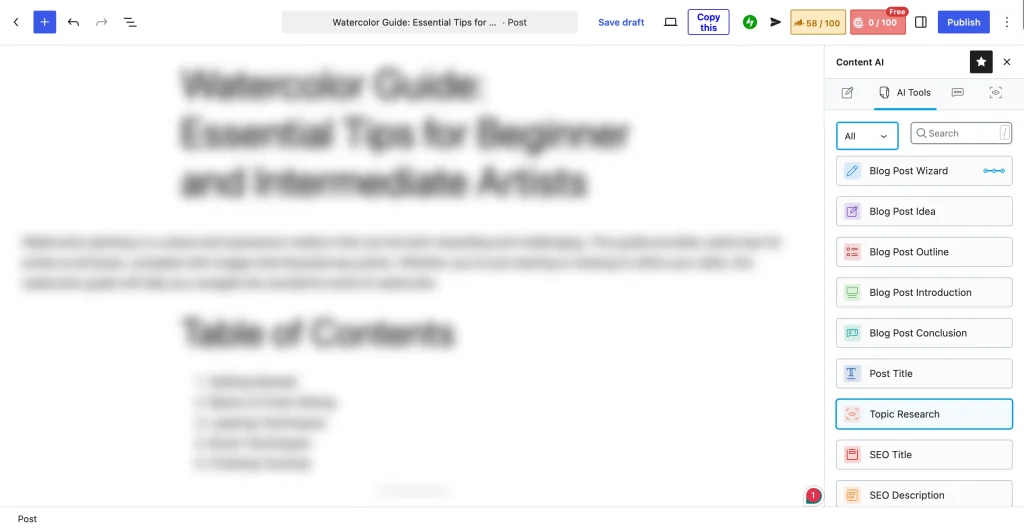
Rank Math is one of the most-installed SEO plugins for WordPress, and its Content AI add-on brings AI writing and SEO tools into the editor. You can research competitors, generate content, and optimize your metadata without leaving WordPress.
Why it’s picked
It brings more than 40 AI writing and SEO tools into the editor, including one-click fixes for failed SEO tests, so you can optimize where you write.
Best for
Content teams and site owners who want data-driven optimization feedback inside WordPress.
Skip it if
You only need basic AI drafting and search is not where your traffic comes from. A writing tool alone will do.
Standout features:
- More than 40 AI tools, from blog outlines to product descriptions.
- AI-generated SEO meta titles, descriptions, and Open Graph tags.
- AI Link Genius, which suggests internal links as you write.
- One-click fixes for failed Rank Math SEO tests.
- AI-generated image ALT text, a RankBot assistant, and 125+ prompt templates.
- Works inside the Block editor, Classic editor, Elementor, and Divi, in 30 languages.
Pros:
- Optimization advice sits next to your draft, so you act on it right away.
- The credit system suits high-volume publishers.
- It plugs into the wider Rank Math SEO suite.
Cons:
- The interface can feel dense for a casual blogger.
- Content AI runs on a monthly credit system and needs a connected Rank Math account.
Best for Chatbots and Customer Support
There are two angles here: a bot that talks to visitors and AI that helps your own agents resolve tickets faster.
4. Tidio Lyro
Tidio’s Lyro AI resolves routine queries and hands the rest to your team with context. It learns only from your support content, and Lyro Smart Actions can handle tasks like order updates and product recommendations.
Why it’s picked
It answers customer conversations on its own and reads your store catalog, so it deflects routine questions before a human is needed.
Best for
Store owners who want a front-end bot to handle common questions around the clock.
Skip it if
Your real problem is helping internal support agents rather than answering website visitors. Fluent Support is built for that.

Standout features:
- Answers common questions using only your support content, in your brand voice.
- Lyro Smart Actions automate tasks like order updates and lead qualification, now with MCP.
- Recommends products from your store.
- Guidance controls for tone, style, and escalation, with instant handoff to your team.
- Connects to Zendesk, Intercom, Salesforce, and more through REST APIs, webhooks, or MCP.
- Powered by Claude and Tidio’s own in-house models.
Pros:
- Deflects routine questions without a human on hand.
- Purpose-built for WooCommerce and online stores.
- A free plan lets you test the fit.
Cons:
- Its answers are only as good as the support content you give it.
- Account setup and management are in Tidio’s own panel, not your WordPress dashboard.
- Aimed at storefront support more than internal ticket work.
5. Fluent Support
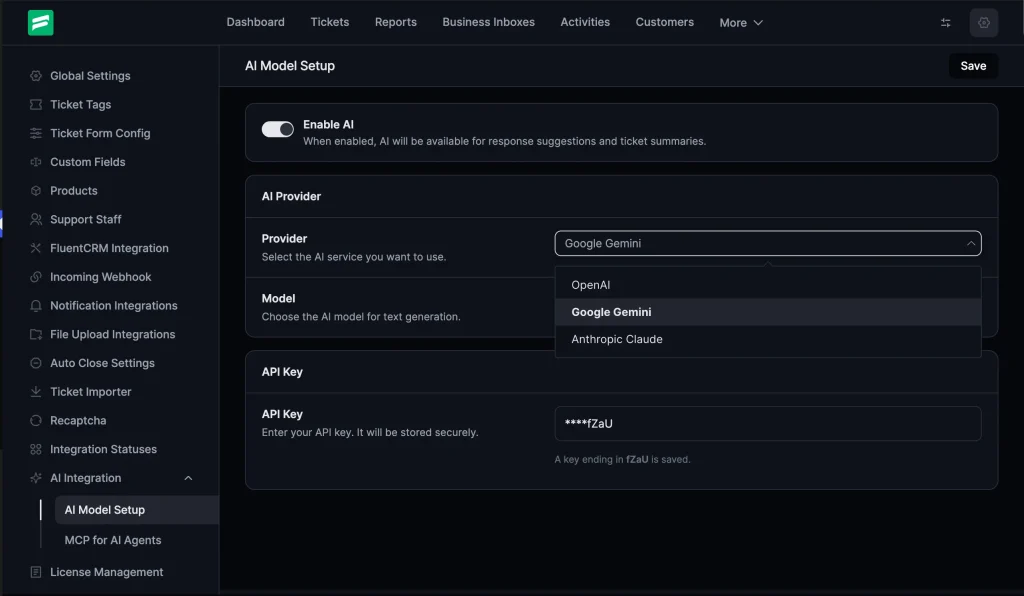
Fluent Support is a self-hosted helpdesk plugin for WordPress, and its AI features sit inside the ticket view where your agents already work. You connect an AI provider, then let it handle the repetitive parts of a reply while your team keeps control of the send.
Why it’s picked
It puts AI inside a helpdesk you host, aimed at your agents rather than your visitors, which is the support job Tidio does not cover.
Best for
Teams that run their own helpdesk in WordPress and want AI to speed up agents, not replace them.
Skip it if
You want a bot that talks to site visitors on the front end. That is Tidio’s role.
Standout features:
- Ticket summaries that condense long threads into a quick read.
- Customer sentiment analysis so agents can match the right tone.
- AI-generated replies your agents review, fine-tune, and send.
- A choice of AI providers: OpenAI, Google Gemini, or Anthropic Claude.
- Through FluentHub MCP, an assistant can work with tickets, replies, and conversations (20 tools), with permissions you control.
Pros:
- AI works inside a helpdesk you host and own.
- Summaries and drafts cut resolution time on busy days.
- You decide what the AI can access and can switch it off.
Cons:
- You connect and pay for your own AI provider account.
- It assists agents rather than running a visitor-facing bot.
Best for Workflow Automation and Agentic AI
6. Uncanny Automator
Uncanny Automator connects WordPress to hundreds of plugins and services through no-code recipes, and its AI Actions module lets any recipe call OpenAI, Claude, or Gemini mid-flow. A new order can trigger an AI-written follow-up, a published post can generate social captions, etc.
Why it’s picked
It lets AI take actions inside your workflows across hundreds of plugins.
Best for
Sites that want AI embedded in automation recipes across their tools.
Skip it if
You only need one-off content generation and have no workflows to automate. A writing tool is simpler.
Standout features:
- More than 240 app and plugin integrations.
- AI Actions that call OpenAI, Claude, Gemini, and more to write copy, summarize, analyze sentiment, or generate images inside a recipe.
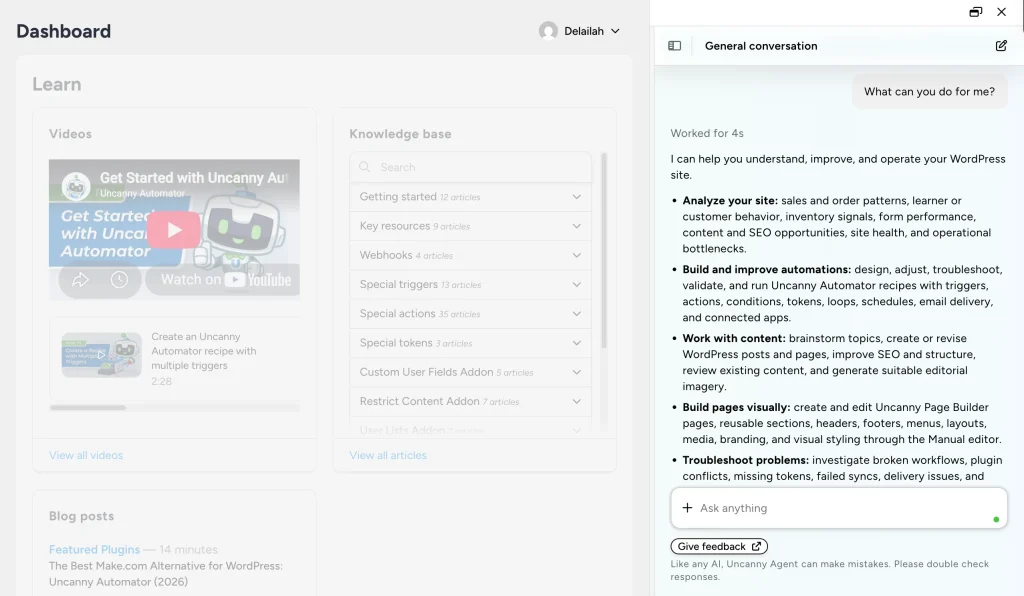
- Uncanny AI Agent, an assistant in wp-admin that answers questions about your site and builds recipes from a description.
- Recipes it builds are ready for you to review and activate.
Pros:
- AI fits into automations you already run.
- One recipe can span several tools and services.
- A free version covers unlimited automations to start.
Cons:
- AI usage is metered, so watch your credits.
- Agentic actions can change your site, so they need oversight.
7. FluentHub MCP
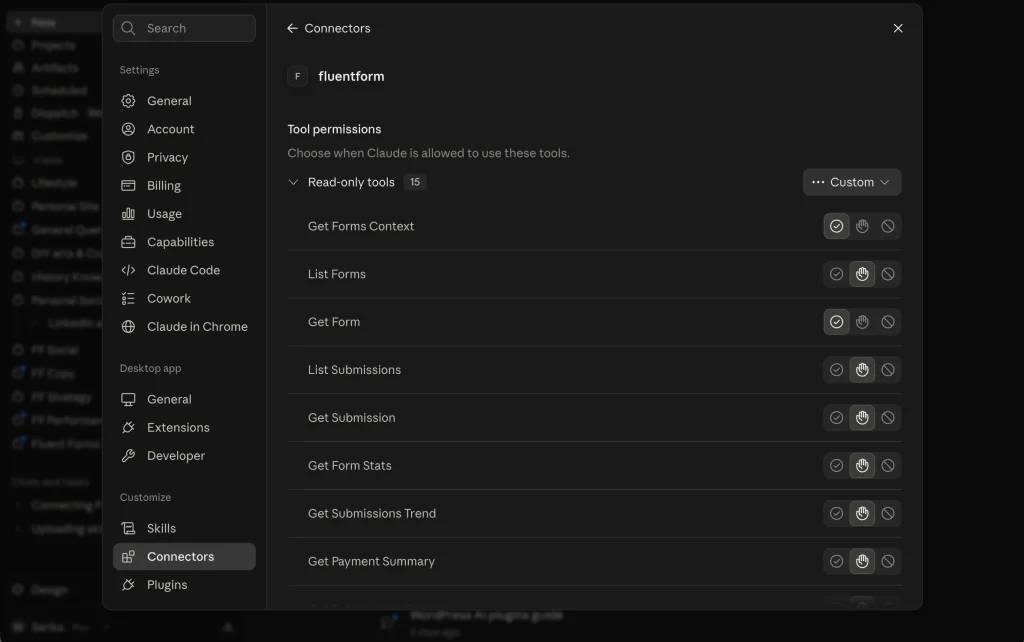
FluentHub MCP connects WPManageNinja plugins to AI agents such as Claude Desktop, Claude Code, Cursor, Codex, and GitHub Copilot over the Model Context Protocol. Instead of opening each dashboard, you ask your assistant, and it works with your data through the actions you allow.
Why it’s picked
If you run Fluent tools, it turns routine lookups and edits across them into a single question to your AI client, which Uncanny Automator’s recipe model does not do.
Best for
Anyone running Fluent products who wants to manage them from an AI chat rather than clicking through dashboards.
Skip it if
You do not use Fluent plugins or you prefer a visual recipe builder over chat-based control.
Standout features:
- One connection that links your AI assistant to your Fluent plugins, instead of setting each one up separately.
- Plain-language requests like “show me subscribed contacts who have not opened an email in 90 days.”
- Documented abilities currently cover FluentCRM, FluentCart, FluentBoards, Fluent Support, and Fluent Forms.
- Permission-scoped access tied to a WordPress application password, with a preview-and-confirm step for sensitive actions.
- A connection you can disable or revoke at any time.
Pros:
- Makes routine lookups easy across the Fluent plugins.
- Works with the AI clients your team already uses.
- Free, and turned off until you turn it on.
Con: Requires setup steps, which involve creating an application password and connecting a client.
8. Novamira
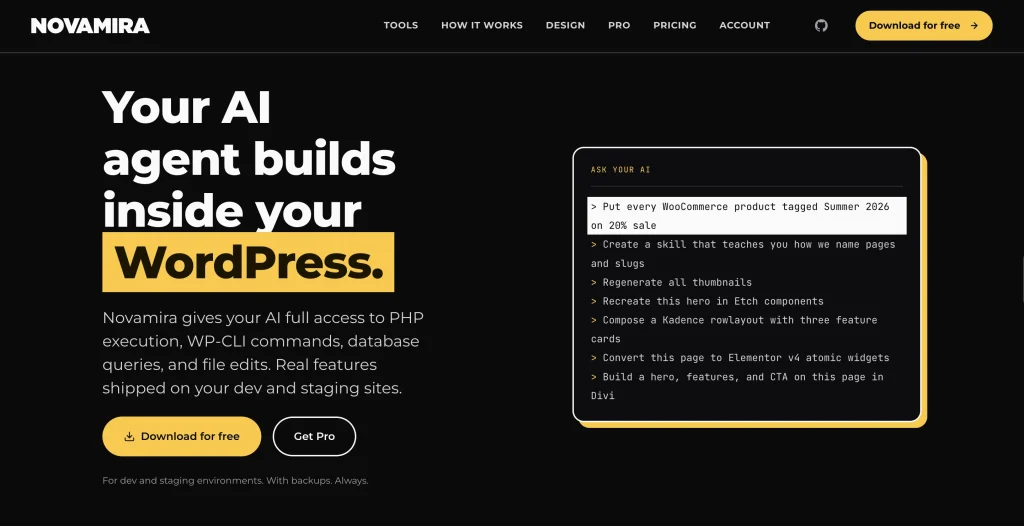
Novamira is an open-source plugin and MCP server that connects your AI client straight to WordPress, with no hosted proxy in between. The agent can run PHP and WP-CLI, query the database, read your active plugins and theme, and edit files, so it builds working code validated against your real setup instead of handing you snippets to paste.
Why it’s picked
It gives your AI agent full, code-level access to build real features on your site, going further than tools that only edit content or one plugin’s data.
Best for
Developers and agencies who want an AI agent to build and debug working functionality on a dev or staging site.
Skip it if
You are not comfortable with code, or you want to run AI on your live production site. Novamira is for dev and staging only.
Standout features:
- Runs PHP and WP-CLI, queries the database, and edits files inside your WordPress.
- Reads your whole install (database, options, post meta, active plugins, theme, and filesystem) before it builds.
- Works with Claude, Codex, Cursor, Gemini CLI, and any MCP client, plus a Novamira CLI for terminal agents.
- New PHP files run in a recoverable sandbox, with OAuth or application-password authentication.
- Pro adds memory across sessions and built-in expertise on 40+ builders and plugins.
Pros:
- Full code-level control, so the AI ships real features, not suggestions.
- Provider-agnostic and open source, with nothing passing through a third party.
- One tool spans any builder, plugin, or theme at the PHP level.
Cons:
- Dev and staging only, with backups. It is not built for live production sites.
- Full PHP access means full responsibility, so it suits technical users more than solo site owners.
Best for Page Building and Site Creation
Building layouts by hand is slow. Two Elementor tools shorten that work in different ways, one for structure and one for the creative details.
9. Angie by Elementor
Angie is an agentic AI for WordPress that uses MCP to read your active theme, plugins, and custom post types before it builds anything. You describe a feature, it plans the work, and it produces structured Elementor content or snippets that you review in a safe test environment first.
Why it’s picked
It reads your actual site before it builds and produces real WordPress assets, not just suggestions, which sets it apart from a copy generator.
Best for
Web creators who want an agent that turns a prompt into structured pages, post types, or snippets.
Skip it if
You only want copy and images rather than structure or code. Elementor AI covers that.

Standout features:
- Reads your site context before generating.
- Builds full pages, design systems, and dynamic loops from a prompt.
- Generates custom widgets and admin snippets.
- Previews changes in a sandbox before they go live.
Pros:
- Saves development time on complex site features.
- Output stays fully editable in the Elementor editor.
- No API keys or external dashboards needed.
Cons:
- Very complex prompts may need manual cleanup.
- You get more from it if you know basic WordPress asset types (like custom post types, fields, widgets, snippets, etc.).
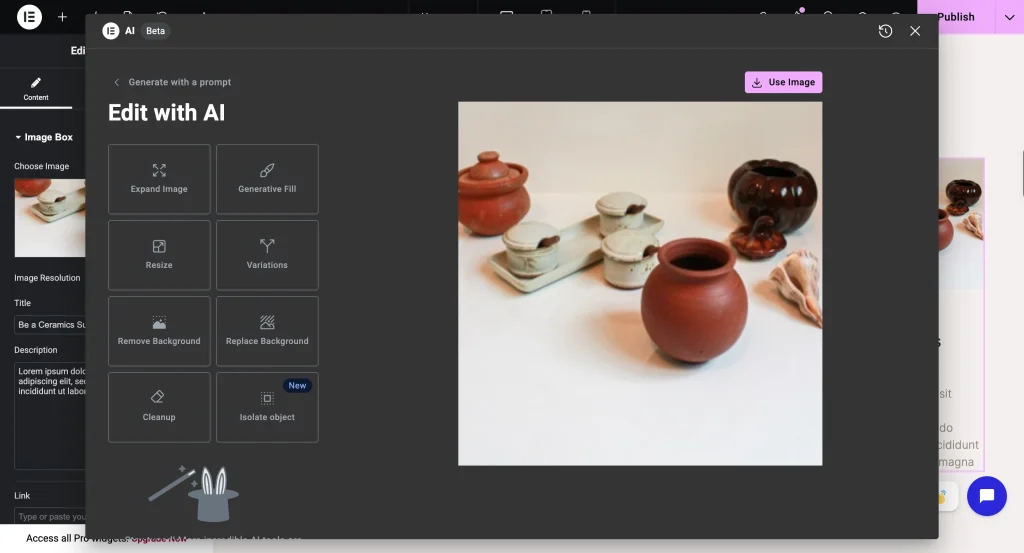
10. Elementor AI
Where Angie handles structure, Elementor AI is the creative assistant on the canvas. It drafts copy, generates images, and writes custom CSS for a specific widget based on what you type, and it inherits your global brand settings as it works.
Why it’s picked
It handles the creative layer on the canvas, copy, images, and CSS, so you finish a design without leaving the builder.
Best for
Designers who want writing and image help in place while they build.
Skip it if
You need structural changes, custom post types, or code. Reach for Angie instead.
Standout features:
- Generates wireframes and container layouts from a text description.
- Writes and rephrases page copy in place, and translates it.
- Generates and edits images, including background removal and replacement.
- Produces custom CSS for a container from a plain description.
Pros:
- No context switching during design.
- Picks up your fonts and brand settings automatically.
- Removes the need to remember CSS syntax for small tweaks.
Cons:
- Text and image generation run on Elementor AI credits.
- Focused on the front-end visual layer only.
Best for Email Marketing
11. FluentCRM
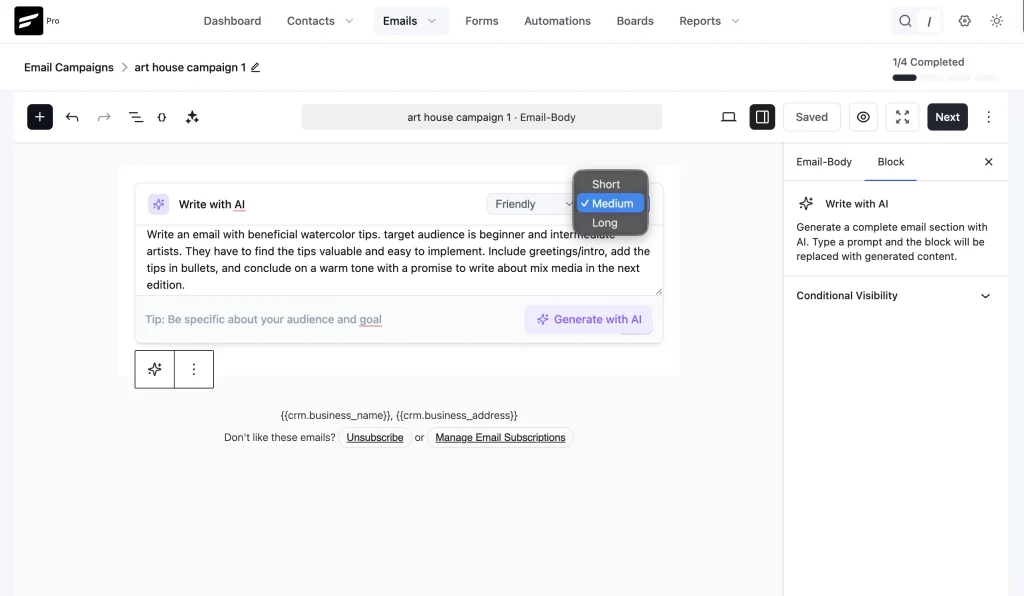
FluentCRM is a self-hosted marketing automation plugin, and version 3.0 built AI into the daily workflow. You generate campaigns, improve copy, and read a customer’s whole journey at a glance, then connect an assistant through MCP to operate the CRM by chat.
Why it’s picked
It brings AI drafting and contact insight inside a CRM you host, so you do not pay for a separate email tool to get it.
Best for
Site owners who run email marketing in-house and want AI in the campaign editor.
Skip it if
Your email already lives on a separate platform you are happy with.
Standout features:
- AI email writing for subject lines and body copy tied to your segments.
- AI contact summaries that condense a customer’s activity and sentiment.
- An MCP connector with around 25 tools that works with several major LLMs.
- A Gutenberg-native email builder and SMS campaigns.
Pros:
- AI drafting sits inside the campaign editor you already use.
- Contact summaries save digging through activity logs.
- MCP is optional and off until you set it up.
Con: AI contact summaries read your CRM data, so incomplete or messy records limit how useful they are.
A Bonus Pick for Forms and Data
12. Fluent Forms
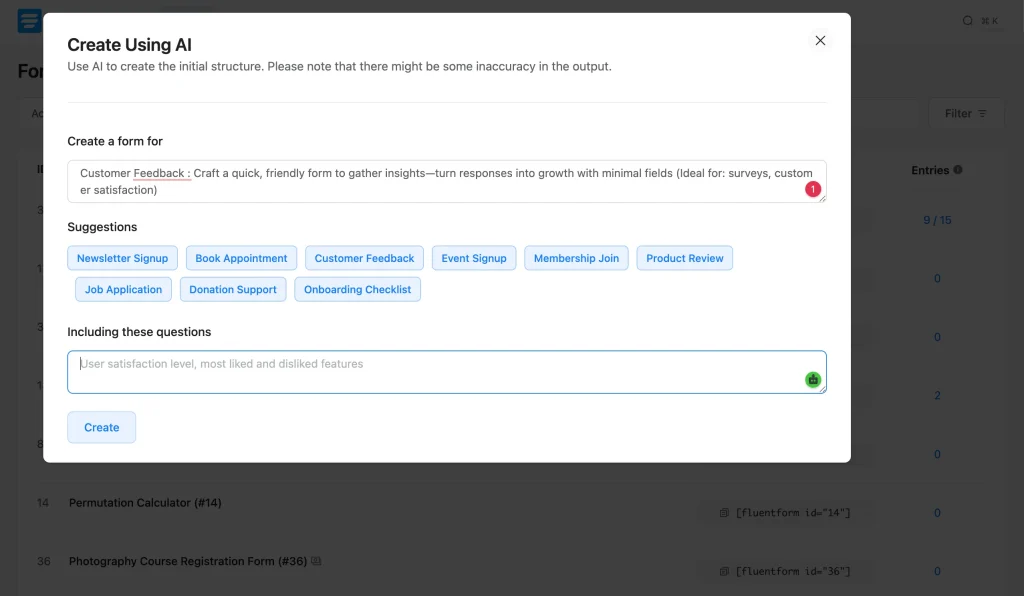
Fluent Forms is a form builder for WordPress trusted by more than 700,000 users, and it has two AI angles. Its built-in AI builds a form from a command, and ChatGPT integration (Pro) can also create auto-responses on submission.
Why it’s picked
It is the one pick that pairs AI form creation with a way to question your entries in plain language, which none of the writing tools do.
Best for
Anyone who wants to create forms from a prompt and then ask about the responses.
Skip it if
You want a visitor-facing chatbot. The MCP server and AI form generation are admin features, not a front-end bot.
It also provides MCP tools that let a supported assistant read and act on your forms, entries, and reports, with 20 tools in the free version and 23 when Pro is active. Like the other Fluent products, it connects through the free FluentHub plugin (or the WordPress MCP Adapter), which exposes those tools over MCP.
Standout features:
- Create a working form from a plain-language description.
- Generate an auto-response for form submissions.
- An MCP server so an assistant can summarize entries or build a form on request.
- Every data-changing action runs a preview, then a confirmation you approve.
Pros:
- The MCP server is off by default and follows your own permissions.
- The free plugin covers the core AI features.
Con: AI form generation is best for straightforward forms; complex conditional logic, calculations, or custom styling still need manual work, though you can prompt an assistant to build a form with these through the MCP connection.
Which AI Plugin to Choose
Start with what you mainly want AI to do, then follow it to the category and pick.
When you want AI to create something
- Writing and publishing content: Jetpack AI Assistant for the easiest start, or AI Engine for model control.
- Pages and layouts: Angie for structure, Elementor AI for copy and images.
- Forms: Fluent Forms.
If you want AI to answer people or help with support
- Website visitors: Tidio Lyro.
- Support agents: Fluent Support.
When you need AI to perform actions
- Automations across your plugins: Uncanny Automator.
- Fluent plugins and data by chat: FluentHub MCP.
If you want AI to improve marketing
- SEO and search: Rank Math Content AI.
- Email: FluentCRM.
Most sites use two or three of these: one to create, one to optimize or market, and one to answer visitors or take actions. If you already run Fluent plugins, you can connect your own AI agent to them through one MCP (FluentHub) and get a lot done before adding anything new.
Frequently Asked Questions
Are AI plugins for WordPress free?
Many have a real free tier. AI Engine, Angie, and FluentHub MCP are free to use, and Jetpack, Tidio, Rank Math, Uncanny Automator, etc., offer free versions with paid upgrades. If you connect your own API key, you pay the model provider for usage.
Do these plugins slow down my site?
Most of the work happens in the admin or through an API call, so front-end speed is rarely the issue. Test any agentic tool on a staging site first, since an elaborate prompt can run up usage or change a page you did not mean to touch.
Which AI plugin is best for writing blog posts?
For drafting inside the editor, Jetpack AI Assistant is the smoothest start. If you want to choose your model or reuse prompts, AI Engine gives you more control. Pair it with Rank Math Content AI when you write for search.
What is an MCP server, and do I need one?
MCP, the Model Context Protocol, is an open standard that lets AI assistants connect to software and take actions you approve. You need it if you want to run tasks by chat, for example, asking an assistant to summarize form entries or draft a support reply from ticket history. It stays off until you turn it on.
Can I use more than one AI plugin at once?
Yes, and most sites do. A common mix is one writing tool, one SEO tool, and one support or automation tool. Keep an eye on overlapping features so you are not paying twice for the same job.
Is AI-generated content bad for SEO?
Raw, unedited AI text reads like it, and readers notice. Use AI for drafts and structure, then edit for accuracy and your own voice. SEO tools like Rank Math Content AI help you optimize a draft, but the editing judgment stays yours.
Pick Your First AI Plugin
You now have a top pick for most jobs. Pick one category that takes a lot of time right now (SEO drafting, support chat, form building, email writing, etc.) and install an AI plugin in that category. Start with the free tiers and add a paid plan when it proves beneficial. Once you’re satisfied with your first AI plugin, you can safely go for the next.

Sarika creates helpful content for Fluent Forms & FluentPlayer. Endlessly curious, she loves connecting over diverse interests & unique perspectives. Off the clock, she’s exploring art or relaxing with a binge-worthy show.
-

FluentSMTP Review: Whats Inside this 700K+ WordPress SMTP Plugin?
Check our FluentSMTP review blog to Discover whats inside this -

7 Best Ecommerce Plugins for WordPress in 2026 (Tested And Compared)
Compare the 7 best ecommerce plugins for WordPress in 2026 -

Popular WordPress Affiliate Plugins: Manage Affiliates Inside Your Dashboard
Compare WordPress affiliate management plugins for tracking referrals, commissions, affiliates,



Leave a Reply
You must be logged in to post a comment.