

Knowledge Management Systems: Benefits, Features & Best Practices

Every growing organization hits the same wall. A customer asks a question your team has answered 40 times. A new hire spends their first week hunting through old Slack threads. A senior employee leaves and takes five years of institutional knowledge with them. These are not isolated incidents. They are symptoms of a broken knowledge infrastructure.
Knowledge management systems exist to fix exactly this. In this blog, we will break down what a knowledge management system (KMS) actually is, the different types available, how to build one that works long-term, and how WordPress-based businesses can get ahead with the right tools.
TL;DR
- A knowledge management system (KMS) captures, organizes, and delivers an organization’s information to the right people at the right time
- There are three core knowledge types: explicit, tacit, and implicit, and most systems only handle the first one well
- A functional KMS reduces support costs, speeds up onboarding, and prevents critical knowledge from leaving with employees
- WordPress users can build a fully functional knowledge base without enterprise pricing
- BetterDocs, paired with Fluent Support, creates a tight customer-facing KMS loop directly inside WordPress
What Is a Knowledge Management System?
A knowledge management system (KMS) is a platform or structured process that helps organizations capture, store, organize, and retrieve information so that employees and customers can act on it without friction. It turns scattered tribal knowledge into structured, searchable assets.
The term covers a wide spectrum. A shared Google Drive folder technically qualifies. So does a full-scale enterprise platform with AI-powered search and automated content expiration. What defines a KMS is not the software. It is whether people can find what they need, when they need it, without asking someone else.
A KMS is a core operational tool, not a documentation archive. The distinction matters because most organizations treat it like a graveyard for PDFs and then wonder why no one uses it.
The Three Types of Organizational Knowledge (And Why Most KMS Tools Miss Two of Them)
Before selecting any system, you need to understand the three forms knowledge takes inside your organization. Most tools are built around only one of them.
1. Explicit Knowledge
Explicit knowledge is anything that can be written down cleanly: SOPs, product documentation, policy manuals, how-to guides. It is the easiest type to manage and the default focus of most KMS platforms. The primary challenge is not capturing it but keeping it accurate and accessible over time. Without a maintenance schedule, even clean documentation becomes a liability.
2. Tacit Knowledge
Tacit knowledge is the hard-won intuition that experienced employees carry in their heads. A support agent who knows exactly how to de-escalate an angry customer. A developer who instinctively knows where bugs tend to surface in a specific codebase. This knowledge is deeply valuable and notoriously difficult to document because it lives in pattern recognition built through years of experience.
3. Implicit Knowledge
Implicit knowledge sits between the two. It exists in the unwritten rules of how your organization actually functions: which approvals can be skipped, which clients prefer phone calls over email, how internal escalation really works. It has not been written down, but it could be.
Most organizations lose tacit and implicit knowledge every time someone resigns. The documents stay. The context walks out the door. A well-designed knowledge management system creates structured ways to surface and preserve all three types, not just the ones that are already written.
How a Knowledge Management System Actually Works
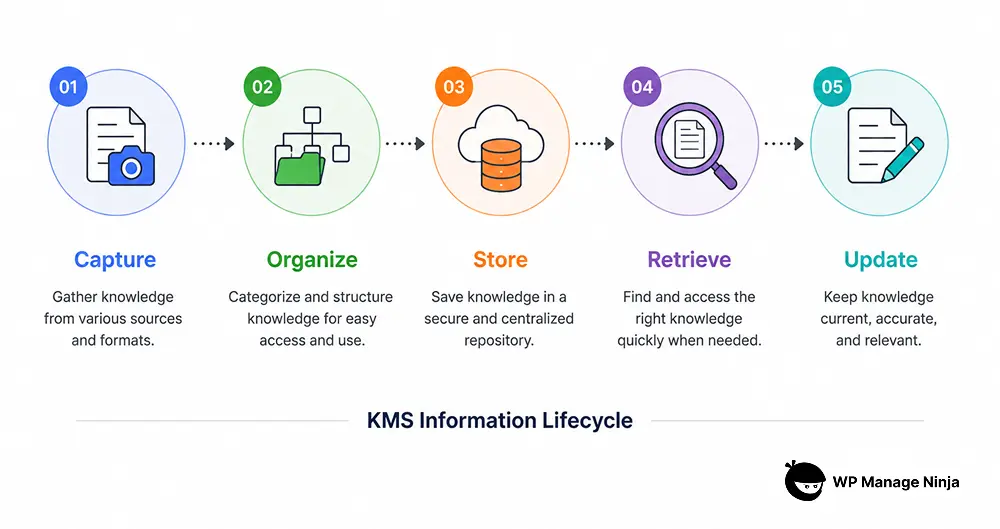
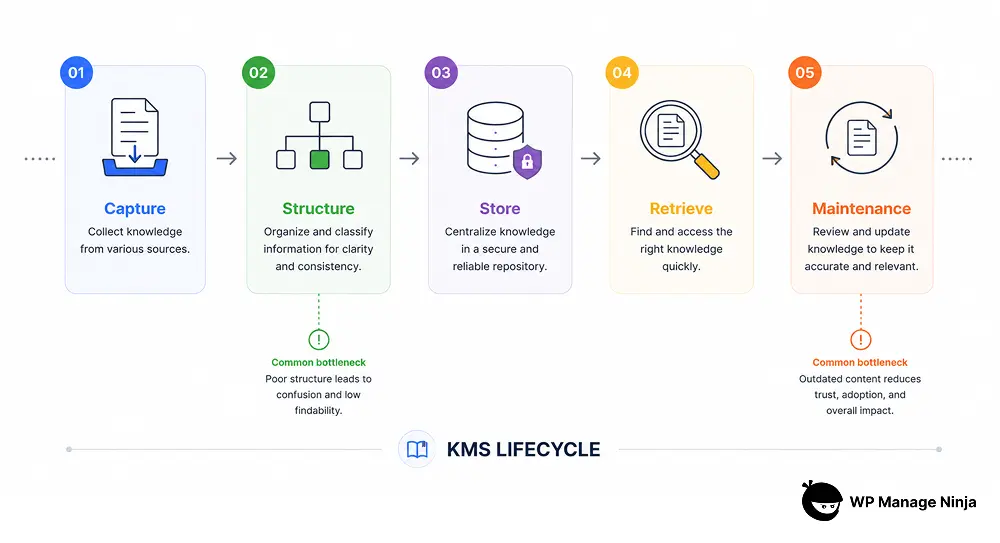
The operational flow of a KMS moves through several stages. Understanding these stages helps you spot where your current system is breaking down.
Capture
Knowledge enters the system from support tickets, internal conversations, customer feedback, subject matter experts, and product documentation. Some of this is manual. And, some modern systems can analyze repeated support tickets and suggest documentation topics automatically.w
Structure
This is where most implementations fail. Information gets dumped into folders with no taxonomy, no tagging, no clear categorization. Useful content becomes impossible to find within six months. Structure is the invisible architecture that either makes a knowledge base work or renders it useless.
Storage
Storage centralizes everything into a single source of truth. The goal is to eliminate the situation where three different employees give three different answers to the same question because they are each working from a different version of the same document.
Retrieval
Retrieval is the end-user experience. Fast, relevant search is the single most important functional feature of any KMS. If users cannot find what they need in under 30 seconds, they will stop using the system and start asking colleagues instead.
Maintenance
Maintenance is the stage that never appears on vendor feature lists. Content goes stale. Products change. Policies update. Without a defined process for reviewing and retiring content, your knowledge base becomes a liability rather than an asset.
The Real Cost of Not Having One
According to IDC’s white paper “The High Cost of Not Finding Information”, knowledge workers spend an average of 2.5 hours per day, roughly 30% of the workday, searching for information they need but cannot find. Across a team of 50 people, that is 125 hours of lost productivity every single day.
The downstream effects compound quickly. Customer support teams answer the same questions repeatedly because self-service options are weak or nonexistent. New employees take months to reach full productivity because institutional knowledge is locked in individual inboxes. Customers abandon products they cannot figure out on their own.
Peter Drucker, widely considered the father of modern management theory, wrote that “knowledge has to be improved, challenged, and increased constantly, or it vanishes.” Organizations that treat their KMS as a static archive rather than a living system are not managing knowledge. They are hoarding it.
5 Types of Knowledge Management Systems
Different teams need different implementations. Here is how the main categories break down.
1. Internal Knowledge Bases
Internal knowledge bases serve employees. They house SOPs, training materials, internal policies, product specs, and process documentation. The primary goal is reducing the time employees spend searching and the errors that come from working with outdated or conflicting information.
2. Customer-Facing Knowledge Bases
Customer-facing knowledge bases serve end users directly. They contain help articles, FAQs, troubleshooting guides, and onboarding content. When built well, they significantly reduce inbound support volume by enabling genuine self-service before a ticket is ever submitted.
3. Community Forums
Community forums add a peer layer on top of official documentation. Users answer each other’s questions, share use cases, and surface problems your internal team has not documented yet. They work particularly well for technical products with engaged user communities.
4. Document Management Systems
Document management systems focus on formal document control: version management, approval workflows, and access permissions. They serve compliance-heavy industries more than general knowledge sharing needs, and they work best when paired with a more accessible knowledge base for everyday use.
5. Integrated Collaboration Platforms
Integrated platforms embed knowledge directly into daily workflows. Rather than requiring users to leave their primary tool to consult a knowledge base, information surfaces inside project management, communication, and support tools. This is the direction the market is moving and where adoption rates are consistently highest.
| KMS Type | Best Use Case | Primary User | Main Limitation |
|---|---|---|---|
| Internal Knowledge Base | Employee onboarding, SOPs, internal documentation | Internal teams and employees | Requires continuous maintenance to stay accurate |
| Customer-Facing Knowledge Base | Self-service support, FAQs, product documentation | Customers and end users | Poor organization reduces article discoverability |
| Community Forum | Peer-to-peer troubleshooting and discussions | Product communities and advanced users | Information quality can become inconsistent |
| Document Management System | Compliance, version control, approval workflows | Legal, HR, and regulated industries | Often too rigid for everyday knowledge sharing |
| Integrated Collaboration Platform | Embedding knowledge directly into workflows | Cross-functional teams | Can become fragmented across multiple tools |
What a Strong KMS Looks Like in Practice
Consider a SaaS company with a mid-sized support team. Without a KMS, support agents spend time re-drafting answers to common questions, inconsistencies appear between agents, and customers who want to help themselves hit dead ends in sparse documentation.
With a structured knowledge base in place, common questions get resolved through self-service before a ticket is ever created. When a ticket does come in, agents pull from one accurate, up-to-date source. Response times drop. Customer satisfaction scores rise. The team shifts focus from repetitive queries to genuinely complex problems that require human judgment.
A McKinsey survey on the future of customer care found that “65% of customer care leaders reported enhanced self-service as a meaningful driver in reducing inbound support volume.” For a growing business, that reduction directly translates to lower operational costs without sacrificing service quality.
How to Build a Knowledge Management System That People Will Actually Use
The most common reason KMS implementations fail is not technology. It is adoption. Here is how to approach the build in a sequence that creates lasting usage.
1. Start with the Highest-Friction Questions
Pull your top 20 most-repeated support tickets. These become your first knowledge base articles. Do not try to document everything at once. Document the most painful gaps first and expand from there. Starting with what actually hurts ensures the system delivers value from day one.
2. Build Your Taxonomy Before You Write a Single Article
Decide on top-level categories, subcategories, and tagging structure before any content exists. Retrofitting a taxonomy onto 200 existing articles is one of the most time-consuming problems in knowledge management, and one of the most avoidable.
3. Write for the Confused Reader, Not the Internal Expert
The person reading a how-to article in your knowledge base is usually someone who cannot figure something out. Plain language, numbered steps, and screenshots outperform dense paragraphs of technical explanation every single time.
4. Assign Ownership to Every Section
Every category in a knowledge base should have a named person responsible for keeping it accurate. Without ownership, content drifts toward obsolescence and no one notices until a customer points it out publicly.
5. Track What Gets Searched but Not Found
Most knowledge base platforms log failed searches. These are direct signals about content gaps. Review them monthly and treat them as a living content roadmap.
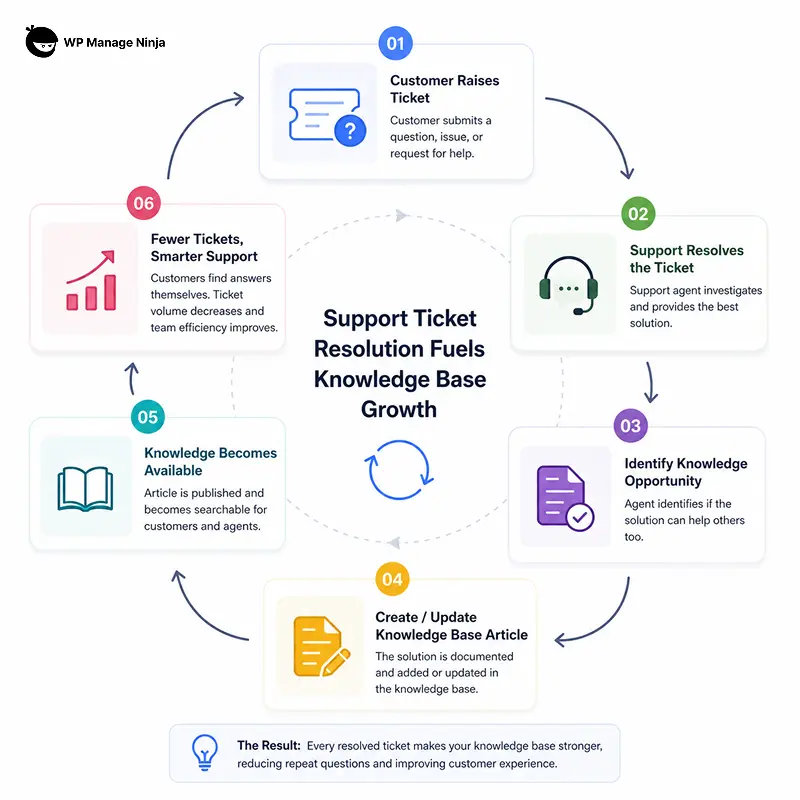
6. Close the Ticket-to-Documentation Loop
When a support agent resolves a new type of problem, that resolution should feed back into the knowledge base. The knowledge base should grow smarter every time your team solves something new. Without this loop, your KMS is a snapshot of yesterday’s problems, not a growing asset.
A hosting company might turn repeated “SSL installation failed” tickets into a searchable step-by-step article. Over time, support volume for that issue drops while customers solve it themselves.
Building a Knowledge Base on WordPress: A Practical Approach
WordPress powers more than 43% of all websites globally. For businesses already running on WordPress, a knowledge management system does not require a separate enterprise platform or a six-figure implementation budget.
BetterDocs is a WordPress plugin purpose-built for this use case. It gives you a structured knowledge base with instant search, support for multiple knowledge bases across different product lines, analytics to track individual article performance, and flexible embedding options so documentation can surface wherever your users are.
What makes the WordPress approach particularly effective is when the knowledge base connects directly to the support workflow. When Fluent Support, WPManageNinja’s help desk plugin, integrates with BetterDocs, support agents can search and surface relevant knowledge base articles directly from within the ticket view. A customer submits a ticket. The agent pulls the relevant article with one click. The response goes out faster with consistent, accurate information.
This closes the loop that most disconnected KMS implementations miss entirely. The knowledge base stops being a separate destination the support agent has to visit and becomes part of the support workflow itself. That integration is what drives real adoption, not training sessions or mandates.
For teams managing customer relationships at scale, FluentCRM adds another dimension to the entire setup. It lets you track which customers are engaging with knowledge base content and trigger follow-up sequences based on what they are reading. A customer spending time on your troubleshooting articles might need a proactive outreach, not just passive documentation.
Common Mistakes That Make Knowledge Bases Useless
- Writing for experts, not users: Documentation written by the person who built the feature rarely helps the person who cannot figure it out. Always write from the reader’s perspective, not the builder’s.
- Treating launch as the finish line: A knowledge base that was accurate at launch but has not been updated since is worse than no knowledge base. Outdated information destroys trust faster than a missing article.
- Ignoring failed search analytics: Failed searches tell you exactly what content is missing. Ignoring this data means building in the dark while users keep hitting dead ends.
- Using documentation to mask a broken product experience: If users need to consult an article to complete a basic task, the UX problem should be addressed at the product level. Knowledge bases should explain, not compensate.
- No article feedback mechanism: If users cannot signal that an article was unhelpful, there is no way to improve it. A simple thumbs up or thumbs down at the end of each article is enough to generate the feedback signal you need.
Key Takeaways
- A knowledge management system reduces support costs, accelerates employee onboarding, and preserves institutional knowledge across employee turnover
- Tacit and implicit knowledge are the hardest to capture and the most damaging to lose
- Structure, meaning taxonomy, tagging, and categorization, determines whether your knowledge base is actually findable; invest in it before creating content
- On WordPress, BetterDocs and Fluent Support together create a practical, integrated KMS that closes the ticket-to-documentation loop
- Adoption follows usefulness: build for the most painful knowledge gaps first, measure failed searches, and keep content ownership clearly assigned
Wrapping Up
A knowledge management system is not a software purchase. It is a commitment to treating organizational knowledge as a maintained, living asset rather than a pile of documents no one reads. The payoff is real: faster support resolution, shorter onboarding time, lower ticket volume, and a team that spends its time on work that actually requires human judgment.
For WordPress-based businesses, the barrier to entry is lower than most assume. The right combination of tools, a clear taxonomy, and consistent content ownership can get you there without enterprise complexity or enterprise pricing.
Frequently Asked Questions
What is the difference between a knowledge management system and a content management system?
A CMS manages the creation, editing, and publishing of digital content, primarily for websites. A KMS is designed to organize and surface information for decision-making and problem-solving.
A CMS is built for content publishing. A KMS is built for knowledge retrieval. The goals overlap in some areas but serve fundamentally different operational functions.
How long does it take to implement a knowledge management system?
A basic internal knowledge base can be functional within a few days. A fully structured, multi-category customer-facing knowledge base with a defined taxonomy and solid initial content typically takes two to six weeks.
The more important question is time-to-usefulness, which depends entirely on whether you prioritized the highest-friction content gaps first.
Can a small business benefit from a knowledge management system?
Immediately and significantly. Small teams lose disproportionate productivity to repeated questions and informal tribal knowledge.
A simple, well-structured knowledge base reduces this friction at a fraction of what larger enterprise implementations cost.

A published literary author, and a musician. I thrive on marketing for tech companies while composing music, collecting books of lasting depth, exploring cinema with a discerning eye, and studying the arts and history.
-

10 Best jQuery Table Plugins for Best Data Visualization in 2026
Discover the 10 best jQuery table plugins for 2026. Compare -

FluentSMTP Review: Whats Inside this 700K+ WordPress SMTP Plugin?
Check our FluentSMTP review blog to Discover whats inside this -

Taking a Closer Look at Common WordPress Errors and How to Fix Them
A troubleshooting guide to the common WordPress errors, why they



Leave a Reply
You must be logged in to post a comment.