

AI in Product Design: 11 Use Cases and Real Examples That Actually Work in 2026
It’s late, the deadline is close, and the client still expects fresh homepage concepts by morning. Your coffee’s cold, and your ideas are running even colder.
Every product designer working in WordPress has lived that night. Tools like Figma, Elementor, Bricks, and Divi are powerful, but they don’t fill the blank canvas for you. Meanwhile, every newsletter says AI is going to either save your career or end it.
But here’s what most blogs skip. AI in product design isn’t replacing designers. The ones who learn where to plug AI tools into their workflow are just shipping faster, with cleaner work, while everyone else is still arguing about it.
This guide covers 11 real use cases, the exact tools for each, real prompts that work, and the areas where AI genuinely breaks down.
TL;DR
- AI in product design is now a practical part of the 2026 design workflow, not just a future trend.
- Designers use AI to speed up research, ideation, wireframing, prototyping, UI copy, usability testing, design systems, and developer handoff.
- The biggest value of AI is saving time on slow, repetitive tasks, such as summarizing interviews, clustering feedback, generating layout ideas, writing microcopy, and creating first-draft prototypes.
- Popular AI tools for product designers include Claude Design, Figma AI, Galileo AI, Uizard, Midjourney, Maze AI, Anima, ChatGPT, Dovetail AI, and Notably.
- WordPress designers can also use tools like Figma AI, Elementor AI, Divi AI, Bricks AI, ZipWP, and CodeWP to speed up site planning, layout generation, content, and client delivery.
- AI is useful for first drafts, structure, research support, and quick variations, but it should not make final design decisions.
- AI still struggles with brand consistency, accessibility details, original thinking, cultural context, edge cases, and complex product judgment.
- The best designers use AI as a copilot, not a replacement. AI helps with speed, but humans still lead strategy, creativity, empathy, and decision-making.
- Start small by adding one AI tool to one repeated task, measure how much time it saves, and only add more tools when they clearly improve your workflow.
- In simple words: AI helps designers skip the slow parts, but human designers still handle the smart, strategic, and emotional parts of great product design.
What does “AI in product design” actually mean?
AI in product design means using AI tools to help with different parts of the product design process. These tools can create wireframes, summarize user research, write UI copy, suggest layouts, find usability problems, manage design systems, and turn designs into code.
AI helps designers work faster and more efficiently, but it does not completely replace designers.
AI in Product Design
Key Statistics 2025-2026
73%
of product designers used AI tools weekly in 2025.
~60%
AI cuts prototyping time by ~60% on average.
9in10
senior designers say AI is a copilot, not a replacement.
78%
of design leaders say AI will significantly impact their org in the next 1-3 years.
Sources: UX Tools Survey (Spring 2026), Figma AI Report 2025, McKinsey & Company – The State of AI in 2024
The phrase covers three rough categories of tools. Generative AI creates things (images, layouts, copy). Analytical AI processes things (summaries, clusters, predictions). Assistive AI nudges things (suggestions, autocomplete, fixes).
In 2026, most product designers use all three types of AI tools in their weekly work, even if they do not realize it.
Below are 11 use cases and real examples of how AI is used in product design:
1. AI for rapid prototyping and MVP design
This is where most designers feel AI’s impact first. You describe what you want, the tool generates a working prototype, and you iterate from there. A full day of work becomes about twenty minutes.
Best tools for prototyping are v0 by Vercel, Galileo AI, Uizard, Visily, Figma AI, plus ZipWP and 10Web for full WordPress site generation.
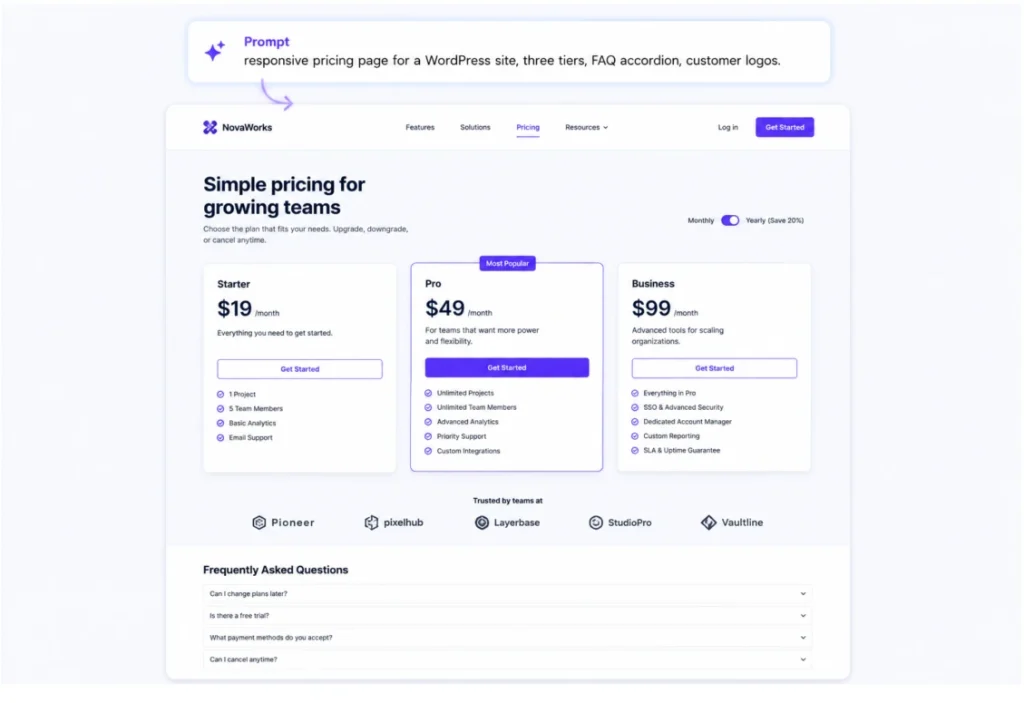
Promt Example of Pricing Page
Create a modern, SEO-optimized, AI-friendly, high-converting responsive pricing page for a WordPress plugin website. The design should feel premium, polished, and inspired by modern brands like Stripe, Linear, Framer, and other clean product-focused platforms.

Build the page with a clean semantic structure and proper heading hierarchy using H1, H2, and H3 tags to improve SEO performance, AI readability, and search engine indexing. The layout should be optimized for Google Search, AI-powered search experiences, featured snippets, and modern content discovery systems.

The pricing page should include a strong hero section with a keyword-rich headline, supporting value proposition, and clear call-to-action buttons. Add three pricing tiers, such as Starter, Pro, and Agency, with a monthly and yearly pricing toggle. Highlight the most popular or best value plan using visual emphasis and discount badges like “Save 30%.”

Include clean feature checklists with icons, a detailed feature comparison table, customer testimonials, trusted company logos, FAQ accordion sections, money-back guarantee sections, and a final CTA banner near the bottom of the page.

Use subtle animations and hover effects, support dark and light modes, and ensure the entire page is fully mobile-responsive.

The overall design style should be minimal yet visually rich with modern typography, rounded corners, glassmorphism or soft-shadow cards, gradient accents, bento grid-inspired layouts, and strong visual hierarchy optimized for conversions.

The page should also follow modern SEO and AI optimization best practices, including:

- Semantic HTML structure
- Schema-ready FAQ, Product, Review, and Pricing sections
- Accessibility best practices with ARIA labels and keyboard navigation
- Core Web Vitals optimization
- Lightweight and reusable components
- Scannable content structure with short paragraphs and clear sections
- Metadata-ready layout for Open Graph and Twitter Cards
- AI-friendly content formatting for summarization and indexing
- Optimized performance and loading speed

The final output should look like a real production-ready pricing page suitable for premium WordPress plugin brands like WPManageNinja products, combining modern UI design, strong conversion optimization, SEO best practices, and AI discoverability.
2. Using AI to speed up user research
User research is where most product teams lose weeks. AI tools shorten that by transcribing interviews, clustering feedback, generating personas, and pulling sentiment from hundreds of survey responses in one pass. The work that needed a junior researcher now runs in the background.
AI can help with interview transcription, note tagging, and organizing raw research data. Tools like Otter, Dovetail AI, and Notably can turn interviews into searchable notes, group open-ended survey answers, create early persona drafts, analyze customer sentiment from reviews or support tickets, and summarize insights across multiple research sessions.
Example: Drop 30 interview transcripts into Dovetail. The AI tags themes automatically (pricing concerns, onboarding friction, feature requests), and you validate findings instead of color-coding sticky notes. WordPress designers can run WooCommerce review exports through ChatGPT with “Cluster these into the top five complaint themes, ranked by frequency.”
3. AI for brainstorming product layout ideas
When you feel stuck, AI can act like a nonstop creative partner. It may not give you the perfect idea right away, but it can quickly share dozens of rough options. Often, one of those ideas can lead you in the right direction. The real skill is knowing how to ask better questions.
Designers use AI for ideation in concept exploration, moodboard direction, UI copy variations, naming, microcopy, and layout ideas they may not have considered yet. Tools like Midjourney, Khroma, and Adobe Firefly can also help shape early visual directions faster.
Example: Prompts that work “Act as a senior product designer and give me 8 different layout concepts for a WooCommerce product page focused on conversion. For each concept, explain the hero section, where social proof should appear, and where the main CTA should go in two sentences.”
Structured prompts work better than vague requests because they tell AI the role, goal, format, and exact output you need.
4. AI-assisted usability testing
Usability testing used to mean recruiting users, running sessions, watching recordings, and writing reports. AI now handles most of that framework, so you focus on the actual decisions. Testing rounds that took two weeks now wrap in two days.
Best tools for usability testing are Maze AI (auto-generates test plans), UserTesting AI (summarizes recordings), Attention Insight (predicts visual attention before launch), Hotjar AI (heatmap and session summaries), and VWO (A/B test analysis).
Example: Before recruiting a single tester, upload your design screenshot to ChatGPT or Claude with this prompt: “Act as a senior UX researcher. Review this WordPress checkout screen using Nielsen’s 10 heuristics. List the top 5 issues with severity, user impact, and a fix for each.” You get a structured audit in under a minute. For visual checks, Attention Insight predicts a heatmap from a screenshot in seconds. Treat AI predictions as directional, not final.
5. AI for personalized product experiences
Personalization used to need a data team. Now, AI lets product designers build adaptive experiences without custom recommendation engines. You design the structure once. AI fills the slots based on real user behaviour.
AI personalization fits into product design wherever the experience changes based on user behaviour. This can include dynamic website content, adaptive onboarding flows, WooCommerce product recommendations, personalized email sequences through tools like FluentCRM or Klaviyo AI.
Example: On a WordPress membership site, AI can show beginner content to new users and the next lesson to returning users. A WooCommerce store can show bestsellers to first-time visitors and personalized product picks to repeat customers. The goal is to make the experience feel helpful, not random.
6. Using AI to maintain consistent UI and branding
Big design teams burn hours keeping component libraries consistent. AI audits your design system, flags inconsistencies, generates new components in your existing style, and converts designs into reusable tokens. The least exciting use case, and one of the biggest time savers.
Useful tools for design systems are Magician for Figma (icons and components in your style), Anima (Figma to production-ready code), Penpot AI (open-source design system support), Stark (accessibility and consistency audits).
Example: Feed your Figma library to Stark. It flags every button that doesn’t match your tokens, every color that breaks contrast, every component that drifted off-brand. You fix the issues in an afternoon instead of a sprint. For agencies running multiple client sites, AI catches the drift before the client does.
7. AI for generating multiple design concepts quickly
When a stakeholder says, “show me a few options,” AI lets you deliver real options instead of one direction with two colour tweaks. Generate eight to ten genuinely different concepts, narrow to three, then refine those manually with real brand assets.
Tools that are great for variation include Midjourney and Adobe Firefly for visual exploration, Galileo AI for UI layouts, Khroma for color palettes matched to your taste, Uizard for creating multiple screens from one prompt, and Relume for sitemap and wireframe variations.
Example: Generate eight homepage hero directions in Midjourney. Pick three that match the brand. Recreate the strongest ones manually in Elementor, Bricks, or Divi with real assets. Present three real options with real reasoning. AI gives you many ideas. You add the real strategy, quality, and brand feel.
8. AI workflow automation for product teams
Beyond design itself, AI saves hours on documentation, meeting notes, handoff specs, design QA, and project updates that eat into design time. Not glamorous. Just hours back in your week, every week.
Where AI automates the boring parts are meeting notes (Fireflies, Otter, Granola), design specs and handoff docs (Anima, Zeplin AI), Jira and Asana task drafting from design files, Slack summary bots for async teams, and accessibility checklists.
Example: Drop a design review Loom recording into an AI summarizer. You get action items, decisions, and open questions in under a minute. Send it to the team and move on!
9. AI for collaboration between designers and developers
AI makes designer-to-developer handoff easier by turning Figma designs into code, explaining design details clearly, and creating responsive specs. This reduces confusion, cuts back-and-forth questions, and helps teams ship faster.
Best tools for design-to-development handoff are Anima (Figma to React, Vue, HTML), Locofy AI (design to live production code), Visual Copilot by Builder.io, v0 (when designers prototype in code), CodeWP (WordPress-specific AI coding).
Example: A designer builds a custom block layout in Figma. Anima converts it to clean code. CodeWP turns natural-language requests into PHP or JavaScript snippets the developer can drop in. The developer reviews and ships. AI handles 70% of the translation work. Human judgment closes the rest.
10. How product designers write effective AI prompts
Most designers complain about bad AI output. Most of that comes from vague prompts. The designers getting great results follow a simple pattern like role, context, task, constraints, and format. Skip any one of those, and the output degrades fast.
The five-part prompt structure for designers:
- Role: “Act as a senior UX writer…”
- Context: “…for a WooCommerce store selling organic skincare to first-time buyers…”
- Task: “…write three versions of the empty cart message…”
- Constraints: “…under 15 words, friendly tone, no emojis…”
- Format: “…numbered list with one sentence of rationale per version.”
“Make me a dashboard” gets junk. “Act as a senior product designer, redesigning a WordPress analytics plugin dashboard for site owners with 1k to 10k monthly visitors. Give three layouts, each with a different primary metric in the hero, and explain who each is best for” gets usable output.
11. AI supports product designers, not replaces them
Good senior designers usually agree on one thing: that is, AI is a helper, not a replacement. It can handle repetitive tasks, rough first drafts, and boring admin work. But it cannot replace the qualities that make a designer truly valuable, such as strategy, good taste, empathy, original ideas, and the ability to handle a difficult client.
What only human designers do well:
- Understanding the actual problem behind a vague brief
- Making judgment calls when data is incomplete or contradictory
- Designing for cultural, emotional, and accessibility context
- Pushing back on bad client decisions with diplomacy
- Holding brand voice consistently across years and projects
- Spotting the idea that breaks the pattern in a useful way
If you’re worried AI will take your job, the answer isn’t to avoid it. Learn it faster than the designers who are avoiding it. The winners in 2026 use AI as an extra hand on existing skills, not as a replacement for them. The clients who pay well still want a human who can think, defend a decision, and tell them when their idea is bad.
Best AI Design Tools for Product Designers
AI design tools vary a lot depending on what you’re trying to create. Some are built for UI generation, some are better for wireframing and prototyping, while others help with website structure or visual exploration.
So, instead of looking for one tool that does everything, choose based on the part of your design workflow you want to speed up.
Here are 5 AI design tools worth considering:
1. Figma AI: Best for UI and product design
Figma AI brings AI directly into the design environment many product teams already use.
It can help designers explore layouts, generate ideas, automate repetitive tasks, and move faster without leaving Figma.
Best for: UI design, product design, design systems, and team collaboration.
2. Galileo AI: Best for generating UI concepts
Galileo AI turns text prompts into polished interface concepts.
You can describe a dashboard, mobile app, landing page, or SaaS product and quickly generate visual directions instead of starting from a blank canvas.
Best for: App interfaces, dashboards, SaaS UI, and rapid concept generation.
3. Uizard: Best for wireframing and prototyping
Uizard makes it easy to turn rough ideas into wireframes and interactive prototypes.
It is particularly useful for early-stage planning because you don’t need advanced design skills to create something that communicates your idea clearly.
Best for: Wireframes, prototypes, MVP concepts, and non-designers.
4. v0: Best for AI-generated frontend design
v0 by Vercel lets you describe an interface in natural language and generate working frontend layouts and components.
Instead of creating a static design and rebuilding it later, teams can use v0 to explore interfaces much closer to the final product.
Best for: Landing pages, dashboards, frontend prototypes, and design-to-code workflows.
5. Relume: Best for website planning and wireframes
Relume focuses heavily on the early stages of website design.
It can help generate sitemaps, page structures, wireframes, and website concepts before you move into detailed visual design.
For agencies and web designers, this can save a lot of time during planning and client approval.
Best for: Website structures, sitemaps, wireframes, landing pages, and agency workflows.
Which AI design tool should you choose?
There isn’t one AI design tool that is best for every job.
Choose Figma AI for everyday product and UI design, Galileo AI for generating polished interface ideas, and Uizard when you need fast wireframes or prototypes. If you want to move directly toward a working frontend, v0 makes more sense. For website planning and structure, Relume is one of the stronger options.
The goal isn’t to collect AI tools. Pick the one that removes the slowest part of your current workflow and use it where it actually saves time.
Common limitations of AI in product design
Every guide hyping AI skips this part. We won’t. Knowing where AI breaks saves you from shipping bad work, losing trust with clients, or wasting an entire sprint on a tool that wasn’t built for the job. Pay close attention to this section before you commit a new AI tool to a client project.
Where AI consistently falls short:
- Brand consistency: AI visuals rarely match a brand’s tone or established system without heavy direction.
- Accessibility nuance: AI misses cognitive load, screen reader flow, and neurodivergent user needs beyond basic color contrast.
- Context awareness: AI doesn’t know your users, business model, or last quarter’s strategy. It generates what’s statistically common, not what’s right for you.
- Original thinking: AI remixes existing patterns. It won’t invent a new interaction model or design language.
- Edge cases and error states: AI designs happy paths beautifully and ignores empty states, errors, and loading flows.
- Hallucinated UI patterns: AI sometimes generates components that look fine but don’t actually function.
- Copyright and IP risk: Some tools train on copyrighted designs. Always check licensing for client work.
The rule that holds: AI for drafts, still not for final decisions for brands who has good reputation in the market.
How to start using AI in product design this week
Don’t overhaul your workflow in one weekend. Pick one task you do every week, find one AI tool, integrate it for a sprint, then add more once it sticks.
Solo designers or freelancers: Start with prototyping and copy. Use Claude Design or Galileo AI for first-draft layouts. ChatGPT for UI copy, button text, and empty states. Two tools, one habit, five to ten hours saved per week within a month.
In-house WordPress teams: Start with the boring stuff. Plug in Fireflies or Granola for meeting notes, Stark for design system audits. You’ll free up hours before you ever touch AI for design itself. Then layer in Figma AI and Anima for design and handoff.
WordPress agencies: Start with handoff and workflow. Anima or Locofy for design-to-code. ZipWP or 10Web for the first 30% of new site builds. Document the prompts that work in a shared doc so junior designers can use the same playbook from day one.
A tip that holds for all three. Measure the time saved on the first task before adding a second tool. If a tool doesn’t free up at least two hours a week, drop it. AI is supposed to give you back time, not turn into another thing to manage.
Your next move with AI in product design
AI in product design isn’t a future trend. It’s the working reality of 2026. The designers who treat it as a threat fall behind. But designers who use it as a helpful tool can create better work faster, while saving more time for strategy, creativity, and decision-making, the parts AI still cannot replace.
Pick two or three tools that fit your actual workflow. Get good at them. Add more when it makes sense. The goal isn’t to use every AI tool on the market. It’s to buy back enough hours in your week to do the work that actually matters; the strategy, the user empathy, the original thinking that no model can replicate.
Start with one tool this week. Once you see what an hour of saved time feels like, the rest of your workflow figures itself out.
FAQs about AI in product design
How do product designers actually use AI?
They use AI as a copilot across specific stages: drafting wireframes, summarizing user research, generating UI copy, exploring layout variations, automating handoff docs, and analyzing usability test results. Most don’t use AI for final design. They use it to skip the slow parts of the process.
What AI tools do UX designers use most?
The most adopted are Figma AI, Galileo AI, Uizard, v0, Midjourney, ChatGPT, Maze AI, Anima, and Notably. WordPress-focused designers also rely on Elementor AI, Divi AI, Bricks AI, ZipWP, 10Web, and CodeWP for site-specific work and faster client delivery.
Can AI create wireframes?
Yes, AI can create wireframes from text prompts, sketches, or rough ideas. Tools like Uizard, Visily, Galileo AI, and Figma AI can quickly generate early wireframe concepts. However, the output should be treated as a starting point. Designers still need to improve the structure, user flow, accessibility, content, and product logic.
How do designers use ChatGPT in their workflow?
Most use it for UI copy, prompt structuring, research summarization, persona drafts, design critique, accessibility checks, and brainstorming. ChatGPT isn’t a design tool itself. It’s a thinking partner that fills the gaps between design tools and helps you think through problems faster than a blank doc would.
What’s the best AI product design generator for beginners?
Uizard and Galileo AI are the friendliest starting points. Both let you type a description and get a usable UI in seconds, with zero design background required. For WordPress beginners specifically, 10Web’s AI builder generates a full site from a single prompt and lets you edit it visually after.

Hridi here, a curious mind navigating the exciting world of digital marketing with 3-years of experience in content writing, copywriting, and email marketing. I love exploring the ever-evolving world of marketing and finding creative ways to connect with audiences. When I’m off the clock, you’ll often find me enjoying music or seeking serenity in nature.
-
10 Best jQuery Table Plugins for Best Data Visualization in 2026
Discover the 10 best jQuery table plugins for 2026. Compare -

Black Friday Marketing Strategies for 2026: Core and Advance Move
Black Friday is the most celebrated shopping season worldwide. Discover -

How Much Can You Earn With Amazon Affiliate Marketing? Rates & Niches
How much can you earn with Amazon affiliate marketing? Dive



Leave a Reply
You must be logged in to post a comment.