

GiveWP Review: Features, Pricing, Pros, Cons, and Best Alternative

Online donations should feel simple. A donor chooses an amount, completes the payment, and your organization receives the money without confusion.
GiveWP has been one of the biggest WordPress donation plugins for years. It is powerful, donation-focused, and trusted by many nonprofits. But in 2026, the question is different.
Is GiveWP still worth trying, or should smaller nonprofits look for a simpler and more affordable alternative?
TL;DR
- GiveWP is still worth trying if you need a serious WordPress fundraising platform.
- It works well for nonprofits, churches, schools, campaign-based fundraisers, and agencies building donation-heavy websites.
- It is strong for donation forms, donor management, campaign reports, recurring donations, and peer-to-peer fundraising.
- But GiveWP is not the automatic choice for everyone anymore.
- Paid plans start at $199/year, while recurring donations require the Pro plan, and peer-to-peer fundraising is available in the Elite plan.
- GiveWP is now part of Liquid Web’s consolidated software portfolio, which created some confusion after the shift from standalone StellarWP-era product sites.
- So, GiveWP makes sense if you need advanced fundraising features.
- But if you want simple donations, lower cost, zero platform fees, and a lighter setup, Paymattic may be a better fit.
What Is GiveWP?
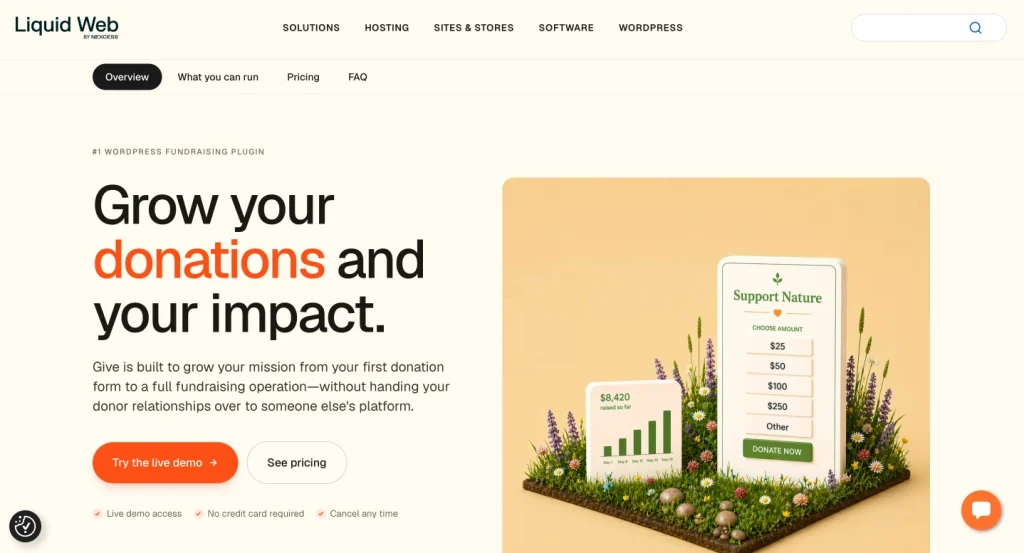
GiveWP is a WordPress donation and fundraising plugin. It helps website owners accept donations, create donation forms, manage donors, view reports, and run fundraising campaigns from inside WordPress.
On WordPress.org, GiveWP describes itself as a plugin for both simple donate buttons and full donation platforms. It also mentions customizable donation forms, donor data, fundraising reports, donor management, and third-party integrations.
The plugin has also been rebranded more visibly as Give inside Liquid Web’s current software lineup. Liquid Web describes Give as a WordPress donation plugin for nonprofits, organizations, and individuals running fundraising campaigns directly through their own websites.
That is the biggest strength of GiveWP. It is not just a payment form. It is built around fundraising.
GiveWP at a Glance (WordPress org)
| Category | Details |
|---|---|
| Plugin type | WordPress donation and fundraising plugin |
| Best for | Nonprofits, charities, churches, schools, fundraisers |
| Free version | Yes |
| Active installs | 100,000+ |
| WordPress.org rating | 4.6 out of 5 stars |
| Paid plans | Essentials, Pro, Elite |
| Starting paid price | $199/year |
| Best feature | Campaign-based fundraising |
| Main concern | Pricing, fees, and recent brand consolidation |
WordPress.org currently lists GiveWP with 100,000+ active installations, version 4.15.2, and a 4.6-star rating. The review breakdown shows 619 five-star reviews and 47 one-star reviews out of 703 total reviews.
GiveWP Setup Wizard
GiveWP does a good job with onboarding. This is one reason many users still like it.
After installation, GiveWP launches a setup wizard to help users configure the basics. WPKube’s hands-on review says the wizard helps users set location, currency, enabled features, and preview a basic donation form generated from their answers.
The setup process usually includes:
- Setting your country and currency
- Choosing the features you need
- Creating the basic donation form
- Connecting a payment gateway
- Reviewing the setup guide
- Editing your first campaign or form
After the wizard, users can go deeper into Donations → Settings. This is where payment gateways, donor emails, default behavior, and add-on settings are managed.
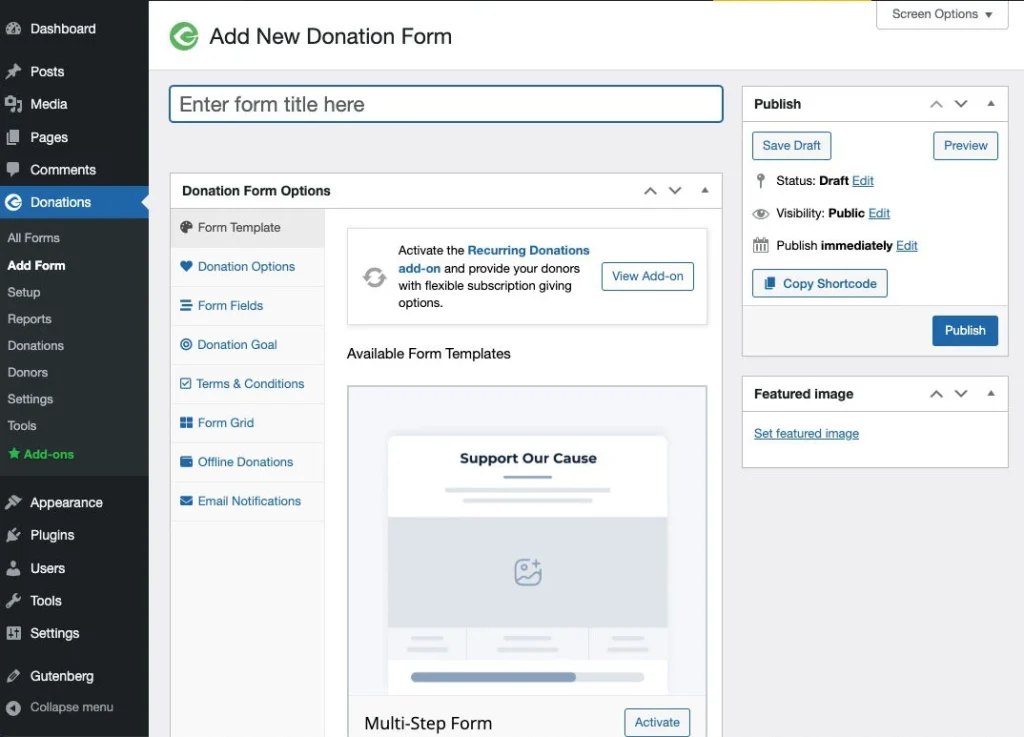
The form editor is also flexible. You can configure donation amounts, custom amounts, donation goals, fields, recurring options, and form behavior from the donation form settings.
For beginners, the setup wizard is helpful. For nonprofits running serious campaigns, the advanced settings give enough control to shape different fundraising experiences.
GiveWP Key Features
Donation Forms
GiveWP lets you create donation forms using templates. You can customize donation levels, allow custom amounts, and place forms on your site using blocks, shortcodes, widgets, or single donation form pages.
The WordPress.org description says donation forms can be displayed anywhere using a block, shortcode, widget, or the single donation form page. It also mentions PayPal and Stripe support in the free plugin.
This makes GiveWP useful for simple donation pages, campaign landing pages, and dedicated fundraiser pages.
Campaign-Based Fundraising
Campaigns are now a major part of GiveWP.
You can create multiple campaigns, set goals, customize campaign landing pages, show progress bars, add campaign-specific content, and control visibility.
GiveWP’s WordPress.org description says each campaign can have its own goal, audience, messaging, landing page, progress bar, and social sharing options.
This is one of the places where GiveWP feels stronger than basic payment form plugins.
Donor Management
GiveWP includes donor records and donation history. You can see donor activity, track donations, and allow donors to access their own dashboard.
The plugin description mentions donor history, profile updates, recurring donation management, and PDF receipt downloads through the donor dashboard.
For nonprofits, this matters because donor relationships continue after the first donation.
Fundraising Reports
GiveWP includes reporting tools to help users track donation performance.
According to the WordPress.org description, reports can show donation activity, exports, date filters, form filters, payment method filters, and campaign performance.
This helps nonprofits understand which campaigns are working and which forms need improvement.
Payment Gateways
GiveWP supports multiple payment options.
The free plugin includes Stripe, PayPal, Venmo, offline donations, and a test gateway. It also mentions additional gateways like Authorize.net, Bitpay, Square, Razorpay, and Paytm through other options or add-ons.
One important detail: WordPress.org notes that additional fees may apply for free users using Stripe.
That detail matters when comparing GiveWP with alternatives.
Recurring Donations
Recurring donations are important for nonprofits because they create predictable revenue.
Give Pro includes recurring giving tools that let donors give weekly, monthly, quarterly, or annually. Liquid Web’s Give FAQ also says donors can manage subscriptions without contacting the organization.
The downside is that recurring donations are not in the entry paid plan. They are part of Pro.
Fee Recovery
Fee recovery lets donors cover payment processing costs.
Give lists the pay-the-fee option under the Pro plan. The pricing page says Pro includes fee recovery, advanced reporting, recurring donations, and marketing integrations.
This feature is useful, but budget-sensitive users should note that it is not part of the Essentials tier.
Peer-to-Peer Fundraising
Peer-to-peer fundraising is where supporters create their own fundraising pages for your cause.
Give Elite includes peer-to-peer fundraising, fundraiser leaderboards, team competitions, and social sharing tools.
This is useful for large campaigns, community events, charity runs, school fundraisers, and nonprofit ambassador campaigns.
GiveWP Pricing in 2026
GiveWP’s current pricing is simple on the surface. There are three paid plans.
Essentials
$199/year
Best For Basic fundraising websites
Pro
$399/year
Best For Recurring donations and fee recovery
Elite
$599/year
Best For Peer-to-peer fundraising and advanced campaigns
Essentials includes unlimited donation forms, donor database and management, Stripe, Square, PayPal, reports, campaigns, PDF receipts, Google Analytics donation tracking, Text-to-Give, and manual donations.
Pro adds recurring donations, donor portal, tributes, fee recovery, Mailchimp, Constant Contact, advanced reporting, international gateways, Zapier, and Salesforce.
Elite adds peer-to-peer fundraising, funds and designations, custom fields, currency switcher, and WooCommerce donation upsells.
So the pricing question is not only “Can GiveWP do it?”
The better question is:
Which plan do you need to get the features your fundraising workflow depends on?
Does GiveWP Charge Transaction Fees?
This part needs careful attention.
Give’s paid pricing page says “No donation fees” for its paid tiers.
But on WordPress.org, GiveWP says additional fees may apply for free users using Stripe.
A GiveWP support reply on WordPress.org explains this more clearly. It says the core plugin is free, but donations may involve gateway fees. It also says GiveWP may charge a platform fee on some donations, currently when a user has no valid license and uses Stripe.
The same support reply says the 2% platform fee can be removed by adding a valid license for any plan or premium add-on. Gateway fees still apply separately.
That means the free version can work, but users should understand the cost structure before going live.
What Users Like About GiveWP
GiveWP still has a strong reputation overall.
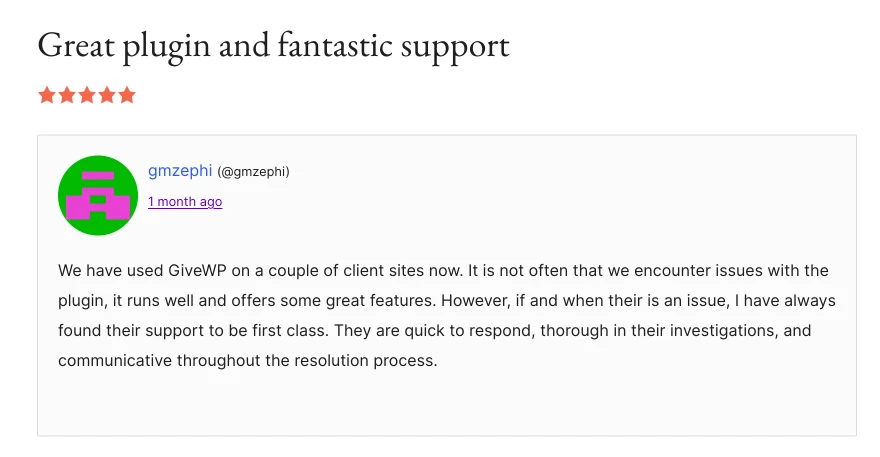
Its WordPress.org review page shows a 4.6-star average from 703 reviews, with the majority being five-star reviews.
Many positive reviews talk about support, setup, and fundraising features.
This matches the old review video context too. The reviewer praised GiveWP for being beautiful on the frontend, simple on the backend, and useful for owning donor data instead of relying on crowdfunding platforms.
The main positives are clear:
- It is mature.
- It is built for donations.
- It handles donor records.
- It supports campaign goals.
- It has strong reporting.
- It works inside WordPress.
- It can scale into serious fundraising.
For organizations that need a proper fundraising system, GiveWP still makes sense.
What Users Complain About
The complaints are also worth taking seriously.
The review page has 47 one-star reviews, which is a small percentage of total reviews but still enough to study.
Recent negative feedback often points to three areas:
- The free version may feel limited for some use cases.
- The pricing can feel high for small fundraisers.
- The additional Stripe platform fee can surprise users who expected a fully free setup.
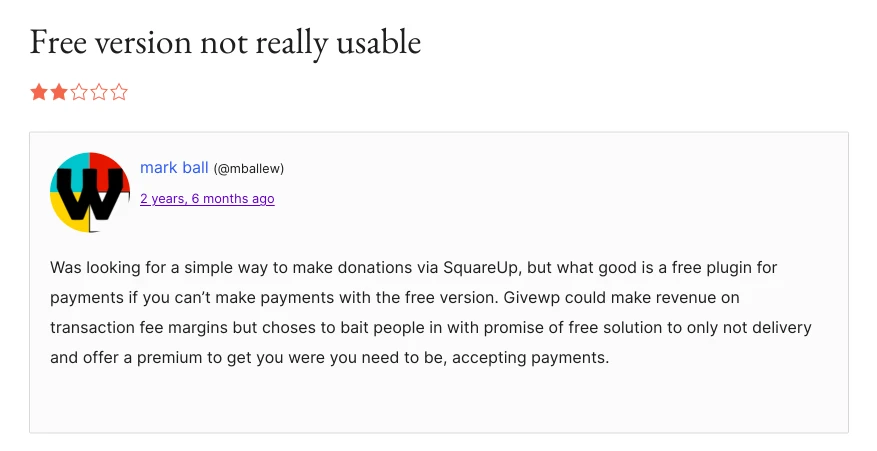
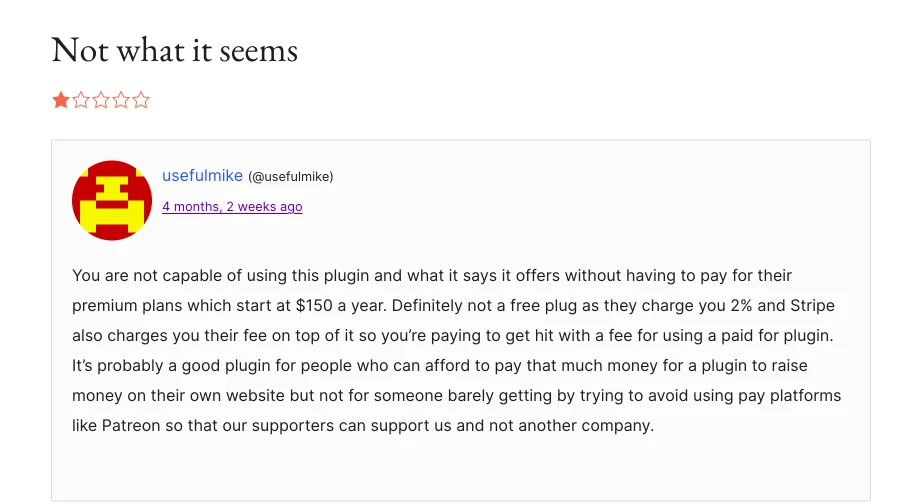
One WordPress.org reviewer complained about an additional 2% fee when using Stripe without a premium plan. GiveWP support replied that the platform fee applies in that setup and can be removed with a valid license.
This does not make GiveWP bad. But it does mean users should check fees and plan limits before building a campaign around it.
What Happened to GiveWP Recently?
This is one of the biggest reasons GiveWP deserves a fresh 2026 review.
GiveWP was part of StellarWP, a group of WordPress product brands under Liquid Web. In 2026, Liquid Web consolidated its WordPress software portfolio into four core products: Kadence, LearnDash, The Events Calendar, and Give.
Search Engine Journal reported that the migration and rebrand caused backlash after users reported missing pages, login issues, and license confusion. The report also said StellarWP seemed to disappear without notice, while products were described as moving into both Nexcess and Liquid Web by Nexcess.
WP Content also reported that LearnDash, The Events Calendar, Kadence, IconicWP, GiveWP, and other StellarWP-era sites were taken offline or redirected to Liquid Web software pages.
For existing GiveWP users, this does not mean donation forms suddenly stop working.
But it does raise practical questions:
- Where do users manage licenses now?
- How will support change?
- Will the roadmap stay focused on nonprofits?
- Will pricing change again?
- Will Give remain a standalone product long term?
Liquid Web says existing customers can keep their current plans, pricing, license keys, and tools unless they choose to upgrade.
Still, nonprofits should pay attention. Donation tools are mission-critical. A confusing support or licensing transition can be stressful during active fundraising campaigns.
GiveWP Pros and Cons
| GiveWP Pros | GiveWP Cons |
|---|---|
|
Strong fundraising features
GiveWP is built for donations, campaigns, donor management, receipts, reporting, and nonprofit workflows. |
Pricing can feel high
Paid plans now start at $199/year, and some important features require higher tiers. |
|
Campaign-based structure
Campaign landing pages, goals, progress bars, and social sharing make it useful for organized fundraising. |
Recurring donations require Pro
If monthly giving is central to your strategy, you need the Pro plan. |
|
Good donor management
The donor dashboard and donation history features make it easier to manage supporter relationships. |
Free Stripe donations may include an added GiveWP fee
GiveWP support says a platform fee may apply if users do not have a valid license and use Stripe. |
|
Payment flexibility
GiveWP supports Stripe, PayPal, Venmo, offline donations, and more gateway options depending on setup. |
Recent brand consolidation created uncertainty
GiveWP is now part of Liquid Web’s consolidated software portfolio, and the rollout created confusion across the WordPress community. |
|
Strong WordPress.org reputation
A 4.6-star average from 703 reviews shows that many users still trust the plugin. |
May be too much for simple donation forms
If you only need a lightweight donation form, GiveWP may feel bigger than necessary. |
Who Should Use GiveWP?
GiveWP is a strong fit for organizations that need more than a simple donation button.
Use GiveWP if you need:
- Campaign-based fundraising
- Donor records
- Fundraising reports
- Donation goals
- PDF receipts
- Recurring donations
- Peer-to-peer fundraising
- Nonprofit-focused workflows
It is especially useful for nonprofits, churches, schools, foundations, and agencies building donation-heavy WordPress websites.
Who Should Avoid GiveWP?
GiveWP may not be the best fit for everyone.
You may want to look elsewhere if you:
- Only need a simple donation form
- Want to avoid yearly plugin costs
- Need recurring donations on a smaller budget
- Want payments and donations in one plugin
- Prefer no platform fee on top of gateway fees
- Do not need campaign-heavy fundraising features
Small nonprofits should be especially careful. A tool can be excellent and still not be the right fit for your budget.
Our Review on GiveWP

GiveWP Review
Our rating: 3.5 out of 5 stars
| Review Factor | Rating | Review Notes |
|---|---|---|
| Fundraising Features | 4.5/5 | GiveWP offers strong donation forms, campaigns, donor tools, receipts, reports, and nonprofit-focused fundraising features. |
| Ease of Setup | 4/5 | The setup wizard makes it easier to create donation pages, configure basic settings, and start accepting donations. |
| Donor Management | 4/5 | Donor records, donation history, and donor dashboard features make it useful for managing supporter relationships. |
| Pricing Value | 3/5 | Paid plans start at $199/year, and important features like recurring donations require higher-tier plans. |
| Free Version Usability | 3/5 | The free version is useful, but some users may find it limited once they need advanced fundraising or recurring donation features. |
| Long-Term Confidence | 3/5 | The recent Liquid Web consolidation creates some uncertainty around branding, support, and long-term product direction. |
| Overall Rating | 3.5/5 | GiveWP is powerful and mature, but pricing, feature gating, added fees, and recent ownership changes make it less ideal for every nonprofit in 2026. |
Best GiveWP Alternative
The best GiveWP alternative for many WordPress users is Paymattic.
Paymattic is a WordPress payment and donation plugin with built-in donation features, online payments, online donations, subscription payments, recurring donations, custom amounts, customer dashboard, PDF invoices, and 157+ currency support.
The biggest difference is the approach.
GiveWP focuses mainly on fundraising. Paymattic combines payments and donations in one plugin.
That makes Paymattic a better fit if your site needs:
- Donation forms
- Payment forms
- Recurring donations
- Subscription payments
- Customer or donor dashboard
- Payment reports
- PDF invoices
- Multiple gateways
- A lighter setup
Paymattic also positions itself with zero platform fee. Its website says it is a payment plugin with built-in donation features and zero platform fee.
On WordPress.org, Paymattic says it supports payment forms, donations, subscription payments, recurring donations, customer and donor management, donor leaderboard, customer dashboard, and currency switcher.
It also says Stripe payments are available in the free plugin, and the free version can be used to accept one-time payments and donations.
Why Paymattic Makes Sense as a GiveWP Alternative
Paymattic makes sense if you want a donation plugin that can also work as a payment plugin.
That matters for nonprofits, creators, service businesses, agencies, schools, clubs, and community projects.
You can use it to collect donations, sell services, accept subscriptions, process payments, and manage donors from one place.
Paymattic’s pricing page also says it follows a “One Plan. All Features. No Extra Add-Ons” model, with plans differing by site license rather than locked feature tiers.
This is useful for users who do not want to keep upgrading just to unlock one important feature.
Can You Migrate From GiveWP to Paymattic?
Yes. Paymattic recently introduced a dedicated GiveWP to Paymattic Migrator.
Paymattic 4.6.22 includes a migrator that handles donation forms, recurring subscriptions, donor records, custom fields, email notifications, and currency switcher settings. It also includes a pre-flight scan, migration step, and report.
The migration guide says users should keep GiveWP installed and active during migration because the migrator reads data from GiveWP database tables. It also recommends taking a database backup before running the migration.
The migrator can move:
- Donor records
- Donation history
- Donation forms
- Recurring subscriptions
- Custom fields
- Email notifications
- Currency switcher settings
After migration, users can check Paymattic entries to verify donor names, emails, payment status, and imported donation details.
That makes switching less painful for existing GiveWP users who want to test a different setup.
Final Verdict: Is GiveWP Still Worth Trying in 2026?
Yes, GiveWP is still worth trying in 2026.
It is mature, powerful, and built specifically for WordPress fundraising. If your nonprofit needs campaigns, donor management, recurring donations, reports, peer-to-peer fundraising, and a full donation platform, GiveWP is still a serious option.
But it is not the easiest recommendation for every user anymore.
The pricing is higher than many small nonprofits expect. Some important features sit behind higher tiers. Free Stripe donations may include an extra GiveWP platform fee unless you have a valid license. And the recent Liquid Web consolidation created new questions around branding, support, and long-term direction.
So here is the honest answer:
Choose GiveWP if you need a full fundraising platform. Choose Paymattic if you want a simpler donation and payment plugin with lower friction, zero platform fee, and an easier migration path from GiveWP.
FAQs About GiveWP
Is GiveWP free?
Yes, GiveWP has a free version on WordPress.org. It includes donation forms, donor tools, reports, and payment options. However, some advanced features require paid plans or add-ons.
How much does GiveWP cost in 2026?
Give’s paid plans are Essentials at $199/year, Pro at $399/year, and Elite at $599/year.
Does GiveWP charge transaction fees?
Gateway fees always depend on the payment processor. GiveWP support says an additional platform fee may apply when users do not have a valid license and collect donations through Stripe.
Does GiveWP support recurring donations?
Yes. Give Pro includes recurring donation tools for weekly, monthly, quarterly, and annual giving.
Is GiveWP good for small nonprofits?
GiveWP can work for small nonprofits, especially if they need campaign-based fundraising. But smaller teams should check pricing, platform fees, and feature limits before choosing it.
What is the best GiveWP alternative?
Paymattic is one of the best GiveWP alternatives if you want donations, payments, subscriptions, recurring donations, donor management, and zero platform fee in one WordPress plugin.
Can I migrate from GiveWP to Paymattic?
Yes. Paymattic 4.6.22 introduced a GiveWP to Paymattic Migrator that moves donation forms, donors, donation history, recurring subscriptions, custom fields, email notifications, and currency switcher settings.

WordPress, automation, eCommerce and growth marketing specialist, a WordPress Core Contributor and Media Corps member blending storytelling with technology to craft strategies in SEO, email marketing, and beyond.
-

FluentSMTP Review: Whats Inside this 700K+ WordPress SMTP Plugin?
Check our FluentSMTP review blog to Discover whats inside this -

7 Best Ecommerce Plugins for WordPress in 2026 (Tested And Compared)
Compare the 7 best ecommerce plugins for WordPress in 2026 -

Popular WordPress Affiliate Plugins: Manage Affiliates Inside Your Dashboard
Compare WordPress affiliate management plugins for tracking referrals, commissions, affiliates,



Leave a Reply
You must be logged in to post a comment.