

Content Marketing: Build a Business From What You Already Know
If people already come to you for advice about WordPress, CRM, automation, ecommerce, design, SEO, photography, finance, or another subject, you may be closer to a content business than you think. You already have the hardest asset: useful knowledge and a connection to people who care about it.
You do not need a team, investors, inventory, or a stack of paid SaaS tools to test that opportunity. A domain and hosting can be the only unavoidable upfront costs. WordPress is free, and the free versions of Fluent Forms, FluentCRM, FluentSMTP, and FluentCart are enough to build the first version of the business, collect subscribers, send email, automate basic follow-up, and even sell digital products.
That makes content marketing unusually practical as a side hustle. Start with what you know, publish consistently, grow an audience, and spend more only when the business gives you a reason to. This guide shows the complete path from niche selection to search visibility, newsletter automation, affiliate income, services, digital products, and later-stage paid learning.
Key Takeaways
- Start with a niche where you already have knowledge, credibility, access, or community connections.
- WordPress gives you an owned publishing and marketing engine instead of only a rented publishing profile.
- Domain and hosting can be your only required upfront costs for the website stack.
- Use the free Fluent tools first. Upgrade only when advanced needs or revenue justify it.
- Give yourself a six-month publishing runway before judging the business too quickly.
- Build the email list from day one, even if the first newsletter has only a handful of readers.
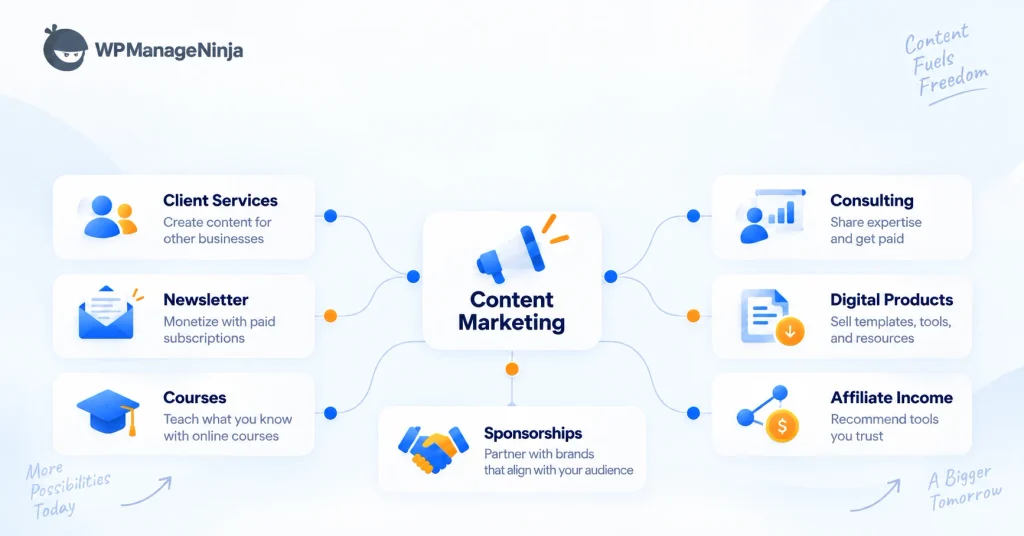
- Monetize in layers: affiliate recommendations, services, digital products, and later premium learning or community.
What Content Marketing Means When You Are Building the Business Yourself
Content marketing is the strategic creation and distribution of useful content for a defined audience, with the goal of attracting attention and influencing profitable action. That content can be an article, newsletter, video, comparison, tutorial, case study, research report, template, podcast, or another useful format.
For an independent publisher, the important part is what happens after discovery. Search, social media, communities, referrals, and AI assistants can introduce people to your work. Your website keeps the content under your control. Forms turn readers into subscribers or leads. Email keeps the relationship active. Relevant offers create revenue.
The business model is simple:
Expertise → useful content → discovery → subscriber or lead → repeated value → relevant offer → revenue
The goal is not to build “a blog.” It is to build an owned marketing engine around knowledge you already have.
Step 1: Choose a Niche You Already Understand
A broad subject gives you more things to write about, but it also gives readers fewer reasons to remember you. “Technology” is vague. “WordPress security for agencies” or “CRM automation for small SaaS teams” immediately tells the right person why the publication exists.
Your niche should sit at the intersection of three things: what you understand, what a recognizable audience cares about, and what has a commercial ecosystem around it.
Study focused publishers, then find your own angle
| Study | Editorial Angle | What You’ll Learn |
|---|---|---|
| WordPress | The WP Weekly | Focused weekly WordPress news and resources |
| WordPress | WP Tavern | WordPress ecosystem news, products, events, and community |
| WordPress & web tech | Kinsta Blog | WordPress, development, hosting, and performance |
| Automation | Zapier Blog | Automation, productivity, workflows, and integrations |
| SEO | Ahrefs Blog | SEO, content strategy, AI search, and original research |
| CRM & marketing | HubSpot Blog | Marketing, sales, CRM, and business growth |
If WordPress is already your world, study The WP Weekly and WP Tavern. They serve the same ecosystem in different ways. One is built around a concise weekly briefing; the other operates more like an industry publication covering WordPress core, plugins, themes, events, companies, and community news.
If your expertise is closer to hosting, development, and web performance, look at the Kinsta Blog. For automation and productivity, study Zapier. For SEO, Ahrefs is a strong example of combining product knowledge, search demand, original research, and education. HubSpot does the same across marketing, CRM, sales, and business growth.
Do not copy their article titles or design. Copy the principle: own a clear editorial territory.
Validate before you buy the domain
Spend a few days looking for repeated questions and repeated spending. Search Google and YouTube. Read Reddit, Facebook groups, LinkedIn discussions, niche forums, conference agendas, product marketplaces, and existing newsletters. Check whether the niche has products, services, affiliate programs, advertisers, courses, or consulting demand.
Then write a one-sentence editorial mission:
We help [specific audience] understand or accomplish [specific result] through [specific expertise or content].
A WordPress example could be: “We help WordPress business owners understand plugins, automation, ecommerce, and practical growth strategies.”
If you want a more detailed publishing setup, WPManageNinja already has a practical guide to starting a WordPress blog.
Step 2: Choose Your Content Marketing Stack
You can start publishing on Substack, Medium, Ghost, Beehiiv, or another hosted platform. Those options can be excellent when your priority is speed and you do not want to manage infrastructure.
The question is what you want the business to become.
| Platform | Best Fit | Main Trade-off |
|---|---|---|
| WordPress | An owned content business that can expand into email, products, services, courses, or community | You manage hosting, updates, and configuration |
| Substack | Newsletter-first publishing with minimal setup | Less freedom over the full website and business stack |
| Medium | Publishing into an existing reading network | Limited control over conversion and business infrastructure |
| Ghost | Publishing and membership with a focused publishing experience | Self-hosting needs technical ownership; managed hosting costs extra |
| beehiiv | Newsletter-first growth and monetization | Advanced features depend on the hosted platform and plan |
Why WordPress is the strongest fit for an owned marketing engine
WordPress is free and open-source software. You can move it between hosts, customize the design, connect APIs, add plugins, create landing pages, sell products, manage subscribers, and build completely new business models on top of the same website.
For this setup, the software cost can stay at zero in the beginning. Domain and hosting are the only required upfront website expenses. Fluent Forms Free can capture subscribers and leads. FluentCRM Free can manage contacts, send campaigns, and run basic automations. FluentSMTP is free. FluentCart Free can sell digital products.
| Free Starting Tool | What It Handles at the Start | Upgrade Later When… |
|---|---|---|
| WordPress | Website, blog, pages, design, and publishing | When you need paid themes, plugins, or custom functionality |
| Fluent Forms | Capture subscribers and leads | For advanced form logic or extra integrations |
| FluentCRM | Manage contacts, campaigns, and basic automations | For advanced sequences, recurring campaigns, and deeper automation |
| FluentSMTP | Connect WordPress to an email provider and view logs | Only when sending volume or routing needs grow |
| FluentCart | Sell digital products | Only when you need deeper scale or advanced features |
You may eventually pay for email delivery if your list grows beyond a provider’s free allowance. That is an operating cost created by growth, not a reason to delay starting.
The principle is simple: earn first, upgrade when the business is pulling you toward an advanced feature.
Step 3: Get a Domain, Hosting, and WordPress
Choose a domain that is easy to spell, easy to say, and broad enough to survive if your editorial direction expands. Avoid spending weeks chasing the perfect name.
For hosting, a new publication mainly needs HTTPS, backups, reasonable performance, current WordPress support, and straightforward DNS management. You do not need enterprise infrastructure for the first 20 articles.
After installation, finish the basics before touching elaborate design: configure clean permalinks, set the site title and time zone, remove sample content, enable backups, keep plugins and WordPress updated, and confirm the XML sitemap works.
Create the minimum pages: homepage, blog, about, newsletter, contact, and privacy policy. Add product, advertising, community, or resource pages only when they become useful.
Step 4: Design the Website With WordPress and AI
WordPress comes with a working theme and block editor, so you can start publishing immediately. You can then customize the site through block themes, Gutenberg, the Site Editor, page builders, plugins, or custom development.
The article experience matters more than decorative complexity. Focus on readable typography, clean navigation, mobile layout, author information, publication dates, related content, and clear newsletter calls to action.
AI agents can now help with more of the repetitive website work. WordPress’s MCP Adapter and projects such as FluentHub MCP can expose supported WordPress actions to compatible agents. Browser-capable agents can also navigate wp-admin and make visible changes while you supervise.
Use that power carefully. Work in staging for major changes, keep backups, give only the permissions the agent needs, and review changes before publishing. An agent can save time, but ownership still includes responsibility.
Step 5: Set Up Analytics From Day One
Do this early, not six months later when you wish you had historical data.
Set up Google Analytics to understand traffic and conversions, and Google Search Console to monitor indexing, search queries, pages, and technical issues. Bing Webmaster Tools is also useful if you want visibility into Bing and Microsoft search experiences.
Define business events from the beginning. Track newsletter subscriptions, lead-form submissions, affiliate clicks, consultation requests, product purchases, and any other action that represents progress beyond a pageview.
Traffic is useful. Conversion data tells you whether the business is useful.
Step 6: Build a Six-Month Content Calendar
Do not judge a publication after five articles. Search discovery, audience recognition, and newsletter growth take time, and there is no fixed ranking timetable.
Treat the first six months as an operating runway rather than a ranking guarantee.
A practical plan is:
| Month | Focus | What to Accomplish |
|---|---|---|
| Month 1 | Foundation | Publish cornerstone content and establish positioning |
| Month 2 | Consistency | Publish consistently and begin growing the email list |
| Month 3 | Authority | Build topic clusters, internal links, relationships, and initial backlinks |
| Month 4 | Automation | Improve subscriber capture, welcome automation, and newsletter workflow |
| Month 5 | Monetization | Test affiliate offers, services, and a first digital product |
| Month 6 | Double down | Review winners, update strong posts, and plan the next six months from real data |
Plan the pillars and major topics in advance, but do not lock every headline. Leave room for news, reader questions, new products, changing search demand, and ideas that come from the community.
Step 7: Build a Content Production System
Consistency is where many side projects disappear. The solution is not motivation. It is a process.
Use a repeatable editorial flow:
Idea → research → search intent → brief → draft → edit → fact-check → visuals → SEO → publish → distribute → update
For a side hustle, a realistic cadence might be one or two substantial articles per week plus one newsletter. A smaller schedule you can maintain is better than daily publishing that collapses after three weeks.
AI can help organize research, build outlines, clean formatting, generate alternatives, repurpose ideas, and reduce repetitive work. Keep the human responsible for expertise, judgment, examples, testing, fact-checking, and the final editorial voice.
Step 8: Optimize for Search and AI Discovery
SEO is one of the main discovery systems for a content business, but it should not become an excuse to publish generic pages around every keyword you can find.
Start with search intent, original usefulness, clear headings, descriptive titles, internal links, fast pages, crawlable text, and accurate structured data. Learn from Google Search Central, Ahrefs Academy, and HubSpot Academy instead of relying only on shortcut videos promising instant rankings.
For AI search, the same principle becomes even more important: create pages worth citing. Add original screenshots, firsthand experience, calculations, frameworks, expert commentary, tests, useful tables, and information that cannot be reproduced by summarizing five competitors.
If you want visibility in AI search products, also make sure the crawlers you care about are not blocked. OpenAI documents OAI-SearchBot, and Perplexity documents PerplexityBot.
Build internal links from the first month
Every new article should strengthen related pages. Link from new posts to useful older content and update older posts when a new cornerstone page deserves a link.
For example, this article naturally connects to WPManageNinja’s newsletter business guide, affiliate marketing website guide, lead-generation CTA guide, WordPress CRM and email marketing guide, and ecommerce content marketing guide.
Step 9: Distribute Content and Build Authority
Publishing is only half the job. Every important article needs a distribution plan.
Turn one substantial article into a newsletter section, LinkedIn post, Facebook discussion, short video, community answer, or another format that fits the audience. The goal is not to paste the same copy everywhere. Pull out the part of the idea that makes sense for each channel.
Backlinks should come from useful work and real relationships, not random link packages. Original research, free templates, statistics pages, detailed tutorials, interviews, tools, and expert contributions all give other publishers a reason to reference you.
SEO matters, but authority is broader than rankings. Brand mentions, direct traffic, newsletter replies, invitations, partnerships, and recurring readers are all signals that the publication is becoming known.
Step 10: Turn Readers Into Subscribers
A search visit can disappear in seconds. A subscriber gives you permission to continue the relationship.
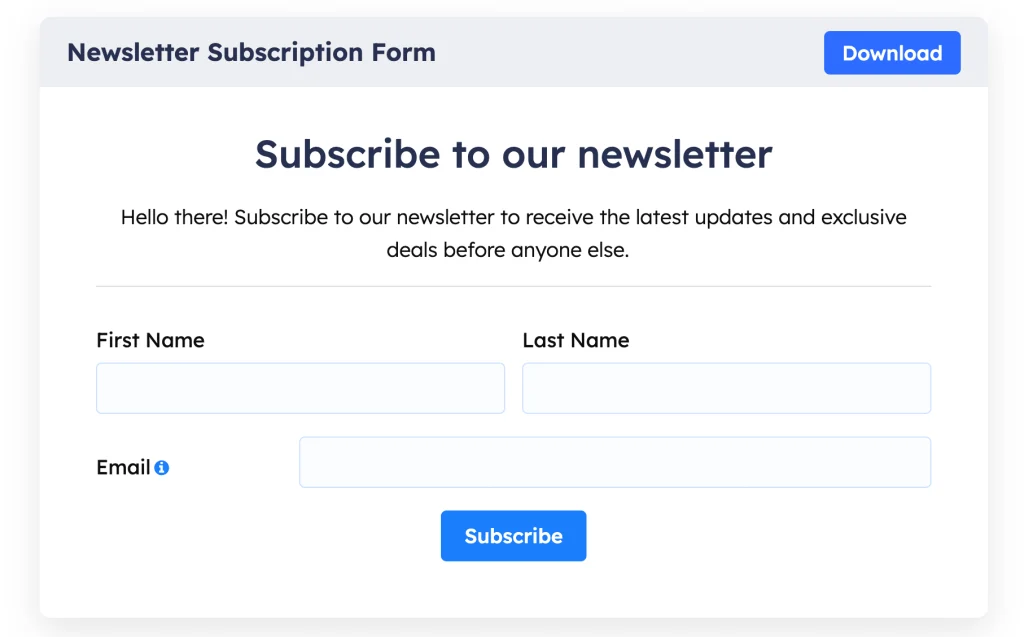
Start with two forms: a short newsletter form and a separate lead-generation form for people who want to work with you, advertise, partner, or ask about a service.
Install Fluent Forms Free and create the newsletter form with only the fields you actually need. Email alone may be enough. Add first name if personalization matters. Then connect Fluent Forms to FluentCRM, select the correct list, map the fields, add relevant tags, and configure consent or double opt-in where appropriate.
Use contextual signup offers inside articles. A WordPress security article could offer a checklist. A content strategy article could offer an editorial calendar. WPManageNinja’s lead-generation CTA guide is useful if you want to improve how those calls to action are written and placed.
Step 11: Set Up FluentCRM and Your Newsletter
A tiny email list is not a reason to operate casually. If 12 people subscribed, write a useful newsletter for 12 people.
Inside FluentCRM, create a main newsletter list and a small set of meaningful tags based on interests or lead sources. Avoid building a complicated segmentation system before you have an audience large enough to need it.
Then create a basic welcome automation.
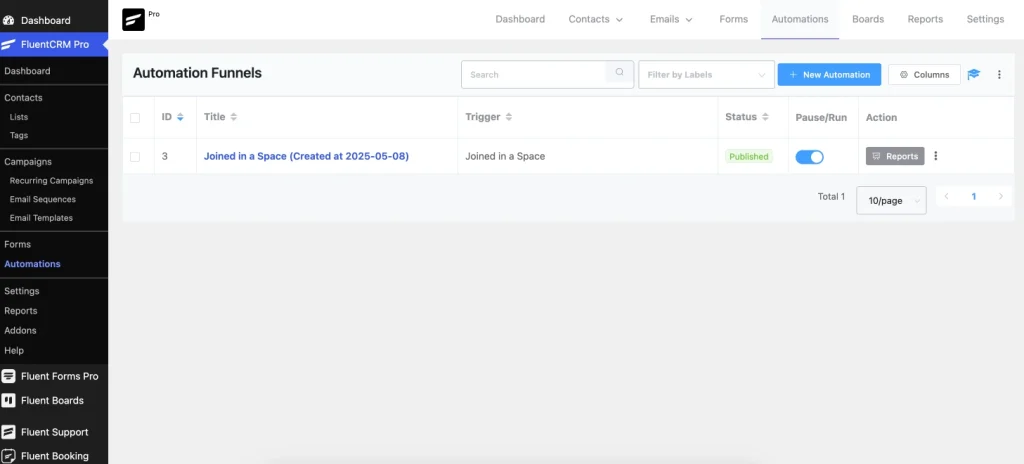
At minimum, a new subscriber should receive a welcome email that confirms what they subscribed to, delivers any promised resource, and tells them what to expect next.
Create a reusable newsletter template with a short editor’s note, the strongest article of the week, a few secondary links, and one relevant action. You can keep sending manually on a schedule at the beginning. Advanced sequences, recurring campaigns, deeper segmentation, and other Pro capabilities become useful later when the list and workflow are large enough to justify them.
Step 12: Configure FluentSMTP
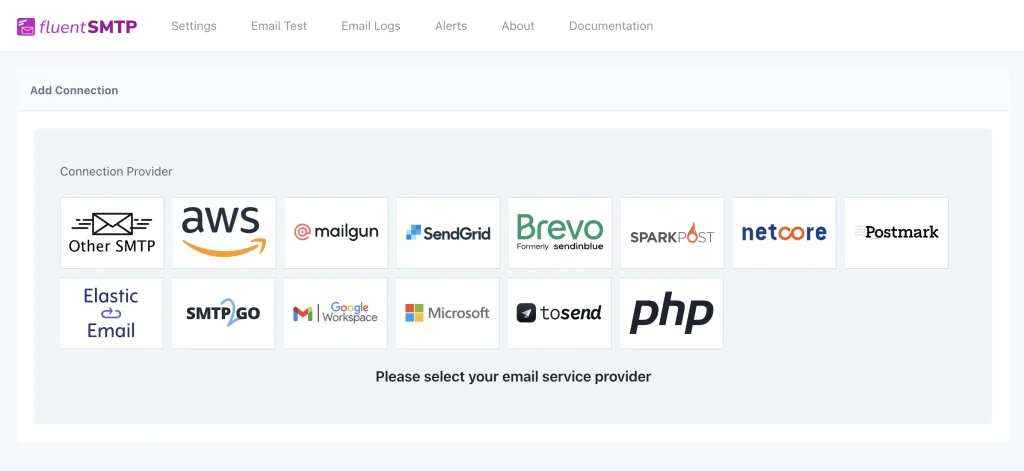
FluentCRM manages the audience and campaigns, but WordPress still needs an email delivery route. FluentSMTP connects WordPress to supported email providers and gives you sending logs and testing tools.
Install FluentSMTP, connect your chosen provider, verify the sender or domain as required, send a test email, and check the logs. Depending on the provider, you may need SPF, DKIM, and DMARC records for proper authentication.
FluentSMTP itself has no paid version. Your email provider may eventually charge when your sending volume grows, but a small publication can often begin on a free allowance or low-cost tier.
Step 13: Start Monetizing
You do not need to wait for massive traffic before testing revenue. The first monetization method should match the audience and the content.
| Revenue Path | Best Time to Use It | Typical Offer |
|---|---|---|
| Affiliate Marketing | When your niche naturally discusses products people already buy | Relevant tools, products, hosting, software, or equipment you genuinely recommend |
| Services & Consulting | When your audience includes people who may hire you directly | Consulting, implementation, audits, writing, SEO, development, or strategy |
| Digital Products | When repeated questions reveal something people would pay to save time on | Templates, reports, checklists, toolkits, ebooks, or downloads |
| Premium Learning / Community | When readers ask for deeper help or structured learning | Private courses, spaces, live sessions, templates, and ongoing access |
Affiliate marketing
Affiliate marketing is often the easiest starting point. If you write about WordPress, many hosting companies, plugin businesses, themes, and tools have affiliate programs. A photography publication can recommend cameras and accessories. An automation publication can recommend software.
The rule is simple: recommend products because they genuinely fit the article, not because a commission exists. Add clear disclosures and create original comparisons, tests, tutorials, or use-case content rather than thin affiliate pages.
Services and consulting
A small audience can be commercially valuable if it contains the right people. A CRM automation publication can sell CRM implementation. A WordPress publication can sell development, content, maintenance, or consulting. A niche SEO site can sell audits.
Your publication becomes proof that you understand the problem. Add a clear service or “Work With Us” page instead of hiding your expertise in the footer.
Digital products with FluentCart Free
Repeated reader questions often reveal product opportunities. A content calendar, spreadsheet, research report, template pack, ebook, checklist, prompt library, or toolkit can become a simple first product.
The workflow is straightforward: install FluentCart, create a digital product, add the description and price, attach the downloadable files, configure checkout and payment, publish it, and complete a test purchase before promotion.
Start with something small and specific. A $20 resource that saves a reader two hours is a better first product than a huge course nobody asked for.
Step 14: Add Paid Learning When the Audience Is Ready
Do not buy a premium community platform on day one just because you might need one later.
Start with public content, newsletter subscribers, affiliate income, services, and digital products. If readers begin asking for structured education, private discussion, live sessions, feedback, or ongoing access, that is when a paid learning layer becomes logical.
At that stage, FluentCommunity can provide private courses and spaces, while FluentCart handles the purchase and access workflow. Premium software is no longer speculative spending because the audience has already shown demand.
This is the operating philosophy for the whole stack: use free tools while the business is small, then pay for scale when scale exists.
Step 15: Review the Numbers and Double Down
At the end of six months, do not judge the project on pageviews alone. Look at the full path from discovery to business value.
Track:
| Area | What to Track | What It Tells You |
|---|---|---|
| Discovery | Search, referral, social, direct, AI-assistant traffic | Shows where qualified readers are finding you |
| Content | Top pages, internal clicks, engagement, conversions by page | Shows which topics deserve more investment |
| Audience | Newsletter signups, lead-form submissions, list growth | Shows whether traffic is turning into an owned audience |
| Newsletter clicks, replies, unsubscribes, return visits | Shows whether subscribers find the publication worth returning to | |
| Revenue | Affiliate clicks, service inquiries, product sales, conversion rate | Shows which monetization path is actually working |
| Authority | Relevant backlinks, mentions, direct traffic, returning visitors | Shows whether your brand is becoming known beyond a single traffic source |
Then make the next six-month plan around the winners. Update content that already has traction. Expand strong topic clusters. Improve conversion paths. Build more original material. Drop ideas that looked clever but attracted the wrong audience.
Spend money the same way. Upgrade CRM, ecommerce, community, hosting, design, or email infrastructure when a proven workflow needs more capacity, not because a launch checklist told you to buy everything upfront.
Frequently Asked Questions
Can I start a content marketing business as a side hustle?
Yes. This model is especially suitable for people who already have professional expertise or a strong community connection. A consistent part-time schedule can be enough to test whether your knowledge attracts an audience before you make larger financial commitments.
How much does it cost to start?
For the WordPress setup described here, domain and hosting can be the only unavoidable upfront website costs. WordPress, Fluent Forms Free, FluentCRM Free, FluentSMTP, and FluentCart Free cover the core starting stack. Email delivery may later become an additional cost as sending volume grows.
Is WordPress better than Substack for content marketing?
It depends on the goal. Substack is faster for a newsletter-first publication. WordPress is usually stronger when you want an owned website that can expand into SEO, forms, CRM, ecommerce, services, courses, communities, custom integrations, and other business models.
How long does content marketing take to work?
There is no guaranteed timeline. Give the publication enough time to build a meaningful body of work and collect data. Six months is a useful operating runway, not a promise that Google rankings or revenue will arrive on a particular date.
Can I send a newsletter from WordPress for free?
Yes, at a small scale. FluentCRM Free can manage subscribers and send campaigns, while FluentSMTP connects WordPress to your email provider. Your provider may impose its own free limits or fees as volume increases.
How can I make content more visible in AI search?
Publish crawlable, original, clearly structured content that adds information worth citing. Use descriptive headings, strong internal links, real examples, first-hand expertise, accurate facts, and useful visuals. Also confirm that the search and AI crawlers you want to reach are not blocked.
Build the Marketing Engine Before You Chase the Audience Size
A content business can begin with one domain, modest hosting, a free WordPress stack, a few useful articles, and a newsletter with almost nobody on it. What matters is that the pieces already connect.
Your niche gives the publication a reason to exist. WordPress gives the knowledge a permanent home. Search and distribution bring people in. Fluent Forms captures interested readers. FluentCRM keeps the relationship active. FluentSMTP handles the delivery connection. Affiliate offers, services, and FluentCart create the first revenue paths. Premium tools can wait until the business is earning or the audience clearly wants more.
If you already know something useful and are connected to people who care about it, you do not need permission to start. Buy the domain, set up the site, publish the first genuinely useful piece, and give the system enough time to prove what it can become.

WordPress, automation, eCommerce and growth marketing specialist, a WordPress Core Contributor and Media Corps member blending storytelling with technology to craft strategies in SEO, email marketing, and beyond.
-
Popular WordPress Affiliate Plugins: Manage Affiliates Inside Your Dashboard
Compare WordPress affiliate management plugins for tracking referrals, commissions, affiliates, -
How to Create Non Disclosure Agreement (WordPress Guide)
Create a professional NDA form in WordPress with Fluent Forms. -
How to Build a RevOps Service With the Best Free CRM Software
Learn how to build a RevOps service using free CRM



Leave a Reply
You must be logged in to post a comment.