

Best WordPress CRM and Email Marketing Plugin: What to Look for in 2026
Your email list grows. Your bill grows with it. That’s the problem with most SaaS email marketing and CRM tools, and it only gets worse over time.
Features like omnichannel marketing or abandoned cart recovery should automatically come with the tool. Instead, they sit behind higher-tier plans that cost more as your contacts grow.
If you’re a WordPress site owner, what if there is a better option?.
A self-hosted CRM and email marketing plugin, giving you every feature, unlimited contacts, and a flat annual fee that does not change as your business scales.
This guide covers what to look for in a WordPress CRM in 2026, compares the top options, and shows why 80,000+ businesses chose FluentCRM to get off the SaaS billing cycle for good.
Key Takeaways
- A WordPress CRM and email marketing plugin helps you manage contacts, send campaigns, and automate customer journeys directly from your WordPress dashboard.
- SaaS email marketing tools often become expensive as your contact list grows, while self-hosted plugins give you more control and predictable pricing.
- In 2026, a good CRM should offer data ownership, email automation, SMS marketing, templates, deep WordPress integrations, AI assistance, and clear reporting.
- FluentCRM stands out because it combines CRM, email marketing, SMS automation, AI workflows, abandoned cart recovery, segmentation, and 45+ integrations in one WordPress-native platform.
- For WordPress businesses that want to avoid rising SaaS bills, FluentCRM offers a flat annual pricing model with no contact limits.
What is a CRM and Email Marketing Plugin?
A CRM, or Customer Relationship Management system, helps businesses track and manage relationships with customers and leads. It stores contact information, purchase history, and behavioral data so your team can engage each person based on full context.
Whereas an email marketing plugin puts that data to work. It lets you send targeted campaigns, build automated follow-up sequences, segment your audience, and measure how your emails drive revenue.
A combined CRM and email marketing plugin does both in one place.
Every contact record updates automatically based on purchases, course completions, and membership events. Every email you send is informed by the full history of that contact’s relationship with your business.
Why Use an Email Marketing Plugin for WordPress?
WordPress powers over 40% of the web, but it does not come with built-in CRM or email marketing capabilities.
Thus, most WordPress businesses fill that gap by relying on a third-party SaaS platform like Mailchimp, ActiveCampaign, or Kit.
That approach works, but it comes with meaningful trade-offs:
- Your customer data lives on a third-party server, creating data privacy and GDPR compliance risks
- Your costs scale with your contact list, so growth becomes expensive rather than rewarding
- Syncing WordPress data to an external platform is fragile and often incomplete or delayed
- You depend on a vendor’s pricing decisions, and migrations away are painful
A native WordPress email marketing plugin eliminates all of those problems.
Your data stays on your own server. Integrations with other plugins are first-class and real-time rather than synced through an API.
And because the plugin runs inside WordPress, your team never has to leave the dashboard they already work in every day.
What to Look for in a WordPress CRM in 2026?
Not all CRM and email marketing plugins are built the same.
Before evaluating any tool, it’s necessary to know which criteria actually matter for a WordPress-based business.
Considering the aspects of businesses, you should be looking at a plugin that offers you these options:
Self-hosted Data Ownership
A self-hosted CRM and email marketing plugin stores all contact and campaign data inside your own WordPress database.
No third party can sell your data, your pricing cannot change overnight, and GDPR compliance is far simpler since data never leaves your server.
Omnichannel Marketing
In 2026, if a tool only provides a one-dimensional email marketing solution, then it limits the business growth.
SMS marketing option is mandatory since its open rates consistently outperform email, and customers expect follow-ups across both channels.
A CRM that handles email campaigns, automation sequences, and SMS from a single dashboard saves you from managing multiple subscriptions.
Built-in Templates
Starting from scratch every time slows your team down. Some people just want to get started right away.
So, a good WordPress CRM should come with ready-made templates for emails, automation workflows, and sms.
Templates save setup time, give your team a starting point, and make it easier to stay consistent across campaigns.
Deep WordPress Integrations
Your CRM is only as powerful as the data it can access.
For WordPress businesses, that means native integrations with your eCommerce store for purchase history, your LMS for course progress, your membership plugin for subscription status, and your form builder for lead capture.
The more your CRM connects with your existing tools, the less manual work your team has to do.
AI-assisted Workflows
AI is no longer a luxury; it has turned into a necessity.
The best tools in 2026 use AI to speed up email writing, summarize contact activity, and suggest improvements to automation. If a plugin has not integrated some form of AI assistance by now, it is already falling behind.
Flat Pricing
SaaS email tools charge you more as your list grows.
For example, some SaaS platforms cost around $100 per month at 10,000 contacts and $350 or more at 50,000.
A WordPress plugin with a flat annual license fee means your costs stay predictable as your business grows.
You can also pair it with an affordable third-party email sending service to keep sending costs low.
Ease of Use
A good CRM should feel intuitive from day one.
It should also support A/B testing, advanced segmentation, multi-step automation, and detailed reporting without requiring a training course to access those features.
Top WordPress CRM Options Compared
There are a handful of credible WordPress-native CRM and email marketing plugins available in 2026.
Here is how the main options stack up against the criteria above.
| Plugin | Self-hosted | Email automation | Templates | SMS | AI tools | Free plan | Starting price |
|---|---|---|---|---|---|---|---|
| FluentCRM | Yes | Yes | Yes | Yes | Yes | Yes | $10.5/month |
| Groundhogg | Yes | Yes | Limited | Via add-on | Limited | Yes | $20/month |
| Jetpack CRM | Yes | Limited | No | No | No | Yes | $17/month |
What is FluentCRM?
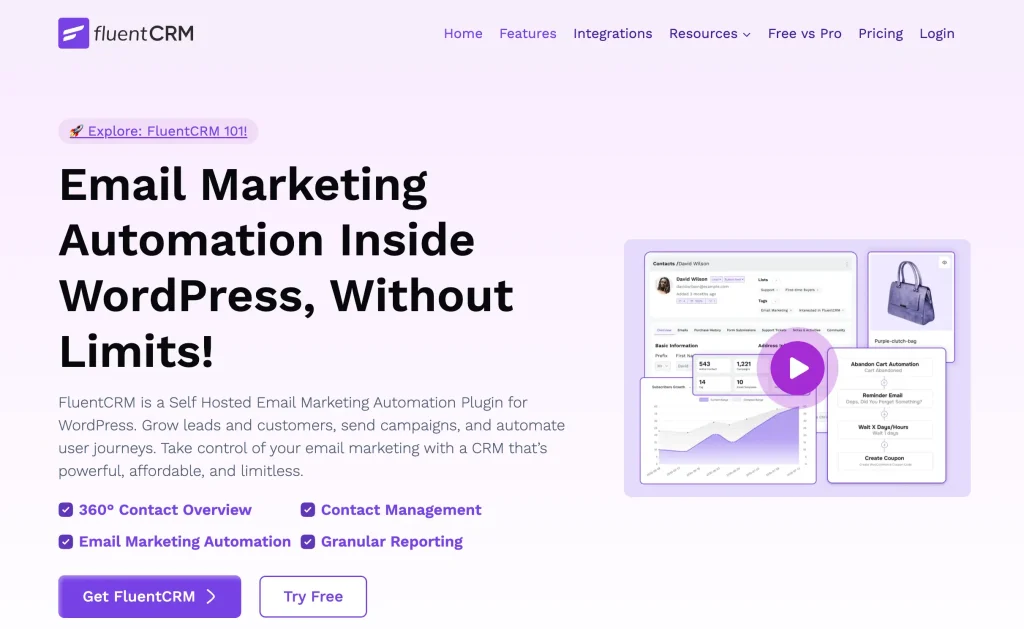
FluentCRM is a WordPress CRM and email marketing plugin that manages your contacts and automates your marketing from inside your WordPress dashboard.
It collects data from everyone who interacts with your business, whether they are customers, subscribers, members, or leads, and gives you a clear picture of each relationship.
From there, use FluentCRM’s built-in email marketing tools to turn that data into action:
- Send unlimited email campaigns
- Build automation workflows
- Set up SMS marketing automation
- Segment contacts by behavior, purchase, or membership status
- Track opens, clicks, and revenue in one dashboard
As of 2026, FluentCRM is trusted by over 80,000 businesses and rated 4.8 out of 5 on WordPress.org.
Recently, the team published a new version, FluentCRM 3.0, rebuilt with a redesigned dashboard, native SMS marketing, and AI-powered workflows. Everything enhanced the overall capability of the plugin.
Why We Recommend FluentCRM Over Others
We have already discussed what a modern CRM & email marketing plugin should consist of, and the comparison table clearly shows why FluentCRM tops.
FluentCRM packs everything a WordPress business needs into one dashboard.
Here is a closer look at what makes it the top pick for WordPress businesses in 2026.
360° Contact Profiles
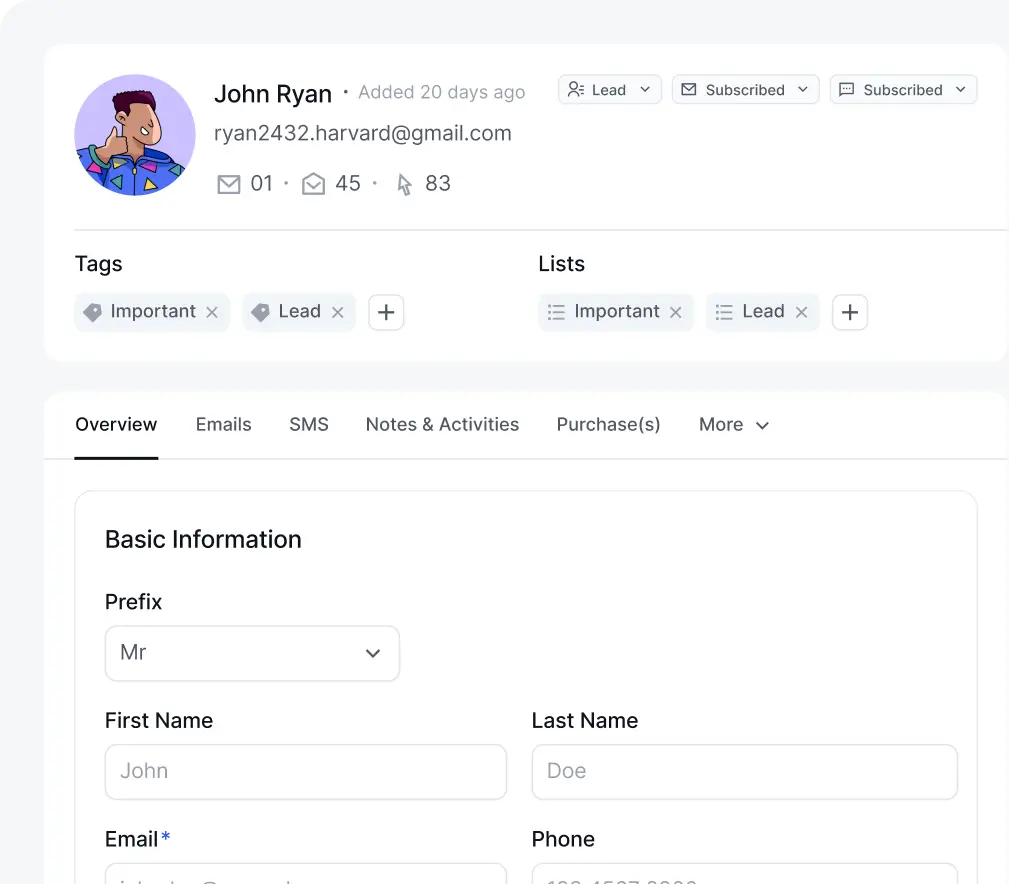
Every contact gets a unified profile pulling data from plugins that you connected to your business.
Say, purchase history from your eCommerce store, course progress from your LMS, and membership status from your membership plugin all appear in one view.
Email Campaigns Management
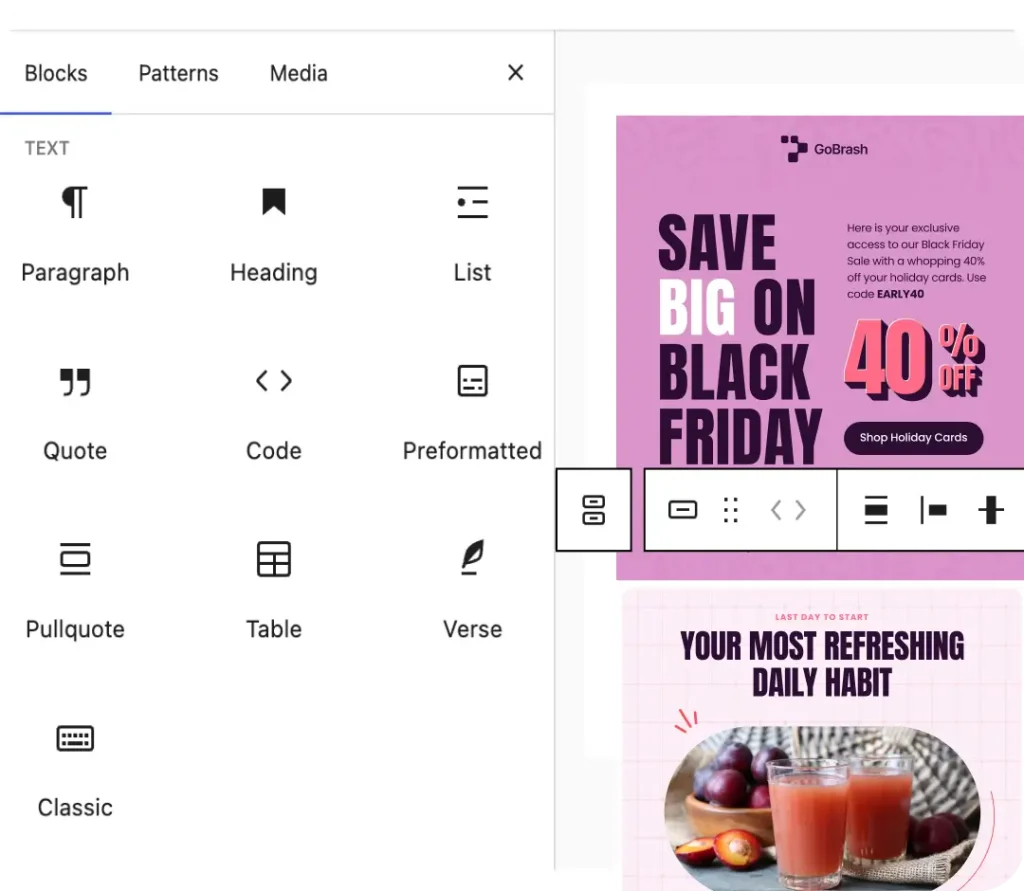
It’s the most predictable feature to have in almost all CRM & email marketing plugins.
For FluentCRM, it supports unlimited campaigns with no sending limit.
The Gutenberg-native or drag-and-drop email builder includes many customization options along with dynamic tags to personalize campaigns.
Also, you can use the visual editor, block editor, or raw HTML. Email split testing and performance tracking are built into the tool.
Workflow Automation
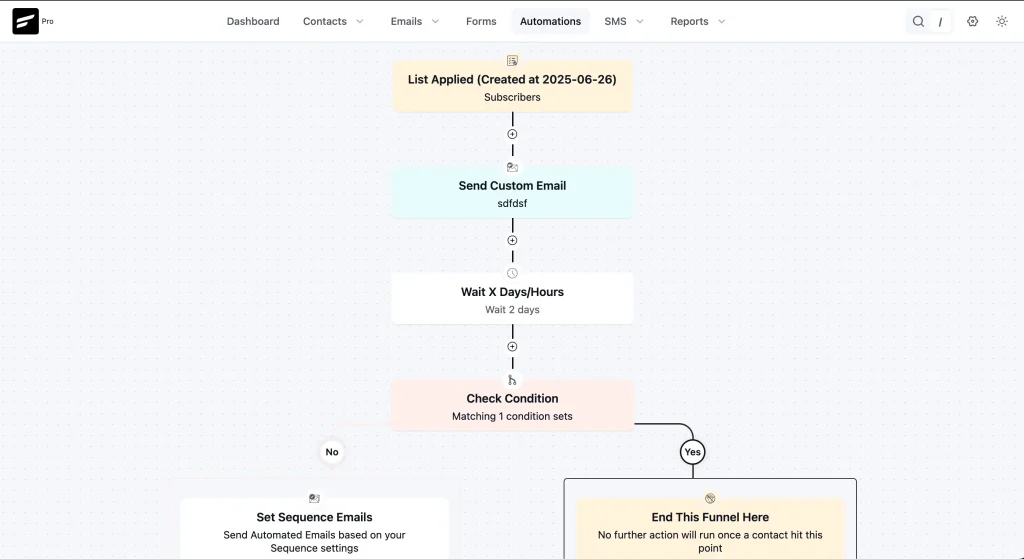
FluentCRM’s automation engine lets you build multi-step workflows triggered by specific events, like a new purchase, a form submission, or a membership renewal.
Instead of sending one-off emails, you set up email sequences that run automatically in the background.
For example, it can handle new customer onboarding automatically, walking new contacts through a structured sequence from the moment they sign up.
SMS Marketing
FluentCRM brings SMS marketing directly into your WordPress dashboard.
You can send one-to-one SMS messages to individual contacts, run bulk SMS campaigns to your entire list, or build mixed email and SMS automation workflows that handle follow-ups, reminders, and re-engagement on autopilot.
Everything runs from the same place as your email marketing, so there is no separate tool or subscription to manage.
AI-powered Workflows
FluentCRM connects with leading AI providers to bring intelligent assistance directly into your CRM.
You can generate email copy with a single prompt in different tones, get instant summaries of any contact’s activity without digging through records, and uncover insights that help you respond faster and more personally.
Abandoned Cart Recovery
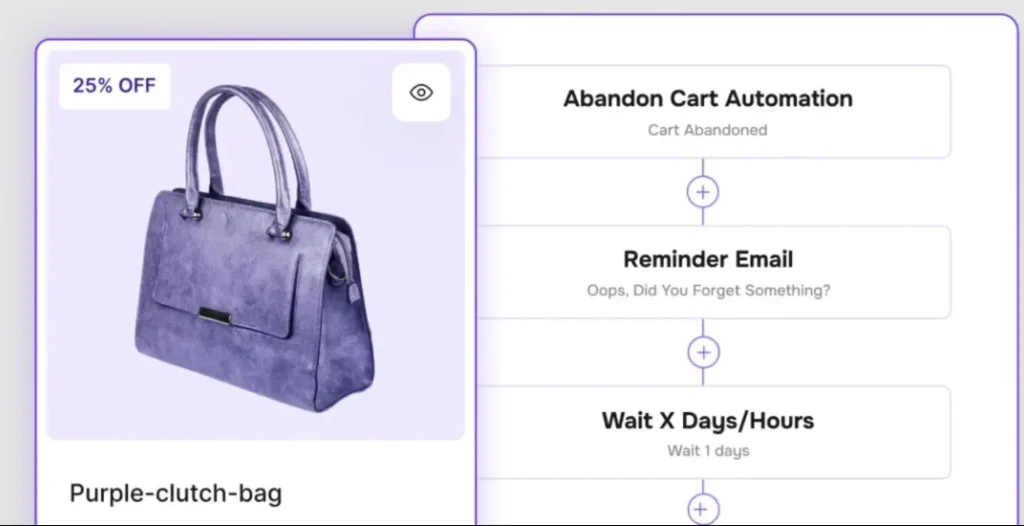
Once you enable the abandoned cart recovery feature, FluentCRM tracks when a customer adds items to their cart but leaves without completing the purchase.
It then triggers an automated follow-up sequence, through email, SMS, or both, to bring them back.
You set it up once, and FluentCRM handles the recovery in the background, bringing in your lost sales without manual workload.
Built-in Email & Automation Templates
FluentCRM comes with ready-made templates for emails and automation workflows.
Instead of building from scratch every time, you start from a working template and customize it to fit your business.
It saves setup time and helps your team stay consistent across every campaign.
Smart Contact Segmentation
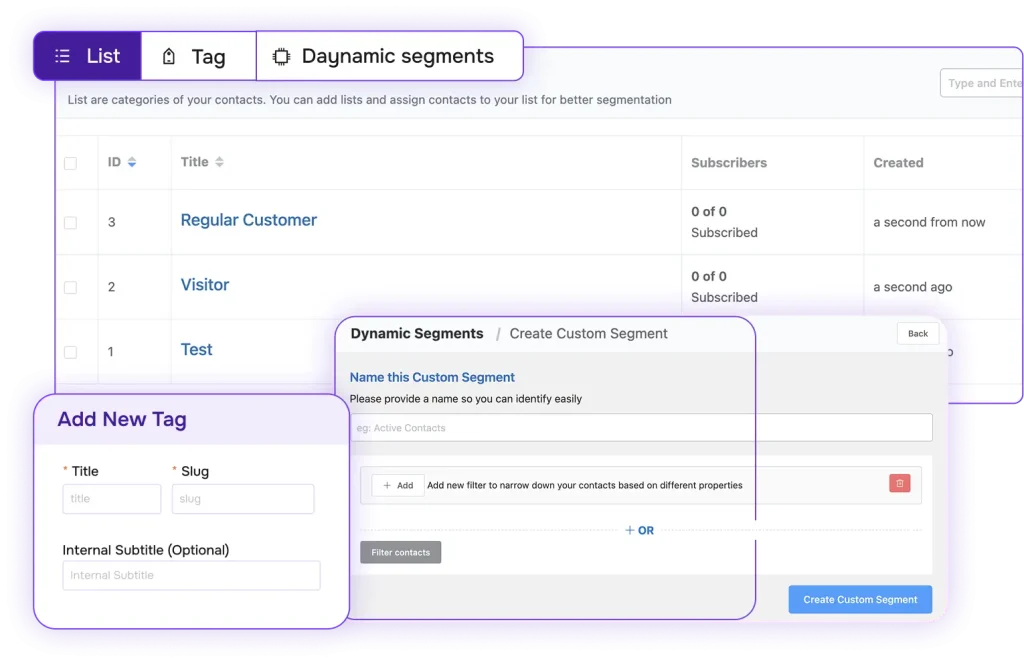
FluentCRM supports list and tag contact segmentation. These allow businesses to identify leads with different characteristics.
Along with that, Dynamic segments update in real time based on purchase history, email engagement, course enrollment, or membership tier. Smart Links apply tags or trigger workflows automatically when a contact clicks a specific link.
Also, with the Company Module, you can handle business-to-business contacts alongside individual profiles.
Reporting and Analytics
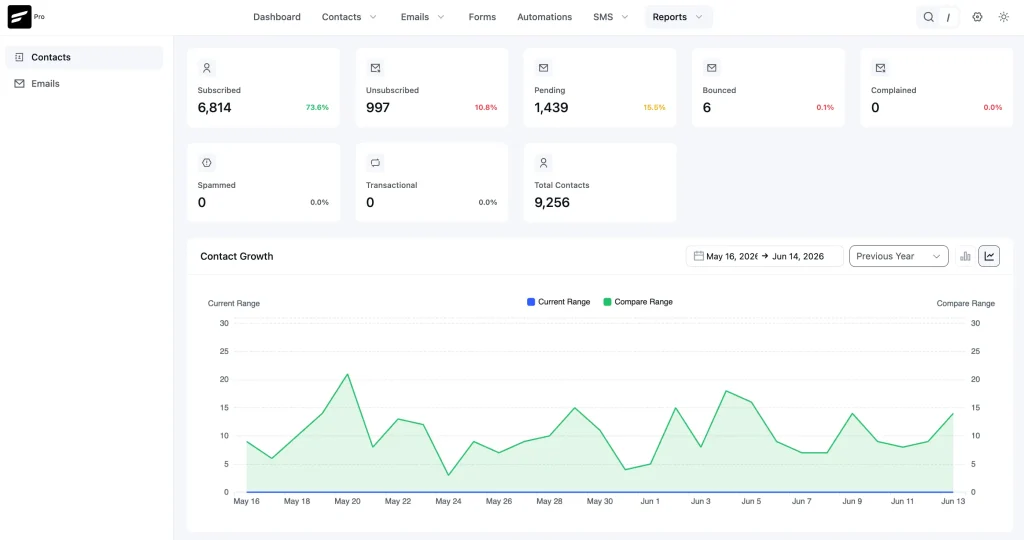
FluentCRM generates detailed reports across every part of your marketing, covering contacts, email campaigns, automation workflows, SMS, and abandoned cart recovery.
You get a clear view of what is working and what is not, so every business decision is backed by real data rather than guesswork.
Whether you are tracking open rates, monitoring automation performance, or measuring revenue recovered from abandoned carts, the numbers are always there when you need them.
Ecosystem Compatibility
FluentCRM is the heart of the Fluent ecosystem, built by WPManageNinja.
It connects tightly with all the Fluent suite products: Fluent Forms, FluentBooking, FluentCart, Fluent Support, FluentBoards, and more. If you are already using any Fluent product, adding FluentCRM to your stack takes minutes.
The tools share a similar interface and workflow logic, so you do not have to learn how the interface functions.
Everything talks to each other, and your data stays connected across your entire WordPress setup.
45+ Built-in Integrations
Most CRM solutions either lock you into a niche tool or push you toward expensive third-party platforms.
FluentCRM connects directly with the plugins you are already using, pulls in real customer data, and gives you more control over how you market to them.
These integrations cover all the major plugin categories a WordPress business is likely to be running.
- eCommerce: FluentCart, WooCommerce, Easy Digital Downloads, SureCart, ThriveCart
- LMS: LearnDash, LifterLMS, TutorLMS, LearnPress
- Membership: MemberPress, Paid Memberships Pro, Restrict Content Pro, WishList Member
- Forms: Fluent Forms, Elementor Forms, Thrive Leads, OptimizePress, Convert Pro
- Community: BuddyBoss, FluentCommunity
- Automation Connectors: Zapier, Uncanny Automator, Pabbly, SureTriggers, FlowMattic, Integrately
FluentCRM Free vs. Pro
The free version of FluentCRM on WordPress.org is genuinely functional. You can manage contacts, send basic email campaigns, and set up simple automations. It is a solid starting point for small lists or teams evaluating the plugin.
With Pro, you unlock the full capabilities of the platform:
- Advanced automation with access to every trigger and action
- SMS marketing campaigns and automation
- AI-powered email generation and contact summaries
- Abandoned cart recovery
- All 45+ integrations, including WooCommerce, LearnDash, and MemberPress
- Advanced reporting and automation analytics
- Smart Links, split testing, Company Module, and Campaign Archive
- 24/7 Priority support
- And, more
FluentCRM Pricing
FluentCRM runs on a flat annual fee with no contact limits and no hidden charges. Pair it with FluentSMTP, the free email sending plugin from WPManageNinja, and you have a complete email marketing setup at a fraction of what SaaS alternatives charge.
| Plan | Sites | Annual price | What’s included |
|---|---|---|---|
| Solo / Blogger | 1 | $129/year | All features, priority support |
| Small Business | 5 | $249/year | All features, priority support |
| Agency | 50 | $499/year | All features, priority support |
*Special 20% discount available if you want to purchase it today!
Sending Emails with FluentSMTP
FluentSMTP is a forever-free WordPress SMTP plugin by WPManageNinja that connects your site to a dedicated email sending service.
It works with Amazon SES, Elastic Email, SendGrid, Mailgun, and several other providers.
Without a proper sending setup, emails from WordPress often end up in spam. FluentSMTP fixes that by routing your emails through a reliable service, improving deliverability without adding to your costs.
Who is FluentCRM Best For?
FluentCRM is the right choice for:
- WooCommerce store owners who want to replace tools with a self-hosted, modern alternative
- Small business owners who want to automate onboarding, re-engagement, and upsell sequences
- Agencies managing multiple client sites that benefit from the 50-domain Agency license at $499 per year
- Privacy-conscious businesses and any organization with GDPR obligations that need customer data to remain on their own infrastructure
Frequently Asked Questions
Is FluentCRM GDPR compliant?
Yes. Because all data is stored on your own WordPress server and never sent to FluentCRM’s or WPManageNinja’s systems or any third-party server.
Will FluentCRM Slow Down My WordPress Site?
No. FluentCRM stores campaign and contact data in dedicated custom database tables that are separate from your core WordPress database.
Can I Migrate Contacts from Mailchimp or ActiveCampaign?
Yes. FluentCRM supports contact import via CSV file, which means you can export your contact list from any existing email platform and import it into FluentCRM.
Can I Import/Export Data?
Yes, you can do it with ease. Be it email, template, or contacts, you import or export all with a few clicks.

Words are my favorite playground. As a Creative Writer at WPManageNinja, I don’t just produce content; I tell stories. By mixing fiction and metaphors with real-life examples, I turn my writing into a creative journey that’s easy for readers to digest and relate to.
-
FluentSMTP Review: Whats Inside this 700K+ WordPress SMTP Plugin?
Check our FluentSMTP review blog to Discover whats inside this -

Black Friday Marketing Strategies for 2026: Core and Advance Move
Black Friday is the most celebrated shopping season worldwide. Discover -

7 Best Ecommerce Plugins for WordPress in 2026 (Tested And Compared)
Compare the 7 best ecommerce plugins for WordPress in 2026



Leave a Reply
You must be logged in to post a comment.