

Holiday Email Marketing Campaigns: Ideas, Mistakes, Dos & Don’ts
October is here. Halloween campaigns are already running, Black Friday preparations are getting serious, and Christmas promotions aren’t far behind.
It’s the busiest time of the year for marketers. And probably the noisiest time of the year for customers.
Think about your own inbox during November. One brand announces an early Black Friday deal. Another promises its biggest discount ever. Someone else has an exclusive offer that apparently expires in three hours.
By the time actual Black Friday arrives, half the emails look the same.
The competition isn’t limited to email, either. Customers see the same promotional messages across Facebook, Instagram, Google Ads, websites, and retargeting campaigns.
And brands have good reason to compete for attention.
According to the National Retail Federation, approximately 202.9 million consumers shopped during the five-day Thanksgiving-to-Cyber-Monday period in 2025.
That’s a lot of potential customers. But it’s also a lot of competition.
So, what should marketers do differently this year?
This guide covers practical holiday email marketing campaign ideas, subject lines worth trying, words and design choices to avoid, and the mistakes that can quietly ruin an otherwise promising campaign.
Key Takeaways
- Plan ahead of the holiday rush. Halloween, Black Friday, Cyber Monday, Christmas, and New Year bring different shopping behaviors. Match your campaigns to each occasion.
- Give people a reason to open your emails. Early access, personalized recommendations, gift guides, and genuine last-chance offers work better than repeating the same discount.
- Don’t obsess over spam trigger words. Words like “free” or “discount” won’t automatically land you in spam. Avoid misleading subject lines, excessive capitalization, and fake urgency.
- Keep promotional visuals simple. Avoid image-only emails, unreadable banners, excessive animations, and misleading product images. Design for mobile first.
- Protect your email deliverability. Set up SPF, DKIM, and DMARC, segment your audience, manage sending frequency, and make unsubscribing easy.
- Connect email with your other campaigns. Keep offers and messaging consistent across paid ads, social media, landing pages, and email.
- Measure what actually matters. Track clicks, conversions, revenue, and spam complaints instead of relying on open rates alone.
Start with the holiday calendar, not another discount
One mistake marketers make is treating the entire holiday season like one long Black Friday campaign.
But Halloween shoppers aren’t necessarily looking for the same things as Christmas shoppers. And someone hunting for a Cyber Monday deal might respond differently to a year-end upgrade offer.
Your campaigns should reflect those differences.
Here are the key dates for the rest of 2026 and the beginning of 2027.
| Occasion | Date | Campaign Angle |
|---|---|---|
| Halloween | October 31 | Themed offers, mystery discounts, bundles |
| Thanksgiving | November 26 | Appreciation, VIP access, early offers |
| Black Friday | November 27 | Major discounts, limited-time deals |
| Small Business Saturday | November 28 | Community, independent brands, customer stories |
| Cyber Monday | November 30 | Online-exclusive deals, digital products |
| Giving Tuesday | December 1 | Charitable campaigns, cause-based promotions |
| Christmas | December 25 | Gift guides, bundles, last-order reminders |
| New Year’s Eve | December 31 | Year-end offers, annual upgrades |
| New Year’s Day | January 1, 2027 | Fresh-start campaigns, new goals |
Here’s something interesting.
The NRF’s 2026 Halloween research found that 49% of Halloween shoppers started shopping in September or earlier.
That tells us something important: waiting until the actual holiday to launch your campaign can mean missing customers who planned ahead.
The same principle applies to BFCM and Christmas.
Start warming up your audience early. Save the strongest sales messages for when buying intent is highest.
10 holiday email marketing campaign ideas that don’t feel repetitive
Not every campaign needs a 40% discount, an enormous banner, and a red countdown timer.
Sometimes, a helpful email gets more attention than another sales announcement.
Here are ten ideas worth considering.
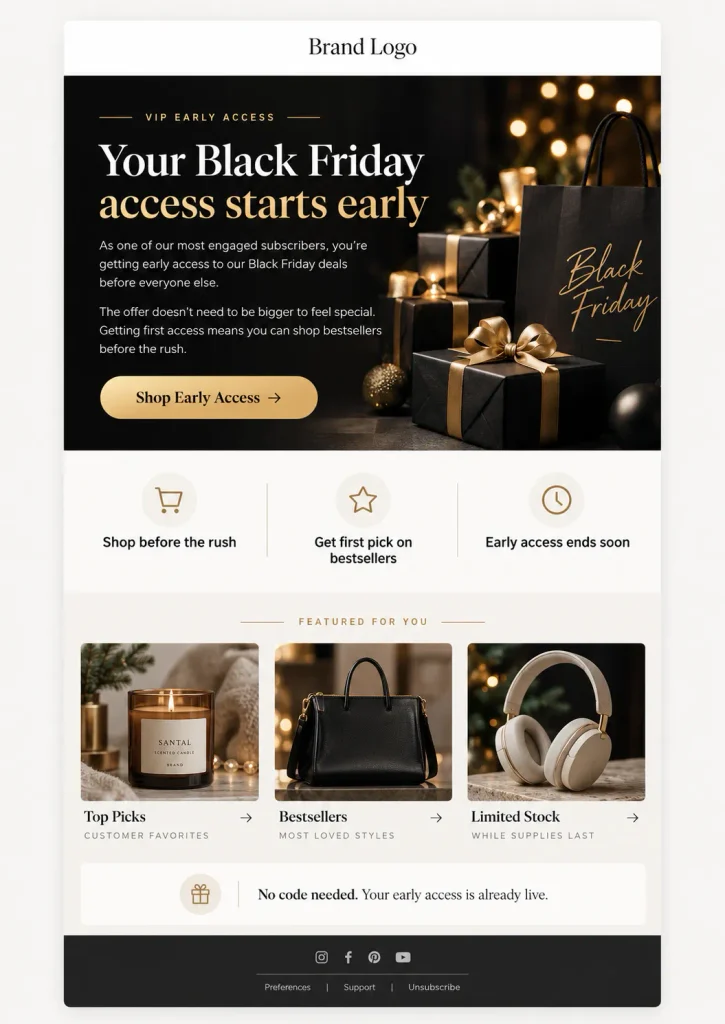
1. The early-access campaign
Give your most engaged subscribers the chance to shop before everyone else.
Subject line: Your Black Friday access starts early
This works especially well for loyal customers, VIP subscribers, and people who have purchased before.
The offer doesn’t always need to be bigger. Getting first access can be valuable on its own.
2. The mystery discount
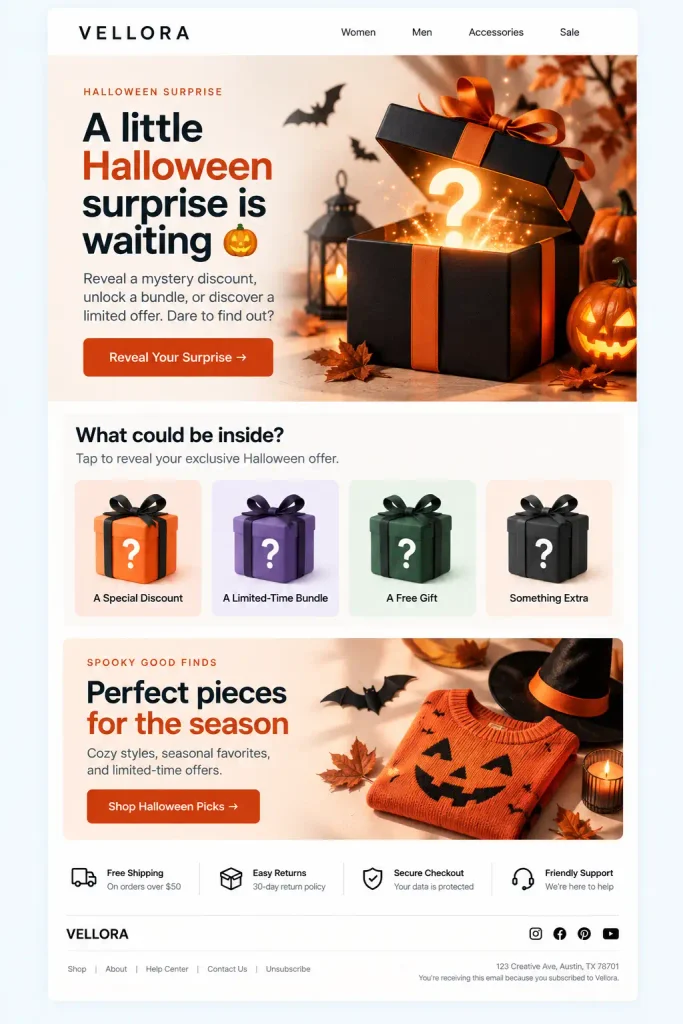
Halloween is a natural fit for playful campaigns.
Subject line: A little Halloween surprise is waiting 🎃
Let customers reveal a discount, unlock a bundle, or discover a limited offer.
Just make sure the experience is genuine. Don’t advertise a mystery prize when every visitor receives the same ordinary coupon.
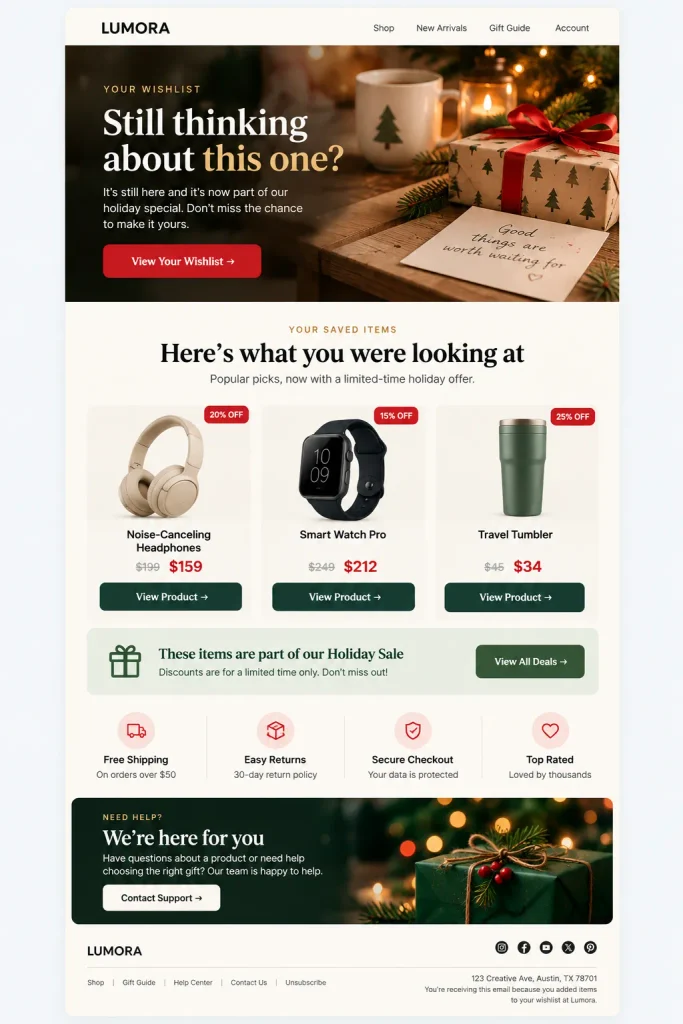
3. The wishlist reminder
Someone viewed your product three times but hasn’t purchased it.
Instead of sending another generic newsletter, remind them about the item they were interested in, provided your tracking and messaging have the appropriate permissions.
Subject line: Still thinking about this one?
This is especially useful when the product is included in a real seasonal promotion.
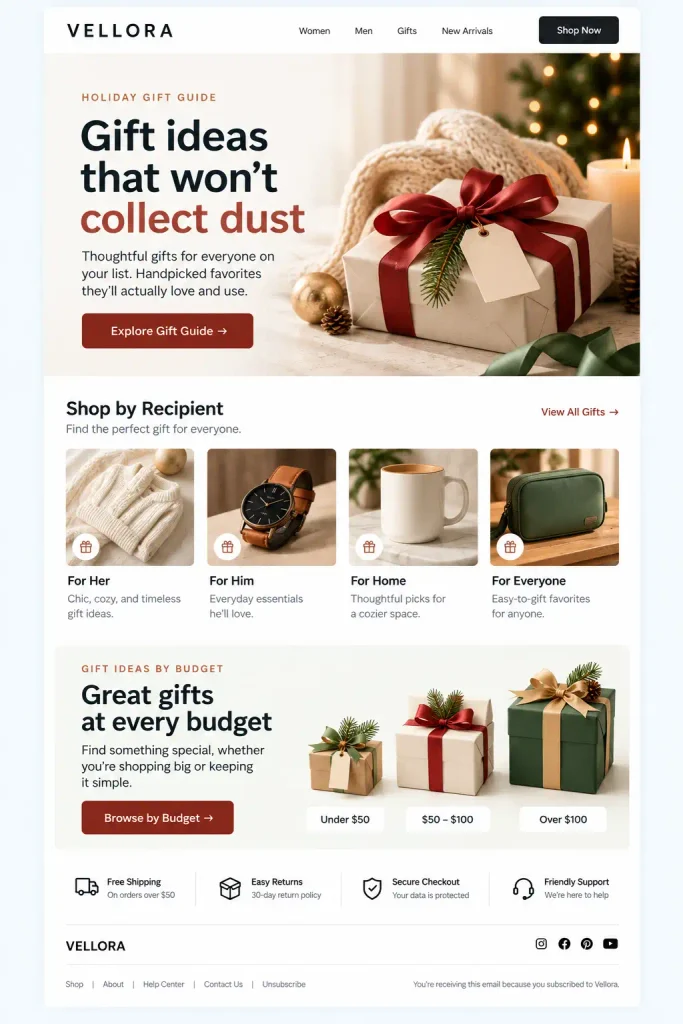
4. The holiday gift guide
Christmas shopping can be exhausting, especially when customers don’t know what to buy.
Make the decision easier.
Subject line: Gift ideas that won’t collect dust
Organize suggestions by budget, recipient, or interest. For software businesses, try something like “Useful WordPress tools for your clients.”
5. The customer appreciation campaign
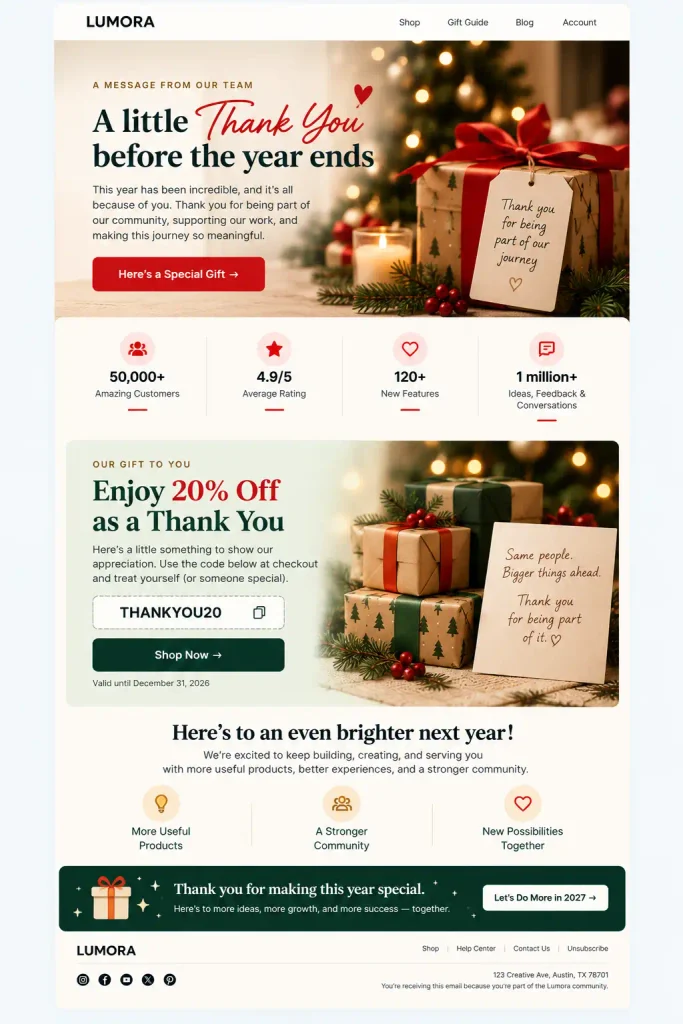
Not every email needs a direct sales pitch.
Subject line: A little thank-you before the year ends
Share a genuine message of appreciation, highlight what customers helped you accomplish, or offer an exclusive benefit.
Keep the focus on them, not a lengthy list of company achievements.
6. The bestsellers campaign
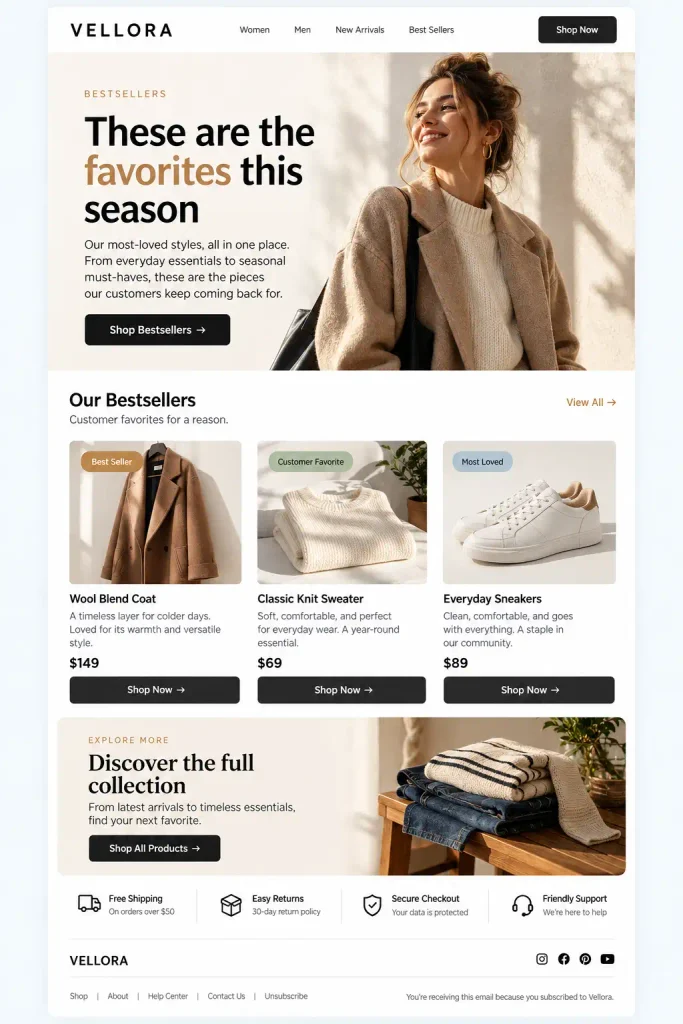
Customers who aren’t sure what to purchase often appreciate seeing what other buyers choose.
Subject line: These are the favorites this season
Feature your actual bestsellers, explain what makes them popular, and link directly to the products.
Avoid fake popularity claims or invented purchase counts.
7. The abandoned cart reminder
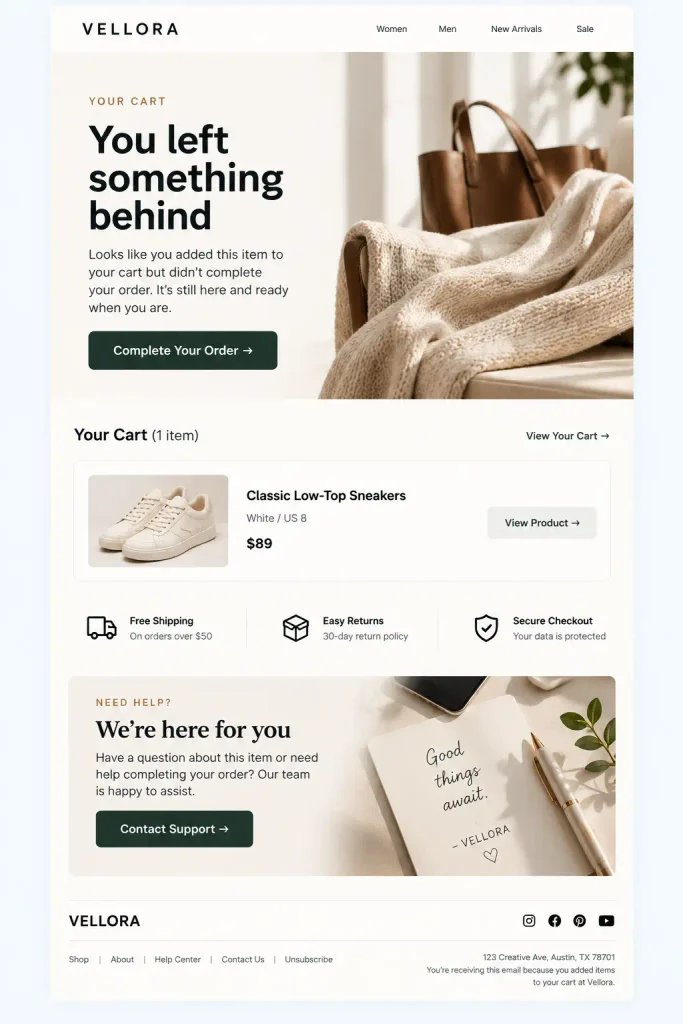
The holiday season brings plenty of browsing, comparison shopping, and unfinished checkouts.
A timely reminder can bring interested shoppers back.
Subject line: You left something behind
You can follow up with a product reminder, relevant shipping information, or a genuine incentive if your margins allow it.
Don’t automatically give everyone a discount five minutes after abandonment. That can teach customers to abandon carts deliberately.
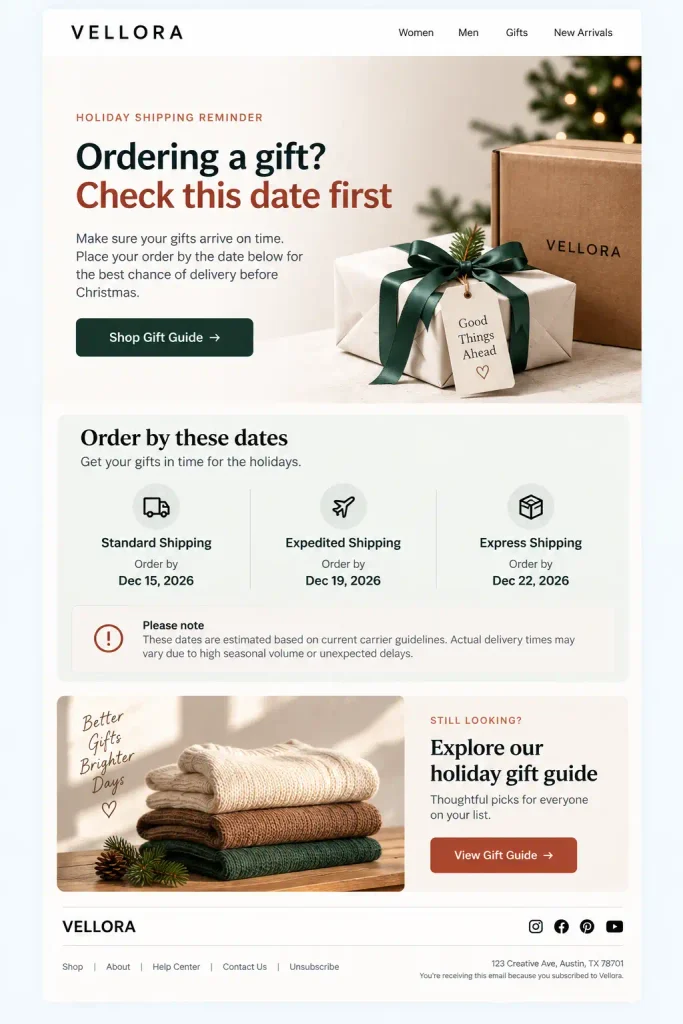
8. The last shipping date reminder
This is particularly useful before Christmas.
Subject line: Ordering a gift? Check this date first
Tell customers when they need to order for the intended delivery window.
Be careful with delivery promises. If arrival isn’t guaranteed, say so.
9. The genuine last-chance offer
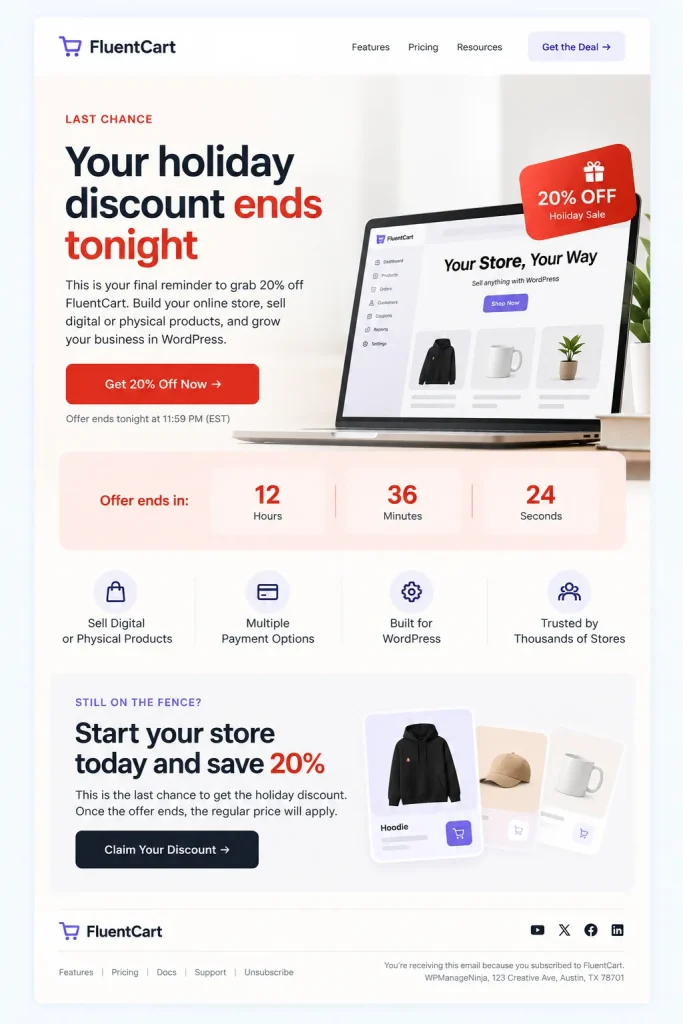
There is nothing wrong with urgency when there’s an actual deadline.
Subject line: Your holiday discount ends tonight
Send a final reminder to relevant subscribers. But if you extend the sale tomorrow, don’t pretend yesterday’s deadline was final.
10. The New Year fresh-start campaign
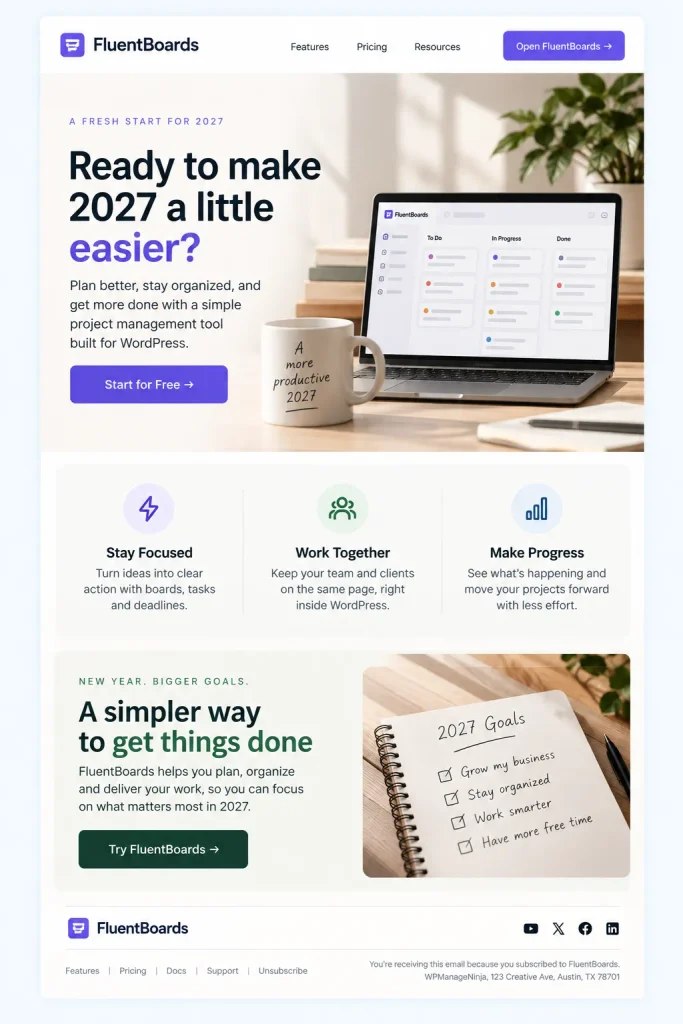
January is a great opportunity to shift the conversation away from discounts.
Subject line: Ready to make 2027 a little easier?
Focus on outcomes, useful upgrades, or problems customers want to solve.
For a productivity product, talk about saving time. For an online store, highlight tools that simplify selling.
The product should feel like part of a useful plan rather than another thing to buy.
Your email subject line matters. But don’t obsess over spam words
You may have seen lists of email spam trigger words.
FREE. GUARANTEED. CASH. WINNER. URGENT.
Some guides make it sound as though typing one of these words will send your email straight to the spam folder.
That’s not how modern email filtering works.
Google’s email sender guidelines emphasize authentication, sending practices, unwanted messages, spam rates, and technical compliance.
Words and formatting can influence how recipients perceive a message, but there’s no published universal blacklist of ordinary promotional words that automatically determines deliverability.
Still, certain writing habits make promotional emails look suspicious or unnecessarily aggressive.
Subject lines to avoid, and what to write instead
| Avoid | Better Alternative |
|---|---|
| FREE FREE FREE!!! | A free gift with your next order |
| $$$ BIGGEST DEAL EVER $$$ | Save 30% this Black Friday |
| URGENT!!! OPEN NOW!!! | Your early-access offer ends today |
| CONGRATULATIONS, YOU WON!!! | Here’s your holiday surprise |
| GUARANTEED MONEY SAVINGS!!! | A better price on your favorites |
| LAST CHANCE!!! BUY NOW!!! | Final hours of our holiday sale |
| RE: Your account (when it’s promotional) | An exclusive offer for your account |
| YOU HAVE BEEN SELECTED!!! | You’re invited to our VIP sale |
Notice something?
You don’t need to ban words like “free,” “sale,” or “discount.” You just need to use them naturally and accurately.
What about capital letters, symbols, and emojis?
One or two capitalized words won’t automatically make your email spam.
But there’s a difference between:
✅ Black Friday starts today
and
❌ BLACK FRIDAY!!! 70% OFF!!! BUY NOW!!!
The second version demands attention rather than earning it.
The same goes for emojis. A pumpkin in a Halloween subject line makes sense. Six fire emojis, three money bags, and a siren probably aren’t helping.
Avoid unusual Unicode characters that imitate normal letters, too. They may look decorative to you but create readability and accessibility problems.
Also, don’t use misleading Re: or Fwd: prefixes to make promotional emails look like existing conversations.
The FTC’s CAN-SPAM guidance explicitly prohibits deceptive commercial email subject lines.
A simple rule: Write something interesting, then make sure the email delivers exactly what you promised.
Images to avoid in your holiday email campaigns
Let’s talk about the other half of holiday promotions: the visuals.
Marketers spend a lot of time creating seasonal graphics. Halloween banners get pumpkins and dark backgrounds. Black Friday graphics turn black and gold. Christmas campaigns switch to red, green, and decorative typography.
There’s nothing wrong with seasonal design.
The problem starts when decoration becomes more important than communication.
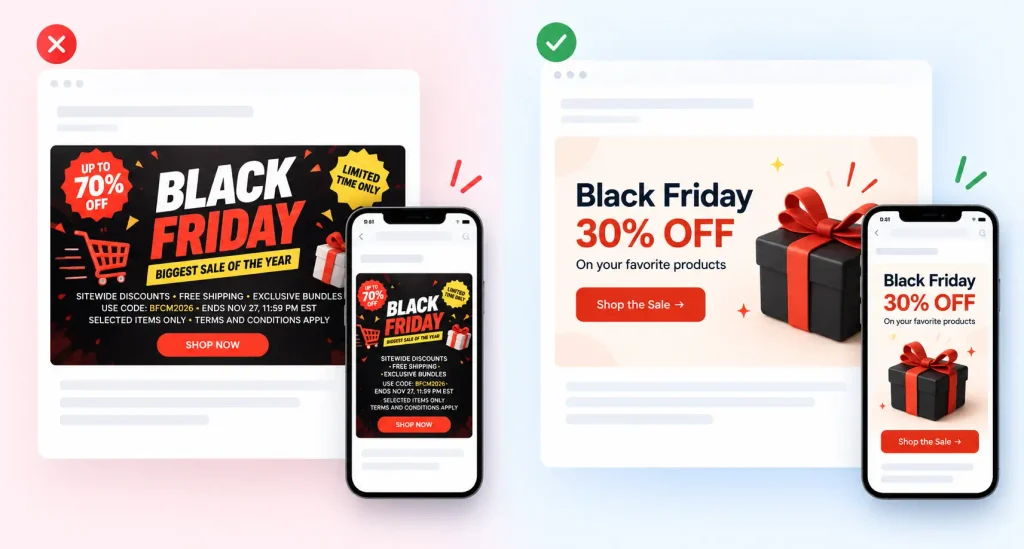
1. Avoid turning the entire email into one giant image
This is surprisingly common.
One large promotional image contains the headline, discount, product information, terms, and button.
It looks good in the design file. But what happens when images don’t load?
The customer sees an empty space.
Use real HTML text for essential information, and include meaningful alternative text for images.
2. Avoid banners filled with tiny text
Your designer might be working on a large desktop canvas. Your customer might be reading the email on a phone while standing in a checkout line.
If the discount conditions require zooming in, something has gone wrong.
Keep promotional graphics simple and place lengthy conditions in readable text.
3. Avoid fake countdowns and misleading visual urgency
A static countdown image that always says “2 hours left” isn’t a real countdown.
Neither is a limited-stock badge that appears regardless of inventory.
Use urgency when it’s supported by actual offer deadlines or stock information.
4. Avoid excessive animation
Animated GIFs can make a campaign fun, particularly around Halloween or Christmas.
But fast flashing, constant movement, and multiple animations can make emails difficult to read.
Keep animation restrained, and ensure the important message remains understandable without it.
5. Avoid questionable AI-generated product images
AI can help with creative concepts, backgrounds, and campaign illustrations.
But be careful when it generates product details.
A promotional graphic shouldn’t show a product feature, package, accessory, or result that customers won’t actually receive.
And for paid advertising, manipulated or misleading visuals can run into platform policies. See Google Ads’ misrepresentation policy.
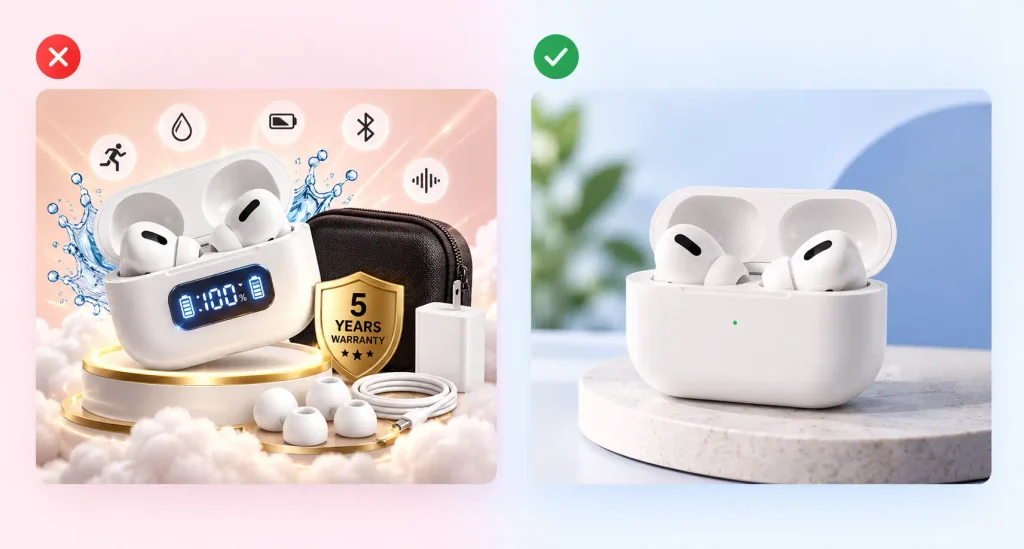
6. Avoid using holiday visuals that hide the offer
Sometimes the pumpkin is enormous, the snowflakes are everywhere, and the actual product is barely visible.
Ask yourself: if someone looks at this image for two seconds, will they understand what’s being offered?
If not, simplify it.
A useful design rule: One main message. One visual focus. One obvious next step.
Seven mistakes that can ruin your holiday email marketing campaigns
A good campaign idea is only the beginning. What happens after planning matters just as much.
1. Sending every email to everyone
Your most loyal customer and someone who joined your newsletter yesterday probably don’t need the exact same message.
Segment audiences using information such as purchase history, interests, engagement, or customer lifecycle.
A returning customer might appreciate an upgrade offer. A first-time visitor may need help understanding your product.
Don’t treat the entire contact list like one person.
2. Starting the campaign without checking email deliverability
It’s frustrating to spend weeks planning a campaign only to discover that important messages aren’t reaching customers.
Before the season gets busy, check your SPF, DKIM, and DMARC configuration.
Google requires stronger authentication and unsubscribe support for senders exceeding 5,000 messages per day to personal Gmail accounts.
Its sender FAQ also recommends keeping user-reported spam rates below 0.1% and preventing them from reaching 0.3%.
Yahoo has similar requirements for bulk senders. You can review its sender best practices.
Don’t leave these checks until the morning of Black Friday.
3. Increasing email frequency overnight
You usually send one newsletter a week.
Suddenly, Black Friday arrives and you’re sending three emails a day.
That abrupt change can frustrate subscribers and create deliverability problems, especially if you’re also increasing sending volume.
Google specifically recommends increasing email volume gradually.
Build your promotional schedule in advance, and give subscribers reasonable control over what they receive.
4. Making discounts look bigger than they really are
A product normally costs $100.
The price suddenly becomes $150, followed by an exciting announcement that it’s 30% off.
Customers notice these things.
Misleading discounts can damage trust and may violate advertising or consumer protection rules.
Make sure reference prices, discount percentages, and conditions are accurate.
5. Forgetting the actual shopping experience
Imagine clicking a Black Friday email offering 25% off, only to land on a homepage where the deal is nowhere to be found.
Or receiving a coupon that doesn’t work at checkout.
Your email is only one part of the campaign.
Test the landing page, coupon, inventory status, shipping information, checkout process, and confirmation email before launching.
6. Making unsubscribing difficult
Hiding the unsubscribe link doesn’t protect your email list.
It may encourage frustrated recipients to mark your messages as spam.
Google and Yahoo require easy unsubscribe mechanisms for applicable bulk promotional messages.
In the United States, the CAN-SPAM Act also requires commercial senders to provide an opt-out mechanism and honor requests within 10 business days. Other jurisdictions and mailbox providers can impose different or stricter requirements.
Make unsubscribing simple. It’s better to lose one uninterested subscriber than damage your sender reputation.
7. Measuring success only through open rates
Open rates used to be one of the first metrics marketers checked.
They’re still useful as a rough signal, but they don’t tell the full story.
Apple’s Mail Privacy Protection can download remote email content in the background, regardless of whether someone engages with the message.
That makes opens less reliable as a measure of human engagement.
Look at clicks, completed purchases, revenue per recipient, unsubscribes, and spam complaints.
A campaign that gets fewer opens but generates more qualified purchases may be the better campaign.
Your paid ads and email campaigns should work together
Holiday marketing isn’t limited to the inbox.
A customer might first discover your offer through a Facebook ad, visit your website, receive an abandoned cart email, and finally purchase after seeing a reminder.
The experience should feel connected.
Here’s a simple BFCM sequence you can adapt.
| Campaign Stage | Email Marketing | Paid Ads and Social |
|---|---|---|
| Teaser | Tell subscribers what’s coming | Build awareness and interest |
| Early Access | Reward loyal customers | Promote signup opportunities |
| Launch | Announce the actual offers | Run conversion-focused promotions |
| Mid-Sale | Recommend relevant products | Retarget eligible interested visitors |
| Last Chance | Share the real deadline | Reinforce the closing offer |
| Post-Sale | Thank customers and help them get started | Exclude purchasers from irrelevant acquisition ads |
A few things matter here.
First, keep your discounts consistent. Don’t promise 30% off in an ad and show 20% on the landing page.
Second, avoid showing customers advertisements for products they’ve already purchased when those ads no longer make sense.
Third, use tracking and retargeting only with the appropriate privacy disclosures, permissions, and consent where required.
And finally, remember that email and paid ads serve slightly different purposes.
Paid ads help you reach and re-engage audiences. Email gives you an opportunity to build ongoing relationships with people who have chosen to hear from you.
They work best when the messaging supports the same customer journey.
A practical holiday email campaign schedule
If you’re planning several campaigns between Halloween and New Year, here’s a starting framework.
| When | What to Focus On |
|---|---|
| Early October | Audit lists, authentication, automation, and email templates |
| Mid-to-Late October | Halloween promotions and BFCM teaser campaigns |
| Early November | Audience segmentation, wishlists, gift guides, VIP signup |
| Mid-November | Early-access promotions and offer previews |
| November 26–30 | Thanksgiving, Black Friday, and Cyber Monday launches |
| Early December | Post-BFCM follow-ups and Christmas gift campaigns |
| Mid-December | Delivery reminders, gift bundles, digital gift options |
| Late December | Customer appreciation and year-end promotions |
| Early January | New Year campaigns, onboarding, annual upgrades |
This isn’t a recommendation to send an email every day.
It’s a planning framework. The actual frequency should depend on audience expectations, engagement, and the value of each message.
For some businesses, three well-timed emails will work better than fifteen repetitive promotions.
A quick checklist before you hit Send
Before launching your next campaign, run through these questions.
Email Campaign Launch Checklist
0 of 110% Complete
One final test is worth doing.
Send the email to yourself and a colleague. Open it on different devices. Click every link. Try the purchase journey.
You’ll often spot problems that were invisible inside the campaign editor.
Make the holiday season count
Halloween, Black Friday, Cyber Monday, Christmas, and New Year give marketers plenty of opportunities to connect with customers.
But more opportunities don’t mean you need more noise.
Your subscribers already know it’s sale season. They don’t need another email shouting about an unbelievable offer.
What they need is something relevant: a product they’ve been considering, a genuinely useful discount, a gift recommendation, or a timely reminder.
Plan your campaigns early. Write like a person. Keep your promises. Make every click worth the effort.
And remember, a successful holiday email campaign doesn’t end when someone opens your message.
It ends when they have a good reason to come back.
Frequently asked questions
What is the best time to start holiday email marketing campaigns?
Start planning several weeks before the promotion. Build anticipation ahead of major sale dates, and launch early enough to reach customers who shop in advance. The best schedule depends on your audience, products, and historical campaign performance.
Which words should I avoid in promotional emails?
There isn’t a universal list of words that automatically trigger spam filtering. Focus on avoiding misleading claims, deceptive subject lines, excessive punctuation, and aggressive messaging. Common words like “free” and “discount” are fine when used accurately.
How many Black Friday emails should I send?
There’s no ideal number for every business. A teaser, early-access message, launch announcement, and final reminder can form a useful starting sequence. Adjust based on engagement, customer preferences, and campaign results.
Are image-only emails bad for marketing?
They can create accessibility and usability problems, particularly when images are blocked or don’t load correctly. Keep essential information in readable HTML text, include useful alt text, and test emails across devices.
What metrics matter most for holiday email marketing?
Prioritize conversions, revenue per recipient, click-through rates, customer acquisition costs, unsubscribes, and spam complaints. Open rates can help identify trends, but shouldn’t be treated as a definitive measure of engagement.

WordPress, automation, eCommerce and growth marketing specialist, a WordPress Core Contributor and Media Corps member blending storytelling with technology to craft strategies in SEO, email marketing, and beyond.
-
How to Master Customer Onboarding and Keep Customers Coming Back
Master customer onboarding with 5 simple stages, 9 proven best -
How to Create a Conversational Survey in WordPress
Build a conversational survey in WordPress with Fluent Forms step-by-step, -
How to Create a Beautiful Online Course Website with WordPress
Creating online course has become easier with WordPress. Are you


Leave a Reply
You must be logged in to post a comment.