

How to Start a Newsletter Business With WordPress (Step-by-Step)
Newsletters are still one of the simplest ways to build audience ownership and create repeat communication. They work for creators starting from scratch and for businesses that already have leads or customers.
This tutorial shows how to build a practical newsletter system in WordPress using the Fluent ecosystem.
- A newsletter can work as a standalone business or a growth channel inside an existing business
- A clear signup offer matters more than a complex setup
- Reliable email delivery should be configured before you send campaigns
- Segmentation and welcome emails make newsletters more useful from day one
- WordPress gives you more ownership and flexibility than a SaaS-only setup
Why a Newsletter Business Still Works
A newsletter gives you direct access to people who want to hear from you. That makes it different from social media, where reach can drop the moment a platform changes its algorithm.
It is also a proven business model. Lenny’s Newsletter became a real paid media business, with Lenny Rachitsky sharing that he was making about $65,000 a year before fees with around 500 paid subscribers.
On the larger end, Axios reported in 2020 that Morning Brew expected more than $20 million in revenue and $6 million in profit.
The model also works well inside WordPress-focused niches. The WP Weekly is a live newsletter built for WordPress professionals, delivering curated updates, tools, and community news in a short weekly format. That shows how a focused niche newsletter can create value even without trying to become a giant media brand.
The broader numbers support this too. beehiiv reported that in 2024, newsletters on its platform generated $8.67 million from paid subscriptions, $3.73 million from ads, and $2.09 million from boosts.
Mailchimp also says ecommerce businesses using its Standard plan see up to 30x ROI, and its benchmark page lists an average open rate of 35.63% across all users.
That is why this tutorial matters for two types of readers. Some want to launch a newsletter business from zero. Others already run a website and want to turn traffic, leads, or customers into an owned audience they can reach again.
What You Are Building in This Tutorial
By the end of this setup, you are not just collecting emails. You are building a connected newsletter system inside WordPress.
That system includes a signup form, reliable email delivery, subscriber management, segmentation, welcome emails, and a reusable newsletter workflow. Once that foundation is in place, you can publish consistently without rebuilding the process every week.
Step 1: Prepare Your Website and Offer
Before you touch any plugin, make sure the basics are already handled. Your domain, hosting, and WordPress installation should be ready. You also need a niche or business angle and a clear reason for people to subscribe.
That offer matters more than most beginners realize. “Join my newsletter” is too vague. People subscribe when they understand what they will get. Weekly tips, product updates, curated insights, short lessons, templates, or a useful lead magnet all work better than a generic label.
Think of this step as your positioning step. If your offer is unclear, the rest of the tutorial will still work technically, but conversion will be weaker than it should be.
Step 2: Create Your Newsletter Signup Form With Fluent Forms
Start with the front door of the system. Install Fluent Forms and create a simple newsletter signup form.
Keep the form short. In most cases, name and email are enough. Every extra field adds friction, and friction lowers conversion. You can always collect more information later after trust has been established.
Once the form is ready, give it a clear heading and supporting copy. Tell people what they are signing up for and why it is worth their time. This is where your subscription promise should show up clearly.
After that, place the form where people will actually see it. Add it to your homepage, footer, blog sidebar, and any landing page or high-traffic content page that already gets attention. If you already run a business site, place it on your most visited pages first.
Step 3: Make the Signup Offer Stronger
The form alone is not the offer. The form is only the tool that captures the response.
What matters here is the value behind the signup. If you are building from scratch, decide what your newsletter will consistently deliver. If you already run a business, decide what kind of email content people would genuinely want from you.
For a creator, that may be weekly insights, lessons, or curated ideas. For a business, that may be product news, practical industry content, customer tips, or special updates. In both cases, the reader should understand the benefit in one quick glance.
If you want faster growth, tie the form to something useful. A checklist, template, short guide, or quick resource can help turn casual interest into actual subscriptions.
Step 4: Set Up FluentSMTP Before Sending Anything
This is one of the most important steps in the entire process. It is also one of the most skipped.
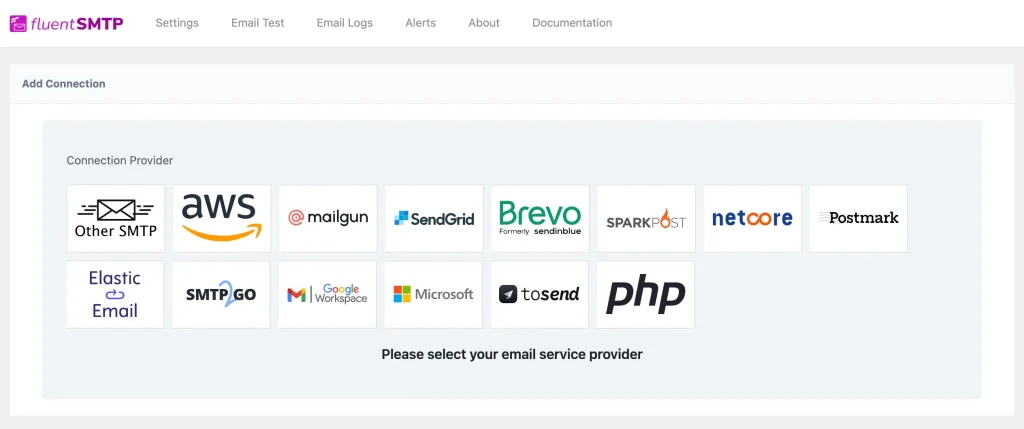
Install FluentSMTP and connect your preferred sending method. The goal here is simple. You want your emails to land properly instead of relying on weak default delivery.
Once the connection is complete, send a test email. Then send another one to a different inbox if possible. Make sure the messages arrive properly before you move on.
A newsletter system only works if delivery works. It is better to catch problems now than after your first real campaign goes out.
Step 5: Set Up FluentCRM and Connect Your Form
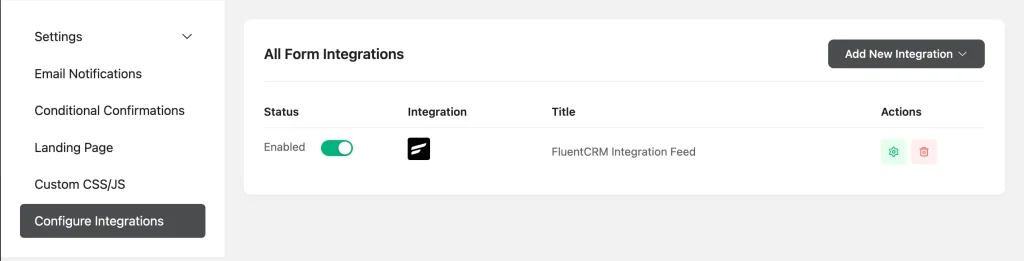
Now it is time to turn your signup system into a real newsletter workflow. Install FluentCRM and connect your Fluent Forms entries to it.
When someone fills out your form, their contact should flow into FluentCRM automatically. That saves time and keeps your list organized from the beginning.
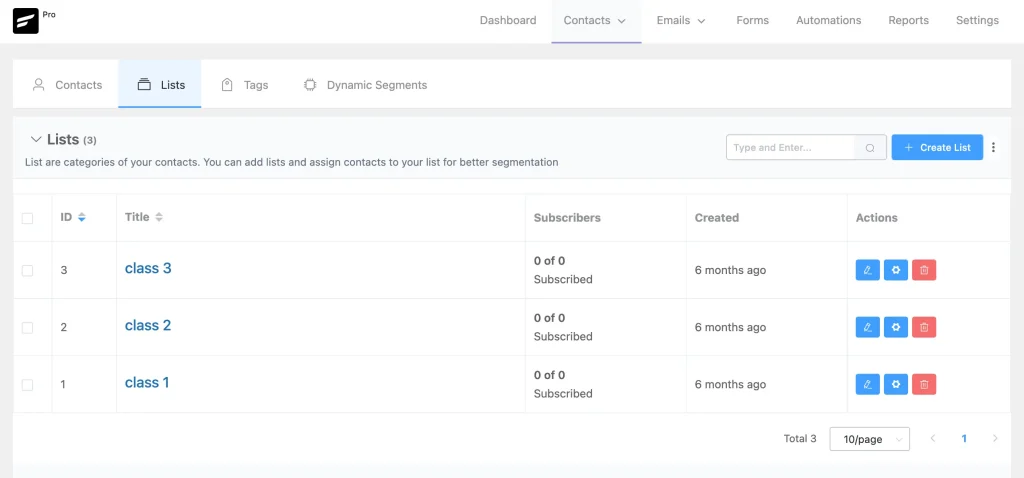
Create your main newsletter list first. Then think about basic organization. If you already have an existing business, this is where your setup becomes much more valuable. You can start separating leads from customers, interest groups from general subscribers, and active contacts from old ones.
This is the step where your email setup stops being a pile of addresses and starts becoming a usable database.
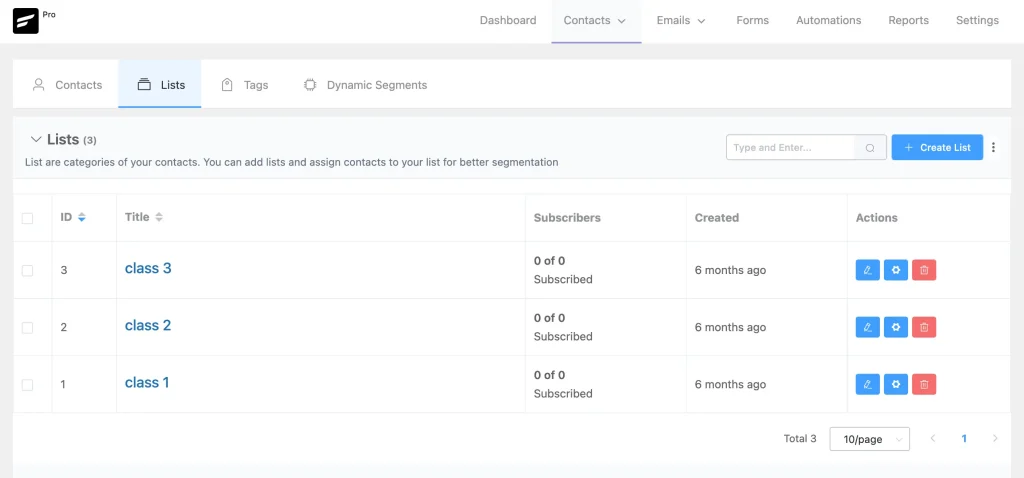
Step 6: Organize Subscribers With Lists, Tags, and Segments
Do not keep everyone in one large undifferentiated group if you can avoid it. Segmentation makes your newsletters more relevant, and relevance improves engagement.
Start simple. You do not need advanced behavior tracking on day one. Basic segmentation is enough. You might create one segment for new subscribers, one for customers, one for people who signed up through a specific lead magnet, and one for people interested in a particular topic or offer.
If you already have old leads or customers, import them carefully and label them properly. This gives you a cleaner path for future newsletters and promotional emails.
The more clearly your contacts are organized, the easier it becomes to send useful emails instead of generic blasts.
Step 7: Build a Welcome Sequence
A welcome sequence is one of the easiest ways to make your newsletter feel intentional from day one. It also solves a common beginner mistake, which is collecting subscribers and then saying nothing until the next big campaign.
Create a simple automated welcome email in FluentCRM. That email should thank the subscriber, explain what they can expect, and deliver any promised resource if your signup offer included one.
If you want to go one step further, build a short welcome sequence instead of a single email. The first message can confirm the signup. The second can introduce your brand or point of view. The third can direct people to a helpful article, product, or next step.
This is the handshake of the newsletter system. It tells subscribers they made the right choice.
Step 8: Design a Clean Newsletter Template
Your newsletter template does not need to be fancy. It needs to be clear, reusable, and easy to read on both desktop and mobile.
Create a layout with a simple header, readable body text, enough spacing, and a consistent visual rhythm. Keep branding visible but restrained. The goal is not to impress people with layout tricks. The goal is to make the message easy to consume.
Once the structure is in place, stick with it. A repeatable format saves time and makes your publishing process smoother. It also makes your newsletter feel familiar over time.
A clean template helps your content do the work.
Step 9: Add Small Improvements With FluentAuth and FluentSnippets
This step is not required for launch, but it is useful if you want more control.
If you think your newsletter may later connect to gated content, member access, or a more controlled login experience, FluentAuth gives you room to handle that more cleanly.
If you need small custom tweaks, FluentSnippets helps you make them without turning your website into a messy pile of manual edits. These tweaks may be minor now, but they become more useful as your newsletter workflow gets more advanced.
For the first launch, keep this light. The point is not to overbuild. The point is to know the system can grow with you.
Step 10: Check Everything Before Launch
Before you publish your signup pages and start promoting the newsletter, test the core workflow from end to end.
Submit the form yourself. Confirm that the contact reaches FluentCRM correctly. Check that FluentSMTP delivers the email. Make sure the welcome message arrives. Review the template on desktop and mobile. Confirm that the signup page is visible and easy to find.
This final check matters because broken forms, missing automation, or bad delivery can quietly damage trust before the newsletter even starts.
Do not aim for a perfect launch. Aim for a working launch.
Step 11: Publish Your Signup Pages and Start Collecting Subscribers
Now make the system visible.
Your homepage should point people toward the newsletter if it is a major part of your strategy. Your blog pages, footer, and relevant landing pages should also make subscribing easy. If you have an about page with good traffic, that can be another strong placement.
If you are starting from scratch, begin with simple promotion. Share your signup page in social content, mention it in blog posts, and tell your network directly.
If you already run a business, use the attention you already have. Add forms to high-traffic pages. Mention the newsletter to current customers. Announce it through your existing channels. Then start sending useful updates to properly segmented contacts.
This is where a new system becomes a live channel.
Step 12: Keep the Newsletter Simple at First
Many people make newsletters harder than they need to be. They try to perfect design, over-segment too early, or wait until they have months of content planned.
A better approach is to keep the first version simple. Focus on one clear audience, one consistent promise, and one repeatable publishing rhythm. Weekly or biweekly is usually enough to begin.
The first goal is not scale. The first goal is consistency. Once the system is live and your process is stable, improvement becomes much easier.
How to Monetize a Newsletter
A newsletter can start as a communication channel, but over time it can become a real revenue stream. The best part is that you do not need to monetize it in only one way. You can start simple, then add more once your audience becomes more engaged.
One of the easiest ways to start is affiliate marketing. If you already mention tools, products, or services in your emails, you can recommend useful ones and earn a commission when readers buy through your links. This works best when the offers are relevant and genuinely helpful to your audience.
You can also build a paid newsletter membership if your content offers deeper value. With FluentCommunity, you can create a gated space for premium subscribers and give them access to exclusive content, discussions, or member-only resources. This works well when your audience wants more than free updates and is willing to pay for closer access or deeper insights.
Another strong path is selling helpful digital resources. If your newsletter audience would benefit from templates, guides, checklists, swipe files, or mini products, you can package those and sell them through FluentCart. This turns your newsletter into a natural sales channel for digital products that already match your niche.
The good thing is that these models can work together. You might start with affiliate offers, then add premium community access, and later sell digital products once you know what your audience values most. That gives your newsletter room to grow from a simple list into a real business asset.
Benefits of This WordPress Newsletter Stack
This setup works well because it gives you ownership. Your forms, subscribers, and workflow live inside your own WordPress environment rather than on a platform that controls the entire relationship.
It also gives you flexibility. You can keep the newsletter simple, or you can grow it into a larger system that supports products, memberships, services, automations, or customer retention.
Most importantly, it keeps your tools connected. The form captures the lead. The SMTP layer handles delivery. The CRM manages the contact. The template supports publishing. That connected workflow is what makes the system practical.
What It Costs to Start
The cost depends on what you already have in place.
If you already run a WordPress website, your main additional cost may be related to your plugin setup and email sending method. If you are starting from zero, you will also need a domain and hosting.
Even then, the starting cost is still modest compared to many other business models. For most people, the bigger investment is not money. It is clarity, consistency, and the discipline to keep publishing.
That is one reason newsletters remain attractive. They can start small and become more valuable over time.
WordPress vs SaaS Newsletter Platforms
This is not a winner-takes-all decision. It is a setup decision.
If your goal is the fastest possible launch, SaaS platforms can feel easier at first. beehiiv offers a free plan for up to 2,500 subscribers with unlimited sends, and Substack lets you start without paying upfront, then takes a cut when you monetize through paid subscriptions.
WordPress becomes more attractive when you want the newsletter to live inside a bigger business system. Instead of keeping forms, email capture, delivery, segmentation, and website content on separate platforms, you can keep everything connected in one place.
The cost picture is also better than many people assume. In the early stage, a small list can be very cheap to maintain. Google Workspace trial accounts are limited to 500 messages per day, which is enough to test and run a small newsletter workflow. Amazon SES includes up to 3,000 free message charges per month for the first 12 months, so a list of 500 subscribers sent weekly would use around 2,000 emails a month, and a list of 1,000 subscribers sent twice a month would also stay around 2,000 emails a month.
That makes the tradeoff clearer. SaaS is easier when speed matters most. WordPress is stronger when you want ownership, branding control, and a newsletter system that fits into the rest of your business.
Common Mistakes to Avoid
One common mistake is having a weak value proposition. If people do not understand why they should subscribe, they usually will not.
Another mistake is skipping FluentSMTP or delaying deliverability checks. Good content will not help much if emails fail to land where they should.
A third mistake is collecting subscribers without a welcome sequence. Silence after signup creates a weak first impression.
Another common issue is failing to segment contacts. When all subscribers sit in one list, future campaigns become less relevant and harder to manage.
The final mistake is overbuilding before publishing. Launch the simple version first. Real feedback will teach you more than endless preparation.
Conclusion
A newsletter business does not need a complicated setup to start working. It needs a clear subscription promise, a visible signup form, reliable delivery, organized subscriber management, and a simple welcome flow.
That approach works whether you are starting a newsletter business from scratch or adding newsletters to an existing business. Build the simple version, launch it, and improve it as you learn. A working system is far more valuable than a perfect plan.

WordPress, automation, eCommerce and growth marketing specialist, a Core Contributor and Media Corps member blending storytelling with technology to craft strategies in SEO, email marketing, and beyond.
-
10 Best jQuery Table Plugins for Best Data Visualization in 2026
Discover the 10 best jQuery table plugins for 2026. Compare -
Black Friday Marketing Strategies for 2026: Core and Advance Move
Black Friday is the most celebrated shopping season worldwide. Discover -
How Much Can You Earn With Amazon Affiliate Marketing? Rates & Niches
How much can you earn with Amazon affiliate marketing? Dive



Leave a Reply
You must be logged in to post a comment.