

Virtual Meeting Etiquette: A Complete Guide to Better Online Meetings
You’ve probably experienced an online meeting where someone joins late, forgets to mute their microphone, or spends half the meeting saying, “Can you hear me now?” These small disruptions may seem harmless, but they quickly reduce productivity.
Following proper virtual meeting etiquette helps teams communicate more effectively, stay focused, and make every online meeting more productive.
Key Takeaways
- Virtual meeting etiquette helps improve communication, productivity, and professionalism in remote and hybrid meetings.
- Simple habits like sharing an agenda, testing your setup, and staying engaged keep meetings focused and productive.
- Clear follow-ups, action items, and meeting recap emails help teams stay aligned and accountable after every meeting.
- Inclusive meeting practices give remote and in-office participants equal opportunities to contribute and collaborate.
- Scheduling and follow-up tools reduce manual work and help teams run more organized virtual meetings.
Why Virtual Meeting Etiquette Matters
Virtual meetings are meant to bring people together, but without clear expectations, they can quickly become unproductive. Technical issues, interruptions, and poor communication often waste valuable time. Following proper virtual meeting etiquette helps teams collaborate more effectively and get better results from every meeting.
Good virtual meeting etiquette helps you:
- Improve communication by encouraging active listening, respectful discussions, and clear speaking
- Increase productivity by starting on time, following an agenda, and ending with actionable next steps
- Build professional relationships through punctuality, engagement, and respectful interactions
- Encourage equal participation by giving every attendee, whether remote or in person, an opportunity to contribute
- Reduce meeting fatigue by keeping discussions focused, avoiding unnecessary interruptions, and respecting everyone’s time
- Create a more inclusive environment by using accessibility features like captions, chat, and the Raise Hand function when appropriate
- Keep meetings outcome-driven with clear decisions, assigned responsibilities, and documented follow-ups
When these habits become part of your team’s routine, online meetings become more organized, collaborative, and enjoyable for everyone involved.
Virtual Meeting Etiquette Before the Meeting
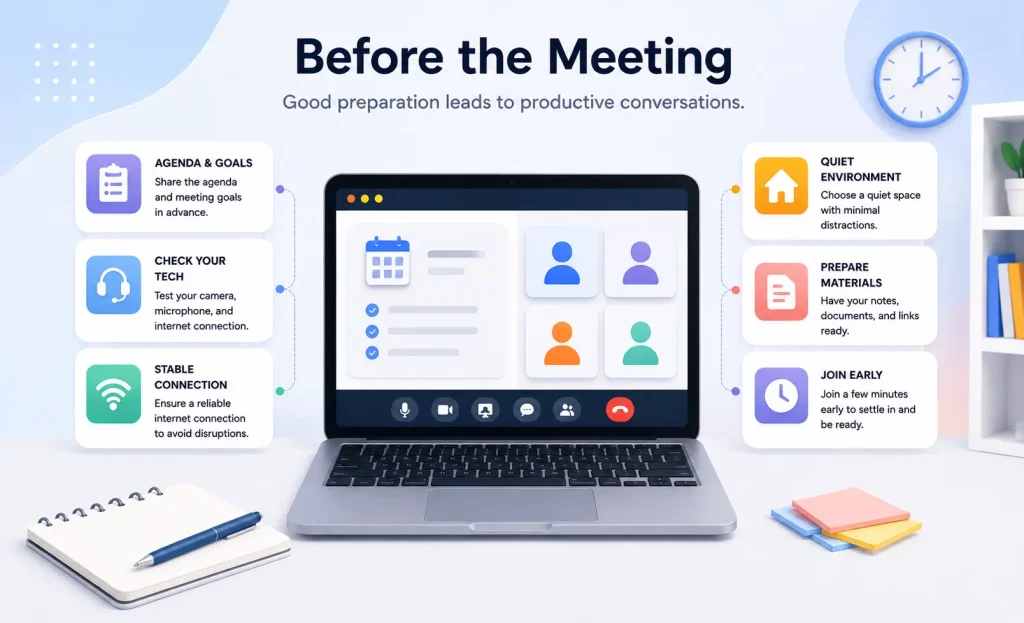
Good virtual meetings don’t start when everyone joins the call. They begin with proper preparation. Taking a few minutes to plan ahead can prevent technical issues, reduce unnecessary delays, and help everyone stay focused on the discussion.
Set a Clear Meeting Agenda
A well-structured agenda helps participants understand the meeting’s purpose and what is expected of them. Instead of spending valuable time deciding what to discuss, everyone can focus on achieving the meeting’s goals.
A good meeting agenda should include:
- The meeting objective
- Topics to discuss
- Time allocated for each topic
- Required participants
- Any documents or resources attendees should review beforehand
Sharing the agenda at least a day in advance gives participants enough time to prepare questions, gather information, and contribute more effectively.
Test Your Technology
Technical issues can quickly disrupt an otherwise productive meeting. Before joining, take a few minutes to make sure everything is working properly.
Check the following before every meeting:
- Internet connection
- Camera and microphone
- Speakers or headset
- Video conferencing software
- Screen-sharing functionality
If you’re hosting the meeting, it’s also a good idea to test the meeting link and confirm that presenters have the necessary permissions to share their screens.
Choose a Quiet and Professional Environment
Your surroundings can affect both your concentration and the meeting experience for others. Joining from a quiet, well-lit location helps reduce distractions and allows participants to focus on the conversation.
For a professional setup:
- Find a quiet space with minimal background noise
- Use a clean or blurred background
- Position your camera at eye level
- Make sure your face is well lit
- Silence notifications on your phone and computer
Even small adjustments can create a more professional impression and improve communication.
Dress for the Meeting
Your appearance should match the purpose of the meeting. While formal attire isn’t always necessary, dressing appropriately shows respect for your colleagues, clients, and the discussion.
For internal team meetings, business casual is usually appropriate. For client presentations, interviews, or executive meetings, choose attire that reflects your organization’s professional standards.
Prepare Your Materials
Searching for files or notes during a meeting interrupts the discussion and wastes everyone’s time. Preparing everything in advance helps you stay organized and participate confidently.
Before joining, make sure you have:
- Meeting notes
- Relevant documents
- Presentation slides
- Links you’ll need to share
- A notebook or digital note-taking app
Having these resources readily available allows you to respond quickly and keep the meeting moving smoothly.
Join a Few Minutes Early
Arriving two or three minutes before the scheduled start time gives you enough time to resolve any last-minute technical issues and settle in before the discussion begins.
If you’re hosting the meeting, joining early also allows you to welcome participants, verify that your equipment is working, and start the meeting on schedule. Consistently starting on time demonstrates professionalism and shows respect for everyone’s schedule.
Virtual Meeting Etiquette During the Meeting
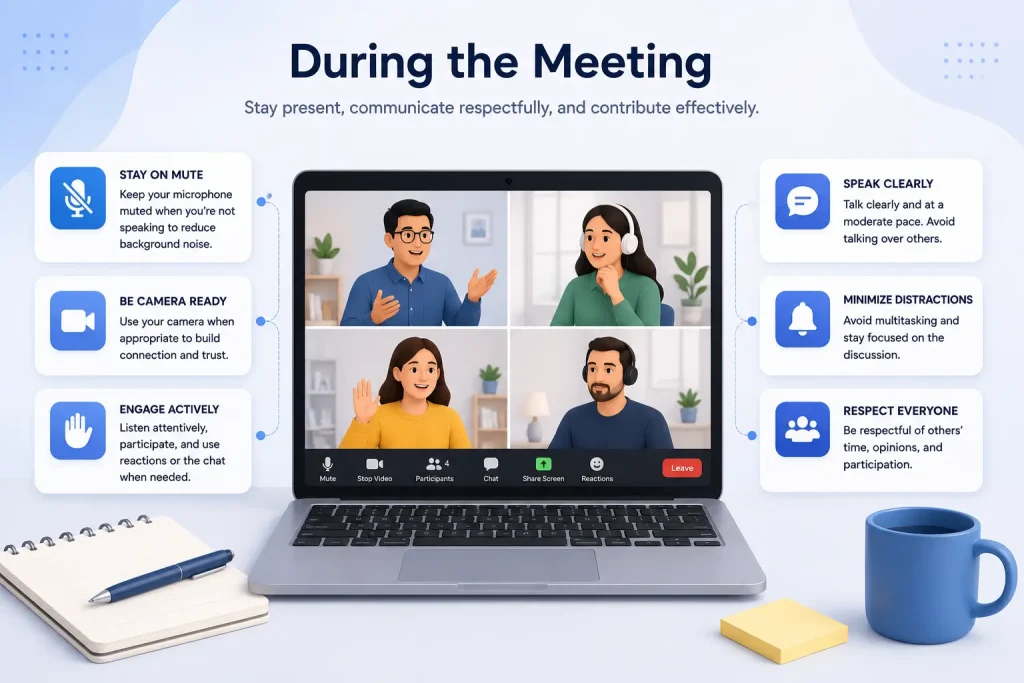
Joining a meeting on time is only the beginning. How you communicate, listen, and interact throughout the discussion has a direct impact on its outcome. Practicing good virtual meeting etiquette helps conversations stay focused, encourages meaningful participation, and ensures everyone’s time is used effectively.
Communicate With Purpose
Every contribution should move the conversation forward. Before speaking, take a moment to consider whether your comment adds value, answers a question, or helps the team make a decision. Clear and thoughtful communication keeps discussions productive and prevents unnecessary interruptions.
To communicate more effectively:
- Mute your microphone when you’re not speaking
- Wait for others to finish before responding
- Speak clearly and at a steady pace
- Use the Raise Hand feature during larger meetings
- Save side conversations for after the meeting
Small communication habits create a more respectful environment where everyone feels comfortable sharing ideas.
Stay Present and Fully Engaged
One of the biggest challenges in virtual meetings is staying focused. With emails, chat notifications, and other distractions only a click away, it’s easy to lose track of the discussion. Giving the meeting your full attention shows respect for the speaker and helps you contribute more effectively.
You can stay engaged by:
- Closing unrelated tabs and applications
- Silencing phone and desktop notifications
- Taking notes instead of multitasking
- Using reactions or brief acknowledgments when appropriate
- Asking thoughtful questions when clarification is needed
When everyone is fully present, conversations become more collaborative and decisions are made more quickly.
Use Your Camera to Build Better Connections
Video helps recreate many of the nonverbal cues that are missing in online conversations. Facial expressions, eye contact, and body language make discussions feel more personal and improve communication, especially during collaborative meetings or client calls.
For a professional appearance:
- Position your camera at eye level
- Sit in a well-lit space
- Keep your background clean or use a subtle virtual background
- Avoid excessive movement while speaking
There may be situations where keeping your camera off is appropriate, such as limited bandwidth or an unsuitable environment. If that’s the case, let the host know beforehand so expectations remain clear.
Respect Everyone’s Time
Every participant has set aside time for the meeting, so it’s important to use that time wisely. Staying on topic, keeping comments concise, and avoiding repetitive discussions help meetings finish on schedule without sacrificing meaningful conversation.
If a topic requires additional discussion, consider parking it for a follow-up meeting instead of extending the current session. Ending on time demonstrates professionalism and keeps everyone’s workday on track.
Make Every Participant Feel Included
A successful meeting isn’t measured by how much one person speaks. It’s measured by how well everyone can participate. This is especially important in hybrid meetings, where remote attendees can easily feel disconnected from the conversation.
Encourage an inclusive discussion by:
- Inviting quieter participants to share their thoughts
- Repeating questions that may not have been heard clearly
- Sharing documents or presentations digitally instead of relying on a physical whiteboard
- Recognizing contributions from both remote and in-office attendees equally
Inclusive meetings lead to better ideas, stronger collaboration, and more informed decisions because every perspective has a chance to be heard.
Focus on Outcomes, Not Just Conversation
A productive meeting should end with more than a discussion. Before moving to the next topic or wrapping up, make sure everyone understands the decisions that were made, the action items assigned, and the expected next steps.
Throughout the meeting, confirm:
- Decisions before moving to the next agenda item
- Action items and their owners
- Deadlines for follow-up tasks
- Questions that need further discussion outside the meeting
Keeping the conversation outcome-focused ensures that meetings drive progress instead of becoming routine calendar events.
Virtual Meeting Etiquette After the Meeting
A productive meeting doesn’t end when the video call is over. The real value comes from what happens next. Without clear follow-up, even the best discussions can lose momentum, leaving participants unsure about their responsibilities or the decisions that were made.
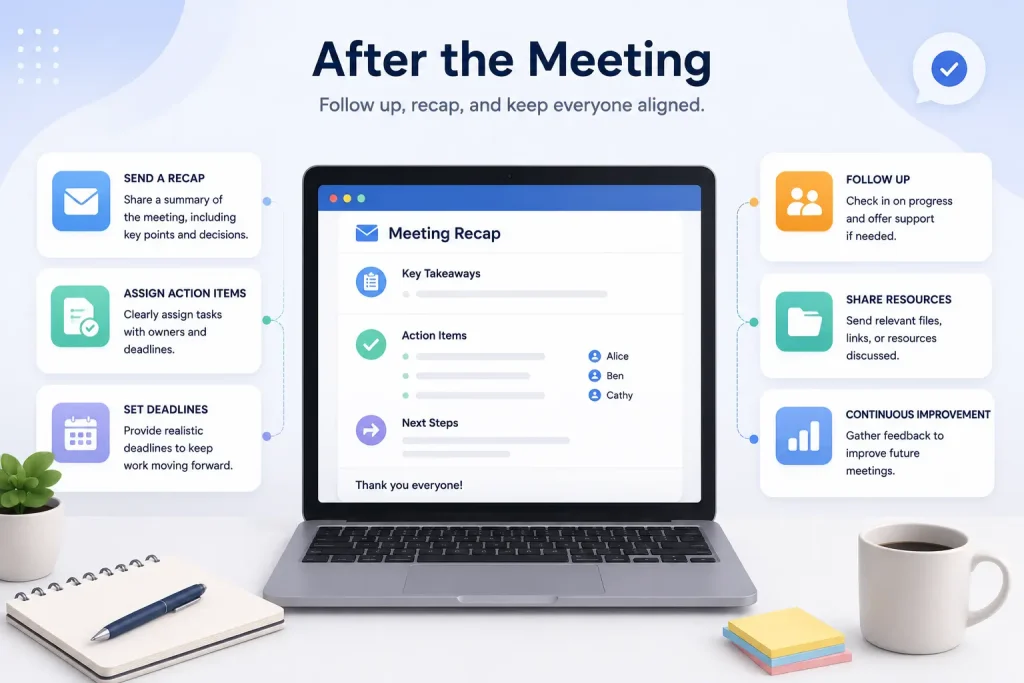
Following good virtual meeting etiquette after the meeting helps turn conversations into measurable progress.
Recap the Key Decisions
People often leave a meeting with different interpretations of what was discussed. A brief recap helps everyone stay aligned and prevents confusion later.
Your meeting summary should include:
- The key decisions made
- Important discussion points
- Any unresolved questions
- The overall outcome of the meeting
A concise recap also makes it easier for anyone who couldn’t attend to catch up without scheduling another meeting.
Assign Clear Action Items
A meeting without action items rarely leads to meaningful results. Every task should have a clear owner and an expected deadline so participants know exactly what comes next.
Instead of saying:
“Someone should update the presentation.”
Assign ownership:
“Sarah will update the presentation and share the final version by Thursday.”
Clear accountability reduces confusion and keeps projects moving forward.
Share Meeting Notes Promptly
Meeting notes lose value if they’re shared days later. Sending them shortly after the meeting keeps the discussion fresh in everyone’s mind and gives participants immediate access to important information.
A good follow-up note typically includes:
- Meeting date and attendees
- Key takeaways
- Assigned tasks and owners
- Deadlines
- Links to relevant documents or recordings
Keeping everything in one place makes future meetings more efficient and reduces repeated discussions.
Send a Professional Meeting Follow-Up Email
A meeting shouldn’t end when everyone leaves the call. Sending a follow-up email reinforces key decisions, reminds participants of their responsibilities, and provides a single place to reference important information. It also helps absent team members catch up without scheduling another meeting.
A well-written follow-up email should include:
- A brief meeting summary: Highlight the main topics discussed and the decisions that were made.
- Action items: List each task along with the person responsible and the expected deadline.
- Supporting resources: Include links to meeting notes, recordings, presentations, or shared documents.
- Next steps: Explain what happens next, whether it’s completing assigned tasks or preparing for the next meeting.
- A clear call to action: Let recipients know if they need to reply, approve something, or complete a task before the next meeting.
Pro Tip: If you regularly send meeting recap emails, FluentCRM can help automate the process. You can create reusable email templates, personalize follow-up messages, segment recipients, and schedule emails to be sent automatically after meetings.
Schedule the Next Meeting Efficiently
Not every conversation needs another meeting. Before sending a follow-up invitation, ask whether the next step requires a live discussion or if it can be handled through email, shared documents, or your team’s collaboration platform.
If you’re looking for a simple way to streamline the scheduling process, learn how to build a booking system in WordPress before setting up your next online meeting.
When another meeting is needed, make it easier for everyone by:
- Defining a clear objective
- Sharing available time slots in advance
- Sending the meeting link and agenda early
- Scheduling it at a convenient time for all participants
Thoughtful scheduling reduces calendar overload and ensures each meeting has a clear purpose.
Tip: Instead of exchanging multiple emails to find a suitable time, use FluentBooking to let attendees book available slots, receive automatic reminders, and access meeting links from one place.
A successful virtual meeting isn’t measured by how smoothly it runs. It’s measured by what the team accomplishes afterward. By documenting decisions, assigning responsibilities, and following through on commitments, every meeting becomes a step toward meaningful progress rather than just another item on the calendar.
Etiquette Tips for Meeting Hosts
A successful virtual meeting starts with good leadership. As the host, you’re responsible for creating a productive environment where discussions stay focused, participants feel included, and everyone leaves with a clear understanding of the next steps.
To run a professional online meeting, make sure you:
- Define a clear purpose: Explain why the meeting is being held and what outcomes you expect before attendees join the call.
- Share the agenda in advance: Send the agenda early so participants can prepare, gather relevant information, and contribute more effectively.
- Provide all necessary resources: Include meeting links, presentation slides, supporting documents, and any pre-reading materials before the meeting begins.
- Start and end on time: Respect everyone’s schedule by beginning promptly and keeping discussions within the allocated time.
- Guide the discussion: Keep conversations aligned with the agenda, redirect off-topic discussions, and ensure every agenda item receives appropriate attention.
- Encourage balanced participation: Invite quieter attendees to share their ideas and make sure remote participants have the same opportunity to contribute as those in the room.
- Manage time effectively: Allocate enough time for meaningful discussion while preventing individual topics from dominating the meeting.
- Summarize key decisions: Recap the important conclusions before ending the meeting so everyone leaves with the same understanding.
- Assign action items: Clearly define who is responsible for each task, what needs to be completed, and when it’s due to improve accountability.
- Lead by example: Demonstrate the same professionalism, punctuality, and active listening that you expect from your team.
A dedicated booking system can also simplify scheduling by allowing attendees to book available time slots and automatically receive meeting details. If you’re using WordPress, check out our guide on how to build a booking system in WordPress.
Etiquette Tips for Participants
Being a participant involves more than simply attending a meeting. Your preparation, engagement, and communication all contribute to a productive discussion. Following these virtual meeting etiquette tips helps meetings stay organized and ensures everyone’s time is used effectively.
As a participant, you should:
- Come prepared: Review the meeting agenda, read any shared materials, and gather the information you’ll need before joining the call.
- Join on time: Log in a few minutes early to check your internet connection, camera, microphone, and meeting link so the discussion can start without delays.
- Stay fully engaged: Give the meeting your full attention by closing unrelated tabs, silencing notifications, and avoiding multitasking during the discussion.
- Practice active listening: Pay close attention to the speaker, avoid interrupting, and ask thoughtful questions when you need clarification.
- Communicate respectfully: Wait for your turn to speak, keep your comments concise, and use features like Raise Hand or chat to contribute without disrupting the conversation.
- Keep your microphone under control: Mute your microphone when you’re not speaking to minimize background noise and create a better experience for everyone.
- Maintain a professional presence: If your camera is on, dress appropriately, choose a clean background, and position your camera at eye level to make communication more natural.
- Respect different perspectives: Encourage open discussions by listening to others’ ideas with an open mind, even when you have a different opinion.
- Take ownership of your responsibilities: Note any tasks assigned to you during the meeting and complete them within the agreed timeline. If you anticipate delays, communicate them proactively.
- Follow up when necessary: Review the meeting summary, confirm your action items, and reach out if you need additional clarification after the meeting.
Good participants don’t just attend meetings. They contribute to meaningful discussions, support their teammates, and help turn conversations into measurable outcomes.
Virtual Meeting Etiquette for Hybrid Meetings
Hybrid meetings bring together in-office and remote participants, making them more challenging to manage than fully virtual or in-person meetings. Without the right approach, remote attendees can easily feel disconnected from the conversation. Following these virtual meeting etiquette tips helps create a more inclusive and productive experience for everyone.
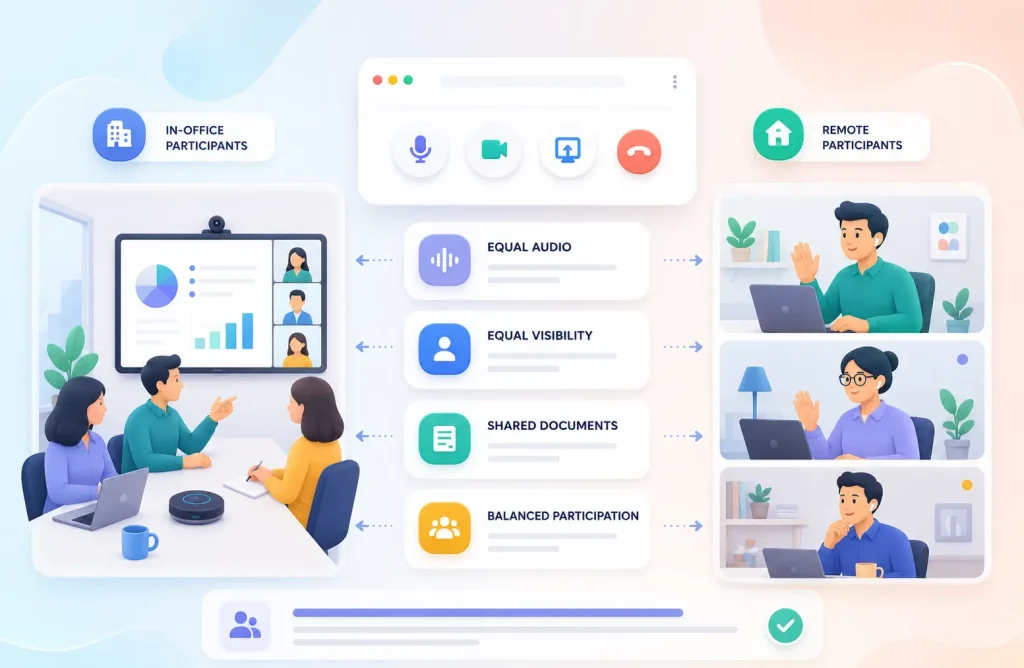
To improve hybrid meetings, remember to:
- Create an equal experience: Treat remote participants as active contributors rather than observers by involving them throughout the discussion.
- Use reliable audio and video equipment: Invest in quality microphones, cameras, and speakers so everyone can hear and see each other clearly.
- Share content digitally: Present documents, slides, and notes through screen sharing instead of relying on physical whiteboards or printed materials.
- Repeat in-room comments and questions: Summarize discussions that take place in the meeting room so remote attendees don’t miss important context.
- Encourage balanced participation: Invite both remote and in-person attendees to share their opinions, especially during brainstorming and decision-making sessions.
- Avoid side conversations: Keep discussions within the virtual meeting so every participant hears the same information at the same time.
- Assign a meeting facilitator: Designate someone to monitor chat messages, technical issues, and speaking requests to ensure remote participants stay involved.
- Be mindful of different time zones: Schedule meetings at reasonable times whenever possible and rotate meeting times for global teams to distribute inconvenience fairly.
- Record meetings when appropriate: Share recordings and meeting notes with participants who couldn’t attend or need to revisit important discussions.
- Gather feedback after the meeting: Ask attendees about their meeting experience and use their suggestions to improve future hybrid meetings.
Successful hybrid meetings aren’t about where people work. They’re about making every participant feel equally informed, heard, and valued, regardless of whether they’re joining from the office or another location.
Build a Better Virtual Meeting Culture
Successful virtual meetings don’t happen by chance. They are the result of thoughtful preparation, respectful communication, and consistent follow-through. Whether you’re hosting a client presentation or attending a weekly team check-in, practicing good meeting etiquette helps strengthen collaboration, improve productivity, and create a more positive experience for everyone involved.

Ready to Simplify Meeting Scheduling?
Stop juggling calendars and let attendees book a time that works for everyone. Explore FluentBooking to automate scheduling, reminders, and meeting links.
Ready to Simplify Meeting Scheduling?
Stop juggling calendars and let attendees book a time that works for everyone. Explore FluentBooking to automate scheduling, reminders, and meeting links.
Frequently Asked Questions(FAQs)
What is the 40-20-40 rule for meetings?
The 40-20-40 rule suggests that effective meetings depend on three stages: 40% preparation, 20% discussion, and 40% follow-up. This means most of a meeting’s success comes from planning beforehand and following through afterward. Creating an agenda, encouraging focused discussions, assigning action items, and sharing meeting summaries all contribute to better outcomes.
What are the 5 best practices for virtual meetings?
The five best practices for virtual meetings are:
- Prepare and share a clear agenda
- Join on time and test your technology
- Stay engaged and avoid distractions
- Communicate respectfully and listen actively
- End with action items and timely follow-ups
These simple habits help improve communication, productivity, and collaboration in remote and hybrid meetings.
What should be avoided in a virtual meeting?
Avoid behaviors that distract participants or reduce productivity. Common mistakes include joining late, interrupting others, leaving your microphone unmuted, multitasking, attending from a noisy environment, and ending the meeting without assigning clear action items. Eliminating these habits creates a more professional and productive meeting experience.
Should I keep my camera on during a virtual meeting?
It depends on the meeting type and your organization’s expectations. Keeping your camera on during team discussions, client meetings, and collaborative sessions helps build trust and improves communication. If technical limitations or your environment prevent you from using your camera, let the host know in advance and remain engaged throughout the meeting.
How can I make virtual meetings more engaging?
Make virtual meetings more engaging by encouraging participation, asking open-ended questions, using polls or chat when appropriate, and keeping discussions focused on clear objectives. Ending with a summary of key decisions and next steps also helps participants stay involved and aligned after the meeting.

I enjoy making complex ideas simple and engaging through my writing and designs. With a strong knowledge of content writing and SEO, I create technical content that’s both easy to understand and interesting.
-
How to Master Customer Onboarding and Keep Customers Coming Back
Master customer onboarding with 5 simple stages, 9 proven best -
How to Create a Conversational Survey in WordPress
Build a conversational survey in WordPress with Fluent Forms step-by-step, -
How to Create a Beautiful Online Course Website with WordPress
Creating online course has become easier with WordPress. Are you


Leave a Reply
You must be logged in to post a comment.