

How to Build a Customer Support Team: Roles, Tiers, and Tools

Every growing business hits the same wall. Orders climb, signups increase, and inboxes fill with questions faster than anyone can answer them. At that point, many founders realize they need more than a shared inbox and good intentions.
Whether you call it building a customer support team or building a customer service department, the process follows the same steps. This guide breaks it into a sequence you can actually follow, whether you are hiring your first agent or restructuring a team that already exists.
In this blog, we will cover why a support team matters, how to structure roles and tiers, which tools to use, and how to keep the whole system improving over time.
TL;DR
- Roles: Roles and tiers give every ticket a clear owner from day one.
- Channels: Channels should be chosen before you hire a single agent.
- Structure: Structure stays generalist for small teams and adds specialists as volume grows.
- Tools: Tools like a help desk, knowledge base, and CRM keep tickets and data in one place.
- Feedback: Feedback and metrics show you when to hire, retrain, or restructure.
What Is a Customer Support Team
A customer support team is a group of people responsible for helping customers solve problems, answer questions, and get value from a product or service. This can include frontline agents, technical specialists, and managers who run daily operations.
A proper support team follows a clear customer service organizational structure. Every ticket has an owner, every escalation follows a known path, and every agent understands what they can decide alone.
Support teams exist at every business stage. A small startup might run one shared inbox. A larger company might split work across tiers and channels. The structure changes, but the goal stays the same: customers get accurate help without repeating themselves to five different people.
Download the full eBook guide on
“How to build a customer support team”.
Why Your Business Needs One
Marketing brings people in. Sales closes the deal. When something breaks or a customer gets confused, support keeps them from leaving quietly.
A PwC survey found that “52% of consumers stopped using a brand after a bad experience, and close to a third left specifically over poor service.” That gap represents real revenue lost in quiet cancellations rather than loud complaints.
A support team also protects your own time. Founders cannot keep answering the same five questions every week. Businesses that invest in support early build habits and documentation that scale cleanly as the company grows.
Define What Great Support Looks Like
Decide what excellent support means for your business before building a team. Some companies define it through speed. Others define it through tone, accuracy, or how much freedom agents have to fix problems directly.
Write this definition down. Turn it into two or three measurable standards, such as response time targets or resolution quality checks. Share it across sales, product, and leadership so everyone understands what the team is accountable for.
Support quality varies widely without a shared standard. A written definition keeps every agent consistent, regardless of who picks up the ticket.
Map Your Support Channels
Customers expect support where they already spend time. Some prefer email for detailed issues. Others want live chat for quick answers. Younger audiences often try self-service first. They search a knowledge base or watch a short video before reaching out directly.
Pick two or three channels based on your actual customer base rather than what looks impressive. Spreading a small team across five channels usually means slower replies everywhere. A focused setup with help desk options handles more tickets with fewer agents.
Match your channel mix to industry norms too. B2B software customers often expect email and a ticketing portal, while consumer apps lean toward chat and social media.
Review Legal and Data Rules
Support agents often handle personal data, payment details, and account information. Check the rules that apply in every region you serve before scaling the team. GDPR sets strict requirements for European customers, and several US states now enforce their own privacy laws.
Write basic guidelines for agents to follow. Cover what information they can share, how to verify identity, and what happens when a customer requests data deletion. A short legal briefing during onboarding prevents costly mistakes later, especially for teams handling international customers.
Customer Support Team Structure Basics
Once channels and standards are set, structure the team itself. This is where customer support team structure, also called customer service team structure or customer service organizational structure, takes shape. Some call it customer support department structure or customer service department structure. Whatever the label, two elements decide most of it: roles and tiers.
Common Support Roles
Most support departments include a mix of these roles, whatever the job titles say:
- Support agent: Support agents handle daily ticket volume across chat, email, and phone.
- Support specialist: Support specialists resolve harder technical issues past the first reply.
- Support engineer: Support engineers dig into bugs, logs, and integrations alongside the product team.
- Service manager: A service manager role runs daily operations and coaches the team through hard cases.
- Success manager: Success managers focus on fewer accounts and try to prevent problems early.
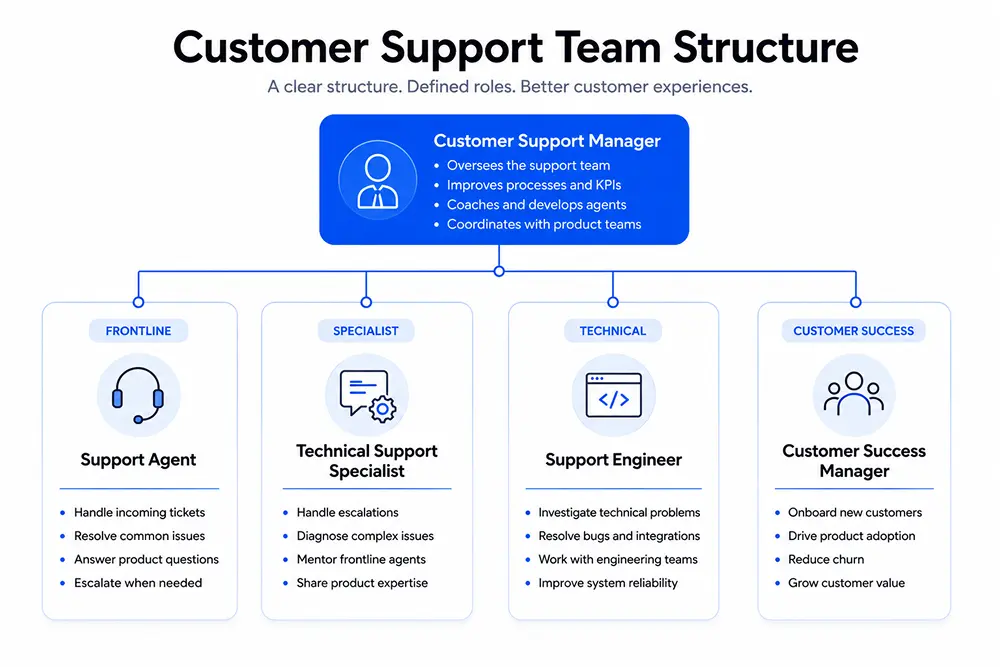
A small team can combine these duties until volume justifies splitting them.
Choosing the Right Tiers
Tiers route problems to the right skill level instead of dropping every issue on one overloaded inbox. A common setup uses three levels.
Tier one handles common questions, account changes, and simple troubleshooting. Tier two takes escalated technical issues that need deeper product knowledge. Tier three, often engineering, resolves bugs or edge cases tier two cannot fix.
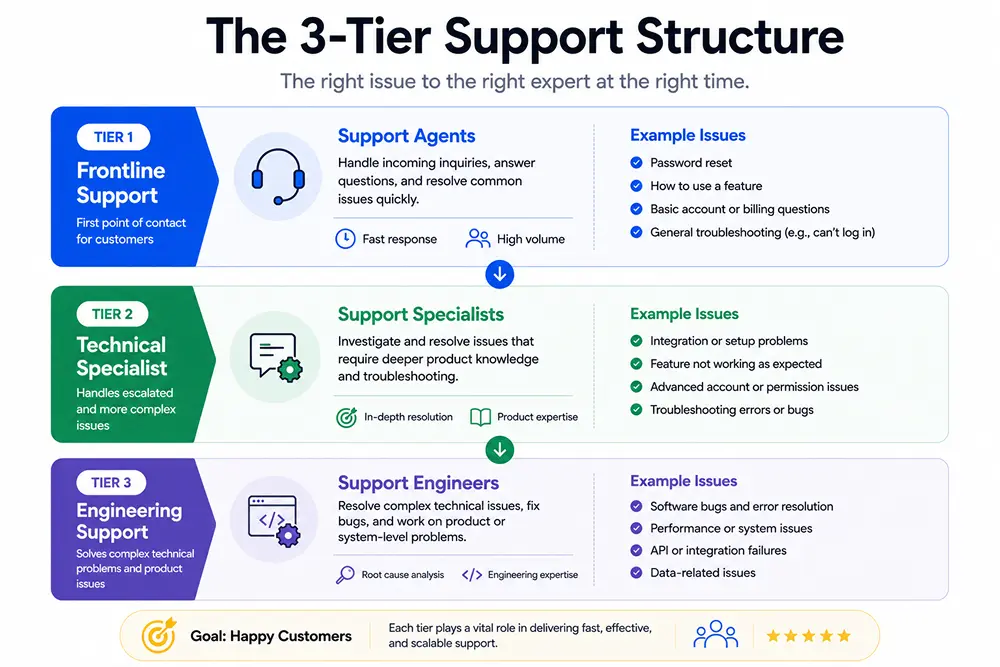
Add a new tier only when frontline agents regularly hit their limits. Many teams add tiers too early. They build management layers before ticket volume actually justifies them. Start with tier one and two, then expand once the data shows a clear need.
Hire for Empathy and Skill
Technical knowledge can be taught. Empathy is harder to build after the fact. Look for candidates who listen carefully, stay calm under pressure, and explain solutions without sounding scripted.
During interviews, present a real scenario from your own ticket history and ask how the candidate would respond. Their answer reveals more than a resume ever will.
Pay attention to writing samples too, especially for chat and email roles. A candidate who writes clearly under time pressure will likely reply to frustrated customers the same way.
Train Agents From Day One
New agents need more than a product manual. Pair them with an experienced teammate for the first two weeks. Let new hires shadow real tickets before handling any on their own.
Build a short sandbox where trainees can practice on sample tickets without risking a real customer relationship. Mistakes during training cost nothing. Mistakes on a live ticket cost trust.
Revisit training every quarter as your product changes. A team that trains once and stops falls behind the product itself fast.
Create a Support Playbook
A playbook turns scattered knowledge into something every agent can reference. Include response templates, escalation rules, refund policies, and answers to your most common ticket types.
Keep the playbook short enough that agents actually read it. A forty page document nobody opens is worse than no document at all. Update it after every recurring issue that catches the team off guard.
A clear support strategy tied to this playbook keeps decisions consistent as the team grows. New hires ramp up faster when policies live in one place.
Choose the Right Support Tools
A help desk keeps every ticket, channel, and customer history in one place instead of scattered inboxes. Look for automation, tagging, and reporting features that match your ticket volume.
Decide between SaaS and self-hosted options early. SaaS tools charge per agent and store data on their servers. Self-hosted systems give full data ownership and often cost less as a team scales.
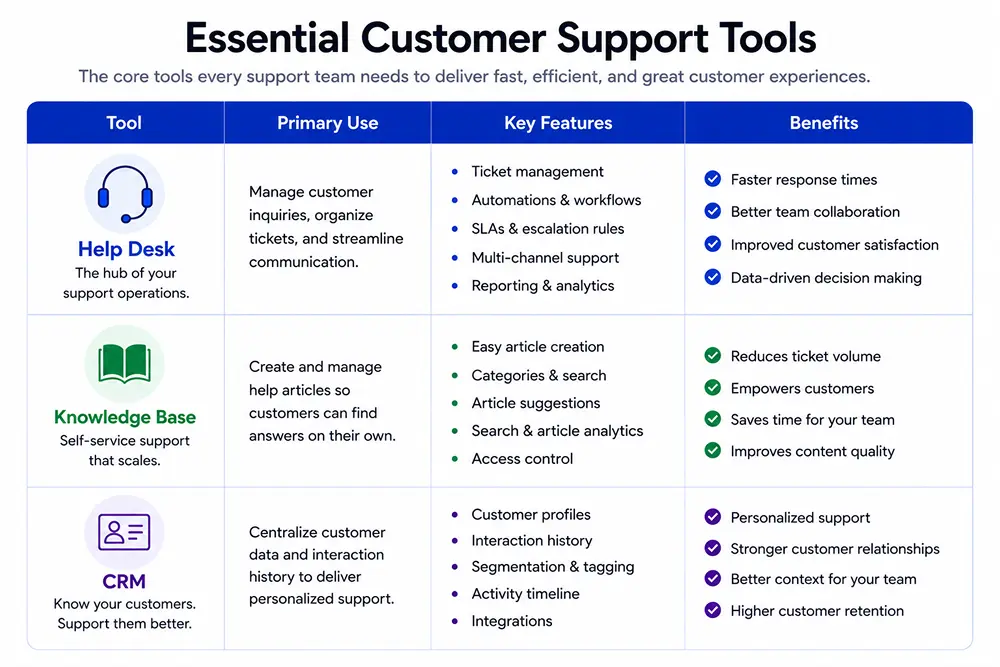
For WordPress-based businesses, Fluent Support runs inside your existing site, connects with WooCommerce and LMS plugins, and keeps ticket data on your own hosting.
Add a CRM and a knowledge base alongside the help desk to round out the setup.
Add Self-Service Options
Not every customer wants to talk to a person first. A solid knowledge base, FAQ page, or short video library lets people solve simple problems on their own at any hour.
A Gartner study shows the limits of this approach. “Only 14% of support issues get fully resolved through self-service alone, and Gartner’s Eric Keller said it’s concerning that so few fully resolve there.” Self-service works best for simple, repetitive questions rather than account-specific problems.
Pair self-service with strong knowledge management practices so content stays accurate. Combine this with clear onboarding best practices so new customers rely less on tickets early on. Community forums add another layer, where long-time users help newer ones.
Track Feedback and Metrics
Support data shows where the team struggles before customers complain publicly. Track first response time, resolution time, and satisfaction scores at minimum.
Fluent Support’s first response time guide breaks down how this single metric affects overall satisfaction more than most teams expect. Fast first replies often matter more to customers than fast full resolutions.
Collect direct feedback surveys after ticket closures too. Short one-question surveys get higher response rates than long forms. Review this data monthly with the team rather than only during annual planning. Patterns in feedback often reveal training gaps long before they show up in churn numbers.
Tired of buying addons for your premium helpdesk?
Start off with a powerful ticketing system that delivers smooth collaboration right out of the box.
Wrapping Up
Building a customer support team takes ongoing attention rather than a single project you finish and forget. Channels shift, products change, and customer expectations keep rising.
Start with clear roles, a simple tier structure, and one or two tools that actually fit your ticket volume. Revisit the structure every few months. Add a tier when agents hit real limits. Add a role when workload proves it.
A support team built this way scales without the growing pains most businesses hit during their first big growth spurt.
FAQs
How to structure a customer support team?
Start with two or three channels, a short list of roles, and one tier for simple issues. Add a second tier once agents regularly escalate problems they cannot solve alone.
What are the 7 steps of customer service?
Most frameworks cover the same ground. Set standards, map channels, hire the right people, train them, build a playbook, pick tools, and track feedback. The exact steps vary by source, but the sequence stays similar.
How do you build a great support team?
Hire for empathy first and train technical skills after. Give agents a clear playbook and enough freedom to solve problems without escalating every small decision.
How to improve customer support team?
Review ticket data monthly, retrain around recurring issues, and ask customers directly what slowed them down. Small, regular adjustments beat big yearly overhauls.

A published literary author, and a musician. I thrive on marketing for tech companies while composing music, collecting books of lasting depth, exploring cinema with a discerning eye, and studying the arts and history.
-

How to Master Customer Onboarding and Keep Customers Coming Back
Master customer onboarding with 5 simple stages, 9 proven best -
How to Optimize Your WordPress Website Without Overloading It
Learn how to optimize your WordPress website by reducing unnecessary -
Kanban vs Scrum vs Agile vs Waterfall: What’s the Difference?
Get a clear, no-jargon breakdown of Kanban vs Scrum vs



Leave a Reply
You must be logged in to post a comment.