

Affiliate Landing Pages: How To Turn Partners Into Revenue Channels
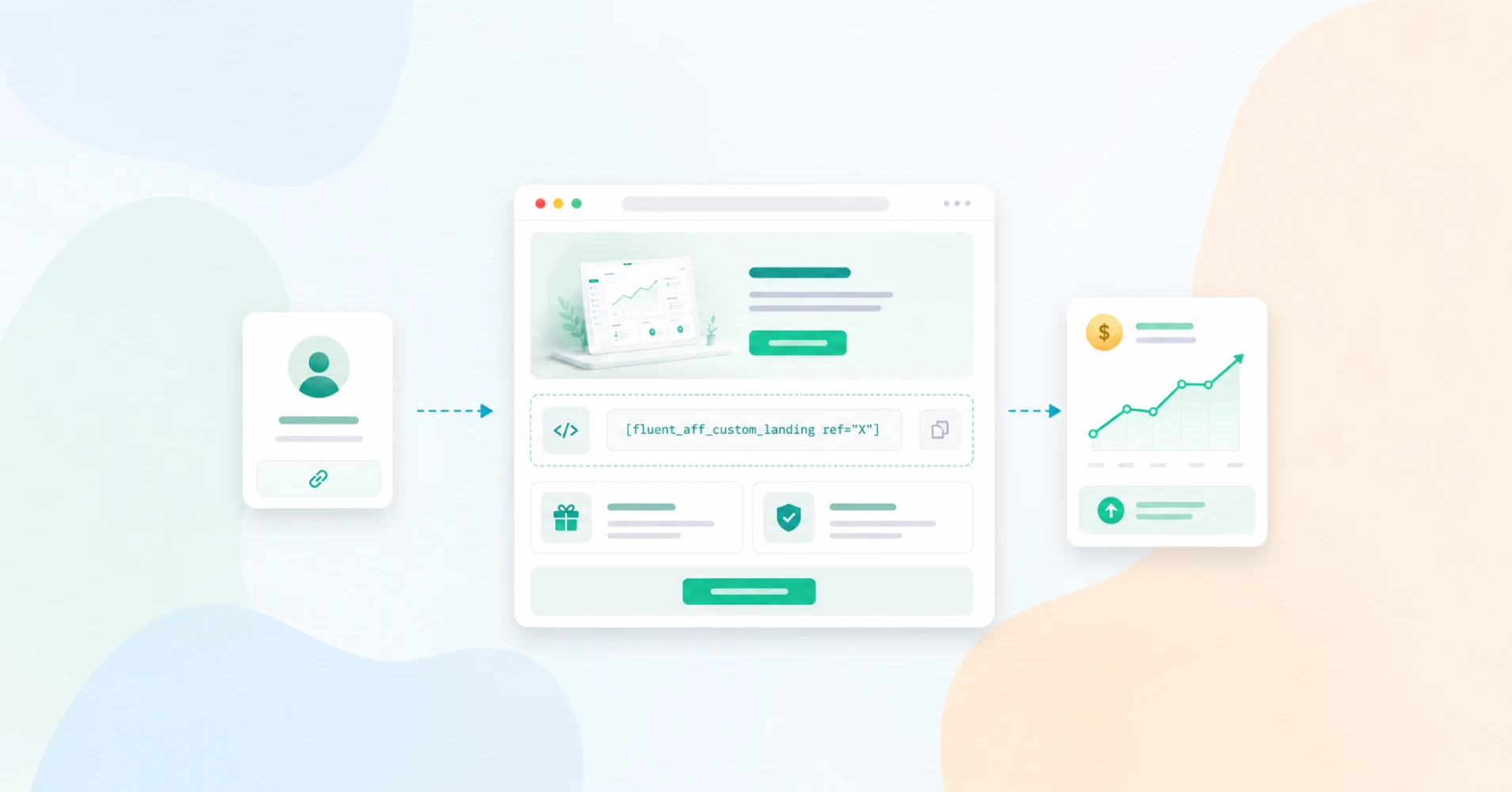
You recruited a handful of affiliates. They post their links, send some clicks, and then nothing. The clicks land on your homepage, which was never built for their audience, and the visitor leaves confused.
The affiliate gives up, you blame the program, and a real revenue channel quietly dies. Most of the time the partner was fine. The page they sent traffic to was the problem.
Key Takeaways
- An affiliate landing page is a dedicated page built for one partner’s audience, with every visit and sale tracked back to that affiliate.
- Sending affiliate clicks to a generic homepage wastes traffic because the page is not built to convert that specific audience.
- Custom-built landing pages convert far better than generic template pages, so a page made for the partner’s audience pays off fast.
- A strong affiliate landing page needs one clear offer, one call to action, real social proof, and fast mobile loading.
- In WordPress, FluentAffiliate creates branded landing pages with a shortcode that ties every visitor to a specific affiliate.
- Tracking only works when visits, referrals, commissions, and payouts all live in one place tied to the same affiliate record.
- Partner enablement matters as much as the page itself, since affiliates promote harder when you hand them ready assets and timely updates.
What Affiliate Landing Pages Are
An affiliate landing page is a dedicated web page made for the traffic a specific affiliate sends, where every visit and conversion is tracked and credited back to that affiliate automatically.
A normal affiliate link looks like yoursite.com/?ref=123. It works, but it usually drops the visitor on your homepage or a busy product page. The visitor has to figure out where they are and what to do. An affiliate landing page removes that guesswork. It speaks to the exact audience the partner brought, repeats the promise that made them click, and points them toward one action.
The important part for program owners is the tracking. A good affiliate landing page is not just a pretty page. It sets the referral cookie the moment someone arrives, so any purchase during that session is credited to the right partner. Without that link between page and affiliate, you have a marketing page, not an affiliate asset.
Why Partners Need Their Own Page
Let’s be honest about what usually happens. You give an affiliate a link, they share it, and the click lands somewhere generic. The visitor came because the affiliate promised something specific, maybe a discount, maybe a solution to one annoying problem. Your homepage says none of that. It talks about everything you do. So the visitor bounces.
This is not a small leak. Research shows nearly half of all visitors never make it past the first page they land on, which means that first page decides most of your outcome. If that page is not built for the partner’s audience, you are losing people before they ever see your offer.
Now look at the upside of doing it right. One analysis found custom-built landing pages convert at about 11.6% compared with 3.8% for template pages. That is roughly a 3x difference, just from building a page for a defined audience instead of reusing a generic one. The same body of research found personalized calls to action outperform generic ones by around 202%.
A page that names the partner, shows the offer, and looks intentional tells the visitor this is a real relationship, not a random ad.
What To Include On A High-Converting Landing Page
A few elements do most of the heavy lifting. Get these right, and the page works. Skip them, and no amount of design saves it.
Elements of A
High-Converting
Landing Page
Message Clarity
Call To Action
Trust Signals
The Partner’s Audience
Mobile Readiness
Offer And Message Clarity
The headline should match the promise that made the visitor click. If the affiliate said “save 20% on your first month,” the page should say that near the top, not bury it.
People scan. Give them the offer and the reason to care in the first few seconds, in plain language.
One Clear Call To Action
Pick one action and make it obvious. Start the trial. Buy the plan. Book the call. Pages built around a single call to action tend to convert better than pages with several competing buttons.
In one dataset, single-CTA pages converted at 13.5% versus 10.5% for pages with multiple CTAs. Every extra option is a chance for the visitor to hesitate, then leave.
Social Proof And Trust Signals
Testimonials, reviews, logos, and short case studies all reduce the fear of buying. This is not optional fluff. Around 92% of consumers read testimonials when they are considering a purchase.
If the partner’s audience trusts the partner, a quote from that partner on the page carries even more weight.
Personalization For The Partner’s Audience
This is where affiliate landing pages beat generic ones. You can add the partner’s photo, a short welcome note from them, or a testimonial in their voice. You can speak to their niche directly.
A page that feels made for “people who follow Alex” converts better than a page that feels made for everyone, because it is.
Speed And Mobile Readiness
Most affiliate traffic is mobile. If the page loads slowly or breaks on a phone, you lose the sale before the offer even appears. Keep the page light, make buttons easy to tap, and test it on an actual phone, not just your desktop preview.
Speed is not a nice-to-have. It is part of the conversion.
How To Build An Affiliate Landing Page In WordPress
If you run your program in-house on WordPress, you do not need a separate landing page tool or a SaaS network to do this. A tool like FluentAffiliate lets you build a branded, fully tracked landing page for any affiliate using a simple shortcode, and you keep all the data on your own site.
The key thing to understand is who builds the page. You, the admin, create it. The affiliate just shares the finished URL. That keeps you in control of the message and the tracking.
Here is the process.
- Create a new page. From your WordPress dashboard, go to Pages and add a new page. Give it a clean, memorable slug that matches the partner, like /partner/john-doe.
- Add the shortcode. Drop this into the page content:
- Set the affiliate. Replace X with the affiliate’s identifier. You can use their numeric ID, so for an affiliate with ID 2, you would use ref=”2″. You can also use their WordPress username, like ref=”johndoe”, but only if you have set the Default Referral Format to “WordPress username” in your referral settings.
- Build out the page. Add your headline, offer, the partner’s photo or note, your social proof, and one clear call to action around the shortcode. The shortcode handles the tracking. You handle the persuasion.
- Publish and share. Once it is live, hand the clean URL to your affiliate. When someone lands there, FluentAffiliate sets the tracking cookie and links that visitor to the partner. Any purchase in that session is credited automatically, exactly like a standard referral link.
A few things worth knowing. Each custom landing page is tied to one affiliate, so do not try to share a single page across multiple partners. You can create as many pages as you want, so every strong affiliate can have their own.
Tracking Visits, Referrals, And Commissions
A landing page that converts is only half the job. If you cannot see what it did, you cannot pay the right partner or improve the page. This is where running your program inside one system pays off, because the visit, the referral, the commission, and the payout all connect to the same affiliate record.
Visits And Attribution
Every click on an affiliate link or landing page gets logged. In FluentAffiliate, the visits log shows the destination URL, the referrer, the related referral if the click converted, the affiliate it belongs to, the UTM source, medium, and campaign, and the date. You can filter by Converted and Not Converted to see which traffic actually turned into sales.
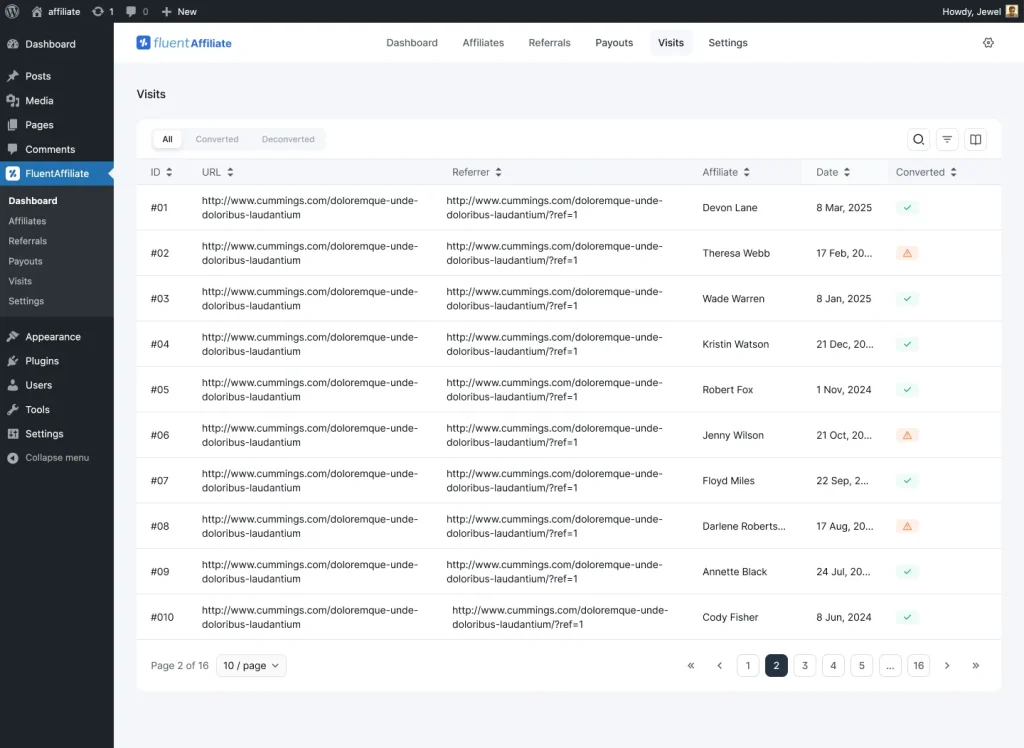
This matters for landing pages specifically. If a partner’s page gets plenty of visits but few conversions, the page needs work. If it gets few visits, the partner needs better promotion. The data tells you which problem you actually have, so you stop guessing.
Attribution itself is set in your referral settings. You decide whether the first affiliate or the last affiliate gets credit, and how long the tracking cookie lasts. The default cookie window is 30 days, and you can change it to fit your sales cycle.
Referrals And Commission Setup
When a visit converts, it becomes a referral. From the managing referrals screen you can see every conversion, its amount, the affiliate, the status, and the source, and you can filter by Paid, Unpaid, Pending, and Rejected.
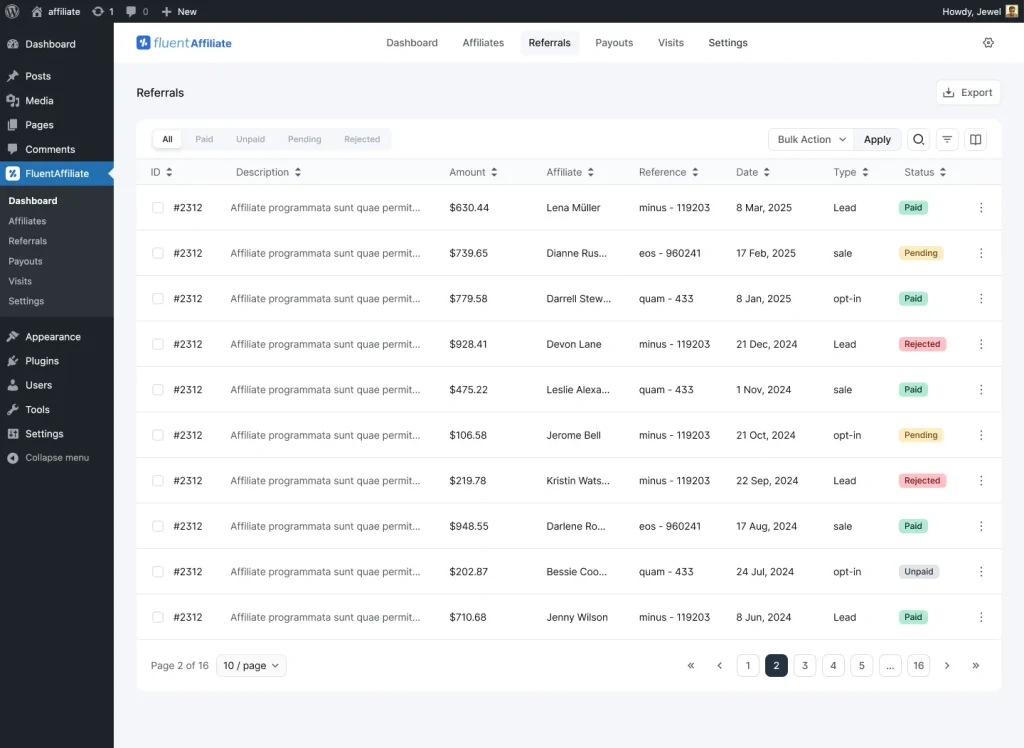
Commission rates are flexible. You set a global rate as either a flat amount or a percentage. On top of that, integrations like WooCommerce, Easy Digital Downloads, and FluentCart let you set custom rates for specific products or categories.
If you want to reward certain partners more, you can place them in an affiliate group with its own rate.
You can also hand top affiliates’ branded coupon codes on WooCommerce, EDD, and FluentCart. The admin assigns a coupon to a specific affiliate, and when a customer uses it, the partner gets credited. It is a clean option for influencers who would rather share a code than a link.
Payouts And Reporting
When it is time to pay, the payout management area lets you create a payout, choose the affiliates and date range, set a minimum payout amount, and generate a record of who was paid and how much. You can export the whole thing as a CSV for your accounting.
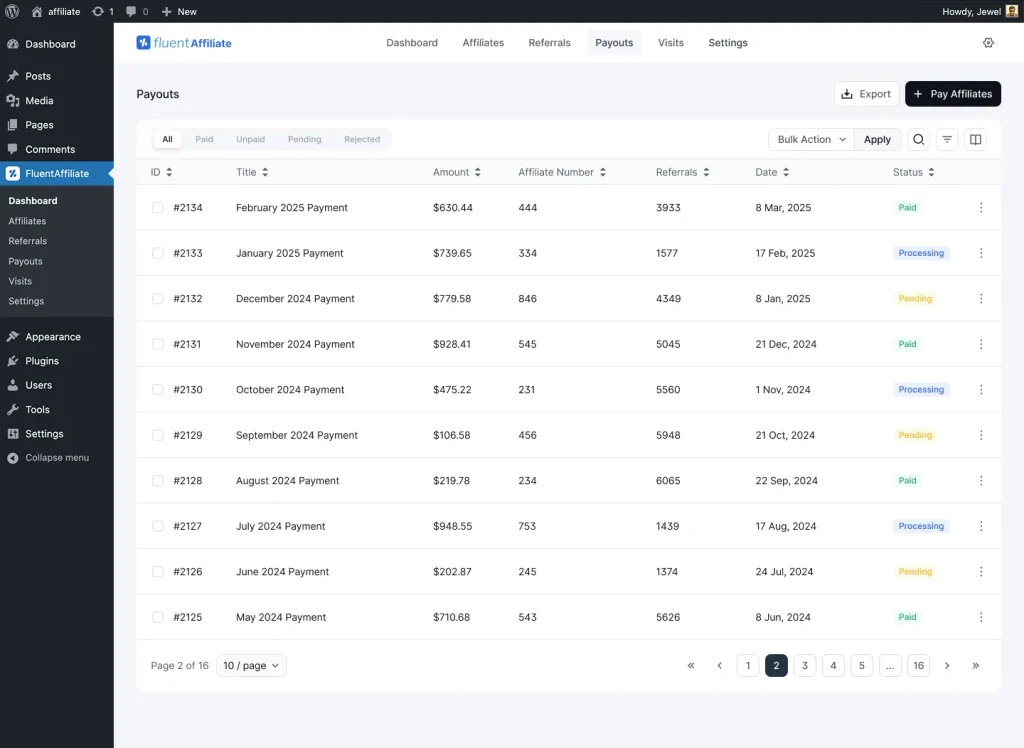
FluentAffiliate records and tracks payouts, but it does not push money through a payment gateway for you. You make the actual payment using the affiliate’s PayPal or bank details from their profile, then mark it recorded. For owners who want full control over when and how money goes out, that is usually a feature, not a limitation.
For the bigger picture, your admin dashboard shows total paid, total unpaid, active affiliates, total visits, total referrals, conversion rate, and a growth graph over time. That is where you spot which landing pages and partners are actually moving the needle.
Email Notifications That Keep Partners Active
Quiet programs die. Affiliates who never hear from you forget you exist. FluentAffiliate sends automated emails for events like a new affiliate signup, a new sale, an approved application, and a completed payout, and you can customize each one from the notification settings.
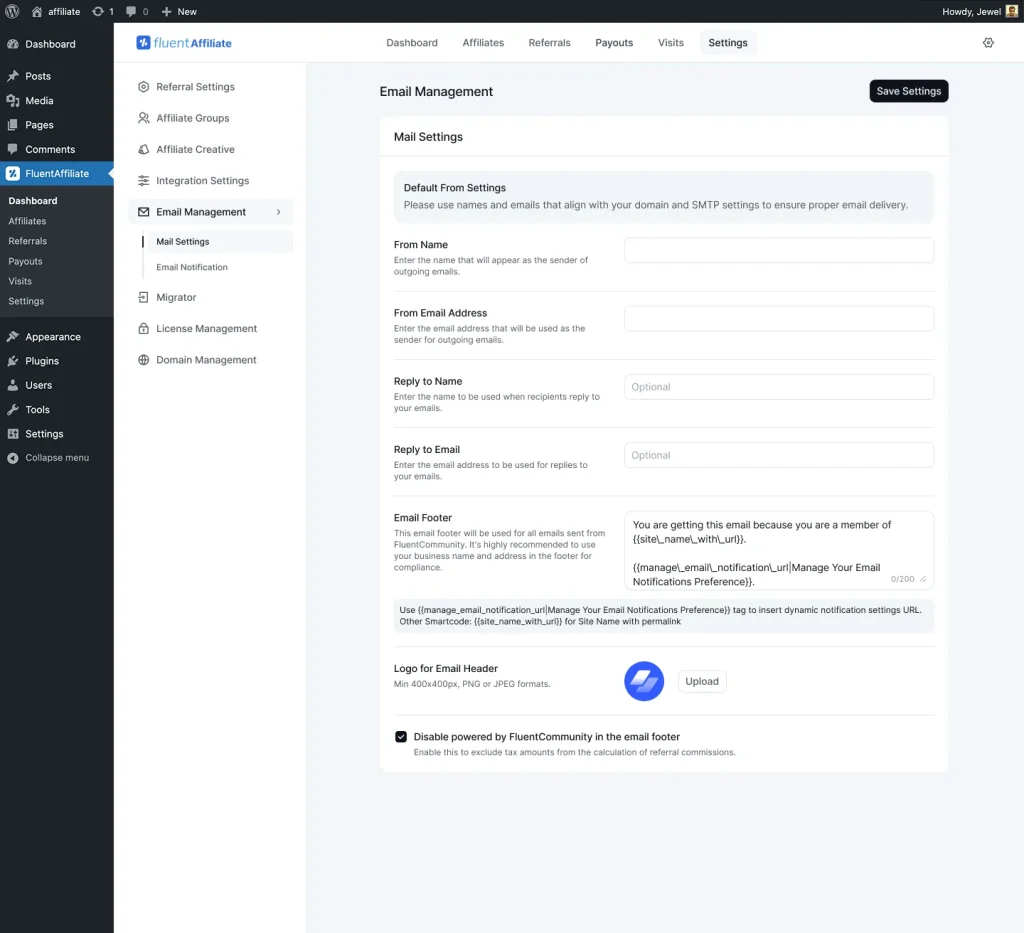
The new-sale email to the affiliate is the one that keeps people promoting. There is nothing like a “you just earned a commission” message to make a partner share your landing page again. Affiliates who use email in their own promotion also tend to earn more, so encouraging that habit helps both sides.
Examples For SaaS, Plugins, And Services
The idea is the same everywhere, but the page changes based on what you sell. Here is how to think about it for three common cases.
SaaS Products
For software, the visitor’s biggest question is “will this actually solve my problem.” So the partner’s page should lead with the specific outcome, show a short demo or screenshot, and offer a frictionless start like a free trial or an extended trial through the partner.
Use the partner’s voice for credibility, since SaaS buyers trust a recommendation from someone in their niche far more than a generic ad. One clear button: start the trial.
A custom landing page also matters more here because SaaS pages built for a defined audience tend to convert well above template pages.
WordPress Plugins
Plugin buyers are practical. They want to know what it does, what it works with, and that it will not break their site. A partner page for a plugin should name the exact use case the partner’s audience cares about, list the key integrations, and show proof it works.
If you sell a plugin and run your own affiliate program with FluentAffiliate, you already understand this audience, so write the page the way you would explain the plugin to a fellow site owner. Offer the partner a branded coupon to sweeten it.
Service Businesses
For services, trust is everything because the buyer is hiring a person or a team. The partner’s page should feature a testimonial, a clear description of the result the client gets, and a single low-pressure action like booking a call.
A referral from a trusted partner plus a page that feels personal is a strong combination, since the visitor arrives already half-convinced. Keep the form short. Every extra field is a reason to leave.
Common Mistakes To Avoid
A few patterns quietly kill affiliate landing pages, and they are easy to fix once you know them.
The first is sending all affiliate traffic to the homepage. You already know why. The page is built for everyone, so it converts no one in particular.
The second is stuffing the page with options. Multiple offers, multiple buttons, a navigation menu pulling people away. Pick one action and protect it.
The third is forgetting the tracking. A beautiful page that does not credit the partner is just a marketing page. Always confirm the shortcode and the affiliate ID are correct, then test the page with a real click before you hand it over.
The fourth is going silent. You set up the program, then never tell affiliates how they are doing. Turn on the sale and payout emails, and check your dashboard so you can nudge partners who have gone quiet.
The last one is treating the page as finished. Watch the visits and conversion data, then improve the headline, the proof, or the offer. Small changes compound, and the affiliates whose pages you improve will notice the bigger checks.
Conclusion
Affiliate landing pages are one of the simplest ways to get more from the partners you already have. Instead of hoping a generic homepage converts traffic it was never built for, you give each partner a focused, branded page that speaks to their audience and tracks every sale back to them. The result is better conversions, happier affiliates, and a channel that actually grows.
The best part is you can run all of it inside WordPress, on your own site, with your own data. Build the page with a shortcode, track visits and referrals in one dashboard, set your commissions, and record payouts when you are ready. No network taking a cut, no data living somewhere you cannot reach.
Launch smarter affiliate campaigns with FluentAffiliate and turn your partners into a real revenue channel.
Frequently Asked Questions
Here are some of the most common queries people ask:
What is an affiliate landing page?
An affiliate landing page is a dedicated page built for the audience a specific affiliate sends, where every visit and sale is tracked and credited to that affiliate. It replaces a generic homepage link with a focused page that repeats the partner’s promise and points visitors toward one clear action.
How is an affiliate landing page different from a normal landing page?
A normal landing page is built for a campaign or an ad. An affiliate landing page does the same job but also ties every visitor and conversion to a specific partner, so the right affiliate gets the commission. The tracking layer is the difference.
Do affiliates build their own landing pages?
Not in FluentAffiliate. The program owner creates the page using the custom landing page shortcode and assigns it to one affiliate. The affiliate simply shares the finished URL. This keeps the message and the tracking in the owner’s control.
How do I create an affiliate landing page in WordPress?
Create a new WordPress page with a clean slug, add the shortcode , and replace X with the affiliate’s ID or WordPress username. Build your offer, proof, and call to action around it, then publish and share the URL with your partner.
Can one landing page be used for multiple affiliates?
No. Each custom landing page is tied to a single affiliate so that tracking stays accurate. You can create an unlimited number of pages, though, so every strong partner can have their own dedicated page.
How are commissions tracked from a landing page?
When a visitor arrives on the page, the shortcode sets the referral cookie and links them to the assigned affiliate. Any purchase during that session becomes a referral credited to that partner, which you can then see, approve, and pay from your dashboard.
Does FluentAffiliate pay affiliates automatically?
No. FluentAffiliate records payouts and generates a report you can export, but it does not send money through a payment gateway. You pay each affiliate manually using the PayPal or bank details in their profile, which gives you full control over timing and method.

Ashik Elahi is a seasoned Digital Marketing Strategist with a passion for Content Marketing. He believes in the power of storytelling and crafting valuable content that resonates with readers.
-
Single-Step Form vs. Multi-Step Form: Which One Is the Best and Why
Single-step vs multi-step form, which format converts better? Learn how -

5 Best Ecommerce Platforms for Small Businesses in 2026
You need a low-maintenance system. focus on business more. Here’s -
The Real Setup Behind a Working Affiliate Marketing Website
A step-by-step guide to building an affiliate marketing website with


Leave a Reply
You must be logged in to post a comment.