

9 SMS Marketing Automation Strategies for eCommerce
Most eCommerce stores already email their customers.
Fewer text them, even though SMS gets read within minutes of arriving.
Texting each shopper by hand does not scale, so most stores skip it entirely. SMS marketing automation for eCommerce removes that manual work
When you have the right tool for SMS marketing automation, it lets you reach shoppers at the exact moment they abandon a cart, restock a favorite item, or go quiet, using flows that run without a marketer hitting send.
TL;DR
- SMS marketing automation strategies for eCommerce send a text the moment something happens, like a cart abandonment, instead of on a fixed schedule
- Nine strategies cover everything from a first welcome text to subscription renewals and order updates
- Start with cart abandonment recovery. It brings back the most revenue for the least work
- Revenue per message tells you more than open rate ever will
- Send less, not more, and always give a strategy a clear stopping point
What’s SMS Marketing Automation for eCommerce?
SMS marketing automation for eCommerce sends automated text messages based on shopper actions, not a fixed calendar.
A trigger such as an abandoned cart, a completed order, or 60 days of silence starts the message. Your marketing team no longer needs to remember to send it.
Manual SMS sending acts like a one-time SMS blast, but this is different. With automation, your SMS reaches the entire list on the same day, regardless of where each customer is.
Every SMS Automation reacts based on customer behavior:
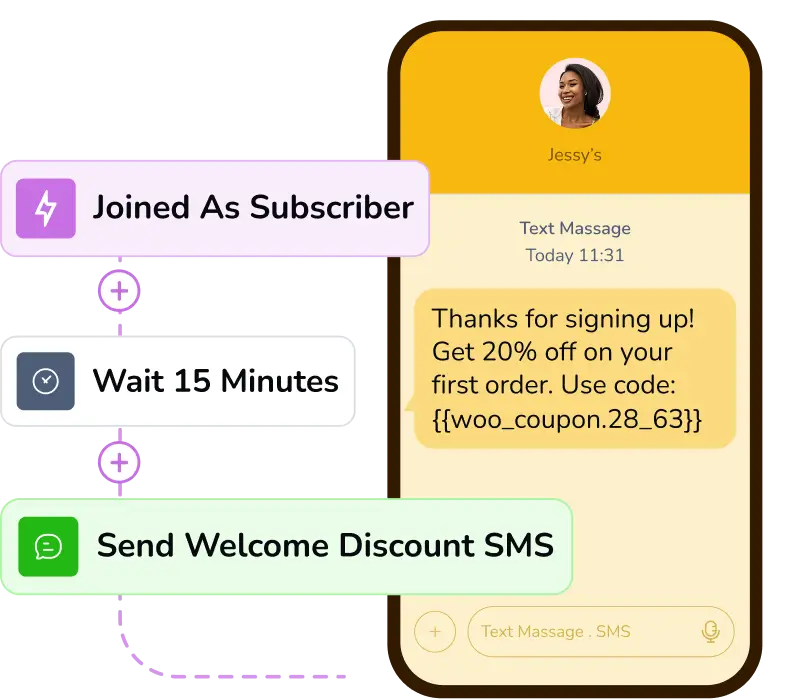
- A welcome flow fires the moment someone subscribes
- An abandoned cart flow fires when a shopper leaves a product in their cart
- A back-in-stock alert fires the moment a sold-out item becomes available again
Why Should eCommerce Brands Add SMS to Their Marketing Stack?
Text messages get seen fast. SMS is widely reported to generate a 90% – 98% open rate, and most messages are read within minutes. Email rarely comes close to that speed.
And that speed shows up in business revenue too. Abandoned-cart SMS messages generate roughly $3 to $11 in revenue per message sent.
Moreover, conversion rates for well-targeted SMS campaigns commonly land in the 20 percent to 30 percent range, close to double typical email conversion.
All of this points to one thing: SMS performs faster and more consistently than email. That does not make email useless. Email can reach a high open rate too, but it depends heavily on subject lines, sender reputation, and inbox placement, factors that barely touch SMS.
Core Elements of eCommerce SMS Marketing Automation
Running SMS marketing automation for eCommerce comes down to four moving parts working together. Each one plays a different role, and skipping any of them turns automation into little more than a manual text message with extra steps.
An SMS Platform Built for eCommerce
This is the software that stores customer information, sends the messages, tracks replies, and connects to your store.
Look for a CRM and marketing automation tool that integrates directly with your cart platform and customer data, rather than a standalone texting tool you update by hand.
Personalized SMS, Not Mass Texts
Automation only works if the message matches the person receiving it.
For example, a shopper who just bought running shoes should not get the same text as someone who abandoned a cart of skincare products.
Segmentation by behavior, purchase history, or preference is what makes a text feel relevant instead of random.
Triggers & Actions that Start the Message
A trigger or action is the event that tells the system to send a text, without a marketer clicking send.
Common eCommerce triggers or actions include:
- A shopper leaves items in their cart without checking out
- A customer’s birthday or account anniversary arrives
Delays that Control When Messages Send
A delay is the wait period between an action, goal, or the message.
Sending multiple SMS instantly is not always the right call. For example, a cart-abandonment text sent the second someone leaves checkout can feel intrusive, while a short wait feels like a helpful reminder.
Common delays in eCommerce SMS automation include:
- 30 to 60 minutes after a cart is abandoned, before the first reminder
- 24 hours between the first and second message in a recovery sequence
- One to three hours after browsing, before a soft product nudge
9 SMS Marketing Automation Strategies for eCommerce
These nine strategies cover most of what an eCommerce store needs from SMS automation.
Start with the first three flows, since they usually carry the most revenue, then add the rest as your list and your team’s capacity grow.
Welcome Series
A new subscriber is paying the closest attention they ever will, right after opting in. That first message decides whether SMS becomes something they read or something they mute.
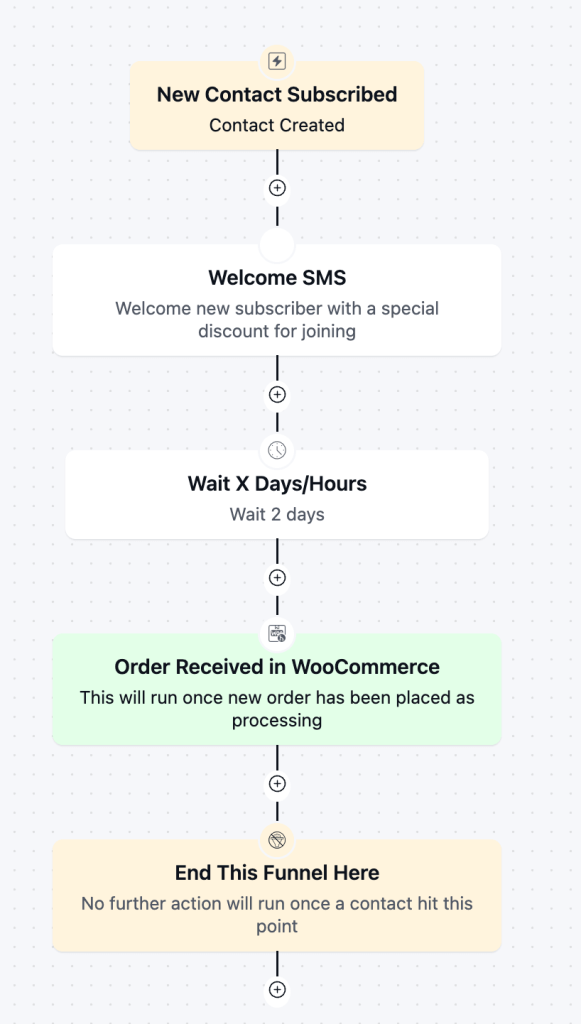
The welcome series must trigger the moment someone opts in. Your message should deliver the promised discount right away, then follow up a day or two later with a bestseller or buying guide.
The moment someone buys, the automation should end the welcome sequence and move them to a post-purchase tag.
Cart and Checkout Abandonment Recovery
Cart abandonment is the biggest revenue leak most stores have, and it is rarely about disinterest.
A shopper who got this far already wanted the product; they just got distracted or hesitated, which is exactly what a well-timed text can fix.
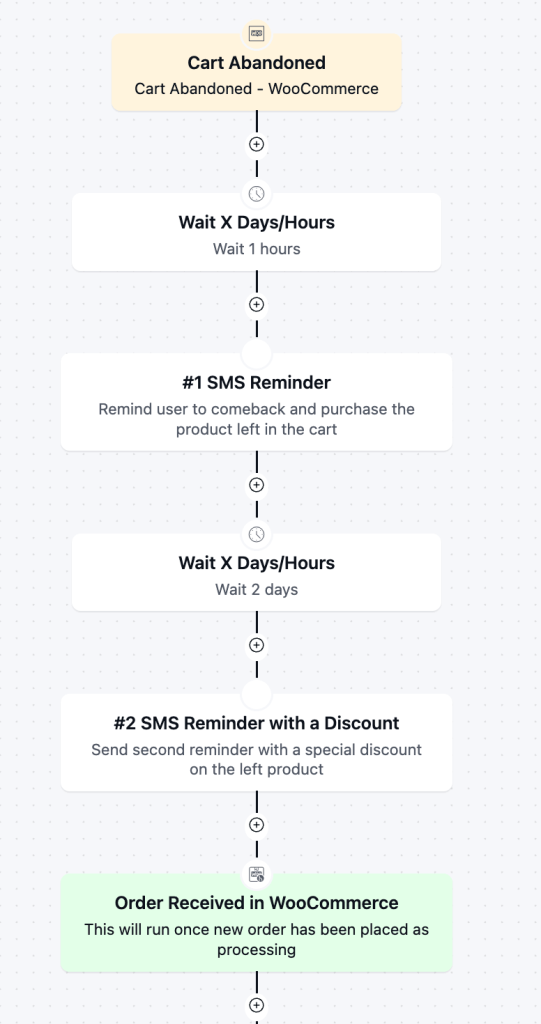
Send the first reminder 30 to 60 minutes after someone leaves a cart or checkout, with a direct link back and no discount yet.
Hold any discount for a second message around 48 to 72 hours later, and only if your margin supports it.
Once the shopper buys the product, end the funnel right away.
Order and Shipping Updates
These are the texts customers actually want, since nobody enjoys wondering about the status of an order.
Getting this right also earns the trust that makes a customer more receptive to a promotional message later.
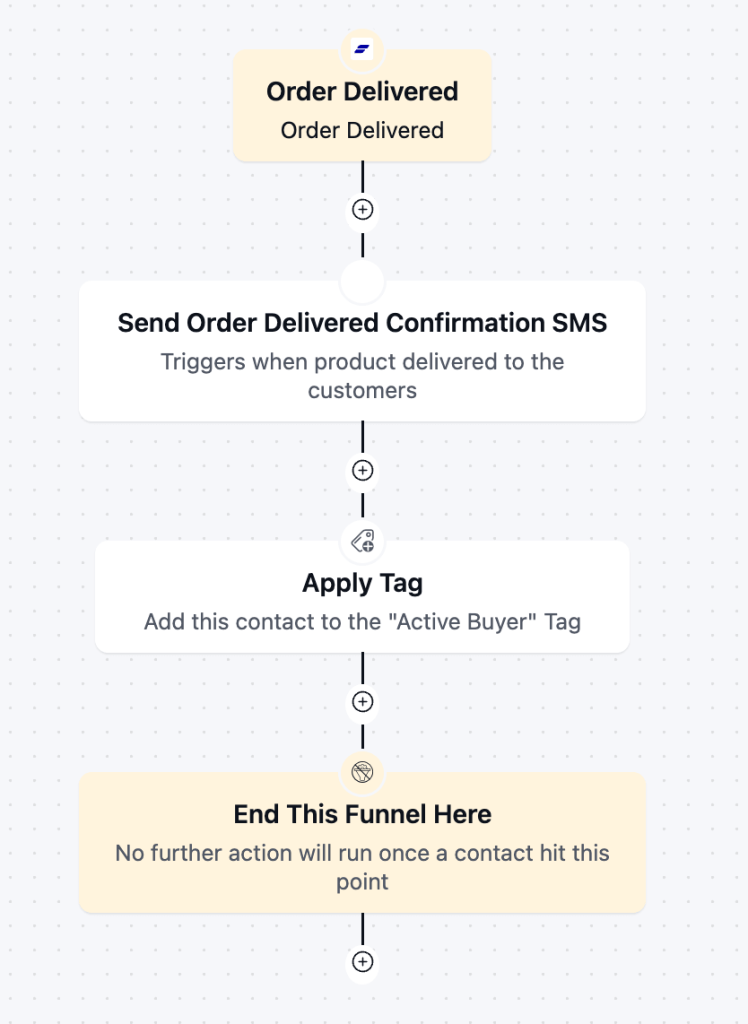
Send a confirmation the moment an order is marked paid, a shipping notice once it ships, and a delivery confirmation once it arrives. Keep this entire sequence service-oriented.
These triggers usually come straight from order-status changes in your store platform, firing the instant a status updates rather than on a delay you set by hand. Save any promotional message for after the customer has the product in hand.
Review Requests and Post-purchase Follow-up
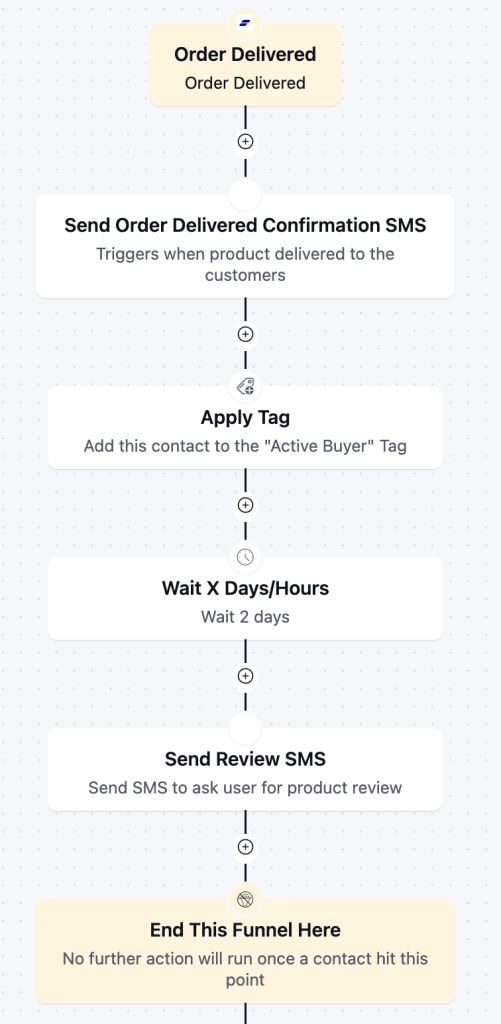
Reviews build the social proof that convinces the next shopper, and a customer who just received their order is in the best mood to give one. This moment also opens the door to a next purchase without feeling like a pitch.
Start this flow when an order is marked delivered, then wait until the customer has had time to actually use the product before asking for a review.
That delay varies by category, for example:
- A skincare routine needs weeks of use,
- A phone case can be judged the day it arrives.
A cross-sell suggestion can follow the review request, tied to what the customer already bought.
Renewal and Win-back
Winning back a lapsed customer costs far less than acquiring a new one, since they already trust the brand and know what to expect. Even a modest response rate here recovers revenue that would otherwise be gone for good.
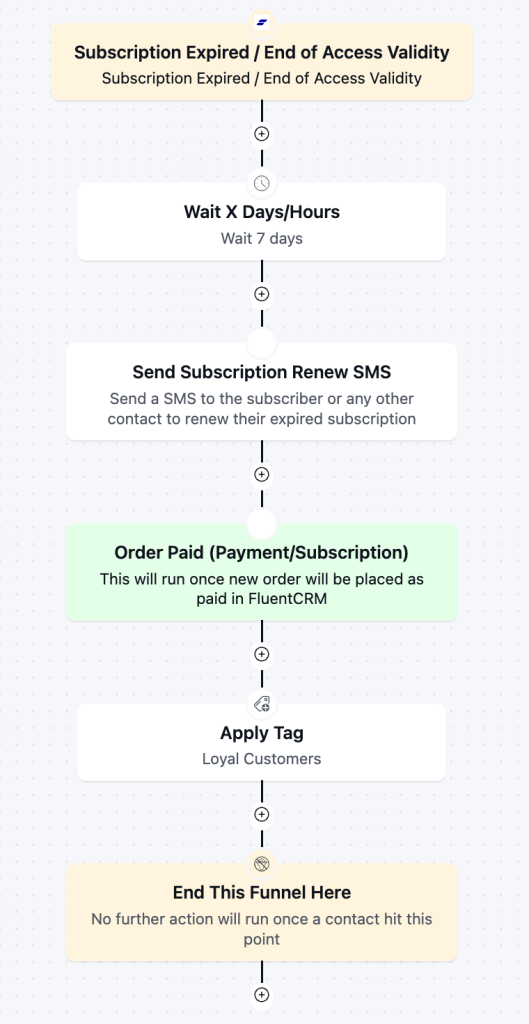
If you sell subscriptions, a cancellation or an expired subscription is a cleaner trigger than any inactivity window, since it marks the exact moment someone left.
Wait a week or two after the subscription ends before reaching out, so the message reads as a genuine win-back rather than a repeat of the same plea.
Personalize the offer around how long they were subscribed and which tier they had.
Someone who stayed a year deserves a stronger nudge than someone who canceled in their first week.
Refund Confirmation and Feedback
A refund is also a trust moment. Confirm it quickly and clearly, and a customer who might have written off your store stays open to buying again later.
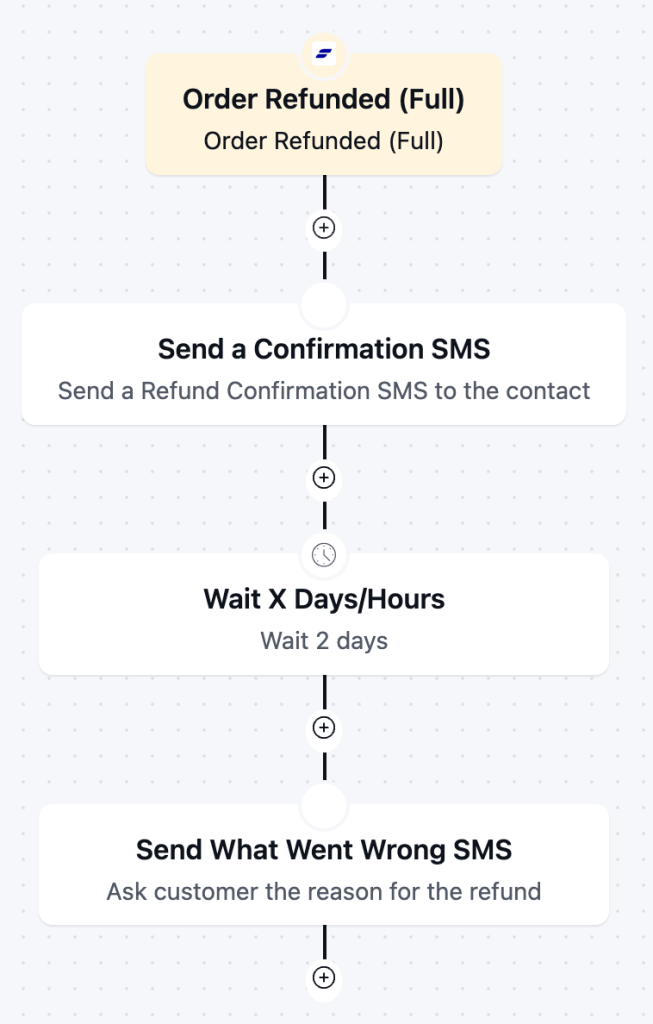
Send the refund confirmation the moment it processes, stating the amount and the timeline for it to appear on their card.
After the refund message goes through, wait a day or two, then follow with one short question asking what went wrong, since refunds are one of the few moments customers will actually explain why they left.
Keep any win-back offer out of this sequence entirely. Asking someone to buy again in the same breath as refunding them reads as tone-deaf.
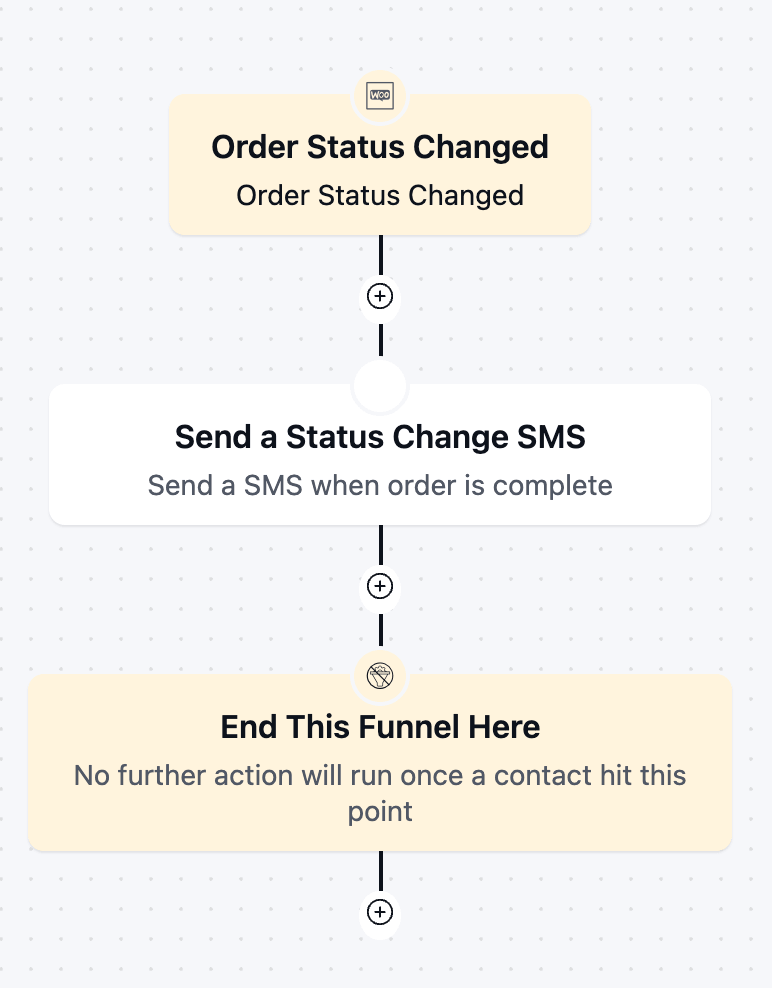
Order Status Updates
A customer places an order and then hears nothing for days. They do not know if it is still being processed, sitting on a shelf waiting to ship, or lost somewhere in between, so they open a support ticket just to ask.
An automated order status update is useful when an order is in progress, on hold, paid, or shipped to keep customers informed.
Configure the trigger with a from and a to status, so it only fires on the exact transition you want instead of every status change on the store. Set it to fire when an order moves from processing to complete, for example, and send a confirmation that the order is ready.
Build a separate trigger for each transition that needs its own message, such as processing to backordered, or awaiting payment to on hold.
Plan Completion and Renewal Upsell
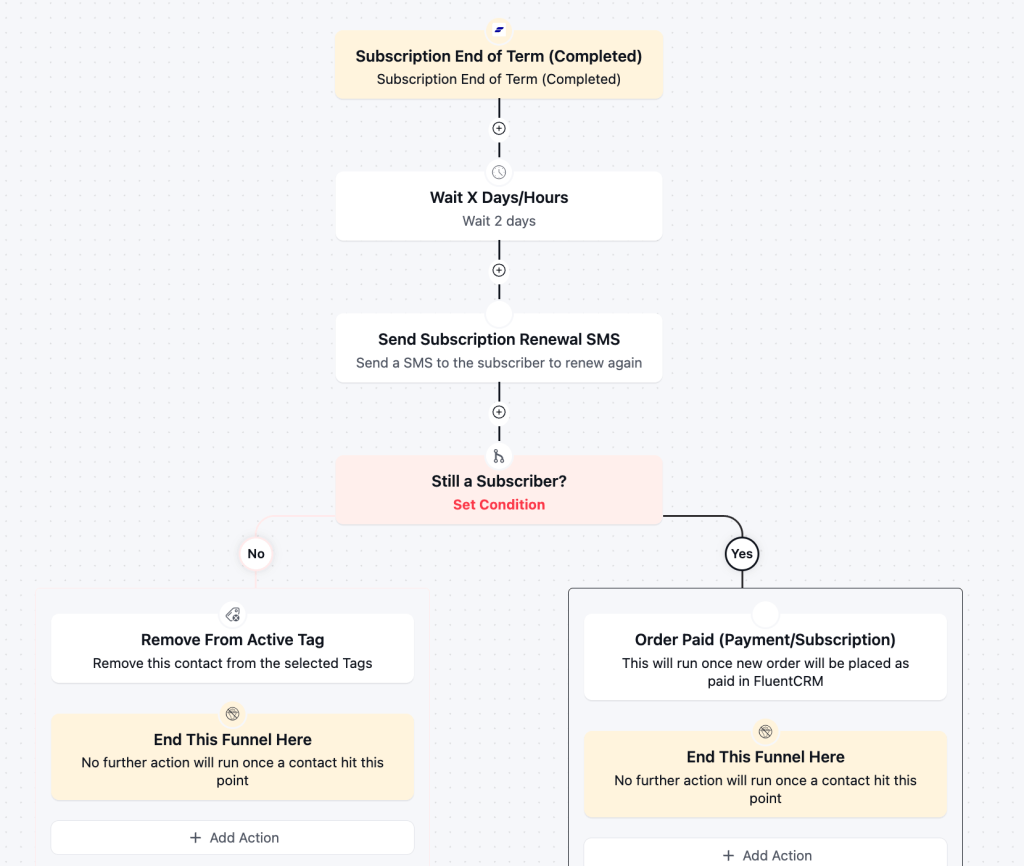
A plan reaching its natural end is a cleaner moment to talk about what is next than trying to upsell mid-term.
The customer already committed once and got full value, so they are not starting the conversation from zero.
Trigger this when the term completes, not when it renews automatically.
Use it to confirm next steps or pitch a next-tier plan. Someone who used the full term is a stronger upsell candidate than someone who barely engaged.
VIP, Loyalty, and Flash-sale Campaigns
Your best customers already spend more, and treating them like everyone else on a discount blast wastes that relationship.
Recognition keeps them loyal in a way a bigger markdown rarely does.
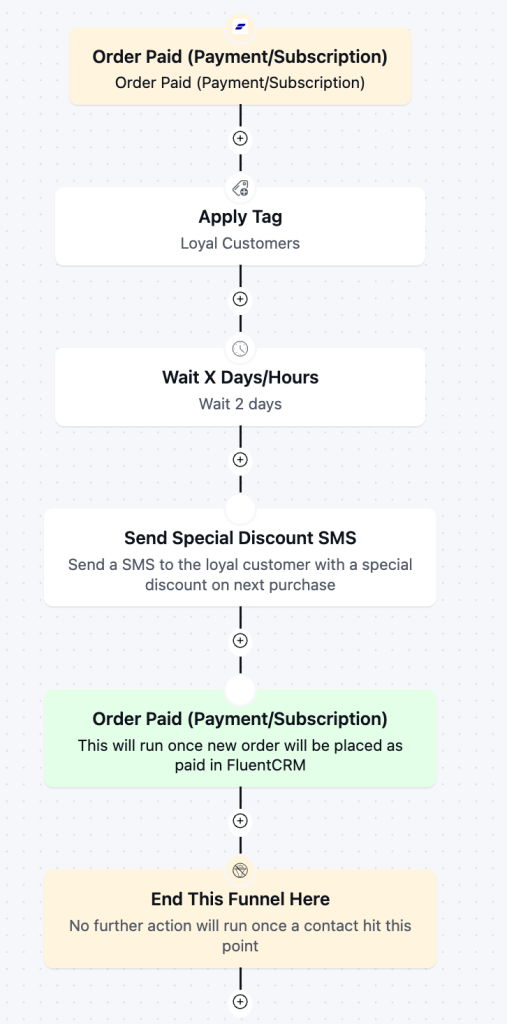
Reward your best customers with access, such as early drops or a private restock alert, instead of defaulting to a bigger discount. Keep the volume low so the message still feels earned.
Use total spend or order count as the trigger for VIP status. A customer gets tagged and enrolled automatically once they cross the threshold, instead of through a manually updated list. A subscriber who keeps renewing is showing the same loyalty signal, so a renewal event can feed the same flow.
For seasonal pushes like Black Friday, this BFCM playbook covers a full messaging calendar to adapt for SMS.
Best Practices for eCommerce SMS Marketing Automation
A few simple habits keep an SMS marketing healthy instead of getting shut down by opt-outs:
- Set a weekly text limit for each customer, no matter how many flows are running
- Stop an automation when the goal is reached
- Never send two automated texts to the same customer on the same day
- Only personalize with data you trust, and use a simple backup when something is missing
- Watch your opt-out rate. Above about 3 percent per send usually means you are texting too often, not bad luck
Choosing an eCommerce SMS Marketing Automation Tool
Picking a tool for SMS marketing is not just about finding an app that sends texts. A real business needs one that also handles email, customer data, and often a store platform, not SMS alone.
A few questions narrow down the options quickly:
- Does it share one customer list with your email tool, or do you need to sync two lists by hand?
- Can customers text back, or is it one-way only?
- Does it track consent and handle opt-outs on its own?
- How much will it cost as your list and texts grow?
- Does it live inside your store, or do you need to connect it through another app?
Adding a separate SMS app on top of your email tool usually means two bills and two lists to keep in sync by hand.
Tools that handle both from one dashboard, like FluentCRM alongside FluentCart, cut that extra work for WordPress-based businesses.
Common eCommerce SMS Automation Mistakes to Avoid
A handful of mistakes show up again and again in underperforming SMS marketing automation:
- Writing texts like short emails, with multiple links and long explanations
- Sending every promotion to the entire list instead of the segment it fits
- Leading with a discount before a simple reminder has a chance to work
- Letting two or three automations reach the same customer on the same day
- Running SMS through a tool disconnected from the store’s actual customer and order data
- Forgetting to set an exit condition, so an SMS automation runs even after achieving the goal
- Running automation through a tool disconnected from the store’s actual customer data
Getting Started With eCommerce SMS Marketing Automation
Getting SMS automation right depends less on which strategy you pick first and more on the basics: real consent, one shared customer view, and measuring by revenue instead of open rate.
If your email marketing already runs on FluentCRM, then it already has native SMS automation that is ready to use.

Words are my favorite playground. As a Creative Writer at WPManageNinja, I don’t just produce content; I tell stories. By mixing fiction and metaphors with real-life examples, I turn my writing into a creative journey that’s easy for readers to digest and relate to.
-
Single-Step Form vs. Multi-Step Form: Which One Is the Best and Why
Single-step vs multi-step form, which format converts better? Learn how -
5 Best Ecommerce Platforms for Small Businesses in 2026
You need a low-maintenance system. focus on business more. Here’s -
The Real Setup Behind a Working Affiliate Marketing Website
A step-by-step guide to building an affiliate marketing website with


Leave a Reply
You must be logged in to post a comment.