

Turn a Free Kanban Board Template Into a Fractional Operations Business
A startup or small agency rarely has the budget for a full-time Head of Ops or PMO. What they do have is a real, recurring mess: missed deadlines, no visible progress, a system that lives in someone’s head instead of a board.
That gap is the opening for a fractional operations business, and it can start with nothing more than a free kanban board template and FluentBoards Free.
So where does the first client actually come from, and what does day one look like before any paid tool enters the picture? That’s what this guide walks through.
Key Takeaways
- A free kanban board template is the acquisition asset that opens the first client conversation
- FluentBoards Free, with Kanban View, is enough to deliver the actual client work
- A weekly operating rhythm and basic reporting are what make the retainer stick
- Templates, extra views, and the client portal in FluentBoards Pro earn their place once several clients are running at once, not before
What Is a Fractional Operations Business
A fractional operator sells senior-level project and operations leadership in slices, not as a full-time hire. The buyer is usually a founder, agency owner, or team lead who knows they need someone running the system, but not enough to justify a full-time salary.
What they are paying for is straightforward:
- Fewer missed deadlines
- A clear, repeatable operating rhythm
- Visible progress without having to chase updates
The offer itself has two parts. A setup project standardizes how the client’s operations run. A monthly retainer keeps that system alive and improves it over time.
The Free Acquisition Asset: A Kanban Board Template
Before pitching anyone on a retainer, there needs to be a reason for them to talk to you at all. A free kanban board template does that job, but only if it solves something on its own instead of teasing a bigger tool.
Well-built project planning templates tend to share the same backbone regardless of format: clear ownership, a realistic deadline, and a status that doesn’t lie.
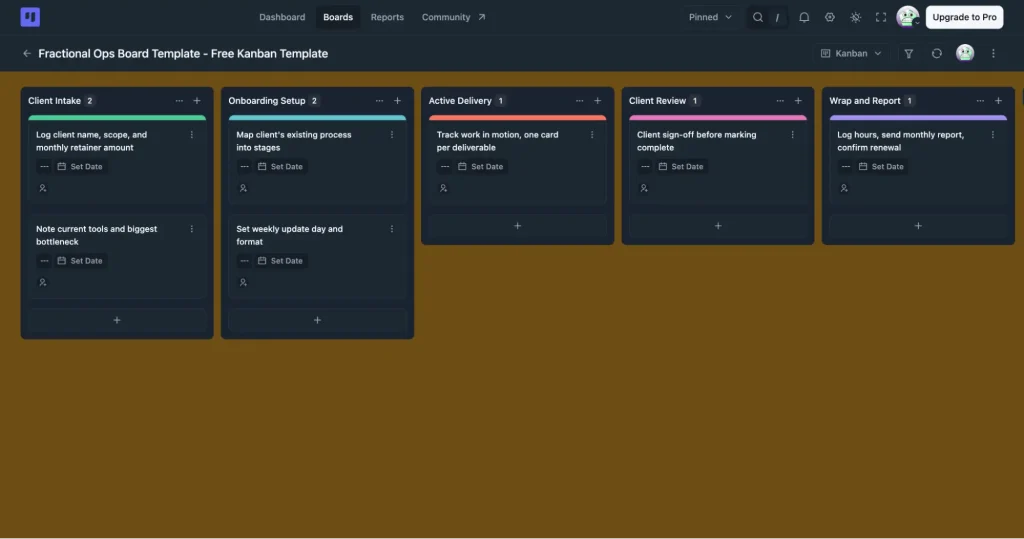
This one’s worth grabbing because it comes pre-filled with the actual client lifecycle:
- Client Intake: log client name, scope, and monthly retainer amount; note current tools and biggest bottleneck
- Onboarding Setup: map the client’s existing process into stages; set a weekly update day and format
- Active Delivery: one card per deliverable in motion
- Client Review: client sign-off before anything gets marked complete
- Wrap and Report: log hours, send the monthly report, confirm renewal
Once the template exists, give it a home: a short landing page explaining what it solves, with a qualification form built in Fluent Forms right after, asking about team size, current workflow, and where things typically break down. Those answers tell you exactly what to say when you reach out, turning the first message into a specific conversation starter instead of a cold pitch.
The FluentBoards import docs cover exactly how to bring the template into FluentBoards.
Setting Up the Free Delivery System in FluentBoards
So let’s build it. A kanban board template gets someone interested, but it’s FluentBoards Free that actually runs their work once they say yes. Think of the template as the handshake and the board as the job itself.
Installing FluentBoards Free
Install the FluentBoards plugin and the work happens right inside WordPress: no separate login, no per-seat fees, unlimited boards and assignees on the free plan.
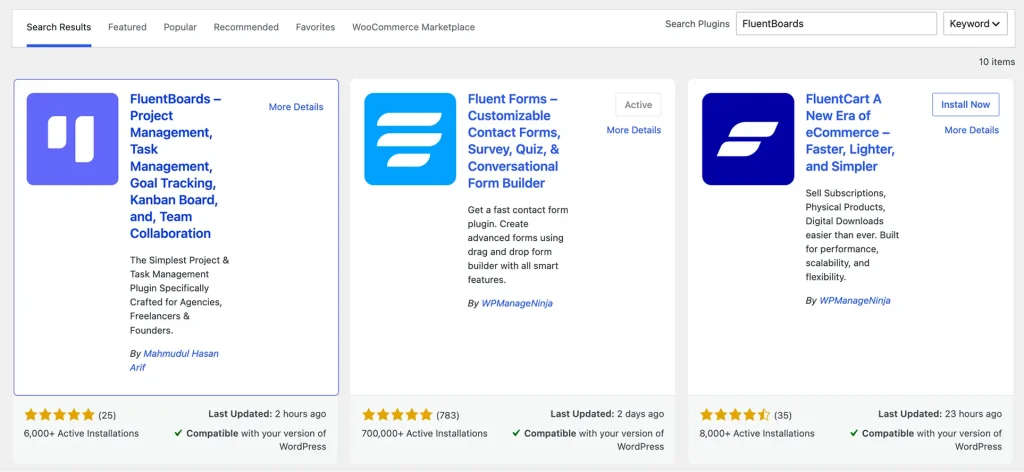
See the full feature breakdown for everything the plugin covers before getting started.
Kanban View as the primary working view
Every board in FluentBoards, the free template and the real client board alike, runs in Kanban by default. It’s the same visual language the client already saw in the template, so there’s almost no learning curve once the real board goes live.
Building the real client board
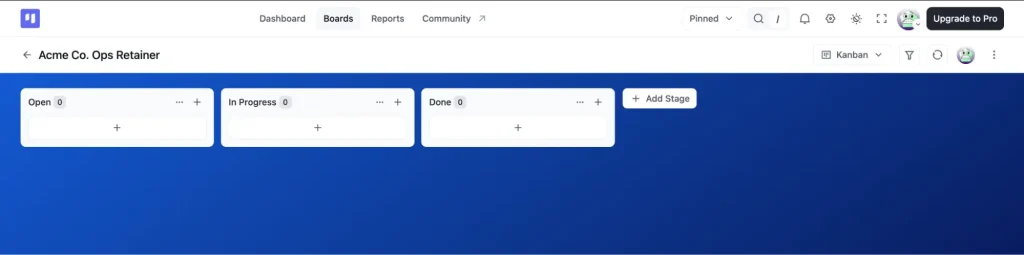
This is a second board, separate from the free kanban board template used to attract the client. It’s where the actual work happens once they say yes. Start by setting the stages to match the template you already built, Client Intake, Onboarding Setup, Active Delivery, Client Review, Wrap and Report, so the client sees the same structure they saw during the pitch. Once the stages are in place, add real tasks for whatever this client actually needs.
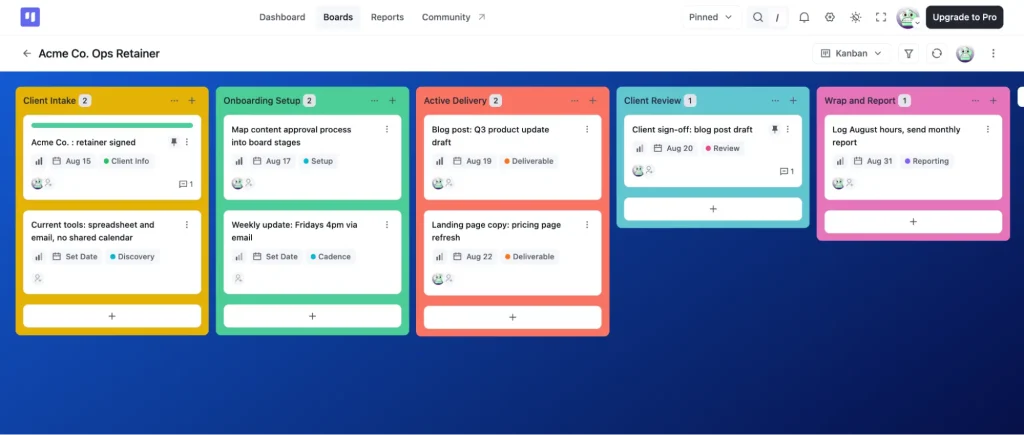
Once it’s populated, Kanban shows exactly where everything sits: what’s upcoming, what’s active, and what’s waiting on review. Every task itself can carry a due date, a priority level, a label, and an assignee, all free, and all editable right on the card.
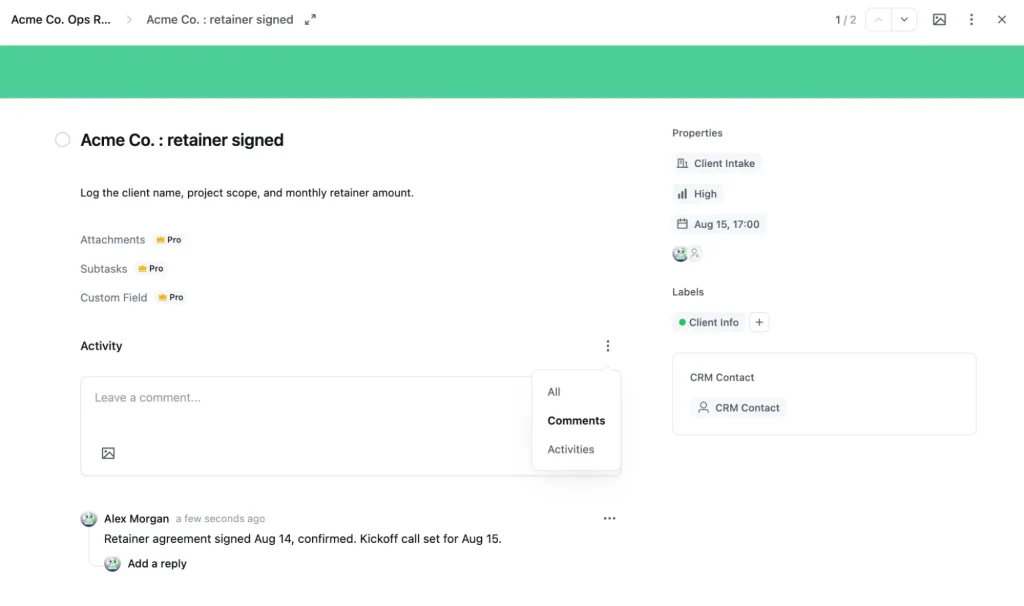
and assignee, all included on the free plan.
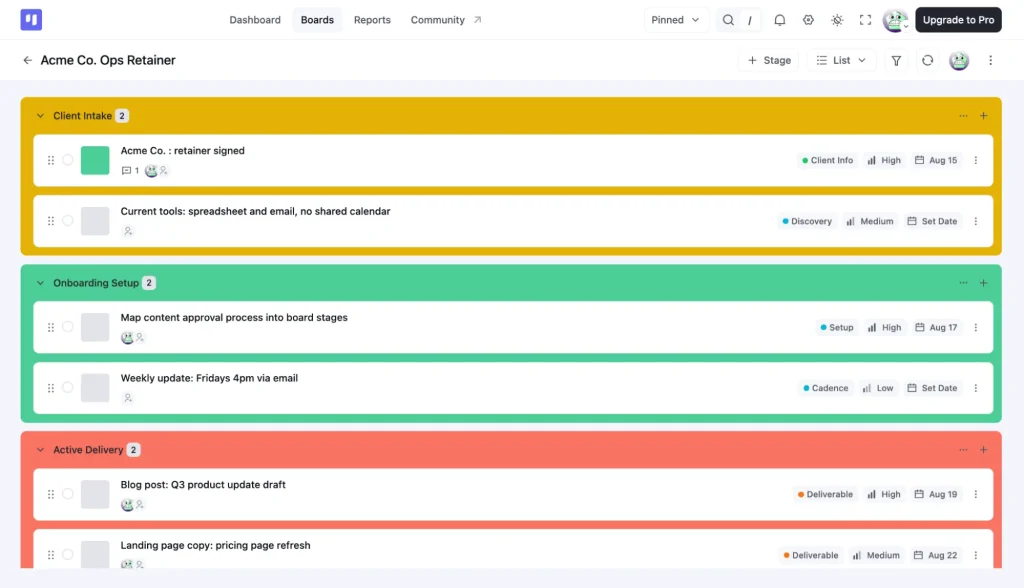
Pro tip: FluentBoards Free also includes List View, the same tasks as a flat, sortable list instead of columns. It’s the faster read before a weekly client check-in or monthly report.
Try FluentBoards free
Set up your first board today, no card required.
Run the Client Onboarding Workshop
This is where the free kanban board template earns its keep as a sales tool, not just a download.
Mapping the client’s current process
Run a short working session with the client: what are the actual steps their work goes through today, informally or in someone’s head?
Adapting the board live
Translate that conversation directly into board stages and cards, in front of the client. Watching their chaotic process become an organized system is, more than any pitch, what sells the retainer.
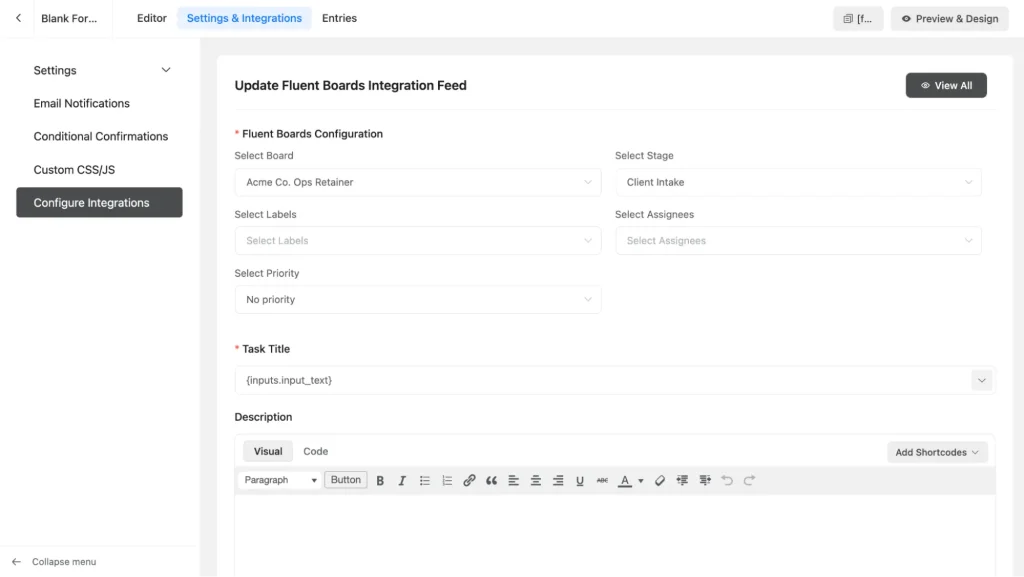
Pro tip: FluentBoards also connects to Fluent Forms for free. Build a short intake form once, map its fields to task title, board, stage, assignee, and due date, and every submission creates a task straight into the right board and stage automatically. Handy if you want the client filling in parts of their own process live during the session instead of you typing every card by hand.
Keep the Work Moving With a Weekly Operating Rhythm
A fractional operator’s value isn’t the board. It’s the discipline of running it the same way every week.
Planning, blocked-task review, deadline check
Start each week with a short pass through the board: what’s planned, what’s stuck, what’s due. Fifteen minutes before anything else happens.
Client update and retrospective
Close the week with a short update to the client and a quick retrospective on what worked, what didn’t, and what changes going into next week.
Comments and activity as the audit trail
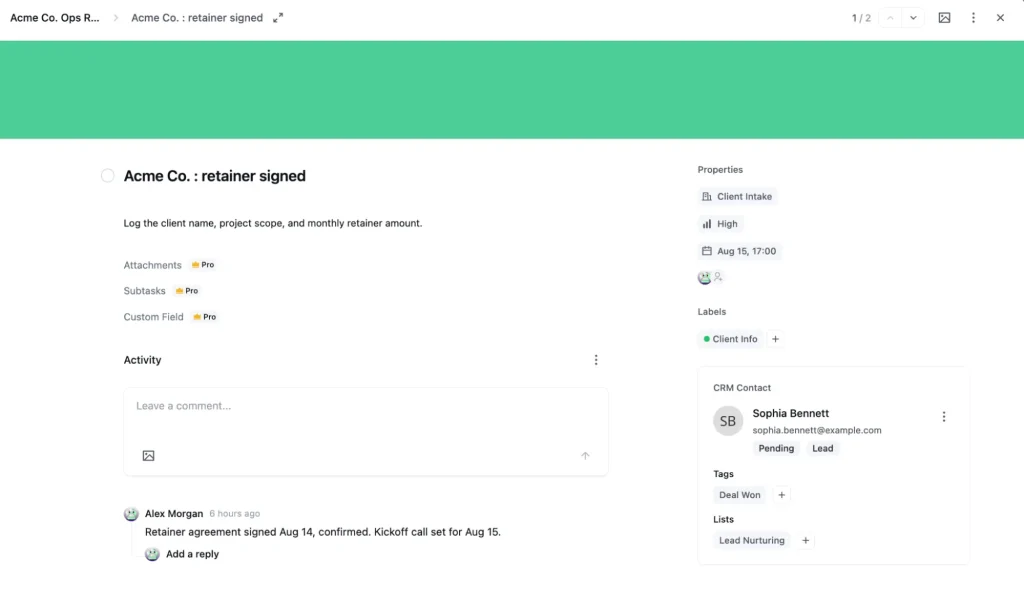
Every decision, approval, and file reference should live in the task’s comments and activity log, not in a separate Slack thread or email chain. That’s the record when a client asks what happened with something three weeks later.
Pro tip: If FluentCRM is running alongside FluentBoards, every task also has a CRM Contact button, free on both plugins. Attach the client’s contact, and their board and task activity shows up on a dedicated Boards tab on their FluentCRM profile, no separate spreadsheet needed to track who’s linked to what.
Turn Basic Reporting Into the Monthly Client Conversation
FluentBoards Free includes basic reporting, and that’s enough to spot overdue tasks and recurring bottlenecks without reaching for anything more advanced. Pull that view once a month and let it shape the client conversation: what shipped, what slipped, and what changes next month.
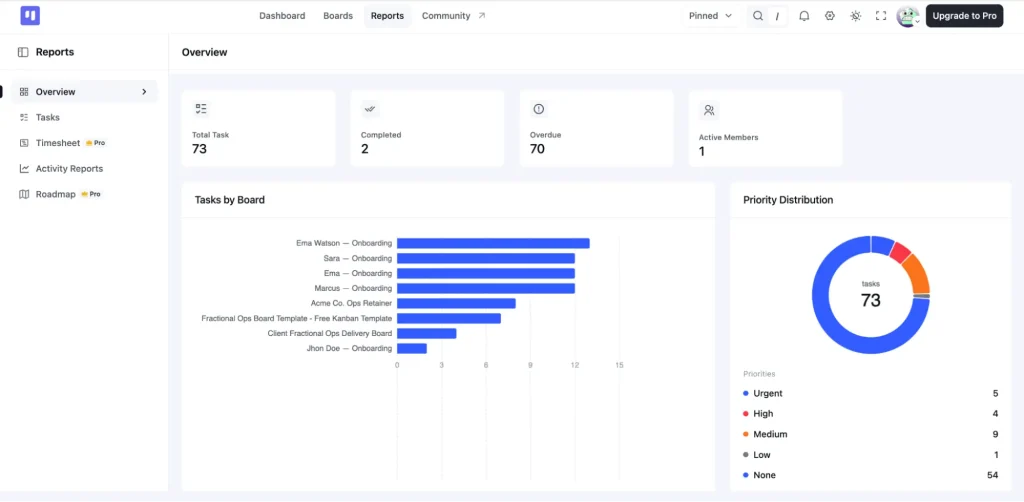
This is also where the retainer proves itself. A client paying every month wants evidence that someone is actually watching the system, not just running it in the background.
Productize the Service So It Scales
One client working manually is a service. The same setup repeated cleanly across ten clients is a business. Getting from one to the other means fixing the onboarding scope so every new client gets the same workshop, the same board structure, and the same first-month setup, then keeping a running list of monthly responsibilities that stays consistent no matter who the client is.
The part that actually matters here: knowing what’s cloneable from client to client and what always has to be built fresh. That distinction is what lets the business grow past whatever hours one person has in a week.
As an example only, not a promise: a setup project priced between $500 and $1,500, paired with a monthly retainer between $400 and $1,200 depending on scope, is a common structure for this kind of offer. Actual pricing depends entirely on the niche and the client’s budget.
Let AI Handle the Board Admin
You can even create your client’s board through FluentBoards MCP, the fastest and easiest way to do it. Tell the connected AI assistant what the client needs and it sets the board up for you, the same way every time. That’s the real point of this connection: it doesn’t just report on the board, it can run it, and getting there is a few minutes of setup, not a project.
How the MCP connection works
FluentBoards connects to an AI assistant right from Settings, using the same WordPress login already in place, so it never does more than that account is already allowed to do. No separate license, no extra cost, the whole thing runs on the free plan.
Which AI assistants connect
- Claude
- Cursor
- Codex
- Any other HTTP-based MCP client
What’s actually useful, free
21 tools ship on the free plan. The ones that matter for running a client board:
- Create a board
- Create a task
- Move a task between stages
- Update a task
- Add a comment
- Assign a task
- Search across tasks
What it changes for a multi-client operator
Monday planning used to mean opening five boards one by one. Now it’s one question. The monthly client call used to mean digging through that client’s board for what shipped and what’s still open. Now it’s a pull from their Wrap and Report stage and the comment thread underneath it, the same audit trail covered earlier in this piece.
Follow the MCP connection guide to get it set up step by step.
Growing the System as the Business Grows
Everything in this guide runs on FluentBoards Free, real clients, real delivery, real reporting. Free isn’t a trial version of the business, it’s a complete way to run it. What follows is for one reason only: past a handful of clients, some things become worth paying for.
Templates, subtasks, custom fields, attachments
Board and task templates cut onboarding time once several clients are running at once. Subtasks and custom fields make room for workflow-specific detail as each client’s operation gets more particular.
Calendar, Table, and Gantt Chart View
As a client’s operation grows more complex, more moving parts, more dependencies, Calendar gives deadline-driven visibility, Table gives a spreadsheet-style breakdown across the whole project, and Gantt Chart View shows how tasks connect and overlap on a timeline. None of these replace Kanban. They extend it once one view stops being enough to see everything at once.
Front portal, permissions, time tracking
The front client portal lets clients see progress without a login of their own. Role and access permissions bring on subcontractors without exposing every client’s board. Time tracking supports the pricing and capacity decisions that come with running several retainers at the same time.
For more understanding, check out: The full Free vs Pro breakdown covers exactly what changes.
Frequently asked questions
Do I need my own WordPress site to run FluentBoards?
Yes, it’s a WordPress plugin, so a live site needs to exist before installing it. Doesn’t need to be fancy, just running.
Do clients ever see the actual board on Free?
No. Updates go to them instead, the weekly check-in and monthly report covered earlier in this guide. The Front Portal, a Pro feature, is what gives clients a direct view themselves.
Can I run multiple clients from one FluentBoards install?
Yes. Unlimited boards and assignees on Free, one board per client, all inside the same site.
Does the five-stage structure only work for one type of business?
No. Client Intake, Onboarding Setup, Active Delivery, Client Review, and Wrap and Report map onto any recurring client service, not just the niche picked as a starting example. The stages stay the same, only the tasks inside them change per client.
Does FluentBoards work if FluentCRM and Fluent Forms get skipped?
Yes. Both are optional add-ons, CRM contact linking and the live intake form, the core board and task system runs fully without them.
Is the MCP connection part of FluentBoards Pro?
No. The MCP connector ships on the free plugin. Pro is a separate upgrade.
Will FluentBoards Free eventually force an upgrade?
No. Free runs the entire workflow in this guide. Pro is for managing several clients at once, not a forced ceiling.
Start With One Client, Not a Finished Business
A free kanban board template gets the first conversation started. FluentBoards Free turns that conversation into paid, repeatable delivery: one board, five stages, a rhythm that runs every week.
None of it needs to be perfect on day one. Download the template, build the first board, land one client, and let the system prove itself before touching Pro.
The business isn’t the tool. It’s the repeatable structure behind it, the same one that lets a single operator run five clients instead of one.

Hi there! I’m Mahjabin, a content writer at WPManageNinja. I write about project management and love helping teams find smarter solutions to everyday work challenges.
-
10 Best jQuery Table Plugins for Best Data Visualization in 2026
Discover the 10 best jQuery table plugins for 2026. Compare -

Black Friday Marketing Strategies for 2026: Core and Advance Move
Black Friday is the most celebrated shopping season worldwide. Discover -

How Much Can You Earn With Amazon Affiliate Marketing? Rates & Niches
How much can you earn with Amazon affiliate marketing? Dive



Leave a Reply
You must be logged in to post a comment.