

How to Create an Event Registration Form on WordPress in Minutes

Planning an event is hard enough without wrestling with a clunky sign-up process. If you are still sending attendees to a third-party platform to register, you are losing control over your data and branding, and often a chunk of your budget to service fees.
With Fluent Forms, you can build a fully functional event registration form directly on your WordPress site in a matter of minutes, no coding required.
TL;DR
- Install Fluent Forms and start with a pre-built event registration template or build one from scratch.
- Add the fields your event actually needs: name, email, ticket type, number of guests, and any custom questions.
- Preview the form and style it with the built-in form styler so it matches your brand.
- Set up confirmation messages and email notifications so attendees and organizers stay informed.
- Add entry limits and scheduling so registrations close automatically once you are full or the deadline passes.
- Publish the form on an existing page or create a dedicated landing page for the event.
- If needed, turn on a payment gateway and add payment fields to collect ticket fees.
Required Fields and Settings for an Online Registration Form
Before you start building, it helps to know which fields and settings actually matter for an event registration form. Here is what most organizers ultimately need.
Name field
A basic first- and last-name field, or a single full-name field, depending on how formal your event is.
Email address
This is non-negotiable since it is how you will send confirmations, reminders, and any last-minute updates.
Phone number
Useful for events where you might need to reach attendees quickly, such as a workshop with a location change.
Ticket type or session selection
If your event has multiple tracks, sessions, or ticket tiers, a dropdown or radio button field lets attendees choose the right one.
Number of guests
For events where one registrant can bring additional people, a number field or a repeater field keeps headcounts accurate.
Custom questions
Dietary restrictions, accessibility needs, or a simple “How did you hear about this event?” field can help you plan better and understand your audience.
Entry limit setting
This caps the number of submissions your form accepts, which is essential if you have limited seats or a fixed venue capacity.
Scheduling setting
This lets you set a start and end date for registrations, so the form automatically closes once the registration window ends.
Payment field (optional)
If you are charging for tickets, you will need a payment field connected to a gateway like Stripe or PayPal.
You do not need every field on this list. Pick the ones that match your event, and keep the form as short as you reasonably can. Shorter forms almost always get more completions.
Steps to Create an Event Registration Form in WordPress
Prerequisites:
- A WordPress website with admin access
- The Fluent Forms plugin is installed and activated (the free version covers most of what is described here, with Pro unlocking many fields, features, and settings)
- Basic event details ready: date, venue or link, ticket types, and capacity
Step 1: Add and customize the required fields
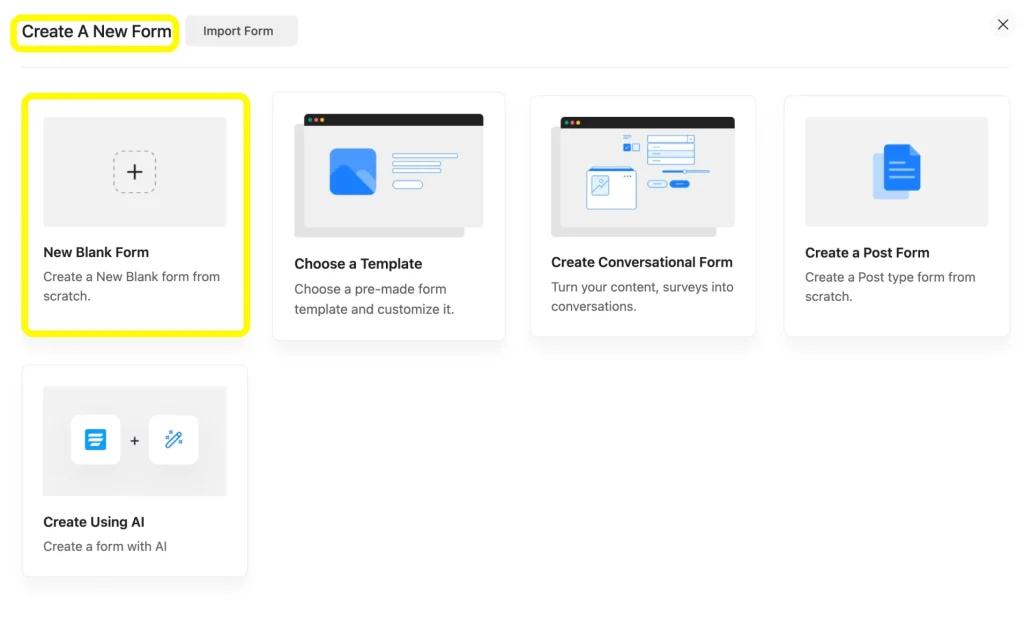
From your WordPress dashboard, go to Fluent Forms > Add New. You can start from a new Blank Form or choose one of the ready-made options from the form templates library, which already includes event and RSVP-style layouts you can adjust instead of building from zero.
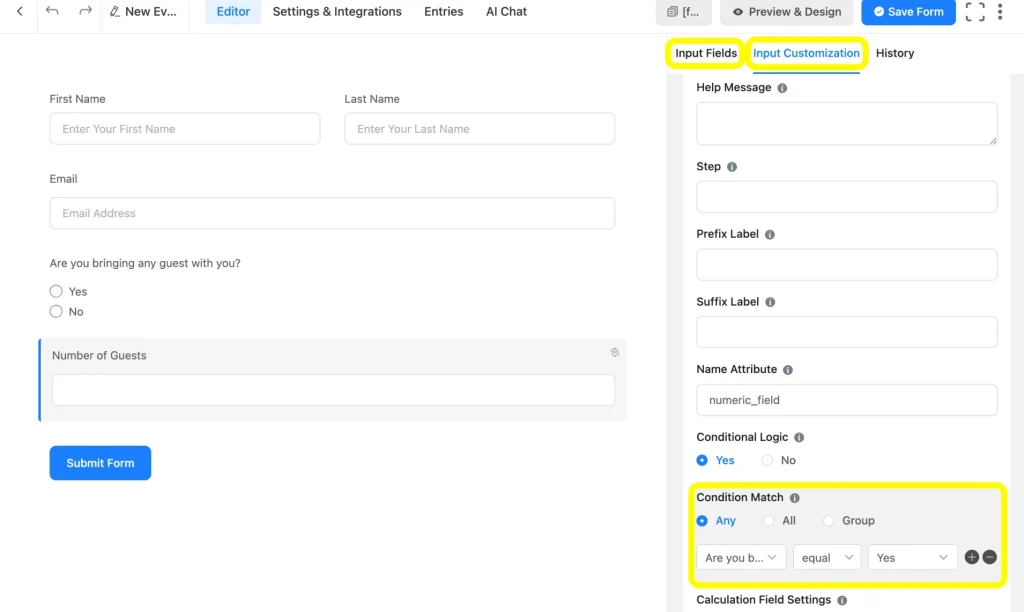
Drag and drop the fields you identified earlier: name, email, guest count, etc. You can easily customize the fields by clicking on the respective field. As you can see here, I’ve set a conditional logic subject to another field’s response.
Step 2: Check the preview and apply the advanced form styler
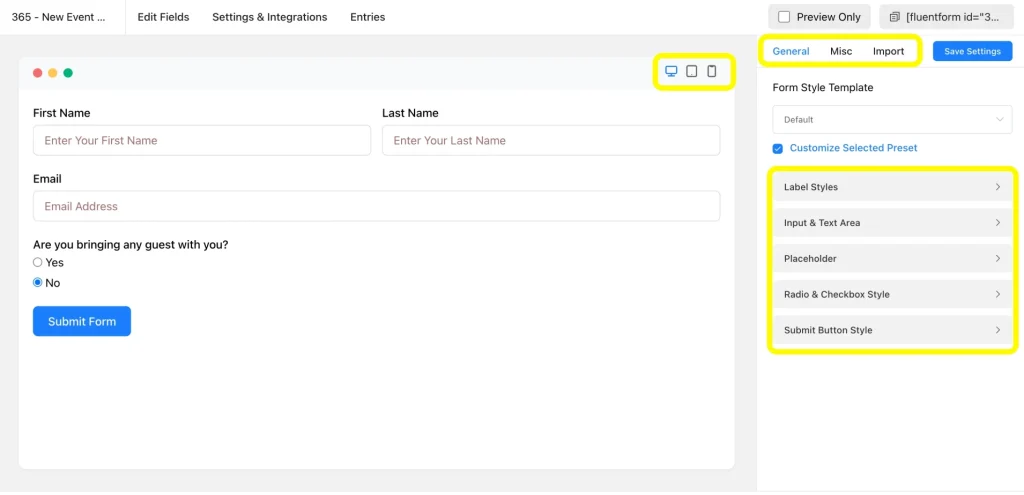
Once your fields are in place, click the Preview and Design button to see exactly how the form will look and behave for attendees. Test device responsiveness as well.
Next, use the Advanced Form Styler, which you’ll easily find on the right side of the preview page. You can adjust colors, fonts, spacing, and button styles to match your event branding without touching any CSS. It helps you create a polished, on-brand form to reduce drop-off compared to a plain default layout.
Step 3: Set up confirmation and form submission notification
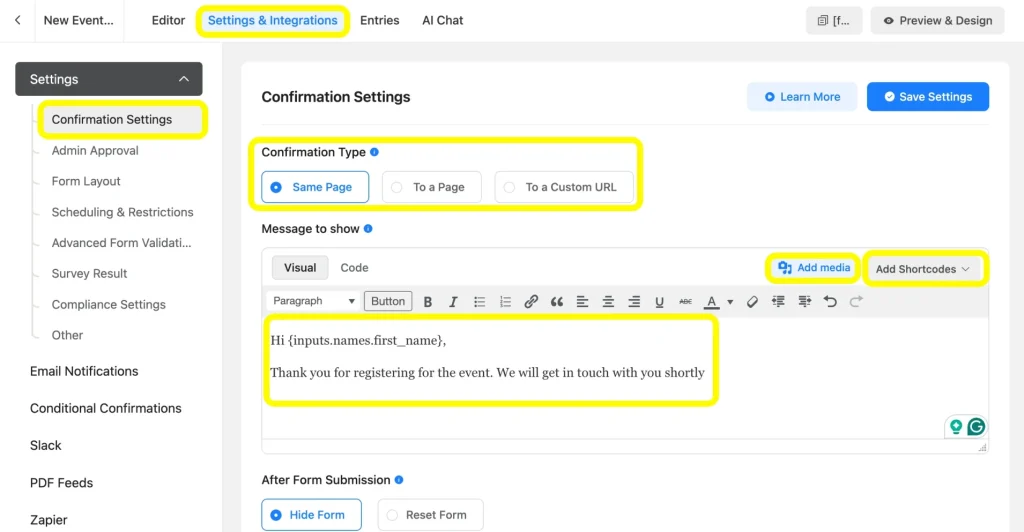
Go to the Settings & Integrations tab and open Confirmation Settings. Here you can customize the message attendees see immediately after registering, or redirect them to a thank-you page with event details.
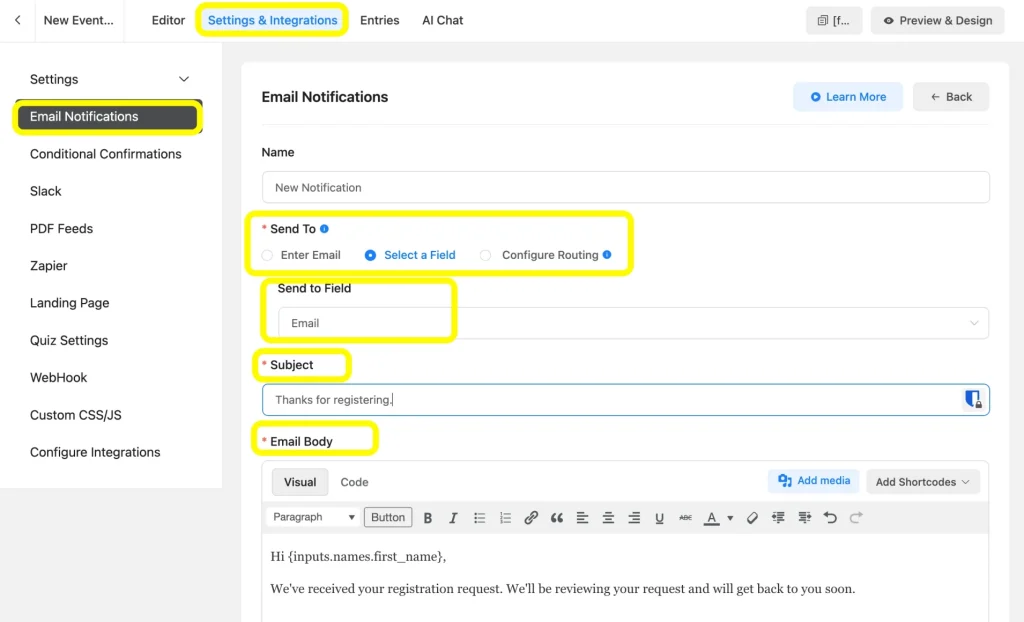
Then head to Email Notifications to configure a confirmation email sent to the attendee, or an alert email sent to you or your event team whenever a new registration comes in. You can use shortcodes to automatically include their name and other responses.
Step 4: Schedule the form and limit entries
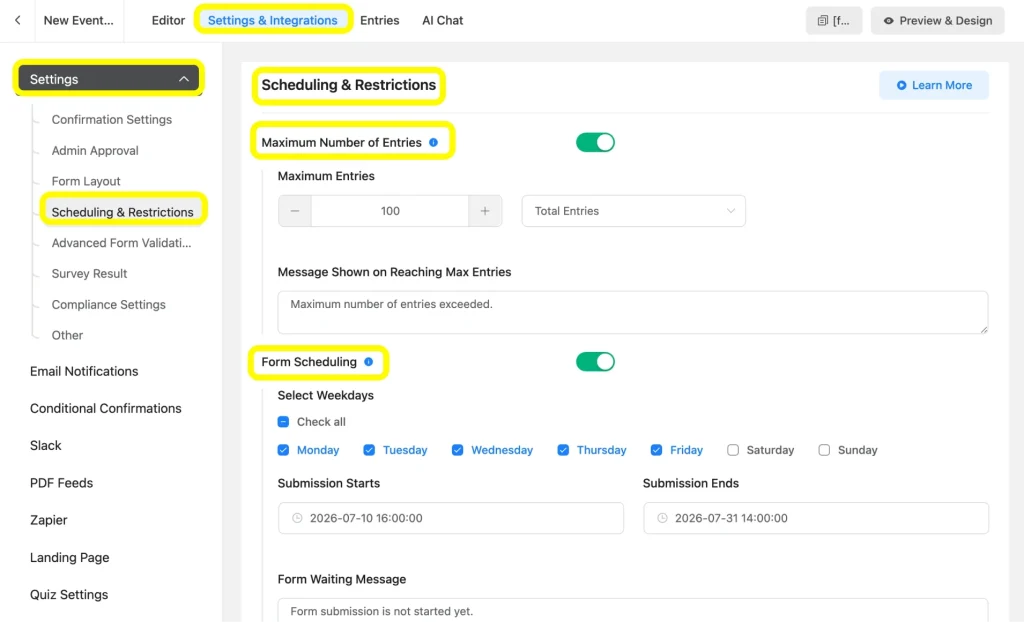
Under Settings & Integrations, find the Form Scheduling & Restrictions options. Set a start and end date if registrations should only be open during a specific window, and set a maximum number of entries if your event has limited capacity.
Once the limit is reached or the schedule ends, Fluent Forms automatically stops accepting new submissions and displays a custom message you control.
Step 5: Publish the form to a page or create a unique landing page
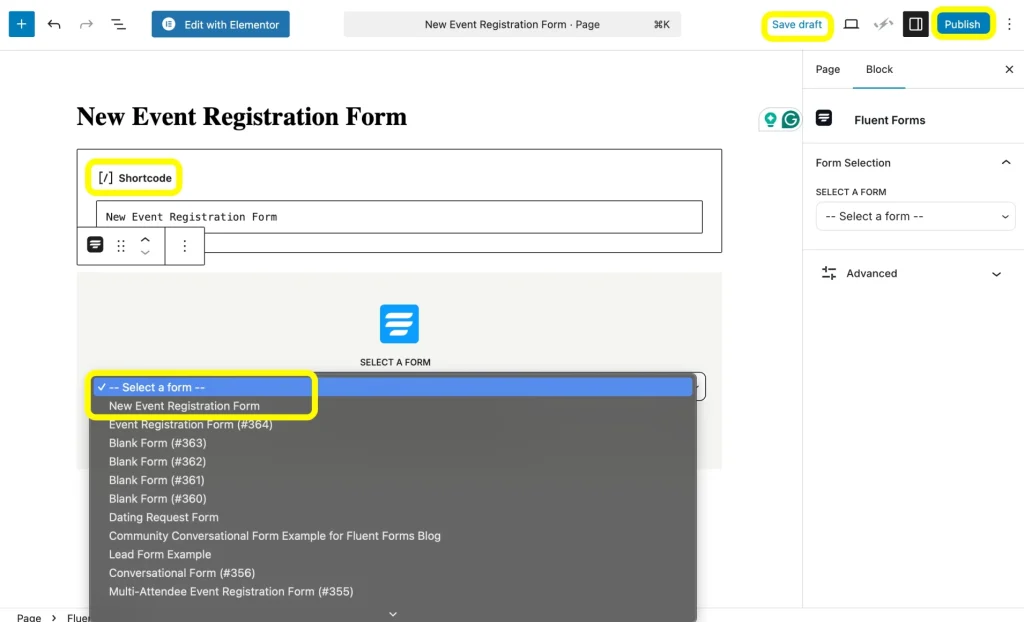
With the form ready, copy the Fluent Forms shortcode from the top-right side of the editor page that looks like: , or use the block editor to insert it directly into an existing WordPress page. This works well if you already have an event details page and just want to add the registration form to it.
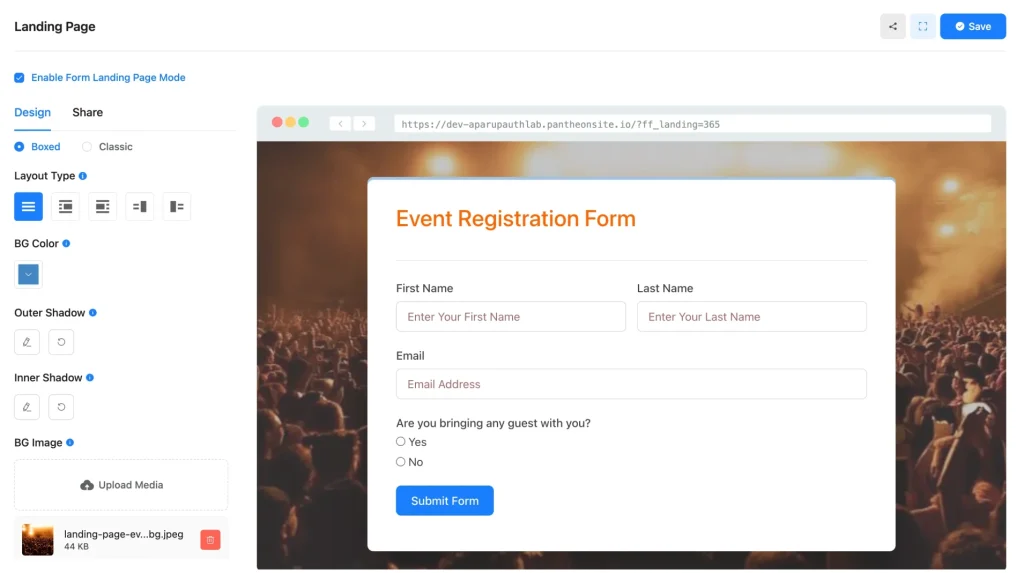
Alternatively, build a dedicated landing page just for the form, which you’ll get in the Landing Page Module settings of Fluent Forms.
Check out the full range of Fluent Forms features to see what else you can combine with your registration form, from conversational form mode to embedded PDFs.
Step 6 (Optional): Configure payment methods and add the payment fields
If your event charges an entry fee, go to Payment in the Global Settings and connect a gateway such as Stripe, PayPal, Razorpay, Paddle, Paystack, Square, Authorize.net, or Mollie. Fluent Forms lets you set fixed prices per ticket type or use a dynamic pricing field if costs vary by selection.
Add the payment field to your form, and optionally combine it with an item or quantity field so attendees can pay for multiple tickets in one submission.
Tips for Building Better Event Registration Forms
Keep the first step short
If you are using a multi-step form, put only the name and email on the first page. People are far more likely to complete a form once they have already started it.
Use conditional logic generously
Showing fields only when they are relevant keeps the form feeling short even if you are collecting a lot of information overall.
Test your entry limit before launch
Submit a few test entries and confirm the form actually closes when it should. It is a small check that avoids a stressful surprise on event day.
Review submissions from your dashboard
Fluent Forms stores every entry, so you can export attendee lists, check payment status, or search for a specific registrant without digging through your email inbox.
Match the form to your event’s tone
A corporate webinar and a community meetup should not look the same. Use the form styler to adjust this in a few clicks.
For a closer look at how organizers use these features specifically for events, the event management page breaks down real examples.
Start Building Your Next Event Registration Form
Building an event registration form does not have to mean juggling a separate ticketing platform, extra fees, or a developer’s help. With the right fields, a bit of styling, and a few settings for scheduling and limits, you can have a professional registration form live on your WordPress site in minutes.
Ready to put this into practice? Get Fluent Forms and start building your event registration form today.

Hi, I’m Aparup. With a background in Literature and experience in tech, I combine creativity and practicality to go beyond generic AI output. I’m a content marketer helping users navigate and solve WordPress challenges.
-
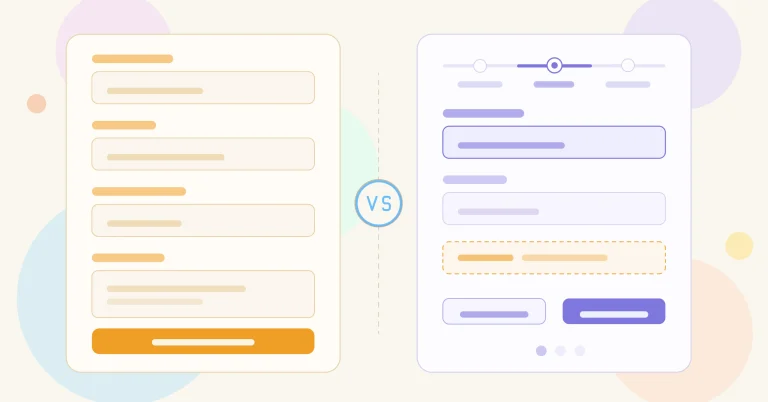
Single-Step Form vs. Multi-Step Form: Which One Is the Best and Why
Single-step vs multi-step form, which format converts better? Learn how -

How to Optimize Your WordPress Website Without Overloading It
Learn how to optimize your WordPress website by reducing unnecessary -

Contact Form 7 vs Fluent Forms: Which one should you go for?
Learn the comparison between Fluent Forms vs Contact Form 7.


Comments
-
I appreciate you sharing this blog article. Much obliged.
-
Hello! I simply want to give you a big thumbs up for your excellent info you have got right here on this post. I’ll be coming back to your website for more soon.
-
Love the site– very informative and lots to consider!
-
wpmanageninja.com does it again! Quite a informative site and a thought-provoking article. Keep up the good work!
-
I believe that is among the most vital information for me.
And i am happy reading your article. But wanna observation on few general things, The
site taste is ideal, the articles is in point of fact excellent : D.
Good process, cheers -
Thank you for such a good passage discussed. I really have a great time understanding it.
-
بديل تروكولر
[…]we like to honor many other internet websites around the net, even if they arent linked to us, by linking to them. Below are some webpages really worth checking out[…]
-
aranżacja wnętrz Gdynia
[…]Here is a great Weblog You may Come across Fascinating that we Encourage You[…]
-
pc apps for windows xp
[…]we came across a cool web-site that you may enjoy. Take a search when you want[…]
-
app for pc download
[…]we like to honor a lot of other web websites on the internet, even when they arent linked to us, by linking to them. Beneath are some webpages really worth checking out[…]
-
free laptop games download
[…]here are some hyperlinks to internet sites that we link to mainly because we feel they are really worth visiting[…]
-
pc software full download
[…]always a huge fan of linking to bloggers that I love but really don’t get a whole lot of link really like from[…]
-
pc games for windows 10
[…]very few websites that transpire to be in depth below, from our point of view are undoubtedly properly really worth checking out[…]
-
mp3juice
[…]below you will uncover the link to some web-sites that we consider you need to visit[…]
-
download apk app for pc
[…]usually posts some quite exciting stuff like this. If youre new to this site[…]
-
Stiiizy Pods for Sale
[…]Wonderful story, reckoned we could combine several unrelated data, nonetheless truly really worth taking a look, whoa did 1 find out about Mid East has got much more problerms at the same time […]
-
Weebi
[…]one of our visitors a short while ago proposed the following website[…]
-
IT Services Bristol
[…]one of our guests recently recommended the following website[…]
-
GOLF CARTS FOR SALE
[…]Every after inside a even though we select blogs that we read. Listed below would be the latest web pages that we choose […]
-
Mac akku tausch pfäffikon
[…]although internet sites we backlink to below are considerably not related to ours, we feel they’re basically worth a go by, so have a look[…]
-
Kenya safari
[…]just beneath, are quite a few entirely not connected web-sites to ours, nevertheless, they may be surely worth going over[…]



Leave a Reply
You must be logged in to post a comment.