

How to Create a Sport Website for Free in WordPress for Sport Clubs
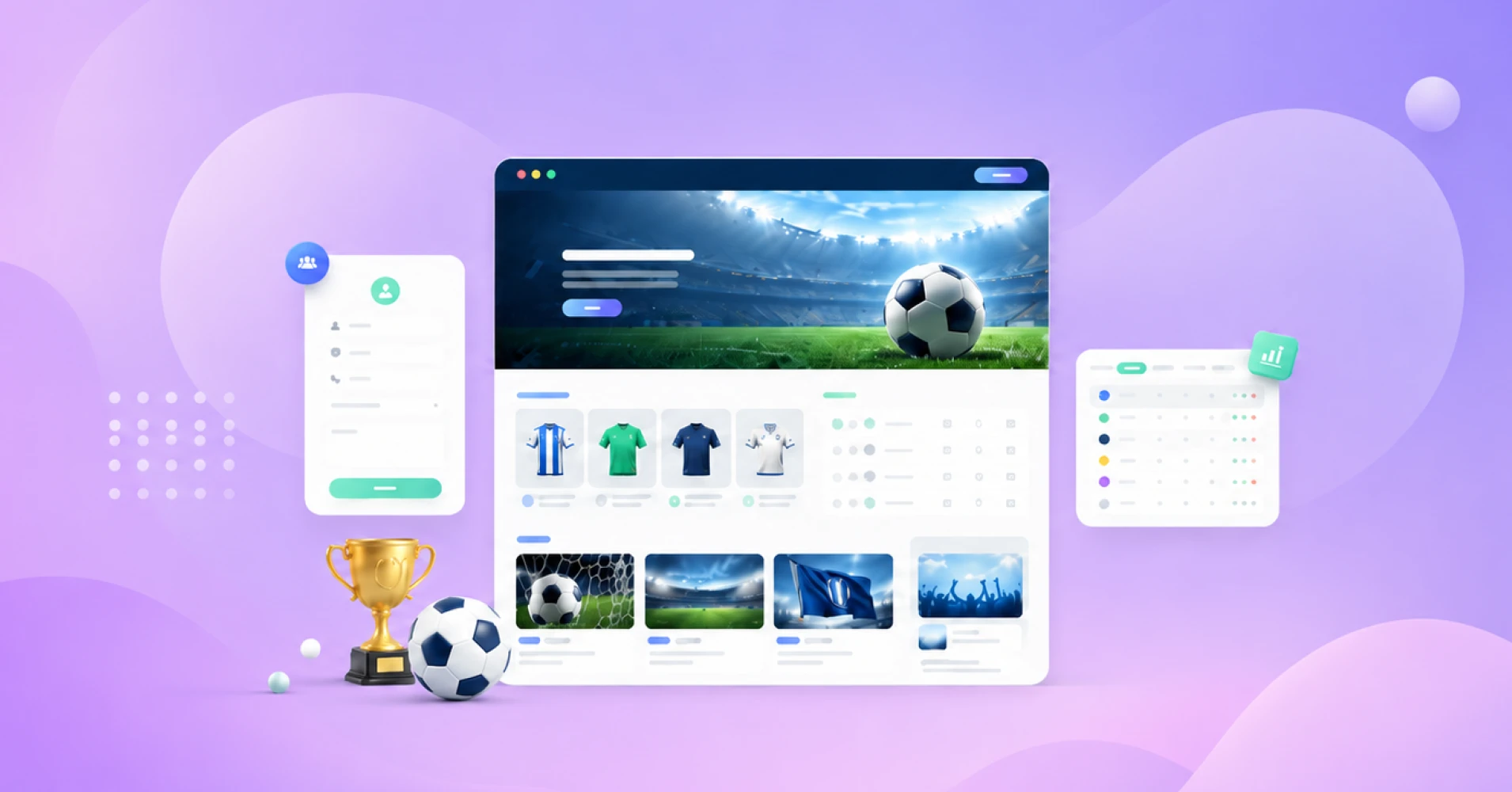
A strong sport website helps your club look professional, collect registrations, share updates, display match schedules, and grow a loyal fan base. In this guide, you’ll learn how to create a sports website in WordPress using practical tools for forms, tables, newsletters, community, and eCommerce.
Key Takeaways
- A sports website gives your sports club a central home for fans, players, sponsors, and parents.
- WordPress is a flexible choice if you want full control over your domain, design, content, and growth.
- Fluent Forms can help you collect registrations, leads, sponsorship requests, and contact messages.
- Ninja Tables is useful for match schedules, league tables, tournament brackets, and player stats.
- FluentCRM and FluentSMTP help you keep fans, players, and members updated through email.
- FluentCommunity can turn your sports club website into a private fan community.
- FluentCart can help you sell merchandise, tickets, training resources, or sports gear.
Why Does Your Sports Club Need a Professional Sport Website?
Most sports clubs start with a Facebook page, WhatsApp group, or a few social media accounts. That works for a while, but updates quickly get buried. Match schedules disappear in old posts, registration details get lost in chats, and sponsors do not get proper visibility.
A professional sport website gives your club one central place for latest news, match schedules, coach updates, player information, registration forms, sponsor logos, photo galleries, and upcoming events. Instead of sending fans, players, and parents to different platforms, you can share one official url.
It also builds trust. Parents can learn about your team, players can check fixtures, sponsors can see their brand in a credible space, and fans can follow updates easily. Since mobile accounts for 51.04% of global desktop vs mobile web traffic, your sports site should also be fast, clean, and mobile-friendly from day one.
What Should a Sports Website Include?
Before you create a sports website, think about what your target audience needs. A football club, cricket academy, school sports team, and league website may have different goals, but the core structure is usually similar.
Start with a homepage that clearly explains who you are, what you do, and who the website is for. Add a strong hero section, recent match updates, next fixtures, team highlights, and a clear call-to-action for registration, membership, or contact.
Then add essential pages like team rosters, coach profiles, player bio pages, match schedules, tournament updates, sports news, photo galleries, sponsorship, contact, and FAQ. These pages make your club website more useful and reduce repeated questions for your admin or support team.
Why Is WordPress the Best Platform to Create a Sports Website?
You can use a website builder, a free sports website builder, or a closed platform like Wix to create a website quickly. These tools are useful for simple projects, but they can become limiting when your club needs more control, features, and ownership.
WordPress is a better long-term choice because it gives you full control over your domain, content, design, and data. According toW3Techs, WordPress powers 41.9% of all websites and 59.5% of websites with a known CMS, which means you get access to a huge ecosystem of themes, plugins, developers, tutorials, and integrations.
With WordPress, you can start with a simple sports club website and expand later. You can add registration forms with Fluent Forms, match schedules and player stats with Ninja Tables, newsletters with FluentCRM, email deliverability with FluentSMTP, a fan community with FluentCommunity, and an online store with FluentCart. That flexibility is why WordPress is one of the best platforms to build a sports website that grows with your club.
How to Choose a Domain, Hosting, and Template
Choosing the right domain name is the first serious step in website building. Your domain should be short, memorable, and connected to your club name. For example, if your team name is “North City Football Club,” a domain like northcityfc.com or northcityfootball.com feels clean and easy to remember.
Try to avoid long or confusing names. Your domain should be easy to say, easy to type, and easy to print on jerseys, posters, banners, and social media graphics. A custom domain also looks more professional than a free subdomain. It tells visitors that your club takes its online presence seriously.
Next, choose reliable web hosting. Hosting affects speed, uptime, security, and overall performance. A slow website can frustrate visitors, especially on match days when fans are checking updates. Pick hosting that supports WordPress, offers good speed, and gives you enough room to grow.
After that, choose a template. A good template gives you a ready-made structure so you do not have to design your website from scratch. Look for sports-focused website templates with sections for teams, fixtures, news, sponsors, galleries, and contact forms. You can customize the colors, logo, images, and layout later.
Tutorial: Basic Setup Workflow
- Buy a domain name that matches your club or sports team.
- Choose reliable WordPress web hosting.
- Install WordPress from your hosting dashboard.
- Pick a sports-friendly template.
- Add your club logo, colors, and brand assets.
- Create the core pages: Home, About, Teams, Fixtures, News, Registration, Sponsors, and Contact.
- Test the website on mobile before publishing.
This setup gives you a clean foundation before you start adding advanced features.
How to Design Your Website and Customize It for Your Team
Your website design should feel like your club. Use your team colors, official logo, real player photos, and action shots from matches or training sessions. Avoid making the homepage too crowded. A clean design with clear sections will always work better than a noisy page full of random elements.
Start with a simple structure. Add a hero section with your club name, short tagline, and one strong call-to-action. For example, “Join Our Academy,” “View Match Schedule,” or “Register for Tryouts.” Then add sections for latest news, upcoming events, team highlights, sponsors, and newsletter signup.
You can personalize the experience with small details. Add sponsor logos in a dedicated section and a widget for fixtures or announcements. Add a gallery from recent matches and pages for coaches and players. These details make the website feel alive and connected to the community.
Tutorial: How to Design Your Website Pages
- Open your WordPress dashboard.
- Go to Pages and click Add New.
- Create your homepage first.
- Add sections for hero, fixtures, latest news, team info, and registration.
- Use your club colors and logo consistently.
- Add pages for teams, players, coach profiles, sponsors, gallery, and contact.
- Preview the pages on desktop and mobile.
- Publish only when the layout feels clean and easy-to-use.
The goal is not to make the fanciest website. The goal is to design your website so visitors can find what they need quickly.
How to Collect Player Registration and Leads with Fluent Forms
Every sports club needs forms. You may need player registration forms, tryout forms, volunteer forms, sponsorship inquiry forms, event signup forms, fan signup forms, and general contact forms. Without a proper form system, you end up collecting information through messages, spreadsheets, and phone calls. That becomes painful fast.
Fluent Forms is a practical WordPress form plugin for this workflow. You can create forms for players, parents, fans, sponsors, and volunteers. Collect names, phone numbers, email addresses, age groups, positions, emergency contact details, payment preferences, and custom notes.
You can also use Fluent Forms for lead collection. For example, if someone wants to join your academy, sponsor your club, or receive updates, they can fill out a form. Then your team can follow up properly. This turns your club website into an organized communication system.
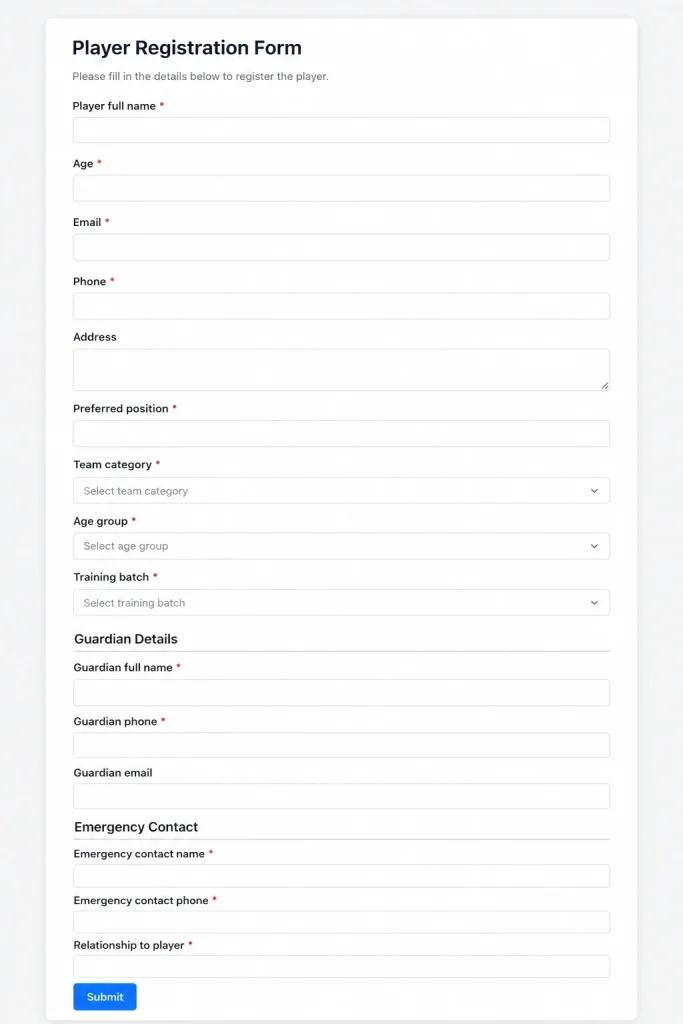
Tutorial: How to Create a Registration Form with Fluent Forms
- Install and activate Fluent Forms in WordPress.
- Go to Fluent Forms and click New Form.
- Choose a blank form or a suitable template.
- Add fields for player name, age, email, phone, address, preferred position, guardian details, and emergency contact.
- Add dropdowns for team category, age group, or training batch.
- Customize the confirmation message.
- Add email notifications for your admin or support team.
- Embed the form on your Registration page.
- Submit a test entry before sharing the page.
You can create different registration forms for youth teams, senior teams, tournaments, coaching programs, or fan memberships. This keeps your data cleaner and easier to manage.
How to Display Match Schedules, League Tables, and Player Stats with Ninja Tables
Sports websites need structured data. Fans want to see fixtures. Players want to check schedules. Parents want to know match times. Sponsors want to see active events. A plain paragraph is not enough for this information. You need clean tables.
Ninja Tables can help you display match schedules, league standings, team rosters, tournament tables, and player stats inside WordPress. Instead of uploading screenshots or manually writing everything in text blocks, you can create responsive tables that are easier to update.
For example, you can create a league table with team names, matches played, wins, losses, points, and goal difference. You can also create a player stats table with name, position, goals, assists, appearances, and cards. This makes your sport website more useful for fans and members.
Tutorial: How to Create a Match Schedule Table with Ninja Tables
- Install and activate Ninja Tables.
- Go to Ninja Tables and click Add Table.
- Create columns such as Date, Opponent, Venue, Time, Competition, and Result.
- Add your upcoming matches.
- Customize the table style to match your club brand.
- Enable sorting or searching if needed.
- Copy the table shortcode.
- Paste it on your Match Schedule page.
- Update the table after every match.
You can use the same workflow for team rosters, standings, player stats, and tournament fixtures. It gives your sports club website a more professional and organized feel.
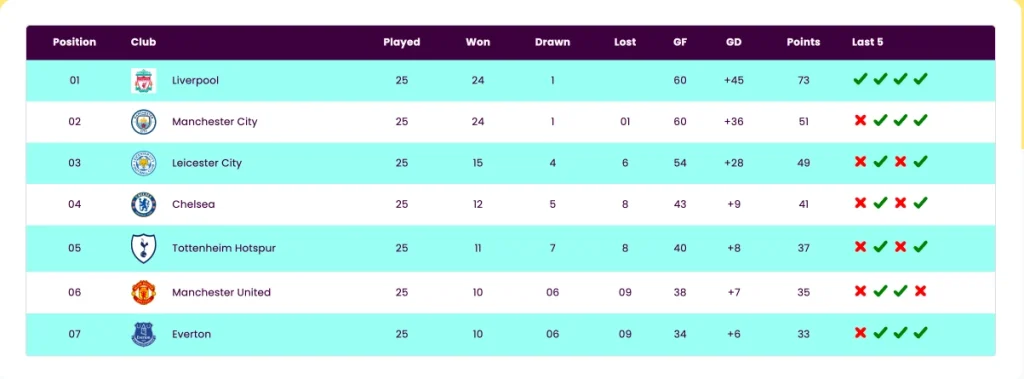
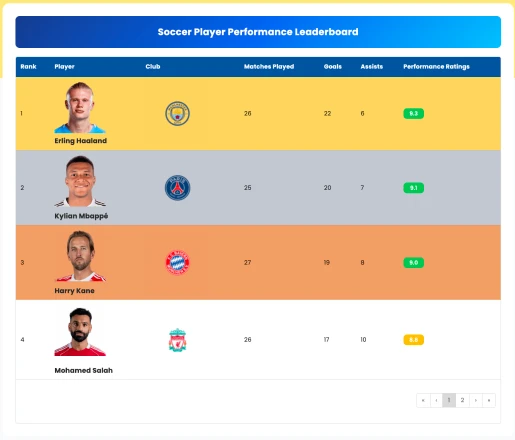
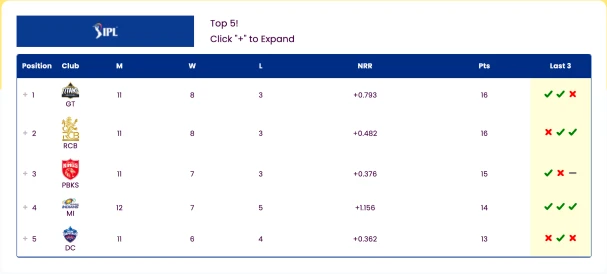
See all free sports table template made with Ninja Tables
How to Keep Fans Updated with FluentCRM and FluentSMTP
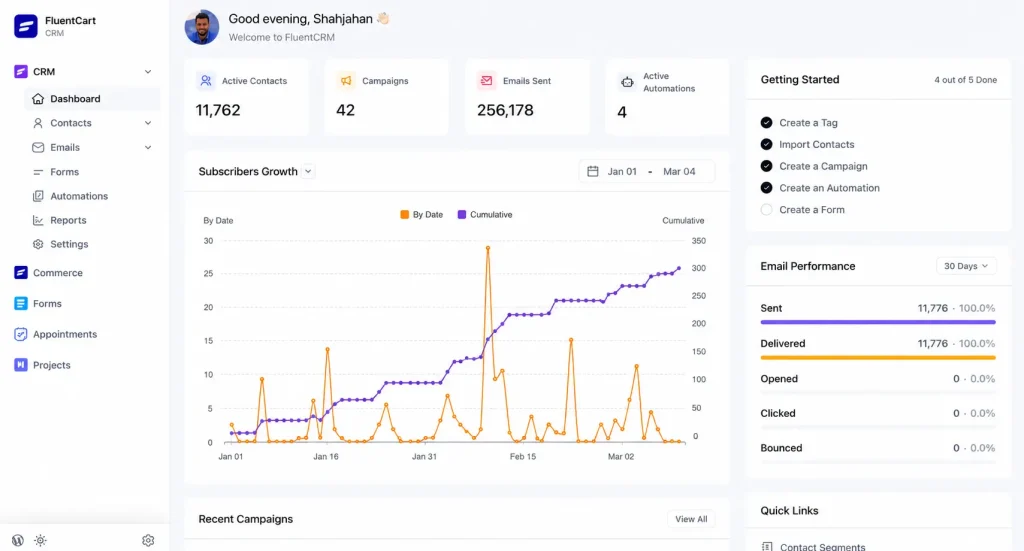
A website is powerful, but people will not visit it every day unless you remind them. That is where email comes in. Email helps you keep fans, players, parents, and sponsors updated about match schedules, latest news, registration deadlines, upcoming events, and club announcements.
FluentCRM can help you manage your sports newsletter inside WordPress. You can create different contact lists for players, fans, parents, sponsors, coaches, and volunteers. This allows you to send more relevant updates instead of sending the same email to everyone.
Email is still a strong channel. Litmus reported that many companies see email ROI between 10:1 and 36:1, and customer engagement emails, promotional emails, and newsletters are among the highest ROI email types. For a club, that means newsletters can support attendance, merchandise sales, registrations, sponsor visibility, and fan engagement.
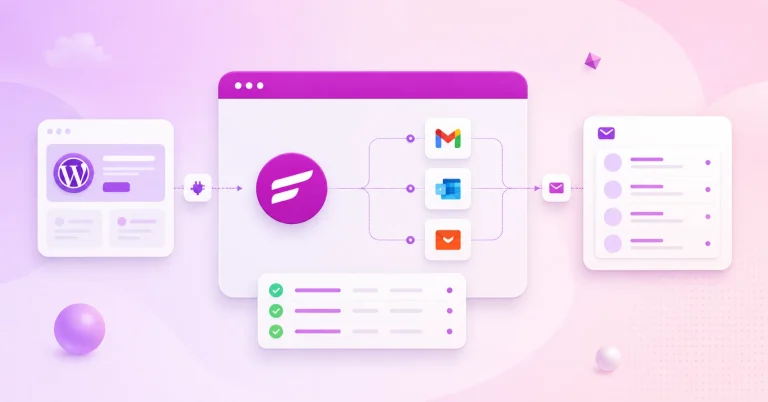
FluentSMTP helps with email deliverability. Without proper email delivery setup, your registration confirmations, newsletters, and contact form notifications may land in spam. FluentSMTP connects your WordPress emails with a reliable sending service so important messages actually reach inboxes.
Tutorial: How to Set Up a Sports Newsletter
- Install FluentCRM in WordPress.
- Create contact lists such as Fans, Players, Parents, Sponsors, and Volunteers.
- Connect Fluent Forms with FluentCRM.
- Add a newsletter signup form to your homepage and footer.
- Write a weekly or monthly sports newsletter.
- Include match results, upcoming fixtures, latest news, and registration updates.
- Install FluentSMTP.
- Connect your preferred email sending service.
- Send a test email before launching your first campaign.
This workflow helps you keep fans informed without depending only on social platforms.
How to Create a Fan Community and Monetize It with FluentCommunity
A sports website gives your club a home. A community gives your fans a place to belong. That is a big difference. When fans can discuss matches, share photos, ask questions, celebrate wins, and stay close to the club, they become more invested.
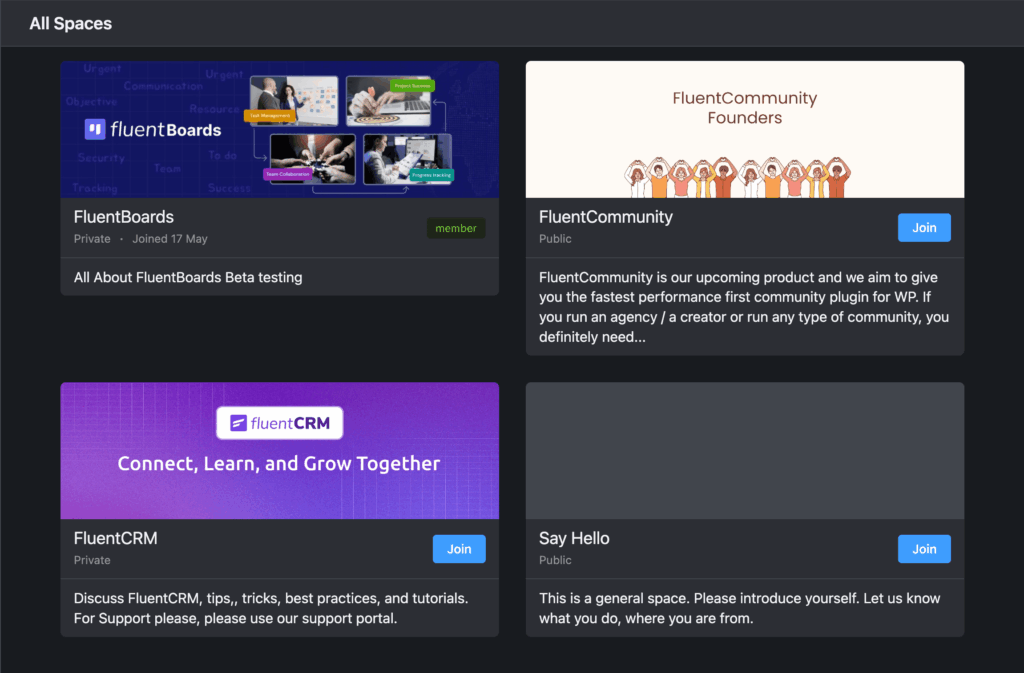
FluentCommunity can help you create a private fan community inside WordPress. You can create spaces for members, players, coaches, parents, or premium supporters. For example, you can have one space for general fans, one for academy parents, and one for premium members.
You can also monetize the community. For example, a club can offer paid access to exclusive training videos, tactical discussions, behind-the-scenes updates, early event access, or premium fan content. This can create a new revenue stream beyond sponsorships and ticket sales.
Tutorial: How to Start a Fan Community
- Install FluentCommunity on your WordPress website.
- Create a community space for fans or members.
- Add categories for match discussions, announcements, training tips, and club updates.
- Invite your first members.
- Set clear community rules.
- Add exclusive content for premium members.
- Connect your payment or membership workflow if you want to monetize.
- Promote the community through your newsletter and homepage.
The best communities do not start with too many features. Start small, keep it active, and give people a reason to return.
How to Sell Sports Merchandise and Tickets with FluentCart
Your sports club website can also become a revenue channel. Clubs can sell jerseys, training kits, caps, scarves, accessories, tickets, digital resources, paid memberships, or sponsor packages. This is where eCommerce becomes useful.
The sports merchandise market is already huge. Grand View Research estimated the global licensed sports merchandise market at USD 37.97 billion in 2025 and projected it to reach USD 59.38 billion by 2033. That does not mean every local club will become a global merchandise brand. But it does show that fans love buying products connected to the teams they care about.
FluentCart can help you create an online store inside WordPress. You can add products, customize checkout, manage orders, and sell directly from your own website. This keeps your store connected to your club content, community, newsletter, and fan experience.
Tutorial: How to Create an Online Store for Your Club
- Install FluentCart on your WordPress website.
- Add products such as jerseys, caps, tickets, training kits, or club accessories.
- Upload clear product images.
- Write simple product descriptions.
- Set prices, stock, and checkout options.
- Add your store page to the main website menu.
- Promote products through FluentCRM newsletters.
- Add store links to match pages, community posts, and sponsor pages.
This gives your club a simple way to monetize fan interest without sending people to a disconnected third-party store.
Can You Create a Sports Website in Minutes with a Free Sports Website Builder?
Yes, you can create sports website pages quickly with a free sports website builder. Some platforms offer ready-made templates, drag-and-drop editing, and basic publishing options. They are useful if you need a small website in minutes and do not need much control.
But there are limits. You may need to upgrade for a custom domain, advanced design, better SEO, analytics, forms, integrations, or eCommerce. Some tools also limit how much you can customize. That is fine for a temporary project, but it may become frustrating for a growing club.
WordPress gives you a better long-term path. With the right template and plugins, you can create a professional sports website in minutes, then improve it over time. You can add pages, registration forms, sports tables, newsletters, community spaces, and online store features whenever your club needs them.
So, if you only need a one-page event page, a simple builder may work. But if you want to build a sports website that grows with your club, WordPress is the stronger option.
Examples of Professional Sport Website for Sports Clubs
Looking at successful sports club websites can give you a clear idea of what your own sport website should include. You do not need to copy their design. Instead, study how they organize content, guide visitors, promote tickets, share updates, and create a better fan experience.
Here are a few examples you can take inspiration from when building a sports club website in WordPress.
1. Manchester City FC
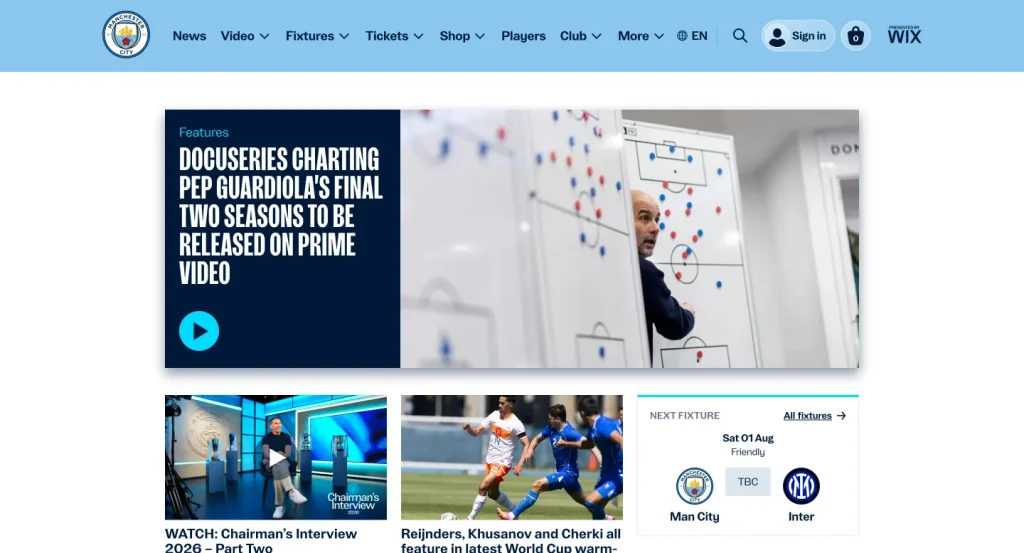
Manchester City’s official website is a great example of a modern football club website. The homepage works as a complete content hub with club news, fixtures, team updates, fan resources, women’s team content, academy updates, community links, and ticketing options.
What you can learn from it:
- Keep the next fixture visible
- Publish regular club news
- Add separate sections for teams, fans, community, and tickets
- Use tickets and hospitality pages as conversion points
- Make the website feel active, not static
For a smaller club, you can follow the same idea in a simpler way. Add your latest news, upcoming match schedule, team information, registration form, sponsor section, and newsletter signup on the homepage.
2. New York Yankees
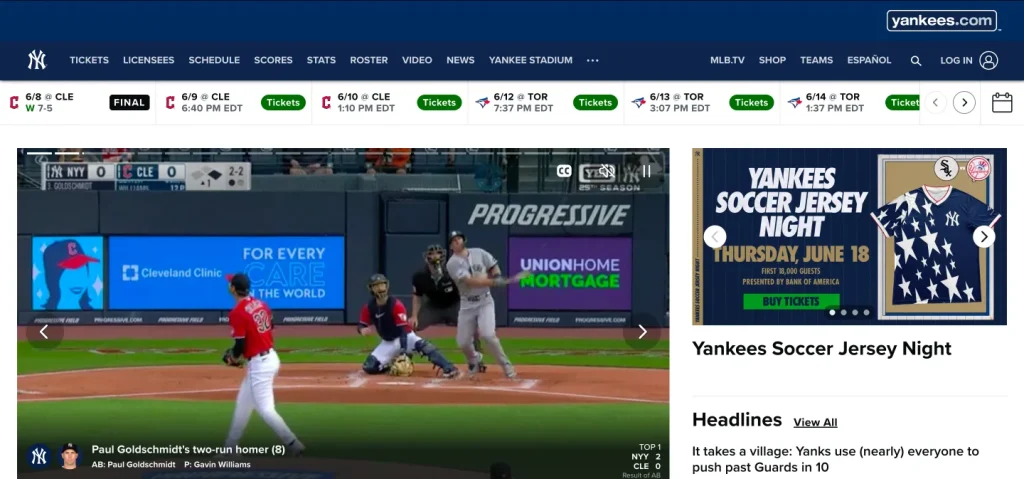
The New York Yankees website shows how a sports club can organize a large amount of information without losing the visitor. Their website includes news, tickets, schedule, roster, scores, stats, fan sections, newsletters, and membership-related content.
What you can learn from it:
- Make schedules and tickets easy to find
- Use email newsletters to keep fans updated
- Create a fan-focused section like Yankees Universe
- Keep scores, stats, and roster information organized
- Use clear navigation for different visitor needs
If you are building a local baseball, cricket, football, or basketball club website, this structure can be very useful. With Ninja Tables, you can show player stats, match schedules, and league tables. With FluentCRM, you can send newsletters just like bigger sports brands do.
3. LA Galaxy
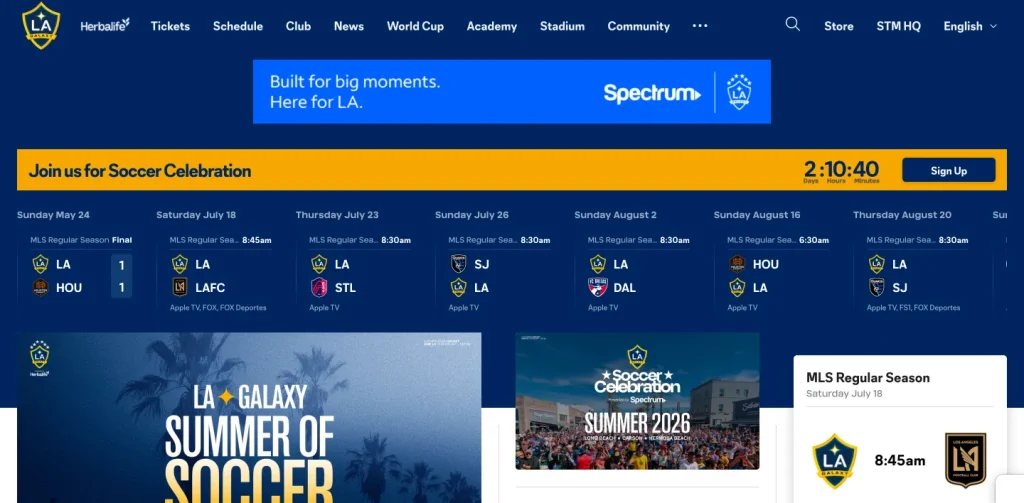
LA Galaxy’s website is a strong example of how a club can use its website for ticketing, promotions, season ticket members, group tickets, youth soccer groups, and fan engagement. It is not just a website for information. It also supports sales, membership, and community-building.
What you can learn from it:
- Create dedicated pages for group tickets
- Highlight youth programs and academy-related offers
- Promote special events and matchday offers
- Give season members a dedicated area through Season Ticket Member benefits
- Use the website to bring fans closer to the club
A smaller sports club can recreate this workflow in WordPress by adding registration forms, event pages, ticket pages, community spaces, and an online store. Fluent Forms can handle registrations, FluentCommunity can support fan engagement, and FluentCart can help sell tickets or merchandise.
4. FC Barcelona

FC Barcelona’s official website is a strong example of a global sports club website. It includes club news, ticket sales, team pages, member services, supporters club content, official store links, and fan community features.
What you can learn from it:
- Build separate sections for different teams and club areas
- Keep news and match updates fresh
- Create dedicated pages for football tickets
- Add member-focused content and benefits
- Connect the website with fan engagement and merchandise
For your own club website, you can take the same concept and scale it down. Start with your main team, fixtures, registration, news, sponsors, and store. Later, you can add community features, premium content, and member-only areas.
5. Real Madrid CF
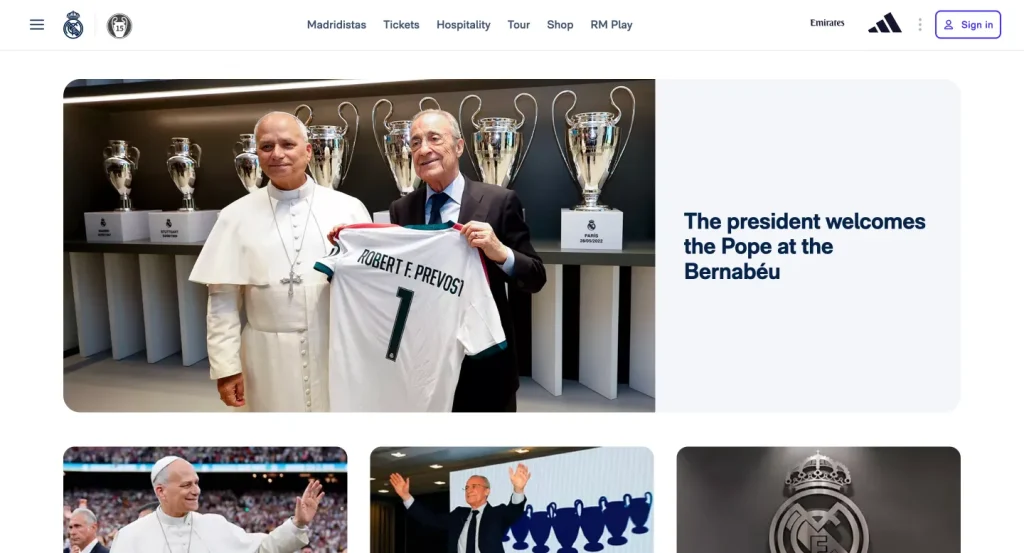
Real Madrid’s official website is a good example of how a sports club can combine content, tickets, official store, team pages, fan clubs, foundation work, academy content, partners, and media in one professional website.
What you can learn from it:
- Give every major club area its own section
- Add team pages for first team, women’s team, academy, or other divisions
- Use an official store to sell merchandise
- Highlight partners and sponsors
- Add fan club or member-focused content
If your club has multiple teams or age groups, this structure is useful. You can create separate pages for each team, add match schedules with Ninja Tables, collect registrations with Fluent Forms, and send team-specific updates with FluentCRM.
6. Golden State Warriors
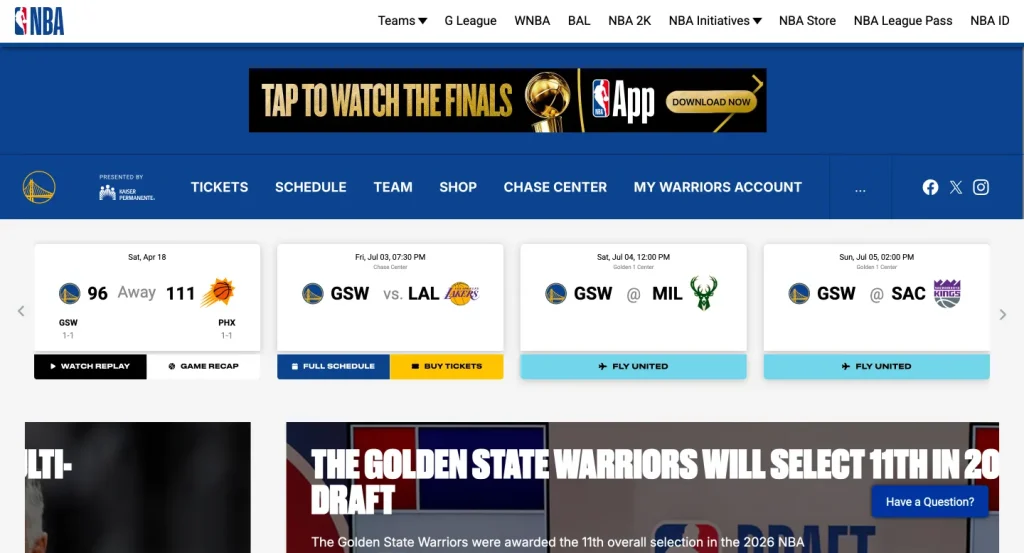
TheGolden State Warriors website shows how a basketball club can use its website for news, roster information, video content, tickets, schedules, shop links, community content, and fan engagement.
What you can learn from it:
- Make roster information easy to explore
- Add player profiles with photos, stats, and bios
- Use video and media content to keep fans engaged
- Connect the site with tickets and merchandise
- Keep the homepage fresh with timely updates
For a smaller club, this can translate into player bio pages, match recaps, highlight videos, team rosters, photo galleries, and newsletter signup forms.
What These Sports Club Websites Have in Common
Most professional sports club websites follow the same basic pattern. They make important information easy to access, keep fans updated, and guide visitors toward action.
The best sports club websites usually include:
- A clean homepage
- Clear navigation
- Match schedules
- Team rosters
- Player stats
- Latest news
- Registration forms
- Ticket or membership pages
- Sponsor sections
- Newsletter signup
- Online store
- Fan or member area
You do not need a massive budget to follow this structure. Start small, then add features as your club grows. With WordPress, you can build the foundation first and gradually add forms, tables, newsletters, community, and eCommerce when you need them.
Sports Website FAQ
What is the best platform to create a sports website?
WordPress is one of the best options because it gives you control, flexibility, and room to grow. You can start simple and add more features later, such as forms, tables, newsletters, community, and eCommerce.
Can I create a football club website with WordPress?
Yes. You can create a football club website with pages for teams, fixtures, player profiles, match reports, registration, sponsors, and fan updates. You can also add league tables and player stats using Ninja Tables.
Do I need a custom domain?
A custom domain is highly recommended. It looks more professional, is easier to share, and helps build trust with fans, players, parents, and sponsors.
Can I collect registrations online?
Yes. You can use Fluent Forms to collect player registrations, tryout requests, event signups, sponsorship inquiries, and fan leads directly from your WordPress website.
Can I add league tables and match schedules?
Yes. Ninja Tables is a great option for adding a league table, match schedule, team roster, tournament table, or player stats table to your website.
Can I send newsletters from my sports club website?
Yes. FluentCRM lets you send newsletters from WordPress, and FluentSMTP helps improve email deliverability. Together, they make it easier to keep fans, players, and sponsors updated.
Can I create a fan community?
Yes. FluentCommunity can help you create a private or public fan community. You can use it for discussions, announcements, premium content, and member engagement.
Can I sell merchandise from my website?
Yes. FluentCart can help you sell jerseys, tickets, training resources, accessories, and other sports products directly from your WordPress website.
Final Thoughts: Build a Sports Website That Works Beyond Match Day
A sport website is not just a digital brochure. It is your club’s home base. It helps people discover your club, register for programs, follow match updates, read sports news, join your community, and support your team.
The best part is that you do not need to build everything at once. Start with the basics: domain, hosting, template, homepage, registration form, and match schedule. Then add newsletters, league tables, community, and eCommerce as your club grows.
If you want full control, WordPress gives you the flexibility to build a sports website around your real workflow. Fluent Forms can handle registrations and leads. Ninja Tables can display sports data. FluentCRM can power your newsletter. FluentSMTP can improve email delivery. FluentCommunity can build fan engagement. FluentCart can turn your club website into an online store.
Most important things to remember:
- Start with a clear domain name and reliable hosting.
- Choose a clean, mobile-friendly template.
- Build pages for teams, fixtures, news, registration, sponsors, and contact.
- Use Fluent Forms for lead collection and registration forms.
- Use Ninja Tables for match schedules, league tables, tournament data, and player stats.
- Use FluentCRM to keep fans, players, and sponsors updated.
- Use FluentSMTP so important emails reach inboxes.
- Use FluentCommunity if you want to build and monetize a premium fan community.
- Use FluentCart if you want to sell merchandise, tickets, or sports products.
- Keep the website simple, useful, and easy to update.

WordPress, automation, eCommerce and growth marketing specialist, a WordPress Core Contributor and Media Corps member blending storytelling with technology to craft strategies in SEO, email marketing, and beyond.
-

10 Best jQuery Table Plugins for Best Data Visualization in 2026
Discover the 10 best jQuery table plugins for 2026. Compare -
FluentSMTP Review: Whats Inside this 700K+ WordPress SMTP Plugin?
Check our FluentSMTP review blog to Discover whats inside this -

Black Friday Marketing Strategies for 2026: Core and Advance Move
Black Friday is the most celebrated shopping season worldwide. Discover



Leave a Reply
You must be logged in to post a comment.