

Recurring Donations in WordPress: Guide with Examples and Tips
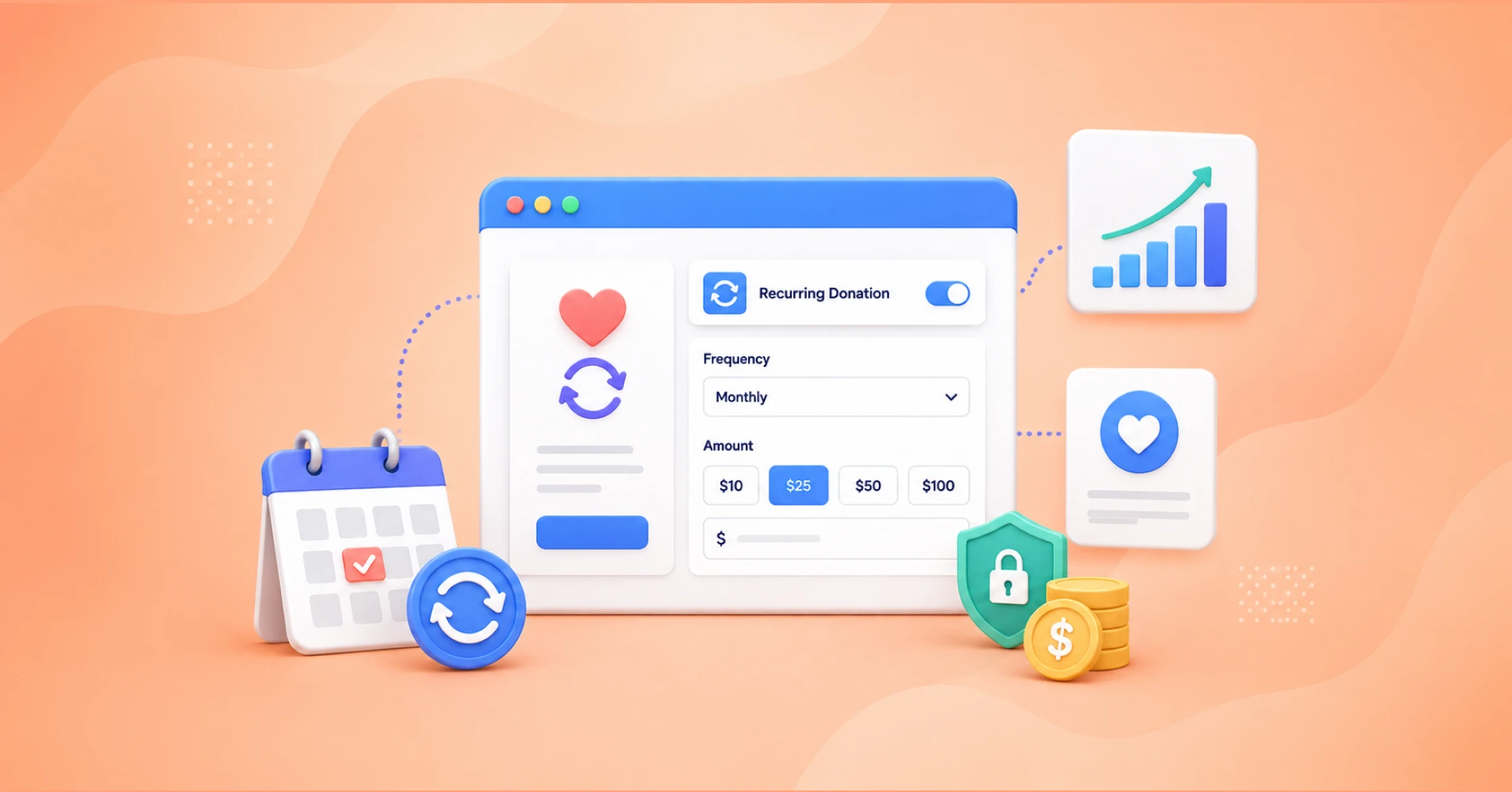
When donors give automatically on a monthly, quarterly, or yearly schedule, your organization gains something valuable: stability. You can plan programs, hire staff, and run campaigns without wondering if the money will be there. This guide walks you through everything: what recurring donations are, why they matter, and how to set them up in WordPress.
Let’s get into it.
TL;DR
- Recurring donations allow supporters to contribute automatically on a monthly, quarterly, or yearly basis.
- Monthly donors create more predictable revenue that helps nonprofits plan programs and campaigns with confidence.
- Nonprofits can set up recurring donations in WordPress without technical complexity using the right plugin.
- Paymattic makes it easier to create recurring donation forms, manage donors, and collect automated payments from one dashboard.
- A smooth donation process and flexible payment options can improve donor conversion rates.
- Real nonprofit campaign examples show how recurring giving supports long-term fundraising goals.
- Small changes like simplifying forms, offering suggested amounts, and explaining donor impact can increase recurring signups.
- Strong recurring donor programs reduce fundraising pressure and help nonprofits build sustainable growth over time.
What is a recurring donation?
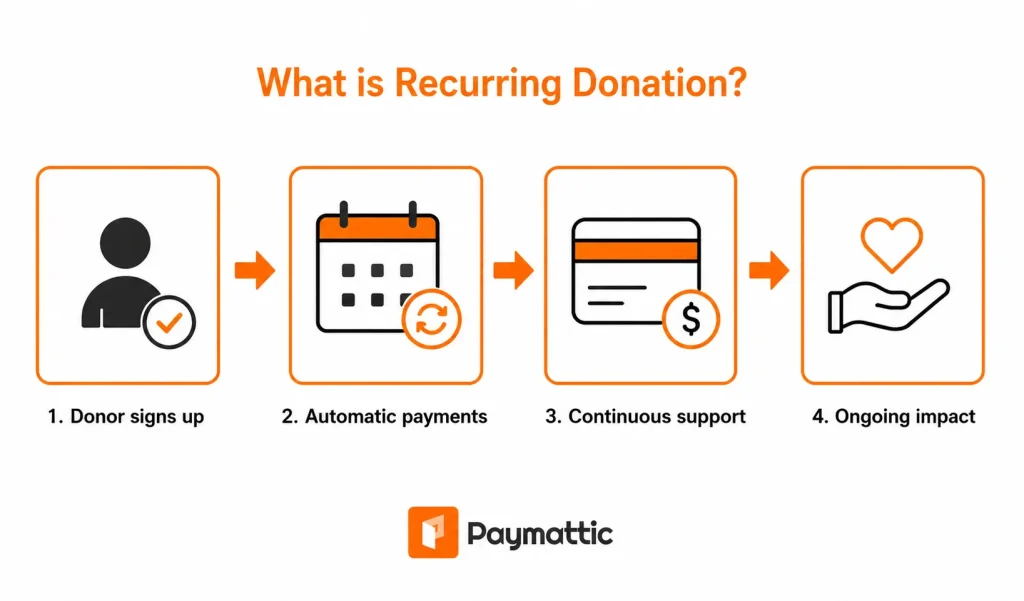
A recurring donation is a gift that a donor sets up once and authorizes to be charged automatically on a regular schedule.
It repeats automatically on a set schedule, which could be monthly, quarterly, or yearly, until the donor decides to cancel or pause it.
Think of it like a Netflix subscription, except instead of paying for content, the donor is funding your mission. They enter their payment details once, choose a frequency, and the charge happens automatically on schedule. No action needed on their end.
Common recurring donation intervals include:
- Monthly – the most popular; manageable amounts for donors
- Quarterly – works well for higher-value donors
- Annually – similar to a membership model
The key concept behind it is automatic billing. When a donor signs up, the payment gateway stores their billing details securely and charges them on the agreed schedule. Your organization gets the funds automatically, no invoice, no follow-up email required.
The benefits of recurring donations for nonprofits
The biggest benefits of recurring donations is it solve the biggest headache in fundraising: uncertainty. According to the M+R Benchmarks Study, monthly giving now accounts for 31% of all online nonprofit revenue. It shows the powerful effects of recurring donations in nonprofit funding.
Besides that, here are other benefits I’ve seen nonprofits gain from building a recurring donor base:
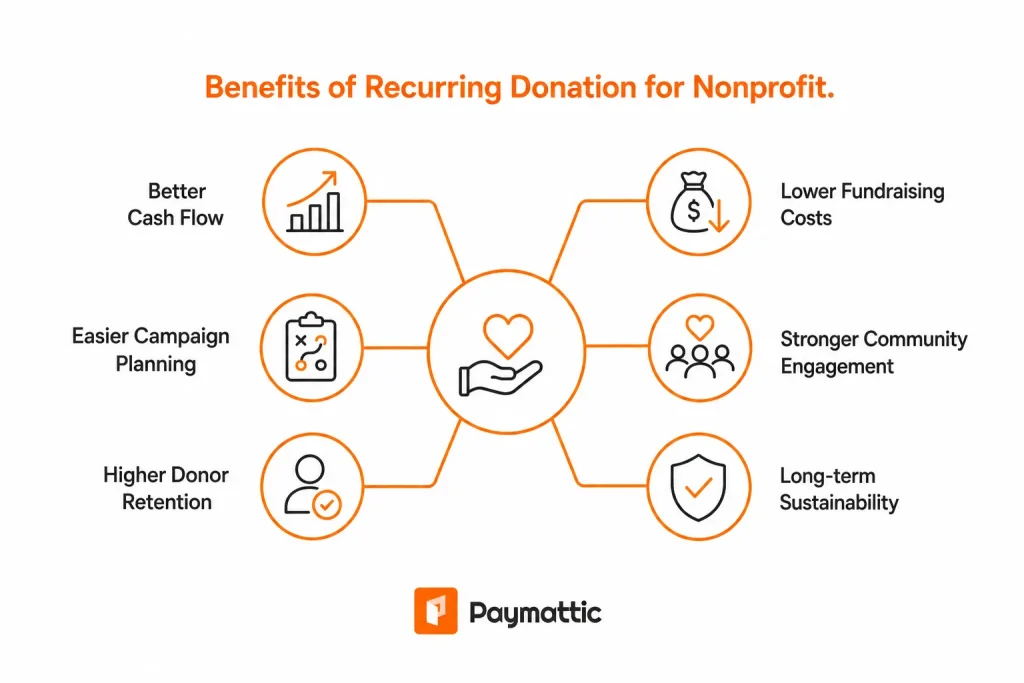
Better cash flow
Monthly giving creates a revenue floor. Even during slow months, summer slumps, and post-holiday dips, you know the recurring revenue is coming. That floor prevents the cash crunches that force nonprofits to delay paying vendors, cut programs, or borrow from reserves.
Easier campaign planning
When you know your baseline monthly income, campaign planning becomes more strategic. You can decide how much additional revenue you need to raise for a specific initiative, rather than trying to fund everything through one-off appeals.
Higher donor retention
Recurring donors have 80% retention rates compared to significantly lower rates for one-time donors. When someone sets up automatic giving, the activation energy required to stop is higher than to simply continue. Inertia works in your favor.
Lower fundraising costs
Acquiring a new donor is expensive in time, effort, and advertising spend. Retaining a recurring donor costs a fraction of that. Once someone is set up on monthly giving, your cost per dollar raised drops significantly compared to constantly re-acquiring one-time donors.
Stronger community engagement
Monthly donors feel like members of something ongoing. They’re not just giving, they’re part of your community. This makes them more receptive to volunteer asks, event invitations, and advocacy campaigns.
Long-term organizational sustainability
Grants dry up. One major donor moves away. Corporate sponsorships get cut. Recurring individual donors provide a diversified revenue base that’s more resilient to these shocks.
How recurring donation work in WordPress?
If you’re running a WordPress website, you need two things: a recurring-capable donation plugin and a compatible payment gateway to work recurring donations in WordPress.
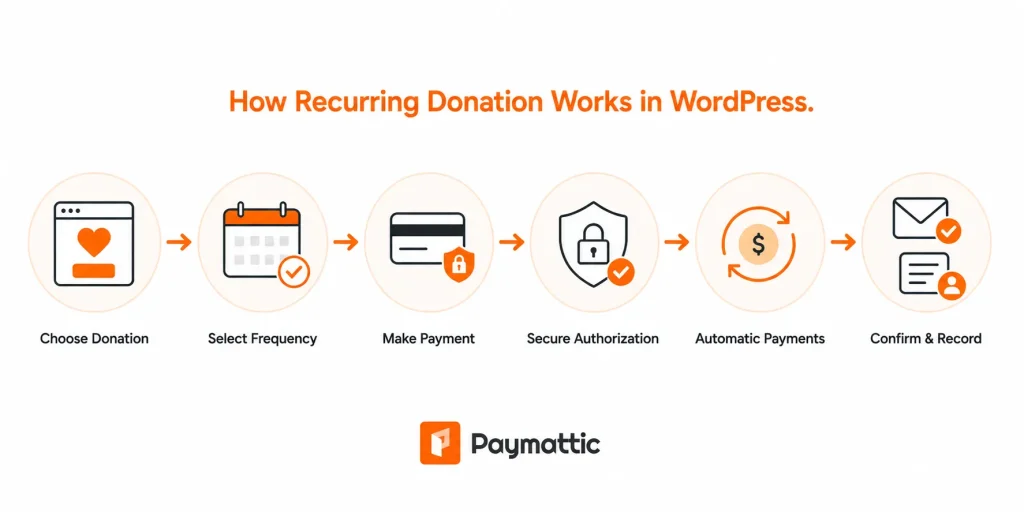
Here’s how the recurring donations in WordPress usually work:
- A donor visits your donation page and selects a recurring donation option.
- They choose the donation frequency, such as monthly, quarterly, or yearly.
- The donor completes the payment using a supported payment gateway like Stripe or PayPal.
- The payment gateway securely stores the billing authorization.
- Future donations are charged automatically based on the selected schedule.
- Both the donor and the nonprofit receive payment confirmations and records of recurring donations.
With the right donation plugin, you can allow supporters to donate automatically every month, quarter, or year without needing to manually collect payments each time.
This is where Paymattic comes in. With its built-in feature for recurring giving, you can set up recurring donations on WordPress websites.
Let’s learn more about this powerful WordPress donation plugin.
Paymattic: WordPress recurring donation plugin
Paymattic helps nonprofits create recurring donation forms directly inside WordPress without complicated setup processes. You can build donation forms using a drag-and-drop builder, connect payment gateways like Stripe or PayPal, and enable recurring billing in just a few steps.
The cherry on top is that there’s no platform fee in Paymattic.
Here’s what makes Paymattic stand out for nonprofits:
- Recurring donation support: Easily collect monthly, quarterly, or yearly donations with automatic recurring billing directly from your WordPress site.
- Multiple payment gateways: Paymattic supports Stripe, PayPal, and all the major payment gateways. Donors can pay with cards, bank transfers, or digital wallets, depending on what you enable.
- Customizable donation forms: Paymattic gives a simple, fast, and customizable donation form builder. Add custom fields, conditional logic, and branding.
- Multi-step donation forms: Break long forms into smaller steps to create a smoother donation experience and reduce drop-offs.
- Custom donation amounts: Let donors contribute preset amounts or enter their own donation value.
- Donor management: You get a dashboard showing all your subscribers, their payment history, and their status. When a payment fails, you know about it.
- No platform fee: Unlike hosted platforms that take a cut of every donation, Paymattic charges zero platform fee. Your payment processor fees are the only transaction costs.
- Donor dashboard: Paymattic features a donor dashboard where your donors can see their donations and manage recurring donations if you allow them to.
- Secure payment collection: Protect donor information with secure payment processing and anti-spam features like reCAPTCHA and Turnstile.
- All features in every plan: Nonprofits don’t need to purchase separate add-ons to unlock essential fundraising features.
Start creating predictable fundraising revenue for your nonprofit.
Tutorial: Steps to set up recurring donations in WordPress with Paymattic
Setting up recurring donations in WordPress with Paymattic is quite simple. Paymattic handles recurring donations with a straightforward setup process.
Here’s how to get started:
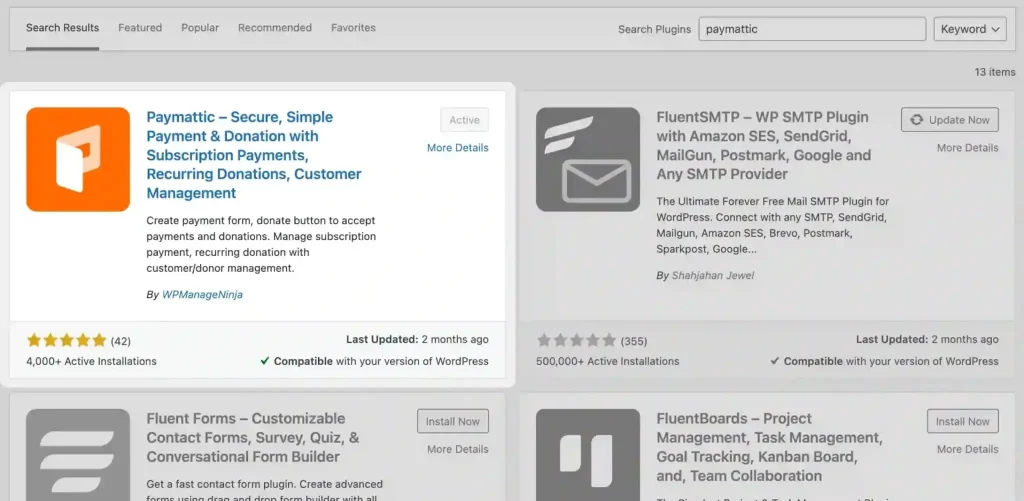
Step 1: Install and activate Paymattic
- Go to your WordPress dashboard → Plugins → Add New
- Search for Paymattic, then install and activate the plugin.
Step 2: Connect your payment gateway
Now, to accept international payments, you have to configure a payment gateway to collect payments from your customers.
- For this, go to Paymattic dashboard > Payment Gateway. Here you will find all the available payment methods.
- Select your preferred payment system and insert the API credentials for your merchant account.
- Then click on the Save Settings button.
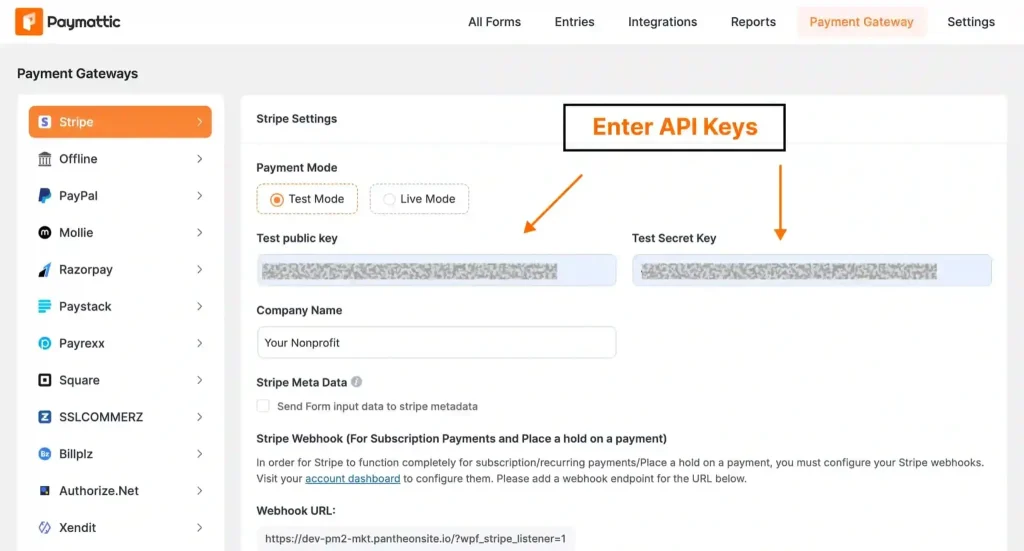
For recurring donations, Paymattic currently supports these payment gateways: Stripe, PayPal, Square, Moneris, and Authorize.net.
Step 3: Create your donation form
To create your first donation form. Go to Paymattic > All Forms > Add New.
You can start from a template or build from scratch.
For a recurring donation form, you’ll want:
- Donor information fields (name, email)
- Donation Progress Bar field (with suggested amounts)
- A payment gateway field that supports recurring donations
- Others form fields based on need
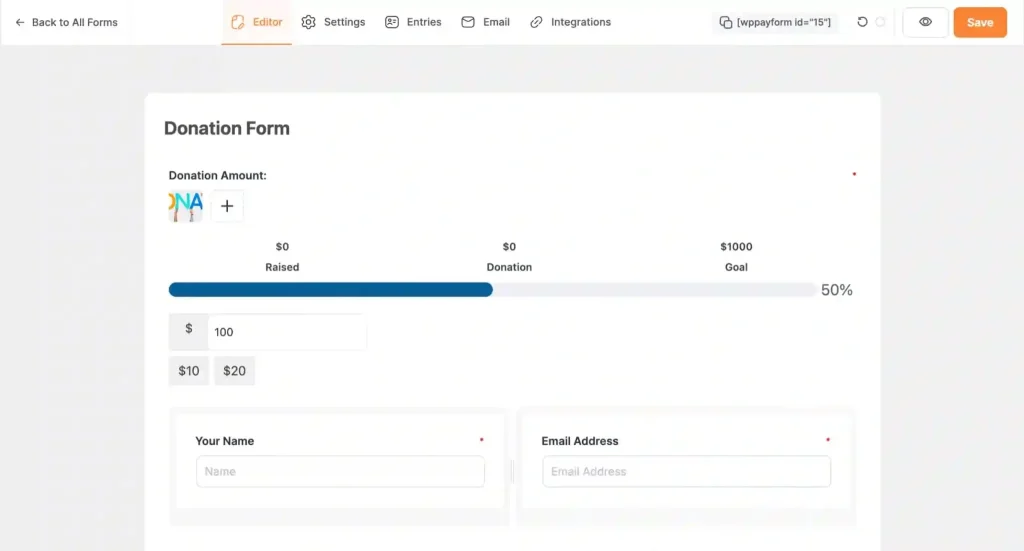
After adding all the necessary fields, click the Save button.
Step 4: Configure recurring donation options
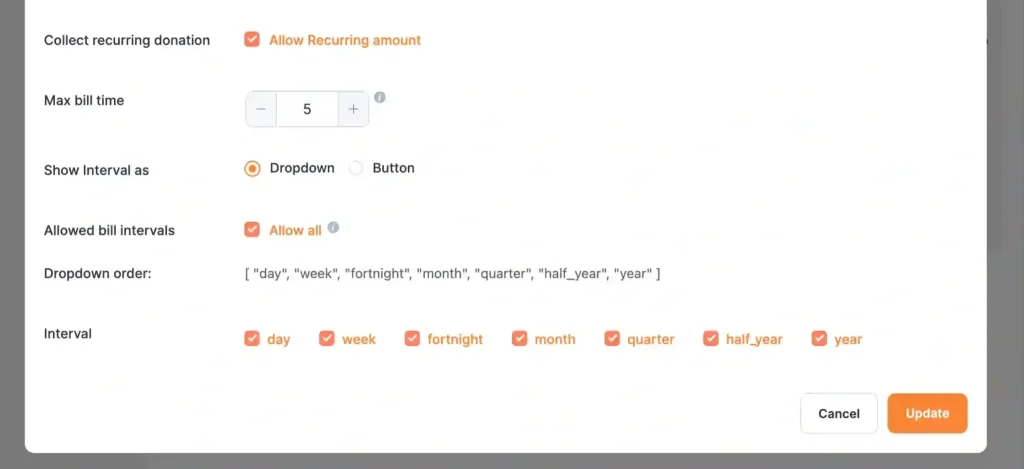
- Go to the settings of the Donation Progress Item and enable Collect recurring donation.
- Pick your interval, maximum billing time, pick interval style, and check the interval elements.
- After configuring recurring donation options, click the Update button.
Your recurring donation form is ready to embed on your WordPress fundraising website. Before publishing the form preview, check if everything looks perfect.
Step 5: Embed the donation form
After the final check, it’s time to embed the form on your website. To do this, copy the shortcode from the top of the donation form and paste it into your page.
Then publish the page and start accepting recurring donations with Paymattic.
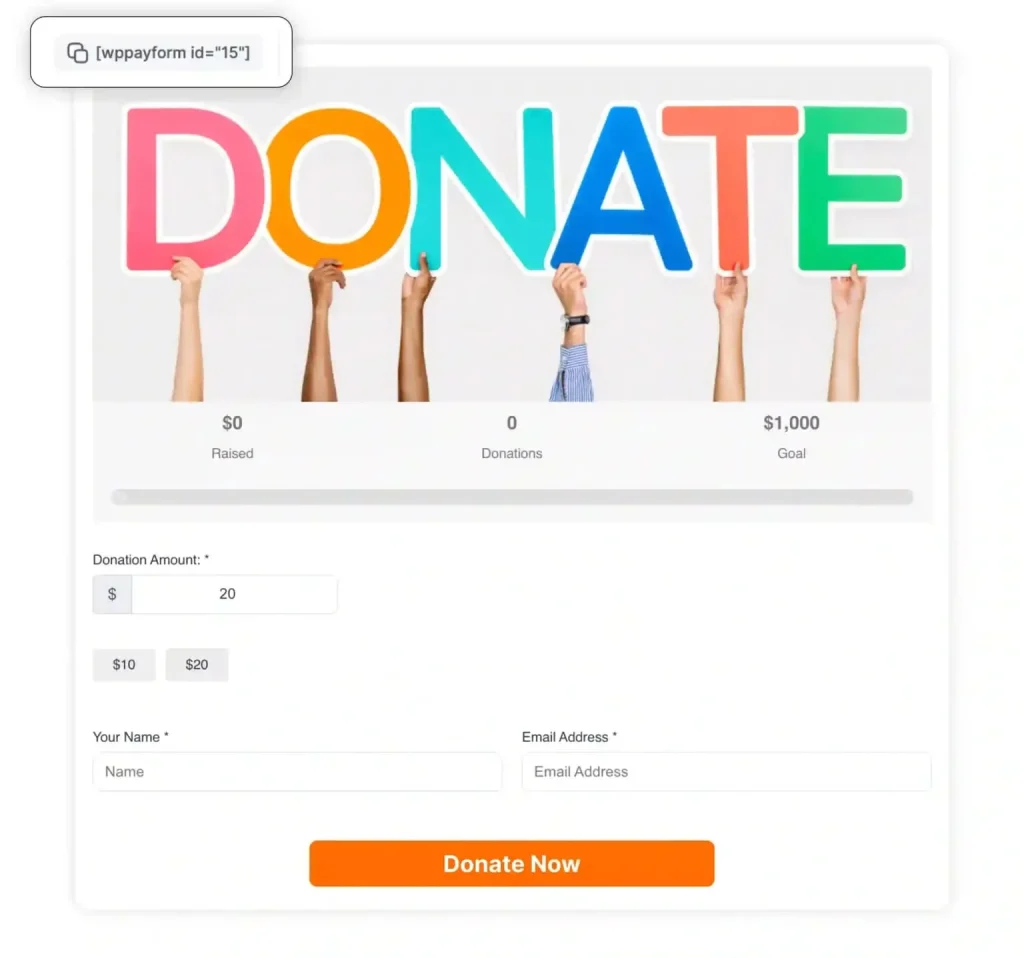
Here’s the final look of a demo recurring donation form I created with Paymattic:
Examples of recurring donation campaigns
Recurring donations work best when nonprofits connect them with a clear mission and ongoing impact. Here are some common recurring donation campaign examples nonprofits use successfully:
“Sponsor a Child” $20/month: Used widely by education-focused nonprofits. Donors feel a direct, personal connection to their impact. The monthly amount feels manageable; the cumulative impact feels significant.
Animal rescue supporter club: Animal shelters create membership-style donation programs where recurring donors help cover food, medical treatment, and shelter costs for rescued animals.
Church or faith-based monthly giving: Religious organizations encourage members to contribute monthly donations to support community programs, events, and operational expenses.
Environmental protection campaigns: Environmental nonprofits use recurring donations to fund ongoing tree plantations, wildlife protection, or climate awareness projects.
Emergency relief support: Disaster relief organizations collect recurring donations to maintain emergency funds that can be used quickly during floods, earthquakes, or humanitarian crises.
Healthcare assistance campaigns: Medical nonprofits ask supporters to donate monthly to help provide treatments, medicines, or healthcare access for underprivileged communities.
Community development programs: Nonprofits working in rural development or social welfare often use recurring donations to sustain long-term projects like clean water, education, or housing support.
Best practices to increase recurring donation conversions
Setting up the form is step one. Getting people to actually choose recurring is step two. Here are some best practices to increase recurring donation conversions.
Make monthly giving the default option
Pre-selecting “monthly” in your form removes friction. Most donors won’t change the default; they’ll just complete the gift. This single change can dramatically shift your recurring vs. one-time ratio.
Offer suggested donation amounts
Don’t make donors guess what to give. Offer 3 – 4 preset amounts (e.g., $10, $25, $50, $100) plus a custom field. Preset amounts anchor expectations and reduce decision fatigue.
Explain donor impact clearly
Every suggested amount should tell a story. “$10/month = school supplies for one child” is more compelling than just “$10.” Impact labels shift the mental framing from “how much should I give?” to “which outcome do I want to fund?”
Keep donation forms short
Every extra field is an opportunity for a donor to abandon the form. For a recurring donation form, you need: amount, frequency, name, email, and payment details. That’s it. Remove everything else unless it’s truly essential.
Use emotional storytelling
Your form introduction, campaign page, and email sequence should lead with stories, not statistics. A specific child, family, or community is more persuasive than aggregate numbers.
Add trust signals
Display SSL security badges, recognized payment gateway logos (Stripe, PayPal), and your nonprofit registration details near the payment fields. Donor anxiety about security is real; address it directly.
Allow flexible billing frequency
Some donors prefer quarterly or yearly giving. Offering flexibility increases conversions from donors who want to commit but prefer less frequent transactions.
Optimize for mobile users
A significant portion of donation form traffic comes from mobile devices. Test your form on a phone before publishing. Long forms, small tap targets, and slow load times kill mobile conversions.
Send recurring donor appreciation emails:
Don’t just send a receipt. Send a welcome email to new recurring donors that thanks them specifically for choosing monthly giving, explains the difference it makes, and tells them what to expect next.
Use dedicated recurring donation landing pages
A general donation page competes for attention. A page built specifically around monthly giving with focused messaging, a single CTA, and no navigation distractions converts better. Consider creating a separate /give-monthly/ page.
Final thoughts
Recurring donations won’t transform your fundraising overnight. But every monthly donor you add is a brick in a more stable financial foundation, one that compounds over time.
Start with a small goal. Acquiring 10 new monthly donors this quarter is achievable and meaningful. Focus less on the size of the gift and more on the relationship behind it.
A donor giving $15/month who feels genuinely connected to your work is worth more financially and relationally than a one-time $200 gift from someone who never hears from you again.Ready to build your first recurring donation form?
Start creating predictable fundraising revenue for your nonprofit.

This is Madhobi, a Marketing Strategist at WPManageNinja with expertise in technical writing and email marketing. Outside of work, she likes traveling and exploring new places.
-

Vanity Metrics vs Actionable Metrics: What to Track in 2026
Actionable metrics are potential that we can help in measuring. -
Web Protocols Explained: The Types and How They Work
Learn what web protocols are, how they work, and the -
Content Marketing: Build a Business From What You Already Know
Learn how to start a content marketing business, grow an



Leave a Reply
You must be logged in to post a comment.