

Turn YouTube Traffic Into Leads With a WordPress Video Funnel

You just published another video. Views climb through the week. The comments are decent. The usual advice says keep posting and let the algorithm reward you. That works for ad revenue. But it doesn’t get you a $6,000 consulting client.
A creator chasing watch hours and a consultant chasing signed clients aren’t solving the same problem. One needs volume. The other needs one viewer to take one next step. Right now that viewer watches, nods along, and leaves. No email captured, no way back, no sign of which video almost turned into a client.
This guide walks through the WordPress funnel that gives them somewhere to go: one flagship video, a lead capture inside it, and a path that ends in a booked call.
TL;DR
- YouTube views need a funnel underneath them to become high-ticket leads.
- The full stack, FluentPlayer, Fluent Forms, FluentCRM, and FluentBooking, runs on free plans.
- Interactive Layers put an email capture or a full form inside the video itself, no separate landing page needed.
- FluentCRM tags each lead by video topic, so your follow-up matches what they actually watched.
- Pro adds video analytics, conditional layer rules, and a booking calendar embedded right in the video, once you’re ready to scale.
Why Views Don’t Turn Into High-Ticket Leads
Views don’t turn into leads because YouTube was never built to hand a viewer a next step.
YouTube is genuinely good at reach. Ad revenue is real income for creators at scale, and an owned funnel doesn’t replace that.
For a consultant, agency, or coach selling a high-ticket service, ad revenue was never the goal. A $30 CPM on a niche B2B channel pays almost nothing next to one signed client worth $5,000 or more.
The person deciding whether to hire you right now, mid-video, is worth more than a thousand anonymous views.
YouTube gives that person nowhere to go except “like and subscribe.” An owned funnel gives them a next step: a page you control, a form that captures their details, and a sequence that gets them on a call.
What the Funnel Actually Does
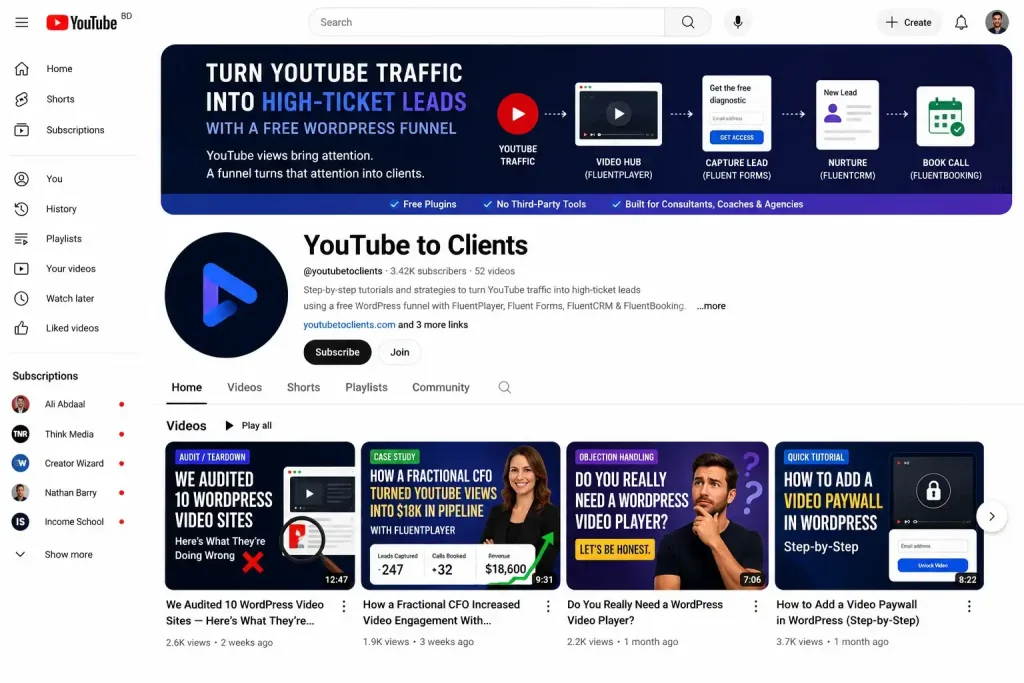
The stack has four parts, and every one of them runs on a free plan.
FluentPlayer, free on WordPress.org, plays your best videos on a page you own, with your existing YouTube channel connected as the source. Fluent Forms captures the lead inside the video. FluentCRM tags and nurtures that lead. FluentBooking gets them on a call.
Nothing here needs a third-party connector. Fluent Forms and FluentCRM are native integrations built into FluentPlayer’s free plan, so a form submission inside a video becomes a tagged contact without Zapier in between.
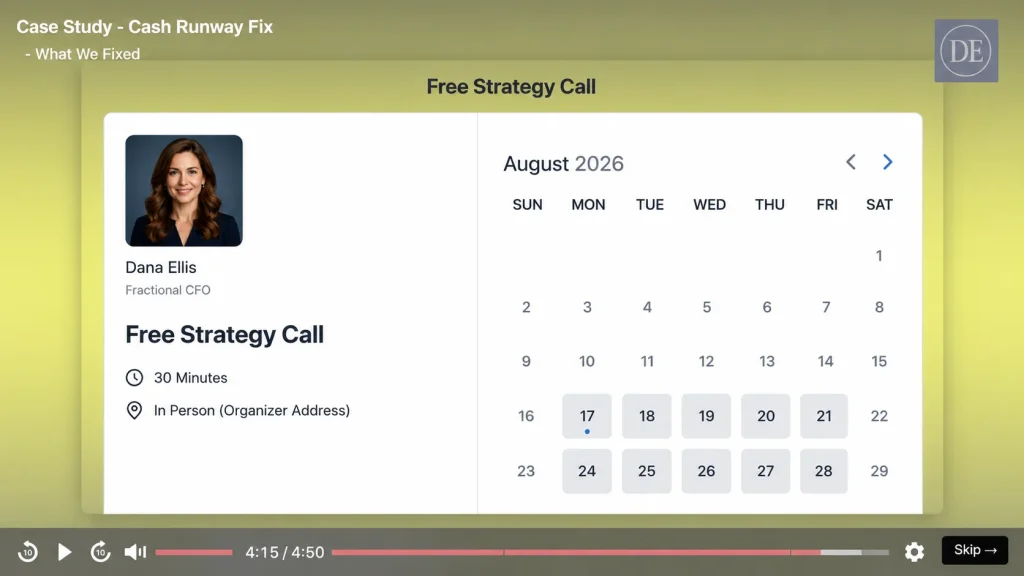
This guide uses one example throughout. This guide follows one example throughout: Dana Ellis, a fractional CFO who sells a $6,000, 90-day engagement. She’s made up, not a real customer.
Building the Video Hub Around One Offer
The offer comes before the content, every time.
Write down the three or four questions a prospect asks themselves before they hire someone like you: can this actually work for my business, what does it cost, why you and not a competitor.
For Dana, those questions are close to the three above.
- Can this work for a business her size?
- What’s actually included in the 90 days?
- Why a fractional CFO instead of waiting to hire full time?
She builds a YouTube content cluster that answers exactly those questions: an anonymized audit of a real client’s books, a case study, a video on the five signs a business needs a fractional CFO before it’s obvious.
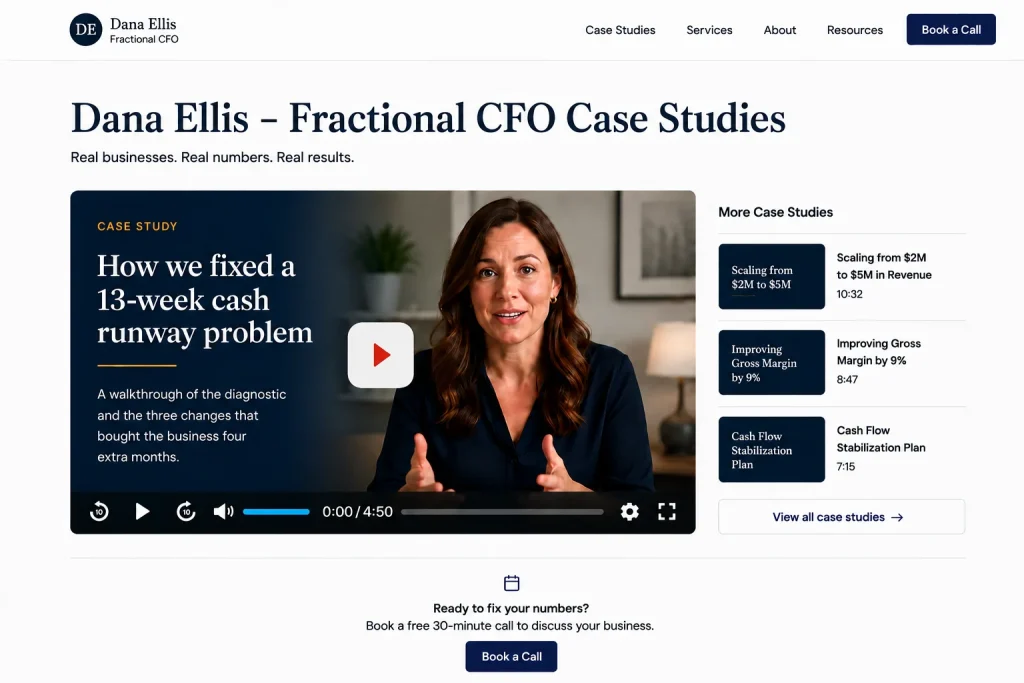
She creates one WordPress page, her video hub, and embeds her best videos there with FluentPlayer instead of sending every visitor back to YouTube. Her flagship video is the anonymous case study, the one prospects ask about most.
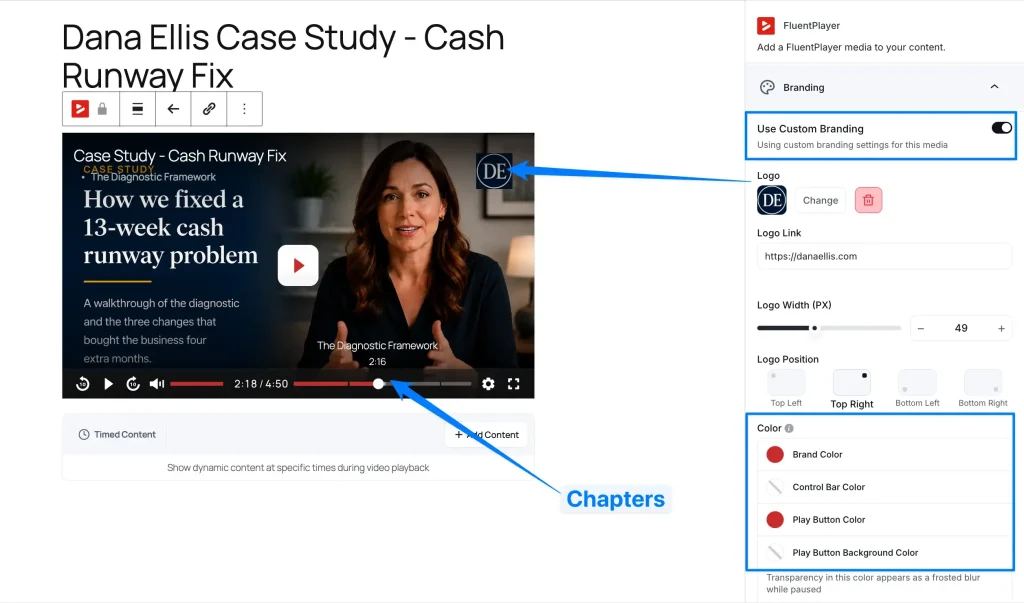
She sets up that video’s player branding, presets, and chapters so it feels like part of her site, not a pasted-in embed. All of this, including YouTube as the source, sits on the free plan.
Capturing the Lead Without Losing the Viewer
The moment a viewer has gotten real value from your flagship video is the moment to ask for something back.
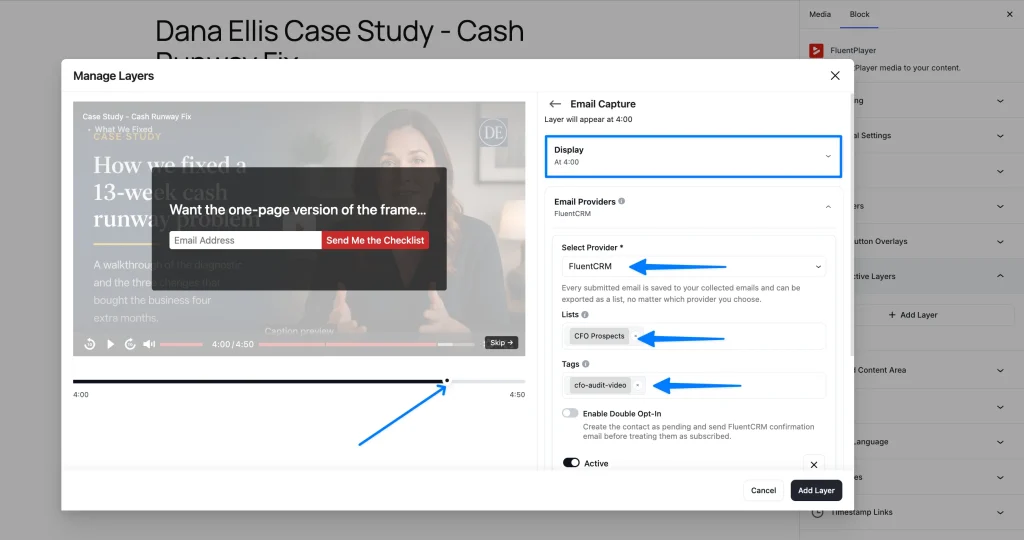
In Dana’s video, that moment lands right after she walks through her diagnostic framework, about four minutes in.
Add a free Email Capture layer or a full Fluent Forms layer at that timestamp. The email capture layer is a single field. The Fluent Forms layer can ask more, or qualify the lead with a short question.
Capturing the lead too early
Here’s what to avoid:
- Layer set to appear at 0:05, before the viewer has learned anything
- Copy: “Enter your email to keep watching”
Here’s what works:
- Layer set to appear right after Dana explains her diagnostic framework, once the viewer has gotten real value
- Copy: “Want the one-page version of the framework you just watched?”
When Dana’s form is submitted, the contact flows into FluentCRM automatically with a tag she set in the layer settings: cfo-audit-video. No separate opt-in plugin, no manual export.
Nurturing the Lead Into a Booked Call
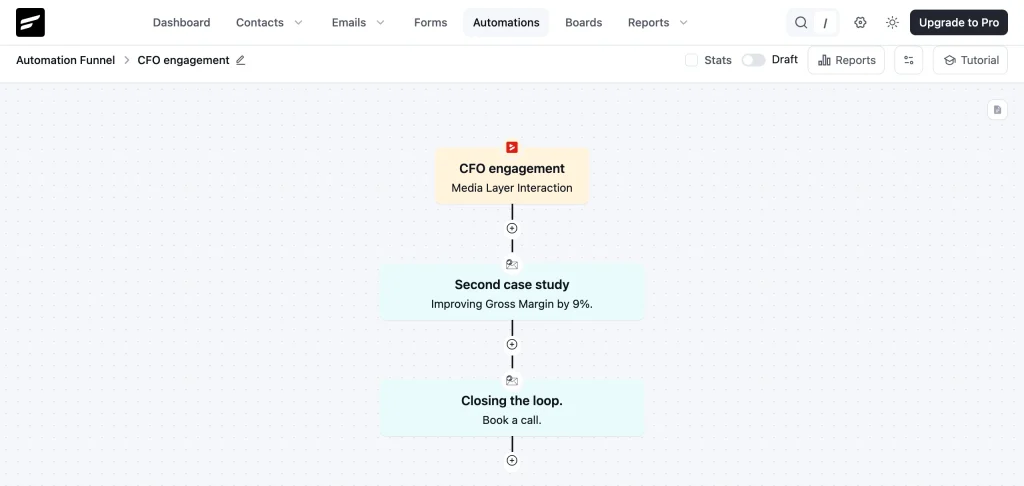
A tagged FluentCRM contact becomes a client only after a short, specific nurture sequence moves them to book a call.
Dana’s sequence runs three emails: a second case study, the specific outcome her engagement produces, and one CTA to book a call, not a menu of options.
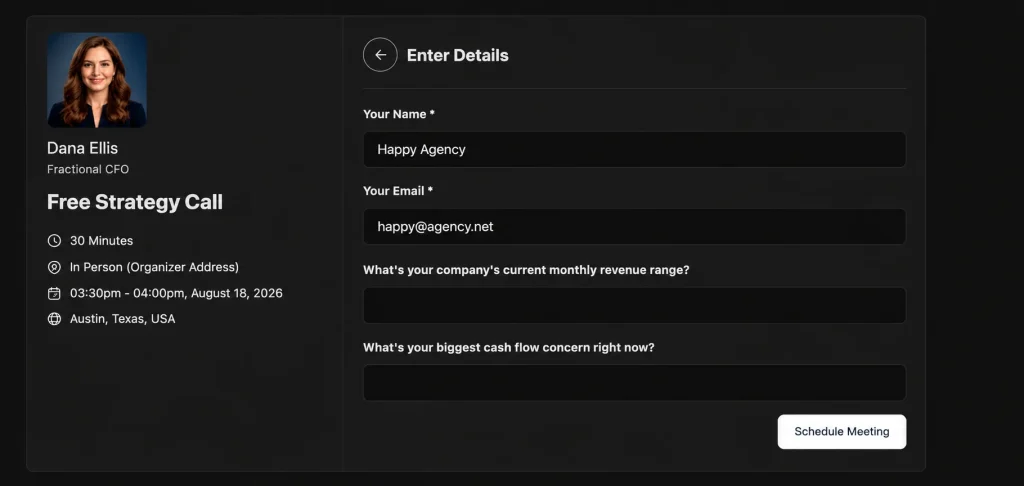
She creates the call as a FluentBooking event with intake questions that qualify the problem before the call happens, so she starts each call already knowing what the prospect needs.
FluentBooking runs on its own free plan and is independent of FluentPlayer. Dana isn’t waiting on a native connection between the two; she’s linking to the booking page from her nurture email.
Tracking What Actually Converts
Views tell you almost nothing about whether this funnel is working. Bookings and closed deals tell you everything.
Start by tracking this manually. Tag each video’s traffic with a distinct link or UTM parameter, and check FluentCRM for which tag shows up most often on booked-call contacts.
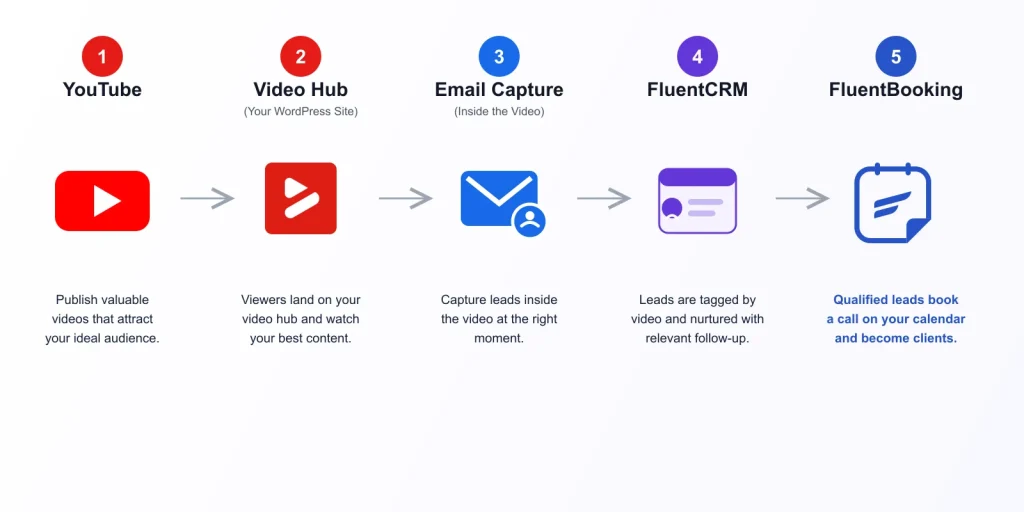
Once you have a few weeks of data, the loop repeats: YouTube topic, owned video page, captured lead, nurture, consultation, sale, new case study built from that client’s result.
Here’s how the math looks for Dana’s funnel. Her offer is $6,000, and one in four booked calls closes. Ten booked calls in a month is two or three new clients, $12,000 to $18,000 that month. This is an illustration of the shape of the math, not a promise.
What Dana’s full funnel looks like, start to finish:
- YouTube video answering a real buying question
- FluentPlayer video hub embed with chapters and branding
- Email capture layer four minutes in, tagged to FluentCRM
- Three-email nurture sequence with proof and one CTA
- FluentBooking call with qualifying intake questions
- UTM-tagged link showing which video sourced the booking
Mapping Content to the Funnel Stage It Should Feed
Each video type has one job: feed a specific stage of the funnel.
| Video Type | Buying Question It Answers | Funnel Stage |
|---|---|---|
| Free audit or teardown | “Would this even work for me?” | Awareness · Top of cluster |
| Case study with real numbers | “Has this worked for someone like me?” | Consideration · Flagship candidate |
| Objection-handling video | “Why you and not a competitor?” | Consideration |
| Quick tutorial | “Can I trust this person’s expertise?” | Awareness · Discovery |
| Behind-the-scenes process video | “What does working with you look like?” | Decision · Pre-call |
What FluentPlayer Pro Adds Once the Funnel Is Working
The free stack gets you to your first booked calls. FluentPlayer Pro is what you reach for once the funnel is producing leads and you want to see exactly where it leaks.
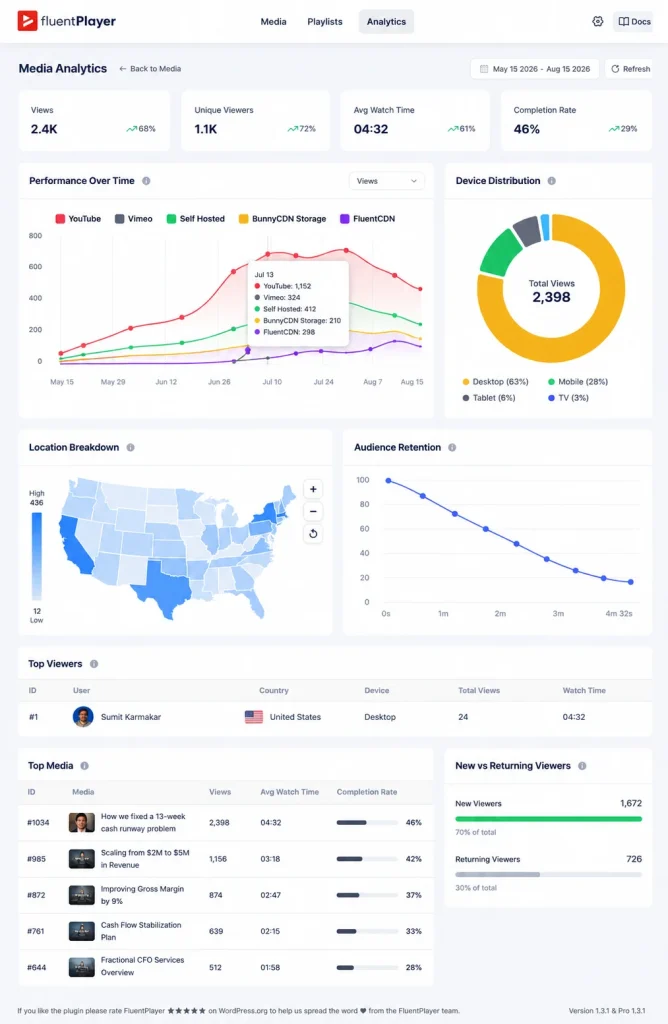
Video analytics show watch time, completion rate, audience retention, and device and location breakdown, so you know whether people drop before your CTA or after it.
Conditional layer rules let a first-time visitor see the email capture while a contact already tagged in FluentCRM sees a different offer instead, so returning viewers stop seeing the same ask twice.
CTA banners, hotspots, and shortcode layers add more ways to prompt action: a hotspot linking to a case study, a banner appearing right after the strongest proof point.
For this exact funnel, the sharpest upgrade is embedding the booking calendar inside the video. FluentBooking calendars can be embedded through the Shortcode layer, so a qualified viewer books the call without leaving the page.
Playlists, media tagging, and subtitles matter once your flagship video becomes a small library instead of one piece. Remember Playback Position keeps a returning viewer from starting over.
| Free | Pro |
|---|---|
| Self-hosted, YouTube, Vimeo, and audio sources | Bunny, Mux, HLS, and more sources |
| Email capture and Fluent Forms layers | CTA, hotspot, ad, and shortcode layers, plus conditional rules |
| Native FluentCRM and Fluent Forms integration | The same integrations, plus Mailchimp and webhooks |
| Chapters, branding, and player presets | Video analytics, playlists, subtitles, and media tagging |
Why This Actually Matters for High-Ticket Sellers
Take a freelance consultant posting weekly teardown videos. Views climb, but nobody replies to a pitch because there was never a form to reply to. The lead evaporates the moment the video ends.
Or a boutique agency running case-study content. A prospect watches the whole thing, gets convinced, and closes the tab meaning to come back later. They don’t.
For a coach or trainer selling a signature program, the cost compounds. Every video is proof stacking up with no way to convert that proof into a call.
Even a solo freelancer with a small audience feels this. A dozen engaged viewers a week is a real pipeline if even one of them can take the next step.
What’s common across all four is that the gap doesn’t feel big while the video is live. It shows up later, when the view count is good and the pipeline still isn’t.
A funnel underneath the video catches most of this. The free Email Capture and Fluent Forms layers collect the lead before the tab closes, and a tagged lead turns follow-up from a guess into a fact.
Add One Capture Layer to Your Best Video
Open your best-performing video today. Add a free Email Capture or Fluent Forms layer at the point viewers already trust you, a case study reveal, a results moment, the part they’d screenshot.
Connect it to FluentCRM so the lead carries the video’s context into your inbox. That’s the whole first move.
Install FluentPlayer free and do this for one video before you publish another. When leads start coming in, FluentPlayer Pro shows you exactly where the rest are dropping off.
Frequently Asked Questions
Do I need FluentPlayer Pro to start this funnel?
No. Every step in this guide, YouTube playback, the email capture and Fluent Forms layers, chapters, branding, and the native FluentCRM connection, runs on FluentPlayer’s free plan.
How long before a YouTube funnel produces a paying client?
It depends on your existing audience and how well your flagship video matches a real buying question. Treat the first month as data collection, not a results guarantee.
Can I run this funnel without FluentCRM?
You can capture leads without it, but you lose the automatic tagging and nurture sequence that turns a form submission into a booked call. FluentCRM’s free plan covers this funnel fully.
Does the video need to be hosted on my own server?
No. FluentPlayer’s free plan plays directly from your existing YouTube channel. You’re embedding the video on your site, not re-uploading it.
What if my audience is too small for this to work yet?
The funnel doesn’t need volume to prove itself. One flagship video, one clear offer, and a handful of booked calls is enough to validate the mechanics before you scale the content cluster.

This is Sumit. He’s a physics major who’s trying to understand both the physical as well as the WordPress worlds. Whenever he’s not busy, plays fifa or spends time with his family.
-
10 Best jQuery Table Plugins for Best Data Visualization in 2026
Discover the 10 best jQuery table plugins for 2026. Compare -

Black Friday Marketing Strategies for 2026: Core and Advance Move
Black Friday is the most celebrated shopping season worldwide. Discover -
How Much Can You Earn With Amazon Affiliate Marketing? Rates & Niches
How much can you earn with Amazon affiliate marketing? Dive



Leave a Reply
You must be logged in to post a comment.