

How to Sell Subscriptions and Licenses in WordPress with FluentCart

You built something worth selling. Now you need WordPress to handle recurring billing and license delivery automatically.
WordPress has no native billing engine or license key system. Everything comes from plugins. The typical approach works until it doesn’t. The cracks show fast when customers upgrade plans or payment cards expire.
In this blog, we will cover what subscriptions and licenses mean for WordPress sellers, where common setups fall short, and how to set everything up with FluentCart.
TL;DR
- WordPress has no built-in recurring billing or license key system
- Separate billing and licensing plugins create sync failures, upgrade headaches, and added cost
- FluentCart handles both natively in one plugin: subscriptions, licensing, upgrade paths, and reporting
- Setup covers product tiers, trial periods, activation limits, and prorated upgrades from one screen
- Buyers manage subscriptions, license activations, and upgrades themselves via a self-service dashboard
What Are Subscriptions and Licenses?
These two things are often treated as one. They describe separate systems.
Subscriptions
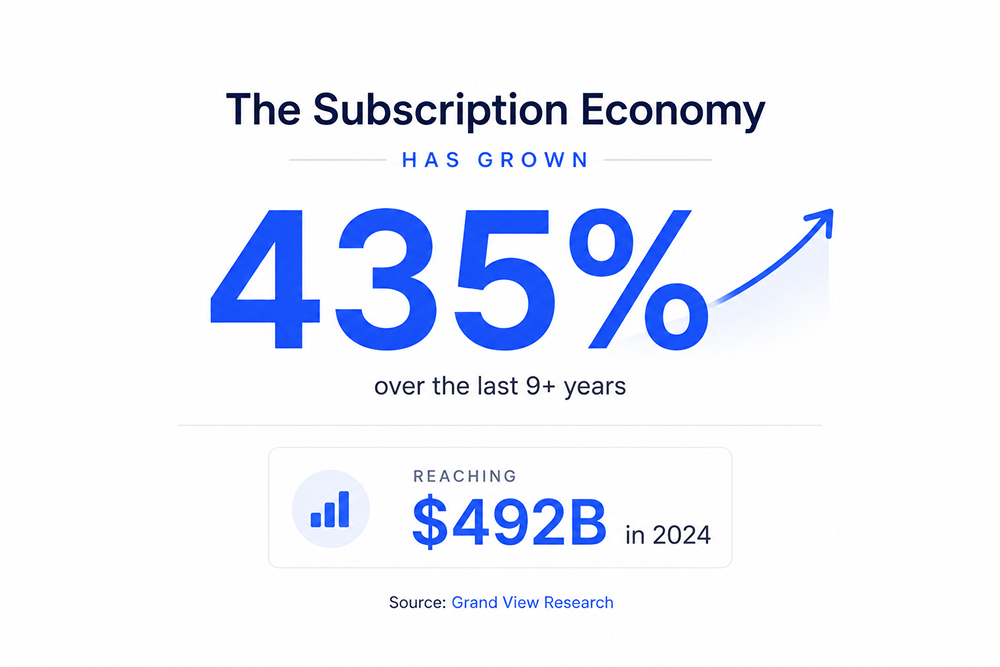
A subscription handles billing. The customer pays on a recurring schedule and keeps access as long as payments continue. “The global subscription economy reached $492 billion in 2024 and is projected to hit $1.5 trillion by 2033” (Grand View Research).
Recurring revenue has become the default model across software, content, and digital tools.
Licenses
A license controls access. A license key ties a purchase to specific usage conditions: how many sites can activate it and how long the activation lasts.
Without billing connected to it, a license has no renewal mechanism. A customer pays, gets a key, uses it on their site, and loses access the moment their subscription lapses.
Both need to work together for software businesses.
Why Most WordPress Setups Fall Short
The Fragmented Stack Problem
The common setup is that an eCommerce plugin for the store, a subscription add-on for billing, and a separate license manager for key generation. Each tool works on its own. Together, they leave gaps.
When a customer upgrades from a single-site plan to a five-site plan, the billing plugin has no connection to the license plugin’s activation limits. Those are two separate databases.
Store owners building micro-SaaS products on WordPress surfaces this problem constantly: tier changes should automatically update license limits, but separate tools don’t handle this natively.
The Cost Problem
Popular WordPress billing and licensing tools often lock key features behind paid extensions: free trials, upgrade paths, and software update delivery.
The base price looks affordable. With necessary extensions added, the total climbs quickly.
| Capability | Typical Plugin Stack | FluentCart Pro |
|---|---|---|
| Subscription Billing | Subscription plugin | ✅ Built in |
| License Key Generation | Separate licensing plugin | ✅ Built in |
| Upgrade Paths | Additional extension or custom setup | ✅ Built in |
| Prorated Upgrades | Extension or custom configuration | ✅ Built in |
| Renewal Reminders | Usually managed separately | ✅ Built in |
| Software Update Delivery | Separate licensing/update system | ✅ Built in |
| Customer Dashboard | Multiple systems | ✅ Unified |
| Customer Records | Stored across plugins | ✅ Single customer record |
| Reporting & Analytics | Multiple dashboards | ✅ Unified dashboard |
| Ongoing Maintenance | Multiple plugins and renewals | ✅ One system |
How FluentCart Handles Both
FluentCart’s makers are also the team behind Fluent Forms, FluentCRM, Ninja Tables, Fluent Support, FluentCommunity, and a lots of other widely-used WordPress tools. Subscriptions and licensing are built-in features in FluentCart. They share the same customer record.
Why That Matters
When a renewal fires, the license extends. Then, when a subscription cancels, access revokes. When a customer upgrades tiers, the billing amount and the activation limit update together in the same transaction. No sync step, no manual override.
What’s Included
- Subscriptions: Billing intervals from daily to yearly, trial periods, installment plans with a fixed end date, setup fees, automated renewal reminders, and auto-cancellation.
- Software Licensing: Automatic key generation at purchase, per-tier activation limits, version control, WordPress plugin update delivery, and license key prefix per product.
- Upgrade Paths: Customers move between tiers themselves. You define the route, the discount, and whether the upgrade is prorated. They complete it from their account page.
- Reporting: Active subscriber counts, cancellation trends, retention cohorts, future renewals forecast, and customer lifetime value. All in one dashboard.
What You Can Sell
The subscription plus licensing model fits a wider range of products than most sellers consider:
- WordPress plugins and themes with annual renewal
- SaaS tools using WordPress as the billing and license frontend
- Online courses sold via installment plans
- Digital asset libraries with monthly access
- Monthly content subscriptions like reports or newsletters
Setting Up Subscriptions and Licenses in FluentCart
This assumes FluentCart Pro is installed and the initial setup wizard is complete.
Step 1: Enable Product Licensing
Go to FluentCart Pro > Settings > Features & Addons. Toggle on Product Licensing. This unlocks the License Settings tab on every product. One-time step.
Step 2: Create Your Product and Set Billing
Go to FluentCart Pro > Products > Add Product. Add title, description, and image.
Scroll to the Pricing section. Choose Simple for a single price or Simple Variations for multiple tiers. For a product with monthly and annual plans, use Simple Variations.
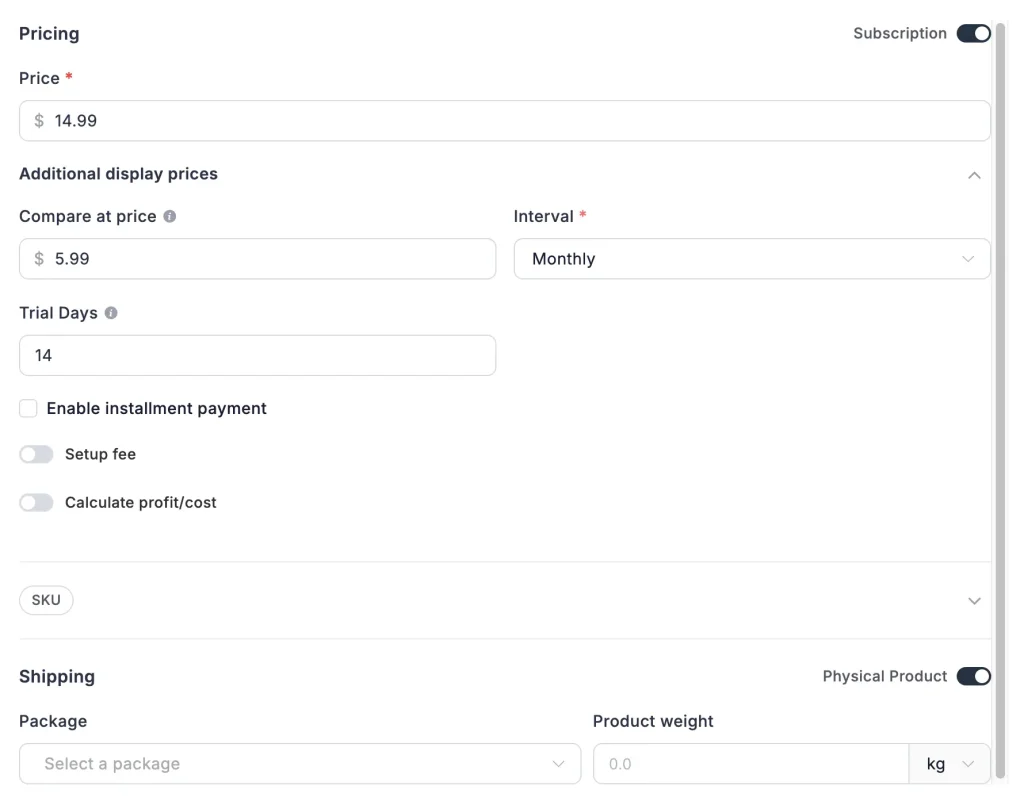
Toggle Subscription to ON for each variation. This reveals the recurring billing fields.
Billing Fields Explained
- Interval: Sets billing frequency: daily, weekly, monthly, quarterly, half-yearly, or yearly. Two variations with different intervals give you a monthly and an annual plan side by side.
- Trial Days: Adds a free period before the first charge. A 7-day trial on higher-priced tiers measurably improves conversion.
- Installments: Limits the subscription to a fixed number of payments. The subscription ends automatically after the final one. Useful for courses and coaching programs.
- Setup Fee: A one-time charge at signup, separate from the recurring price. Shown as its own line item on the invoice receipt.
Step 3: Set License Rules
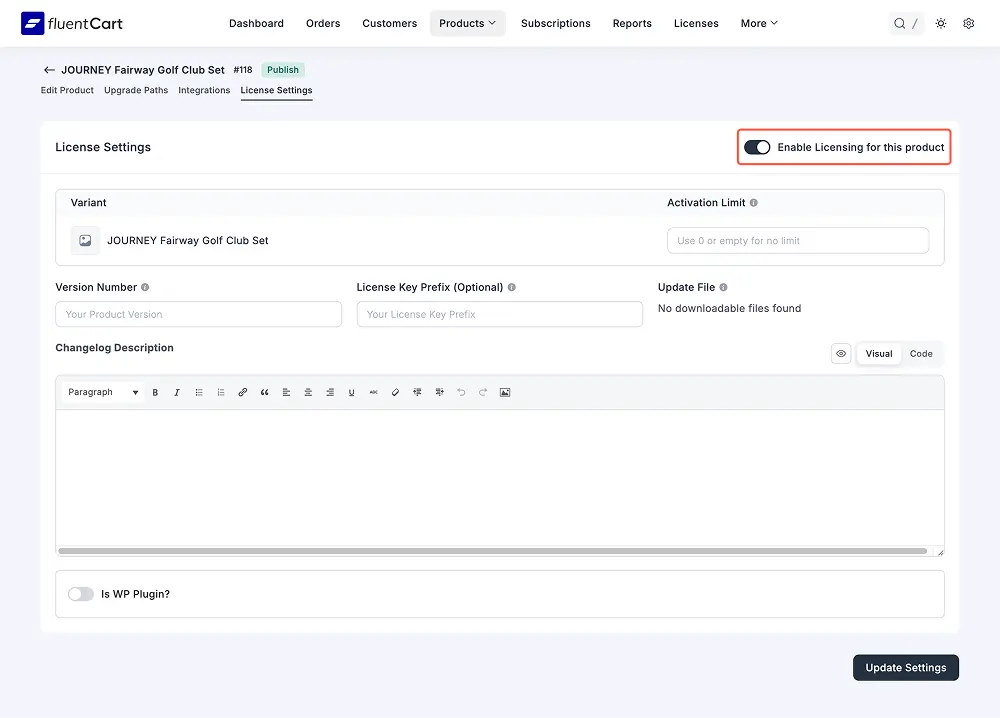
Click the License Settings tab. Check “Enable Licensing for this product.”
In the configuration table, each pricing variation gets its own row. Set the Activation Limit per variation. A single-site license allows 1 activation. An agency license might allow 50.
For WordPress Plugins
Check “Is WP Plugin?” to unlock additional fields:
- Version Number and Changelog Description for the current release
- License Key Prefix to tag every key from this product (example: “fc-” for FluentCart)
- Changelog URL, Banner URL, and Icon URL for the update UI
- Minimum PHP and WordPress version requirements
With these configured, customers receive update alerts directly in their WordPress dashboard, just like official plugin updates appear.
Step 4: Set Up Upgrade Paths
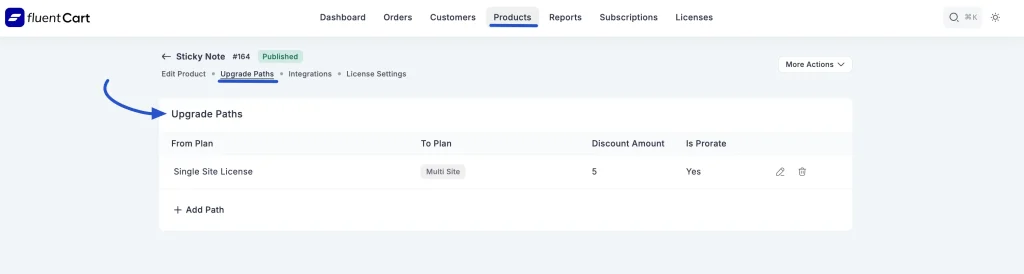
Click the Upgrade Paths tab. Click “+ Add Path.”
Select the From Plan and To Plan. Set a Discount Amount. Toggle Is Prorate to Yes to give customers credit for unused time on their current plan.
Once saved, customers see an “Upgrade Plan” button in their account. They pick the new tier, see the adjusted price, and check out. No support ticket needed.
Step 5: Connect a Payment Gateway
Go to FluentCart Pro > Settings > Payments. Supported gateways include Stripe, PayPal, Paddle, Mollie, Razorpay, Paystack, Authorize.net, Square, Flutterwave, and custom gateways via Webhooks.
Stripe handles automatic renewals and failed payment retries. For regional sellers, Mollie covers Europe, Paystack covers West Africa, and Razorpay covers India.
Step 6: Test Before Going Live
Enable Test Mode under Settings > Payments. Run a checkout using Stripe’s test card (4242 4242 4242 4242). Confirm the license key was delivered by email, the subscription appears under FluentCart Pro > Subscriptions, and the customer dashboard shows both correctly.
Disable Test Mode when everything checks out.
Managing Subscriptions After Launch
The Subscriptions Dashboard
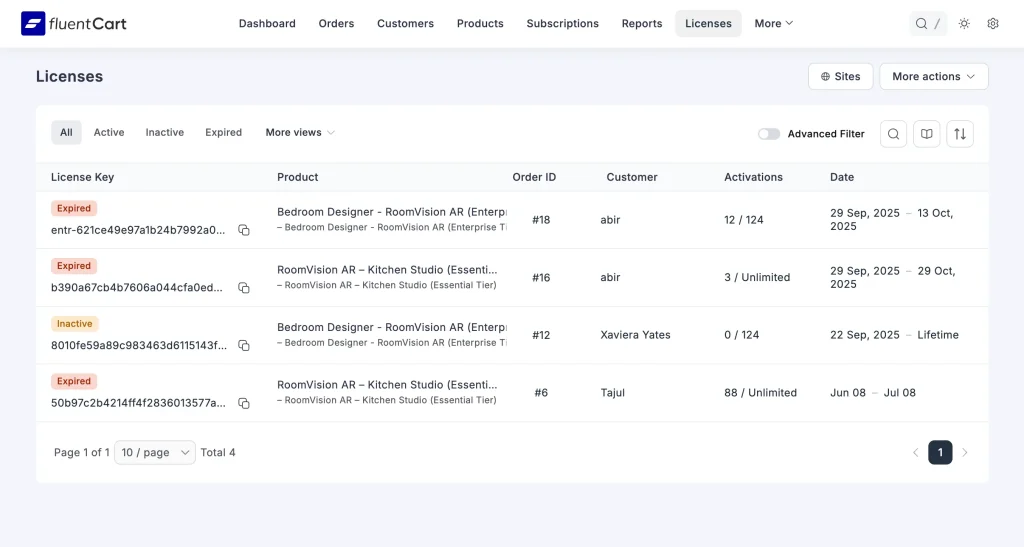
Go to FluentCart Pro > Subscriptions. The table shows every subscriber’s name, product, billing status, next renewal date, payment method, and billing cycle count. Quick filters cover active, trialing, and pending records. The “More views” dropdown surfaces expired and cancelled subscriptions for churn analysis.
Clicking into any subscription opens a full detail view: billing history, gateway reference IDs, customer lifetime value, and internal labels for segmentation.
Cancellations and Reactivations
When a subscription cancels, FluentCart sends an automatic email with the customer’s access end date. This one step reduces “do I still have access?” tickets considerably.
Reactivation is available from the Subscription Details page. FluentCart fires a SubscriptionReactivated event that FluentCRM, FluentCommunity, and email automations pick up automatically. Tags and access restore without manual steps.
Reducing Churn
Annual plans churn less than monthly plans. Free trials lower the signup barrier. Prorated upgrade paths make moving to higher tiers feel financially safe. A self-service dashboard keeps customers from churning over something as fixable as an expired card.
Ecosystem Integrations
FluentCart becomes even more powerful when paired with selected WPManageNinja products. It allows customer data, access control, marketing, support workflows, etc., to stay connected across your business. For example,
- FluentCRM: Tags customers at purchase, renewal, and cancellation. Build email sequences triggered by subscription status without external automation.
- FluentCommunity: Grants or revokes community and course access based on active subscription status automatically.
- Fluent Support: Shows subscription status and license details inside support tickets, so your team has context without switching dashboards.
Conclusion
Subscriptions and licenses work best when they run through one system. Fragmented setups leave gaps that cost time and subscribers. FluentCart closes those gaps natively.
Start with FluentCart’s subscription and licensing overview or go straight to the licensed product setup guide in the documentation.
FAQs
Can customers manage their own subscriptions?
Yes. The customer dashboard lets buyers view active subscriptions, check activation counts, update payment methods, and upgrade plans without contacting support.
What happens when a payment fails?
FluentCart works with Stripe’s retry logic. Failed charges are retried over several days with customer notification. If the subscription cancels after retries, access revokes and a cancellation email goes out with the access end date.
Does licensing work specifically for WordPress plugins?
Yes. FluentCart has dedicated plugin fields for version number, changelog, PHP and WordPress version requirements, and banner and icon URLs. With these set, customers receive update notifications directly in their WordPress dashboard.
Can I migrate an existing store?
FluentCart includes a migration wizard for stores on Easy Digital Downloads. Products, customers, orders, and license records all transfer. Full walkthrough at docs.fluentcart.com/guide/migration/edd.

A published literary author, and a musician. I thrive on marketing for tech companies while composing music, collecting books of lasting depth, exploring cinema with a discerning eye, and studying the arts and history.
-

Ecommerce SMS Marketing: Strategies, Examples & Best Practices
Learn ecommerce SMS marketing strategies, campaigns, and best practices to -

Omnichannel Marketing: 7 Steps to a Connected Shopping Experience
It’s never too late to upgrade your marketing plan. Whether -
FluentSMTP Review: Whats Inside this 700K+ WordPress SMTP Plugin?
Check our FluentSMTP review blog to Discover whats inside this



Leave a Reply
You must be logged in to post a comment.