

AI Customer Service Automation: How to Actually Make It Work
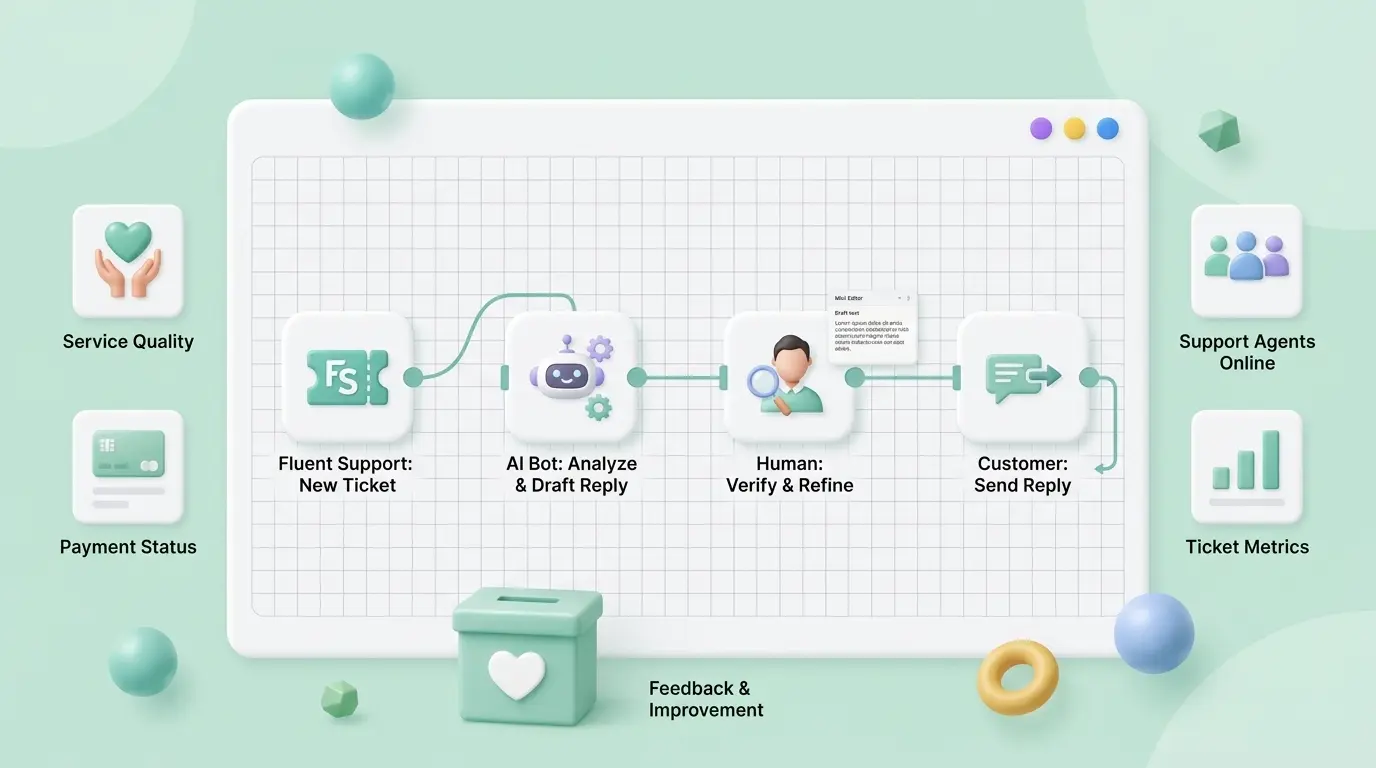
Everyone says automation makes support feel cold. But does it have to? Unity, the real-time 3D platform, pointed an AI agent at its own knowledge base and deflected 8,000 tickets while saving around $1.3 million. Customers got faster answers. Agents stopped drowning. Nobody complained that it felt robotic.
That gap between “automation is cold” and what Unity actually pulled off is the whole story. If you are running a growing store or product, you already know the pain: the same five questions, fifty times a day, while the genuinely tricky tickets sit waiting. That is the thread we are going to pull.
Key Takeaways
- Customer service automation uses AI and rules to handle repetitive support work so humans can focus on the hard stuff.
- Most projects fail because teams automate everything at once instead of starting with the tickets that repeat.
- The safe sequence: routing and tagging first, then summaries, then AI-drafted replies with a human checking them.
- WordPress users can do most of this natively with Fluent Support, no enterprise contract required.
- For agent-level workflows, n8n connects your helpdesk to an LLM and your other tools.
- Keep a human in the loop. The data is clear that empathy still beats pure automation.
- Track resolution rate, not response time. A fast non-answer is still a non-answer.
What Customer Service Automation Really Means
Customer service automation is the use of AI, machine learning, and rules-based logic to resolve, route, and respond to support requests without a human touching every step.
That is the definition. Here is what it looks like at 9 a.m. on a Monday.
A ticket lands. The system reads it, tags it as a billing question, routes it to the right person, and surfaces a suggested reply pulled from past tickets and your help docs. The agent skims, tweaks one line, and hits send. Forty seconds, start to finish. Multiply that across a few hundred tickets and you understand why teams chase this.
The pieces doing the work usually break down into a few jobs: chatbots and AI agents handling tier-one questions, smart routing sorting tickets to the right team, and agent assist tools summarizing threads and suggesting responses. None of it is magic. All of it is pattern recognition applied to work you are already doing by hand.
Why Most Automation Projects Quietly Fail
Here is what’s actually happening when an automation rollout goes sideways. The team gets excited, flips on the chatbot, points it at everything, and waits for the cost savings. Two weeks later, customers are furious, agents are cleaning up bad bot answers, and someone is quietly drafting an email to turn it all off.
The mistake is scope. They automated everything instead of the right thing first.
There is a useful principle some people call the 30% rule: let AI handle the repetitive preparation and the bulk of routine volume, and keep humans on the cases that need judgment, nuance, or empathy. The exact percentage matters less than the posture. You are not trying to remove people. You are trying to remove the work that wastes them.
The other silent killer is content. Every automated reply is only as good as the docs behind it. Salesforce learned this when rolling out its own AI agents at scale: they pruned redundant, conflicting support articles before the automation could resolve 84% of queries. Stale docs produce confident wrong answers. That is worse than no answer at all.
Operators who have lived through this say the same thing. One in r/automation, after watching teams try, noted he had never seen fully automated support hold quality for long. The failure point was rarely the AI being dumb. It was ownership: when a ticket fell outside the happy path, nothing flagged that a human should step in, and quality quietly degraded because no one could explain what the bot had done.
So before you automate anything, two questions. Which tickets actually repeat? And is the knowledge behind them clean and current?
How To Roll Out Customer Service Automation In Four Steps
Ready to build it? We are going to go from least risky to most powerful, so you can stop at the level that fits your team.
Step one: start with the tickets that repeat
Pull your last 200 tickets. Sort by topic. You will almost certainly find that a small cluster of questions makes up most of the volume. Order status. Password resets. Refund requests. “Where is my order.”
Those repeats are your automation candidates. Everything else stays human for now.
This is also where good groundwork pays off. A clear return policy and tidy order management mean half your repetitive tickets have a clean, linkable answer the moment automation reaches for one.
Step two: automate the busywork before the conversation
The lowest-risk automation never writes a word to a customer. It just moves tickets around.
- Routing. Send billing to billing, technical to technical, automatically.
- Tagging. Categorize by intent so nothing gets buried.
- Summaries. Compress a long back-and-forth into three lines so any agent can pick it up cold.
On WordPress, you build this yourself in a few minutes. Fluent Support ships with a workflow engine made for exactly this, no code and no separate platform. Here is the actual path.
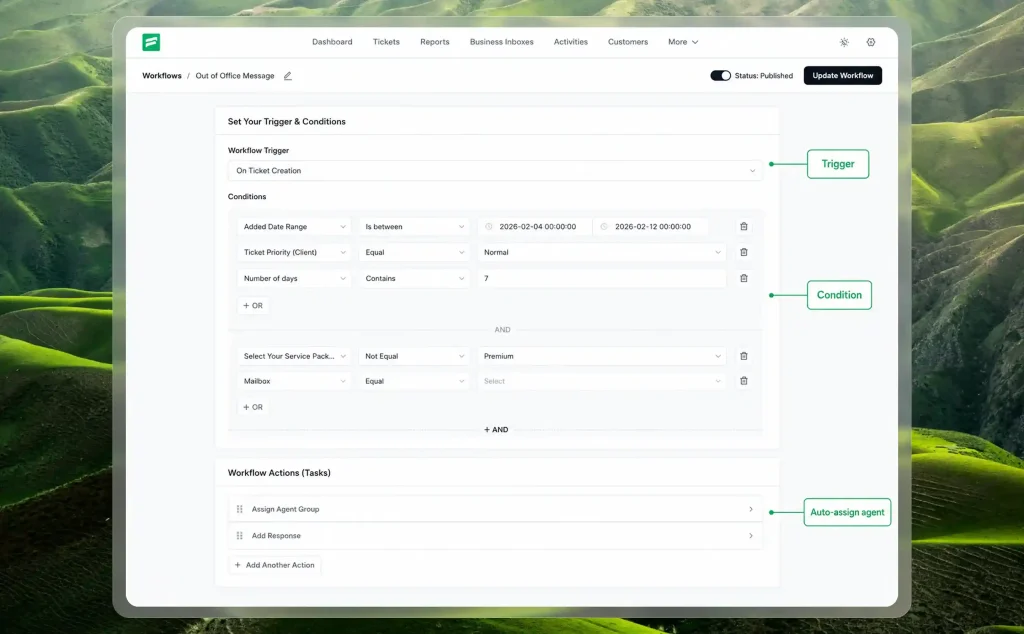
From the dashboard, open Workflows and click + Create New. Give it a name, choose Automatic, and hit Create. An automatic workflow runs on its own whenever the rules you set are met. Then you wire up three things.
- Trigger. When it fires. Pick On Ticket Creation so it runs the moment a ticket lands.
- Condition. Which tickets it touches. Match on ticket title, message content, selected product, priority, or a custom field, and stack rules with AND or OR. For example: ticket title contains the word “refund.”
- Action. What it does. Assign the right agent, add a tag, drop an internal note, set a bookmark, or fire an outgoing webhook. Add as many as you need and drag them into the order you want.
Example:
A working first recipe looks like this. Trigger on ticket creation. Condition: title contains “refund.” Actions: assign your billing agent, tag it “refund,” and add an internal note flagging the order. Flip the publish toggle, press Update Workflow, and every refund ticket now sorts itself before a human even opens it.
Want that same toolkit on demand instead of automatic? Build a Manual workflow with the same actions, then run it inside any ticket with the Workflow button. Handy for a messy thread you want to tag, reassign, and escalate in one click.
Seeing it built helps more than reading it. This walkthrough covers the whole setup:
Heads up: the video uses an older Fluent Support interface, so the screens look a little different now. The trigger, condition, and action logic is the same.
This is also the moment context starts to matter. If you are running your store on WordPress, something like FluentCart keeps order data, refunds, and subscription details sitting right next to the support conversation. Your automation suddenly has something real to work with instead of guessing.
Step three: let AI draft, let a human send
Now the part everyone wants: AI-written replies.
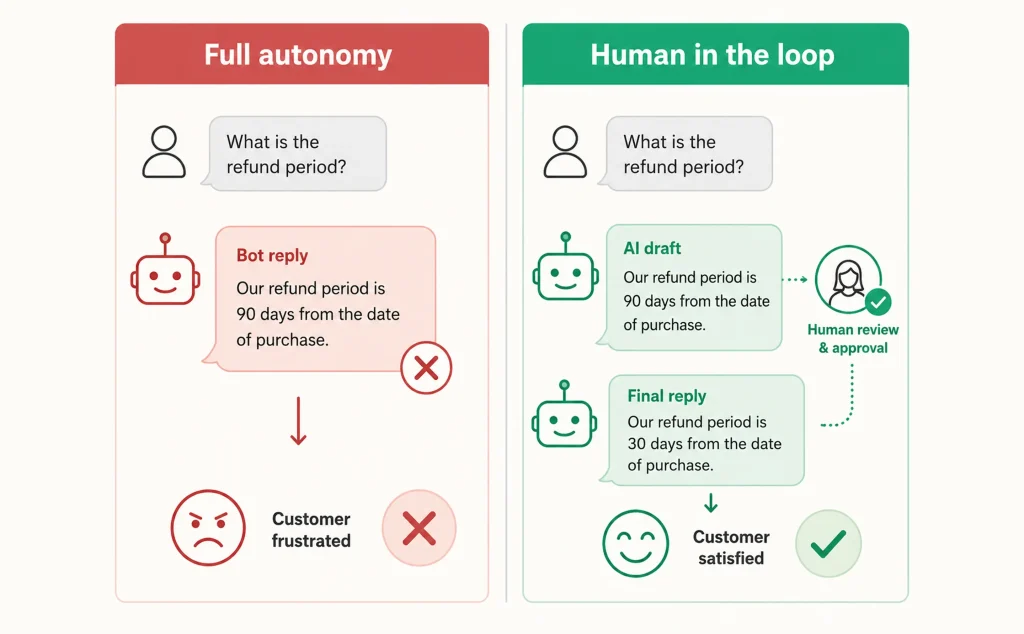
The trick is to keep a person in the loop while you build trust. Fluent Support’s OpenAI integration summarizes tickets and drafts replies based on the full thread, then polishes tone and grammar before an agent approves. The agent stays the editor, not the typist.
Why hold back full autonomy at first? Because you are watching the numbers. Track resolution rate and handoff reasons for a few weeks. When the drafts are consistently good on a specific ticket type, you loosen the leash on that type. You earn autonomy one category at a time.
Research backs the cautious version, too. When support staff were given AI assist tools, the National Bureau of Economic Research found productivity rose around 14% on average. That is real lift, and it came from assistance, not replacement.
Step four: go agent-level with n8n
Hit the ceiling of native workflows? This is where it gets fun.
n8n connects Fluent Support to an LLM and the rest of your stack. It talks to Fluent Support through the REST API and webhooks, so a single ticket can kick off a chain that reasons, decides, and acts across tools. Here is a flow worth picturing.
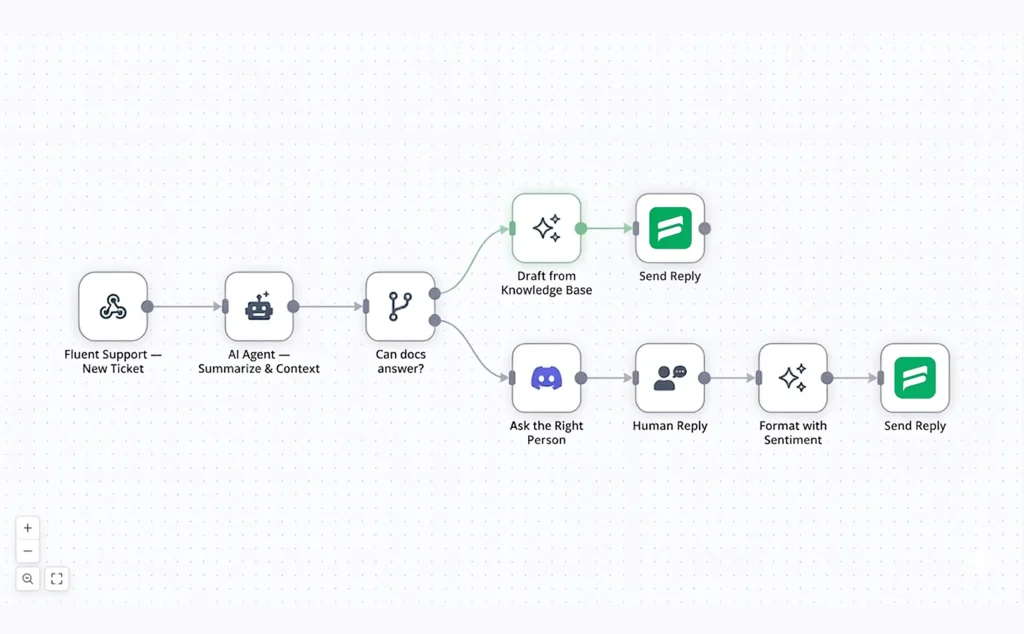
Notice what the AI is actually doing here. It opens every ticket by summarizing and deciding, and it closes every ticket by writing the final reply. When a human is needed, the teammate just drops a raw answer in Discord. The AI handles the wording, so a rushed one-line reply from a busy expert still reaches the customer polished and on brand.
That is the leap from “automated replies” to a support agent that reasons across systems. It takes a bit of API comfort to set up. Once it runs, you have built something most teams pay enterprise money for.
The Tools, Briefly
People always ask which tools to use. The honest answer depends on where you live.
The big SaaS platforms (Zendesk, Intercom, Freshdesk, Zoho Desk) are powerful and priced for scale. Ecommerce-specific tools like Gorgias tie into store data for returns and shipping. They are excellent. They are also a separate subscription, a separate login, and another system to keep in sync.
If your business already lives on WordPress, the practical move is to automate where your data already is. Fluent Support gives you the workflows, routing, summaries, and AI replies inside the dashboard you use every day. That keeps the whole thing simpler, and simple is what survives contact with a busy week.
Keeping It Human
Here is the uncomfortable truth about automation. Customers can tell.
The Zendesk CX Trends data found that 67% of consumers now expect more personalized service precisely because they know AI can analyze their history. The bar went up, not down, and younger buyers expect even faster, more personal support. Automation that feels generic now reads as lazy.
The fix is not less automation. It is better handoffs. Set a clear trigger so that when sentiment drops or the AI is unsure, the customer lands with a real person fast. That single rule protects you from the worst automation failures, and it keeps you inside the response-time targets you have promised.
It helps to remember why people contact support at all. They are frustrated, confused, or worried about money they spent. The old service fundamentals still apply: be prompt, be polite, stay professional, make it personal. Automation should serve those instincts, not flatten them. Salesforce found that teaching its bots to say “I’m sorry” and recognize frustration drove higher satisfaction than raw deflection ever did.
Watch the right metrics while you do it. First response time feels good, but resolution rate and CSAT, the KPIs that actually track customer happiness, tell you whether the automation is helping or just answering quickly and wrongly.
The Bottom Line
Customer service automation is not a switch you flip. It is a sequence you earn: clean your docs, automate the busywork, let AI draft under supervision, then scale into agent-level workflows once the numbers say you can trust it. Done in that order, you get faster support, calmer agents, and customers who never notice the machinery because the experience just works. Done backwards, you get the cold, broken version everyone fears.
The teams that win the next few years will not be the ones that automated the most. They will be the ones that automated the right things and kept a human where it counted. That is not a nice-to-have anymore. It is the job.

Hi, I’m an experienced web designer, and WordPress core contributor. Creating interesting content and products that ensure a 360-degree customer experience is my daily job.
-

Free Influencer Marketing Tools: Build, Manage, and Grow Creator Network
Turn WordPress into the home of your creator network. Collect -

Vanity Metrics vs Actionable Metrics: What to Track in 2026
Actionable metrics are potential that we can help in measuring. -
Web Protocols Explained: The Types and How They Work
Learn what web protocols are, how they work, and the



Leave a Reply
You must be logged in to post a comment.