

How to Make Money Selling Quizzes in WordPress [Beginner’s Guide]
![How to Make Money Selling Quizzes in WordPress [Beginner’s Guide]](https://wpmanageninja.com/wp-content/uploads/2026/04/How-to-Make-Money-Selling-Quizzes-in-WordPress-Beginners-Guide-1.webp)
Quizzes are a fantastic low-budget way to gather the attention from a mass audience. We’ve been doing it since the newspaper (yeah the ones printed on paper) era. But now, you can actually monetize quizzes on your own, without needing a publisher or editorial.
For practical ways to make money selling quizzes, you’re in the right place. Quizzes initially started just as an engagement tool. Over time they’ve come to be so much more.
While it might sound like a new concept, brands like Buzzfeed literally built their empire on quizzes crafted around visitor interests.
The Buzzquiz era might be gone, quizzes still work though!
When structured properly, they become monetizable assets: they segment your audience, personalize offers, and guide people toward the right next step. If not, they’re always a source of entertainment and information for the quiz taker.
Regardless of what you’re selling, for the most part.
This guide will show you:
- What “selling quizzes” actually means
- How to choose the right quiz type
- 7 proven ways to monetize quizzes
- How to price and package without overthinking it
- Step-by-step: how to build a paid quiz on WordPress
- What makes quiz funnels convert
- What analytics to track
- High-intent FAQs
We’ll focus on a beginner-friendly, ownership-first approach using WordPress and the Fluent stack.
What “Selling Quizzes” Really Means
When people search for “how to make money selling quizzes online”, they often think it means charging $10 for a test.
That’s just one model among many, and a very primitive one at that!
In reality, selling quizzes means monetizing interactive engagement. That can happen in several ways:
Direct Monetization
- Charging for quiz access
- Charging to unlock detailed results
- Selling quiz bundles or memberships
Indirect Monetization
- Using a lead generation quiz to build your email list
- Recommending products based on quiz answers
- Using quiz data for segmentation to increase sales conversions
- Running sponsored or ad-supported quizzes
A quiz is a conversion mechanism. It helps users self-identify. That self-identification makes your offer feel relevant instead of pushy.
Instead of:
“Buy my course.”
You say:
“Based on your results, this is the best next step.”
That shift is why quiz funnels work.
Choose the Right Quiz Type (Beginner-Friendly)
Not all quizzes monetize equally. Choosing the right format is half the strategy.
Here are the main types used to sell quizzes online.
1. Personality Quiz (Best for Leads & Segmentation)
These are the quizzes Buzzfeed used to be well known for. Millennials took the most ridiculous of tests and that pumped the numbers for Buzzfeed’s traffic.
But we’re working on a professional setting so here’s what Personality quiz might look like,
- “What Type of Entrepreneur Are You?”
- “What’s Your Learning Style?”
These don’t feel like tests. They feel fun and personalized. They’re ideal for:
- Coaches
- Bloggers
- Course creators
- Agencies
They work well as a personality quiz for leads because users are curious about their result.
2. Assessment Quiz (Best for Paid Access)
These are scored quizzes. They feel diagnostic and professional.
They’re strong candidates for:
- Paid quiz models
- Certification prep
- Skill benchmarking
- Consulting funnels
If you want to monetize quizzes directly, assessment types are often easiest to justify charging for.
Example:
- “Digital Marketing Skills Assessment”
- “Exam Readiness Score Test”
3. Product Recommendation Quiz (Best for eCommerce)
This is a product recommendation quiz. It increases:
- Average order value
- Conversion rates
- Customer confidence
For ecommerce owners, this is often the highest-ROI quiz type.
Example:
- “Find Your Perfect Supplement Plan”
- “Which Camera Should You Buy?”
4. Trivia / Engagement Quiz (Best for Traffic & Ads)
These drive traffic and engagement. They work well with:
- Display ads
- Affiliate links
- Sponsored placements
Choose your quiz type based on how you plan to monetize — not just what seems fun to create.
Example:
- “Can You Pass This History Quiz?”
The 7 Monetization Models for Quizzes
Here are practical, beginner-friendly ways to monetize quizzes.
Model 1 — Direct Paid Quiz
You charge users to:
- Access the quiz
- Unlock detailed results
- Download a personalized report
Best for:
- Teachers
- Certification trainers
- Niche experts
This works when your quiz provides measurable (quantifiable) value.
Model 2 — Lead Generation Quiz → Sell Later
You offer the quiz free, but require an email before showing results.
Then:
- Segment users based on answers
- Send tailored email sequences
- Recommend relevant offers
This is the classic quiz funnel.
It works well because the user already identified their problem inside the quiz.
Model 3 — Product Recommendation Quiz
This is the most passive model because the Quiz itself isn’t making money for your business.
The user answers questions → receives curated product suggestions → clicks to buy.
This works particularly well on WordPress ecommerce stores.
If someone says:
“I struggle with dry skin.”
Your result page can show:
- Product A
- Product B
- Bundled set
That’s contextual selling with context. Does a lot better than throwing everything at the user and seeing what sticks.
Model 4 — Affiliate Quiz Funnel
Instead of selling your own product, you recommend affiliate products.
Example:
- Fitness quiz → recommend equipment via affiliate link
- Software skills quiz → recommend SaaS tools
You earn affiliate commissions when they purchase.
Model 5 — Membership or Quiz Library
Create:
- A premium quiz vault
- Continuing assessment access
- Certification practice library
Users pay monthly or annually.
This works for:
- Exam prep resources
- Professional development
- Coaching communities
Model 6 — Sponsored Quizzes
You sell the quizzes but instead of users paying directly the Brands pay you to create:
- Branded personality quizzes
- Sponsored product matches
- Industry surveys
This works best once you have reliable traffic coming into your site.
Model 7 — Post-Quiz Upsell
This one makes you money after the user takes the quiz. This model works best when you,
- Show personalized plan
- Offer premium version
- Offer coaching call
- Offer detailed PDF report
This hybrid model combines free access with paid upgrades.
Pricing & Packaging (Don’t Overthink It)
One of the biggest blockers for beginners is pricing. Keep it simple.
Paid Quizzes Pricing:
- Price based on outcome value, not question count
- Compare against alternative solutions (e.g., a coaching call)
- Consider offering basic vs detailed report versions
Lead Gen Pricing:
- The quiz is free
- The monetization happens through your main product
- The quiz moves customer along the buyers journey
For Product Recommendation:
- No pricing required
- Revenue comes from product sales
Things to keep in Mind when pricing your quizzes:
- Start simple
- Test one model at a time
- Avoid complex tier systems early
- Bundle multiple quizzes if needed
You can always optimize pricing later.
Step-by-Step: Build and Sell a Quiz on WordPress (Fluent Stack)
If you want full ownership and control, WordPress is a strong choice. The Fluent ecosystem already has the tools you need to monetize your quizzes!
Here’s a practical stack:
- Fluent Forms — build the quiz
- Fluent Forms / FluentCart — sell/gate access
- FluentCRM — automate segmentation and emails
This setup allows you to sell digital products on WordPress without relying on third-party quiz SaaS platforms.
Step 1 — Install Your Plugins
Inside WordPress:
- Install Fluent Forms
- Install FluentCart
- Install FluentCRM
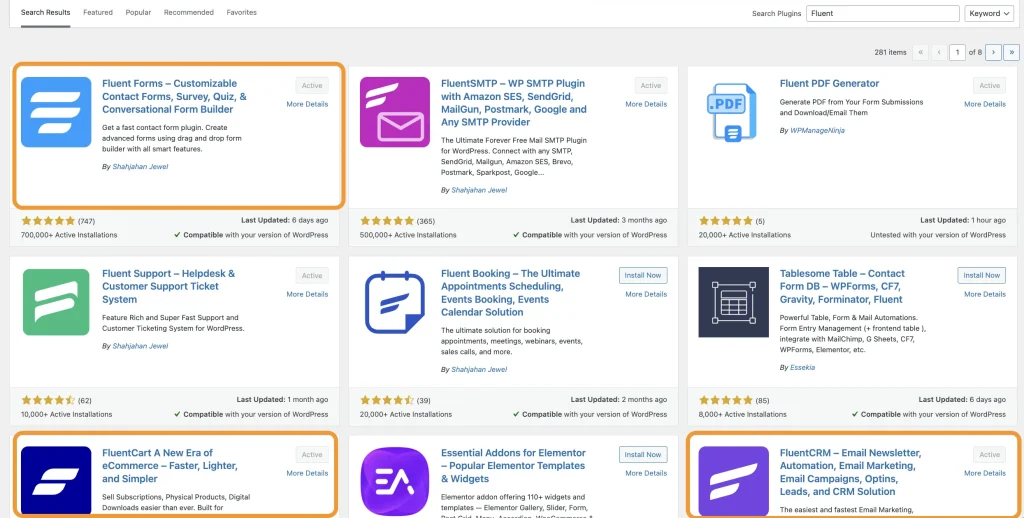
Activate and configure basic settings (email, payment gateways, etc.).
Step 2 — Create Your Quiz
In Fluent Forms:
- Choose multi-step form layout
- Add radio or multiple-choice questions
- Use conditional logic for scoring or branching
- Add an email field (if using lead gen model)
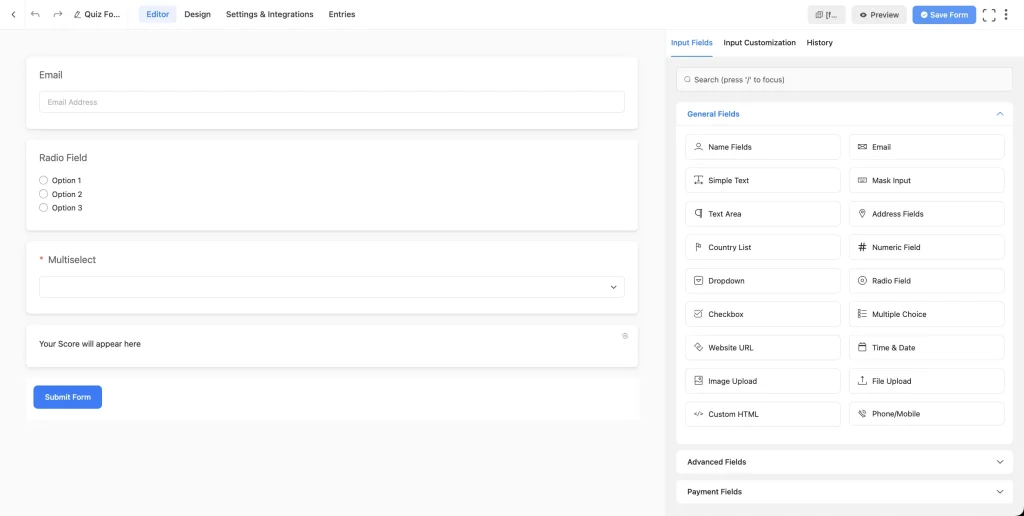
Decide:
- Will results show instantly?
- Or after payment?
- Or after email submission?
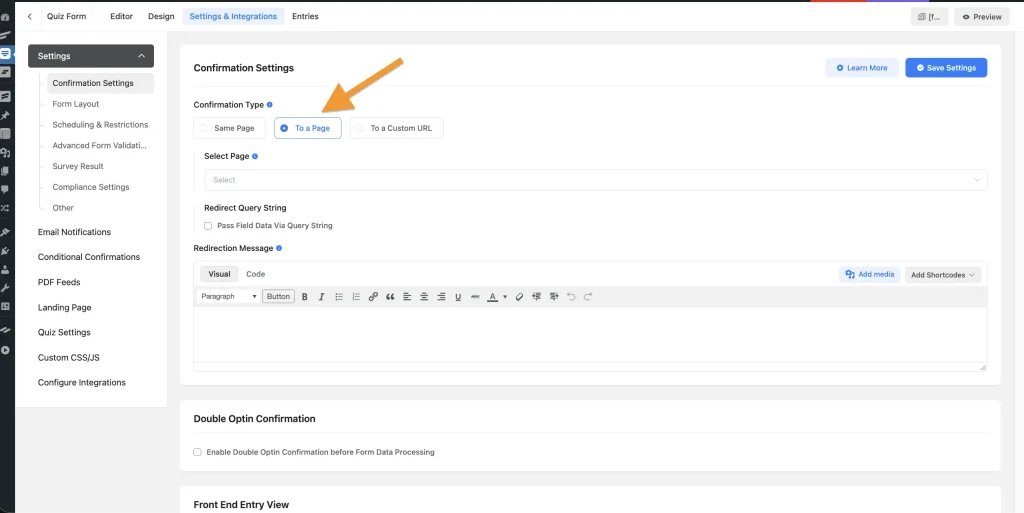
You can either show the results on the form confirmation page or deliver it to the user’s inbox. Completely depends on how you control the usage of your quizzes
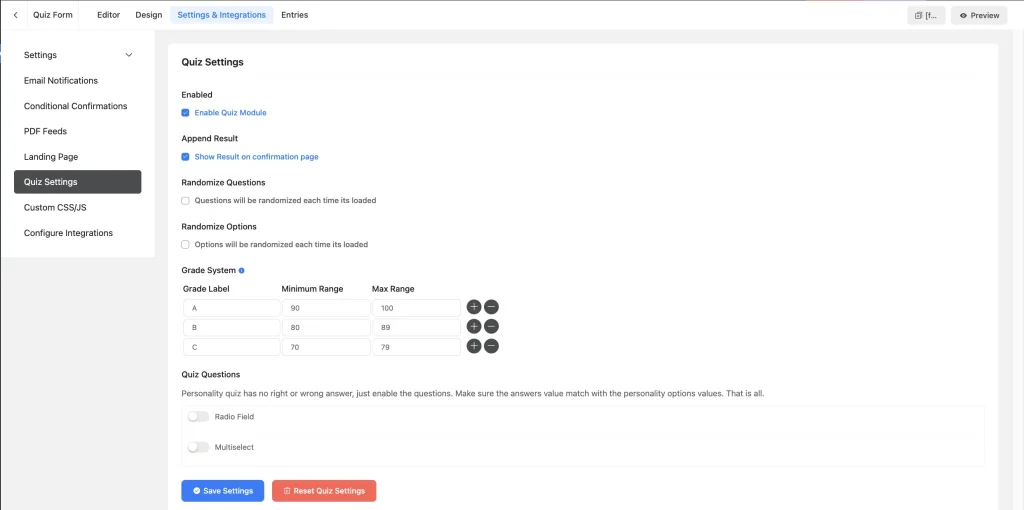
Step 3 — Set Up Gating or Payment
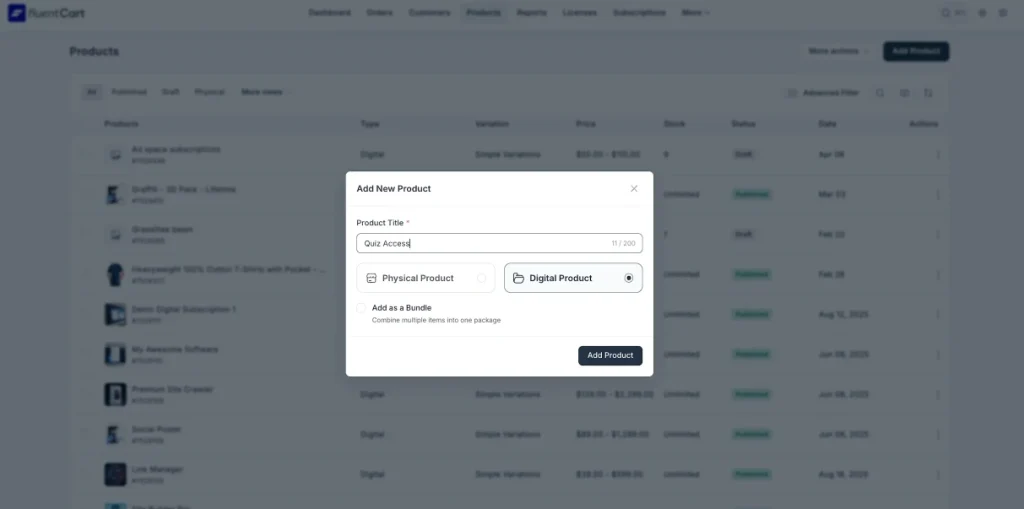
For creating a paid quiz WordPress funnel:
- Install and activate FluentCart from the WordPress repository
- Go to FluentCart dashboard and create a product
- Set price
- Create a protected quiz page
- Redirect buyers to that page after purchase
If doing lead generation:
- Require email before showing final results
- Sync email to FluentCRM as new contact
Conversely you can use the payments on FluentForms and control submissions based on payment status.
Step 4 — Segment with FluentCRM
Create tags based on quiz answers.
Example:
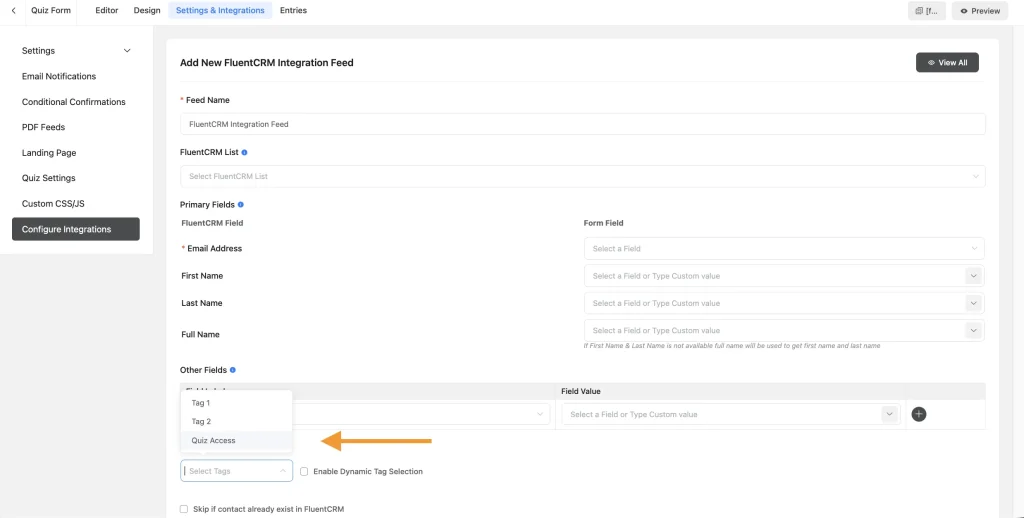
- Tag: Beginner
- Tag: Advanced
- Tag: Needs Coaching
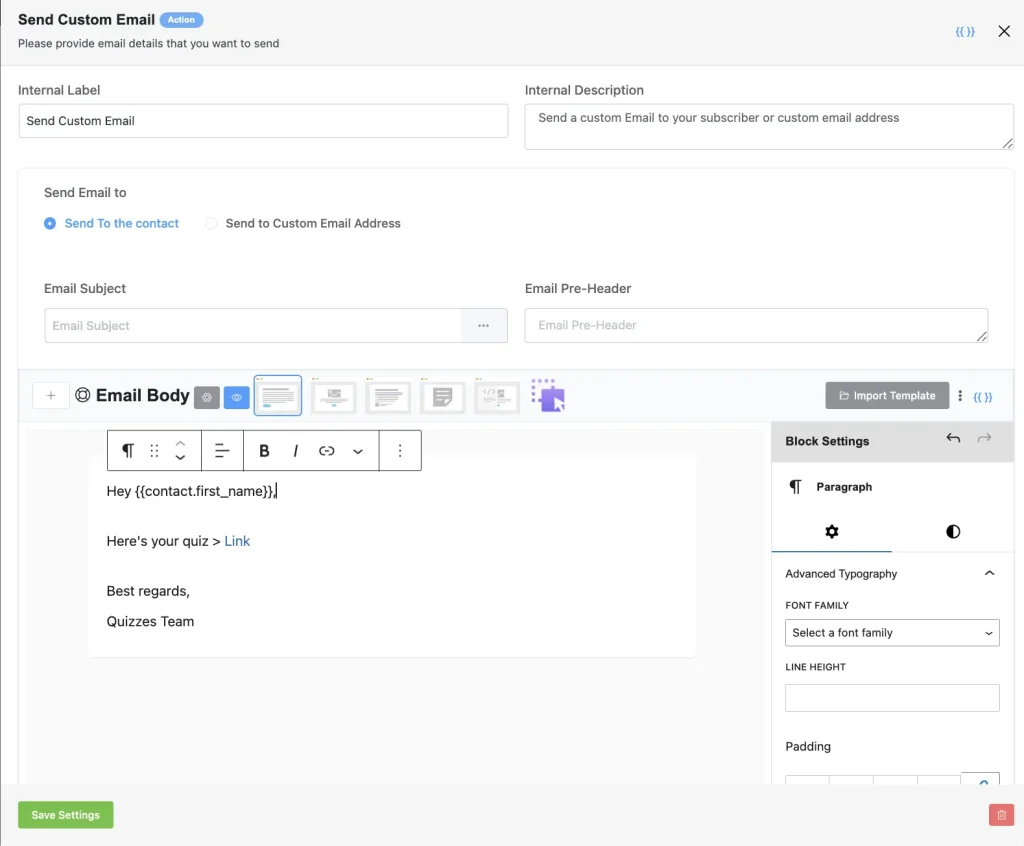
Then build email automations such as:

- “Based on your score…”
- “Here’s your next step…”
- “Special offer for your level…”
This is where quiz segmentation email becomes powerful.
Step 5 — Create Your Results Page
Your results page should:
- Explain what their result means
- Highlight pain points
- Provide actionable tips
- Introduce relevant offer
Be helpful and specific with this. A vague quiz result is just going to leave your users with a bad taste in their mouth. Not to mention a bad impression on your whole site.
Step 6 — Launch and Promote
Embed your quiz where you get the most traffic and ensure visibility to visitors.
Prime candidates for this would be,
- On your homepage
- Inside high traffic blog posts
- On relevant landing pages
- As a pop-up on scroll depth and intent
On top of that you can employ standard content distribution channels to increase eye-balls on your quiz.
Promote via:
- Social media posts
- SEO blog posts
This is how you turn a quiz into a monetizable content asset.
What Makes Quiz Funnels Convert (Best Practices)
A quiz funnel is only effective if people complete it.
Here’s what improves conversions:
1. Clear Outcome Promise
“Discover Your Skin Type in 2 Minutes” works better than “Take This Quiz.”
Being specific and outcome driven is the key!
2. Keep It Short
5–10 questions is often enough.
Long quizzes reduce completion rates unless high value is obvious.
3. Progressive Engagement
Ask easy questions first. Build momentum. Don’t drop the hardest question first. A good way to measure this is to monitor which questions get skipped or where submissions are left incomplete.
4. Make Results Detailed
Surface-level results feel disappointing. It feels like a waste of time and ruins any kind of credibility you hoped to gain with the quiz in the first place.
Include:
- Detailed explanation of what the outcomes mean
- Why it fits them or why they should care about the results
- Action steps they can take based on the outcomes
5. Align Offer with Result
If someone scores “Beginner,” don’t pitch your advanced mastermind. Match offer to segment.
6. Mobile Optimization
Most traffic is mobile. If your quiz form and confirmation page aren’t responsive, you’re going to leave a lot of conversions on the table.
Ensure:
- Large buttons
- Clear spacing
- Fast loading
Analytics: What to Track (Simple Scorecard)
To improve your quiz funnel, track these metrics:
- Quiz Starts – How many people begin?
- Completion Rate – Starts vs finishes.
- Lead Capture Rate – If using email gate, what percentage submits?
- Checkout Conversion Rate – If selling access, how many buy?
- Segment Performance – Which result group converts best?
- Revenue per Quiz Taker – Total revenue ÷ total quiz starters.
Start simple. Improve one metric at a time.
FAQ — High Intent Questions for the amateur Quiz seller
Can you really make money selling quizzes?
Yes — through direct payments, product recommendations, affiliate commissions, or lead-to-sale funnels. Results depend on audience size, niche, and offer quality.
What’s the best WordPress quiz builder?
There are many options. Using a form-based builder with logic (like Fluent Forms) allows flexibility and integration with ecommerce and CRM tools.
Should I charge for my quiz?
If the quiz provides diagnostic or professional value, charging can make sense. If your revenue comes from backend offers, keeping it free may convert better.
How many questions should a quiz have?
Typically 5–10 for engagement quizzes. Assessment quizzes may be longer if value is clear.
Do I need coding skills?
No. Modern WordPress tools use drag-and-drop interfaces.
Is WordPress better than SaaS quiz tools?
Hosted tools like Typeform, Interact, and Riddle offer convenience.
WordPress offers:
- Ownership
- No per-lead fees
- Full data control
- Flexible monetization
Choose based on your long-term strategy.
Wrapping Up
If you want to make money selling quizzes, don’t start with tools.
Start with:
- A clear monetization model
- The right quiz type
- A simple funnel structure
- A focused offer
Then build it on WordPress:
Quiz → Gate or Capture → Segment → Offer → Optimize.
Quizzes work because they personalize the journey. When done ethically and strategically, they don’t feel like sales.
They feel like guidance, and that’s what converts.

Hey WordPress folks! Writing for WPManageNinja by day, coding for Data analytics by night! Other than that I’m mostly interested in sci-fi content and deep founded music.
-

The Best AI Plugins for WordPress (2026 Picks by Use Case)
Most lists of AI plugins for WordPress offer too many… -

How to Create Non Disclosure Agreement (WordPress Guide)
Create a professional NDA form in WordPress with Fluent Forms. -
How to Build a RevOps Service With the Best Free CRM Software
Learn how to build a RevOps service using free CRM



Leave a Reply
You must be logged in to post a comment.