

Sales Pipeline Guide: Build, Manage, and Measure a Workflow That Works

More leads do not automatically create more revenue.
A business can generate hundreds of inquiries and still miss its sales goals when nobody knows which prospects are qualified, where each conversation stands, or what needs to happen next. Leads remain buried in inboxes. Follow-ups arrive late. Promising deals quietly disappear.
A sales pipeline replaces that uncertainty with a visible, repeatable system. It shows your sales team which opportunities deserve attention, where every deal stands, and which action should move it forward.
This guide explains how a pipeline differs from a funnel, which stages to use, how to manage pipeline health, and which metrics support better decisions. You will also learn how to create a connected WordPress workflow using Fluent Forms, FluentCRM, FluentBoards, and FluentBooking without creating unnecessary complexity or duplicate records.
Key Takeaways
- A sales funnel measures how lead volume narrows, while a sales pipeline tracks individual opportunities moving toward a decision.
- Use clear stages: Prospecting, Qualification, Discovery, Proposal, Negotiation, and Closed-Won or Closed-Lost.
- Create an opportunity only after a defined qualification trigger. For most WordPress setups, CRM-qualified is the most reliable default.
- Assign every opportunity an owner, value, expected close date, and next action.
- Connect Fluent Forms, FluentCRM, FluentBoards, and FluentBooking so customer data moves without repeated manual entry.
- Let pipeline stage changes trigger relevant CRM automations, follow-ups, and internal tasks.
- Track more than deal count. Monitor weighted value, conversion rate, win rate, average deal size, sales cycle, velocity, and coverage.
- Review stalled deals and Closed-Lost reasons regularly to improve qualification and forecasting.
- Keep the system simple. One trigger, one owner, and one source of truth will prevent most pipeline problems.
What Is a Sales Pipeline?
A sales pipeline is a visual representation of qualified opportunities as they move through your sales process. Each opportunity sits in a defined stage, such as qualification, discovery, proposal, or negotiation, until the deal is marked won or lost.
In practical terms, the pipeline gives a sales rep clear answers to three questions:
- Which opportunities am I responsible for?
- Where does each opportunity stand?
- What should I do next?
A useful opportunity record normally includes the prospect or company, deal owner, estimated value, expected close date, current pipeline stage, last meaningful activity, and next action. Together, these details turn a static list into a working system.
An effective sales pipeline also depends on an effective sales process. Qualification rules, stage definitions, ownership, and next actions must be consistent enough for the team to trust the information.
Not every contact belongs in the active pipeline. Newsletter subscribers, content downloaders, and casual inquiries should remain in your broader customer relationship management system until there is evidence of a genuine opportunity. When every contact is treated as a deal, the headline value looks impressive but the sales forecast becomes unreliable.
Sales Pipeline vs. Sales Funnel vs. Sales Forecast
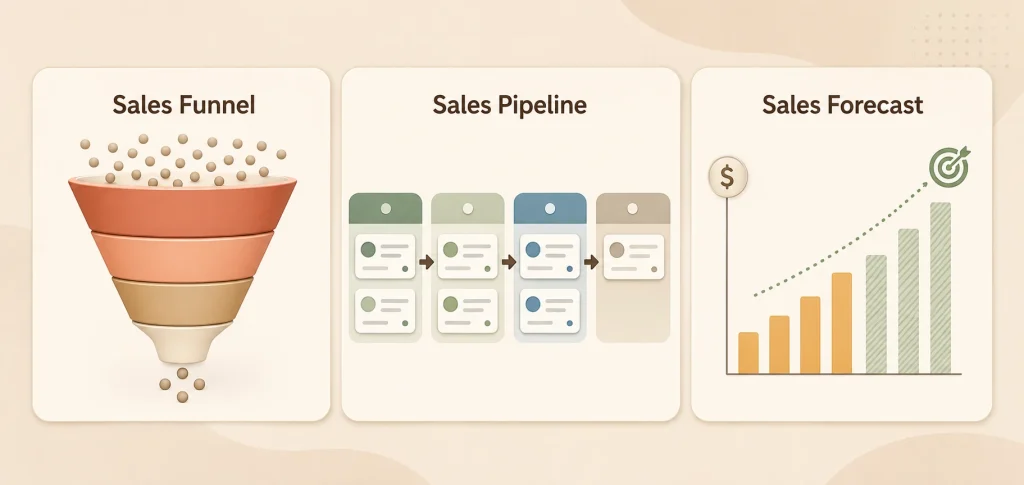
These terms are closely related, but they describe different views of revenue growth.
| Concept | What it represents | The question it answers |
|---|---|---|
| Sales funnel | Groups of prospects narrowing through the buying journey | How many people continue toward a purchase? |
| Sales pipeline | Individual opportunities moving through seller-controlled stages | What should happen next for each deal? |
| Sales forecast | Revenue likely to close within a future period | How much are we reasonably likely to sell? |
A sales funnel focuses on volume and conversion. Marketing may track how many visitors become leads, how many leads become qualified, and how many ultimately become customers.
A sales pipeline focuses on execution. It tracks the sales activities required to advance an individual opportunity, such as completing discovery, demonstrating a solution, sending a proposal, or confirming a decision date.
A forecast uses the quality, value, timing, and probability of those opportunities to estimate future revenue. The three views support one another, but they are not interchangeable.
Stages of a Sales Pipeline
There is no universal set of sales pipeline stages. A consultant may require discovery and a proposal, while an ecommerce purchase may happen without either. B2B sales can also involve procurement, legal review, security checks, and several decision-makers.
The best stages represent meaningful buyer progress rather than vague internal feelings about a deal. The following six-stage model is a practical starting point.
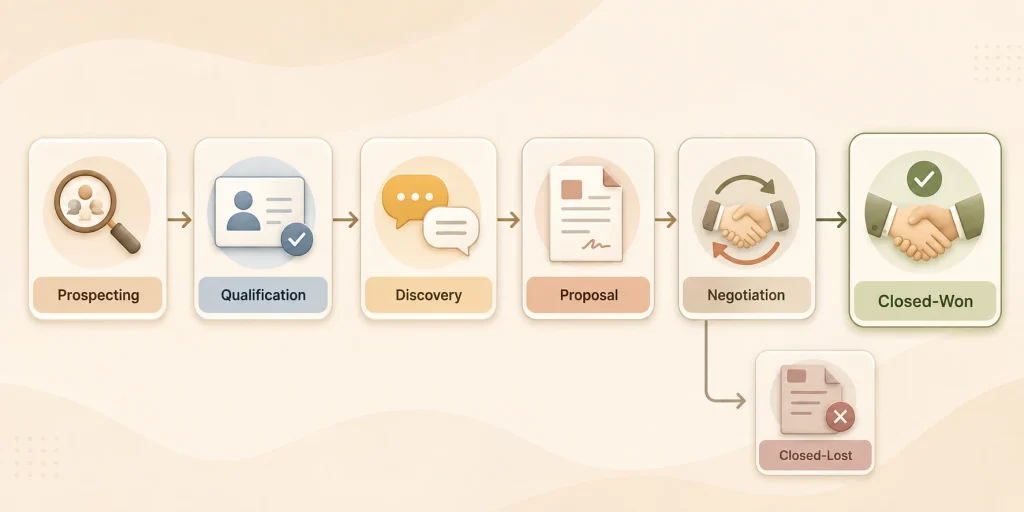
1. Sales Prospecting
Sales prospecting identifies potential buyers who resemble your ideal customer. Sources can include referrals, inbound forms, events, partner campaigns, cold outreach, or LinkedIn Sales Navigator.
At this point, you are identifying possible demand, not declaring every contact an opportunity. Record the source and the reason the prospect may be a fit. Move forward only when there is a credible basis for qualification.
2. Qualification
Qualification tests whether the prospect has a relevant need, reasonable fit, appropriate authority, workable budget, and realistic timeline. The exact criteria will depend on what you sell.
Fluent Forms can collect those details through a quote, consultation, demo-request, or project inquiry form. Conditional fields can show different questions based on previous answers, while integration conditions can determine which submissions should continue into the sales workflow.
If the fit or timing is weak, keep the contact in FluentCRM for nurturing instead of adding a deal that will remain stuck in the pipeline.
3. Discovery
Discovery clarifies the prospect’s problem, desired outcome, urgency, stakeholders, constraints, and decision process. It usually includes a call, consultation, or demonstration.
FluentBooking can reduce scheduling friction by allowing a qualified prospect to select an available time. Discovery is complete when the need and buying process are understood well enough to recommend the right solution, not simply when a calendar event ends.
4. Proposal
At the proposal stage, the prospect receives a recommended solution, scope, price, or commercial offer based on what was learned during discovery.
Connect the offer to the buyer’s stated priorities. Record the estimated value, services or products involved, key stakeholders, delivery assumptions, and the date of the next conversation. Sending a document without agreeing on a follow-up is one of the easiest ways to create a stalled opportunity.
5. Negotiation and Decision
The prospect is now evaluating pricing, terms, implementation dates, internal approvals, or legal requirements. A deal should not remain in negotiation merely because a proposal was sent.
There should be recent engagement, a known decision process, and a specific next step. If those signals disappear, requalify the opportunity rather than leaving it in a late stage based on optimism.
6. Closed-Won or Closed-Lost
A closed-won opportunity has reached the agreed commercial outcome. A closed-lost opportunity should include a consistent reason, such as timing, budget, competitor, no decision, poor fit, or loss of contact.
Lost reasons are useful data. They help sales leaders refine qualification, positioning, pricing, and follow-up. When the fit remains strong but the timing is wrong, return the contact to a relevant FluentCRM nurture sequence.
How to Build a Sales Pipeline
Building a pipeline is not simply creating columns in software. Its structure must reflect how customers buy and how your sales team actually works.
1. Map the Real Customer Journey
Review recently won and lost deals. Identify the conversations, decisions, and commitments that changed their status. Speak with customers and sales reps instead of designing the process entirely from assumptions.
Sales processes are different across products, deal sizes, markets, and buying models. If two offers follow meaningfully different paths, use separate pipelines rather than forcing both into one structure.
2. Define a Qualified Opportunity
Create an entry rule that everyone can understand. For example:
“Create an opportunity when the prospect matches our target customer, has a relevant problem, and has agreed to a sales conversation within the next 30 days.“
The rule must be more specific than “the person seems interested.” A clear standard protects pipeline coverage and keeps sales efforts focused on opportunities that can realistically move.
3. Create Stages Around Buyer Commitments
Each stage should mark a meaningful change in buyer progress. “Follow-up” is usually an activity, not a stage. “Proposal reviewed with decision-makers” is a stronger milestone because it describes something that has actually happened.
Five to seven stages are enough for many teams. Too few stages hide meaningful differences. Too many create administrative work without improving decisions.
4. Set Entry and Exit Criteria
Define what must be true before a deal enters each stage and what must happen before it advances to the next stage in the pipeline.
For example, discovery may begin when a qualified meeting is booked and end when the need, stakeholders, budget range, and decision timing are confirmed. These rules create consistency and make stage-level analysis more credible.
5. Decide Which Information Is Required
Capture only information that helps the team qualify, prioritize, advance, or evaluate a deal. Useful fields may include:
- Opportunity and company name
- Deal owner
- Lead source
- Current stage
- Estimated value
- Expected close date
- Next action and due date
- Last meaningful activity
- Decision-makers
- Product or service of interest
- Won or lost reason
If a field never influences an action, report, or decision, remove it. More fields do not automatically produce better data.
6. Assign Ownership and a Next Action
Every open opportunity needs one accountable owner. Other people can collaborate, but shared ownership often becomes no ownership.
The deal also needs a dated next action. “Waiting to hear back” is not an action. “Call the operations director Thursday to confirm legal approval” is specific and manageable.
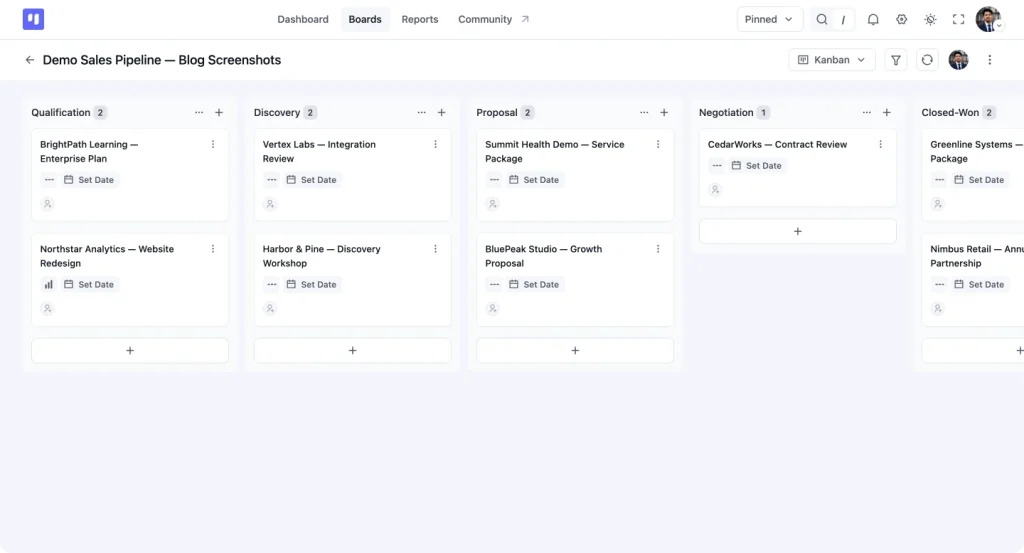
7. Configure the Workflow in FluentBoards
Create a board called Sales Pipeline and add stages that reflect your process. FluentBoards supports customizable stages that can be reordered and marked open or closed. Use a closed stage for Closed-Won and another for Closed-Lost.
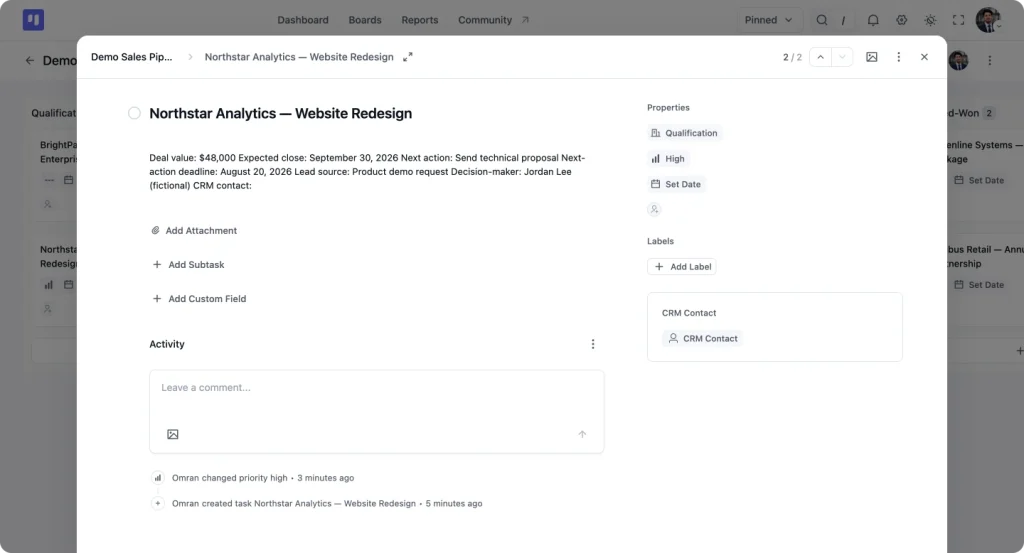
Represent each qualified opportunity as one task card. A practical configuration is:
- Card title: Company or prospect – product or service
- Assignee: Deal owner
- Stage: Current pipeline position
- Due date: Deadline for the next action
- Priority: Deal urgency
- Associated FluentCRM contact: Prospect record
- Number custom field: Deal value
- Date custom field: Expected close date
- Select custom fields: Lead source and lost reason
- Text custom fields: Next action and decision-maker
- Comments and attachments: Internal context and supporting material
FluentBoards supports text, number, select, multi-select, date, and checkbox custom fields, giving a small sales team enough flexibility to create a lightweight opportunity record.
8. Test the Pipeline Before Rollout
Run several recent deals through the proposed structure. Confirm that every stage is clear, the required information is available, and unusual paths can be handled without breaking the model.
Train the sales team with real scenarios. Explain not only how to update a card, but why clean information affects priorities, pipeline reviews, coaching, and forecasting.
Build an Efficient WordPress Sales Workflow
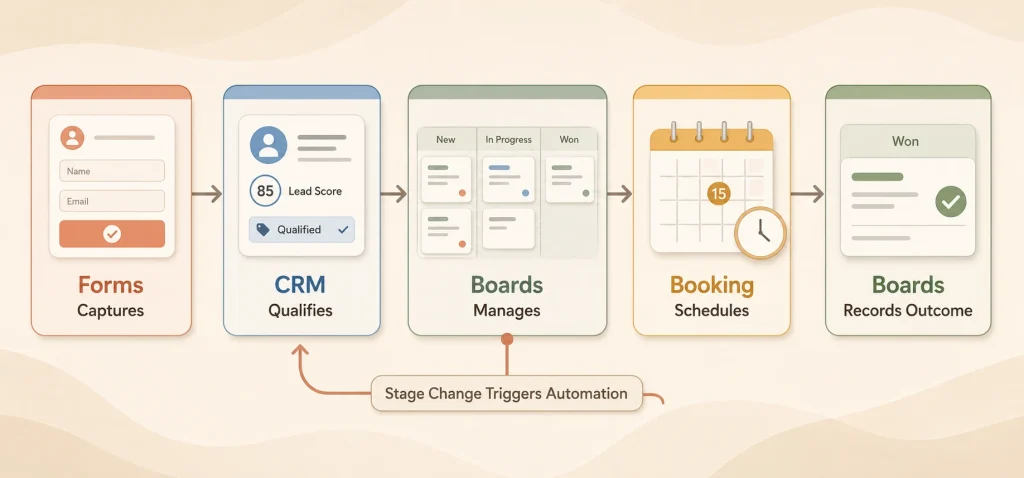
A connected workflow does not require every plugin to create its own record. It requires each tool to perform one clear job and pass useful context forward.
The recommended workflow is:
Fluent Forms captures interest -> FluentCRM qualifies and nurtures the contact -> FluentBoards manages the qualified opportunity -> FluentBooking schedules the conversation -> FluentBoards records progress and the final outcome.
Capture and Qualify With Fluent Forms
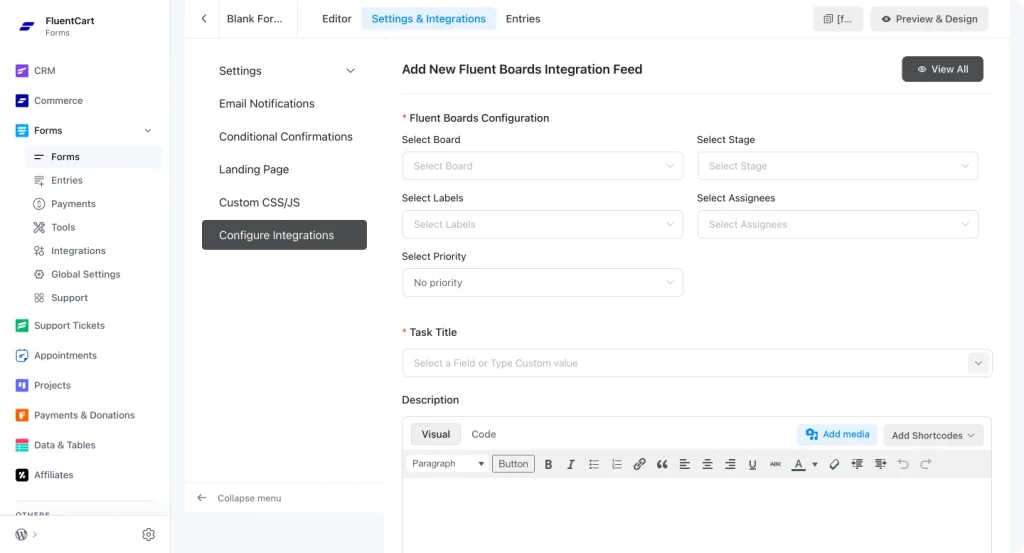
Use Fluent Forms for inquiry, quote, consultation, or demo-request forms. Ask only the questions needed to determine fit and route the response, such as company size, business need, budget range, timeline, or preferred service.
The native FluentBoards integration can create a task in a selected board and stage, assign labels and team members, set priority and due date, associate a FluentCRM contact, and use conditional logic. This makes it possible to create an opportunity card only when a submission meets your qualification rules.
However, automatic form-to-board creation should be only one possible entry method. Do not enable it if another part of the workflow is already responsible for creating the same card.
Segment and Nurture With FluentCRM
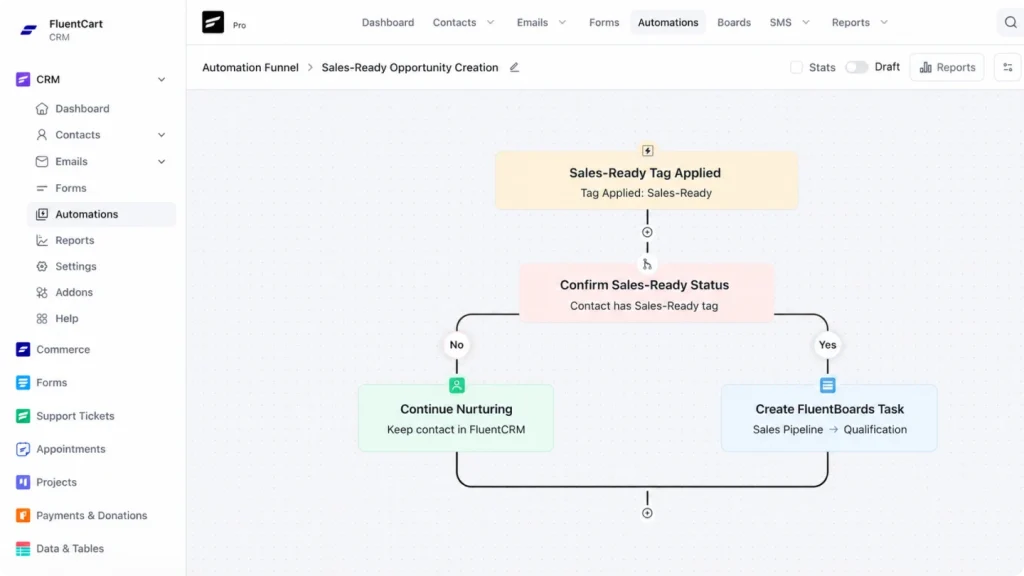
Send form submissions to FluentCRM and organize contacts using lists, tags, and relevant custom fields. High-fit prospects can receive a timely invitation to speak with sales, while contacts who need more time can enter an educational sequence.
FluentCRM integrates directly with FluentBoards. You can associate CRM contacts with cards, view related boards and tasks from a contact profile, trigger an automation when a contact is added to a task or a task changes stages, and create FluentBoards tasks through CRM automation.
For many businesses, the cleanest approach is to let FluentCRM create the opportunity card only when a contact receives a Sales-Ready tag. This provides one controlled entry point and prevents early-stage contacts from filling the active pipeline.
Manage Qualified Opportunities With FluentBoards
Once a prospect meets the qualification standard, create one FluentBoards card and associate it with the corresponding FluentCRM contact. Assign the card to a sales rep, place it in the correct stage, record the estimated value and expected close date, and add a dated next action.
Move the card only when the buyer makes a meaningful commitment. Use comments, attachments, custom fields, labels, due dates, and the activity history to preserve the context needed for follow-up and review.
FluentBoards is a project management tool that can be configured as a visual sales pipeline for small teams. It is especially practical for agencies, consultants, founder-led sales, and WordPress businesses with a simple, repeatable process.
Schedule Sales Conversations With FluentBooking
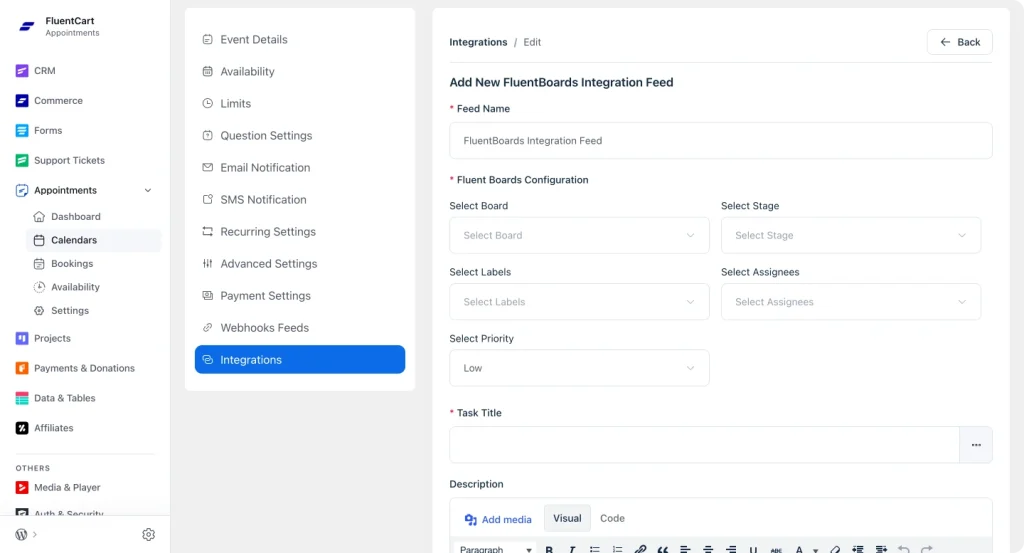
Use FluentBooking when an opportunity requires discovery, a demonstration, a consultation, or a decision call. Its FluentBoards integration can create a task in a selected board and stage, set labels and assignees, add booking information to the description, and base the due date on the meeting date.
Use that automatic task creation only when booking the meeting is the event that qualifies and creates the opportunity. If a FluentBoards card already exists, do not create another sales card from the booking. Keep the meeting connected through the contact workflow and update the existing opportunity instead.
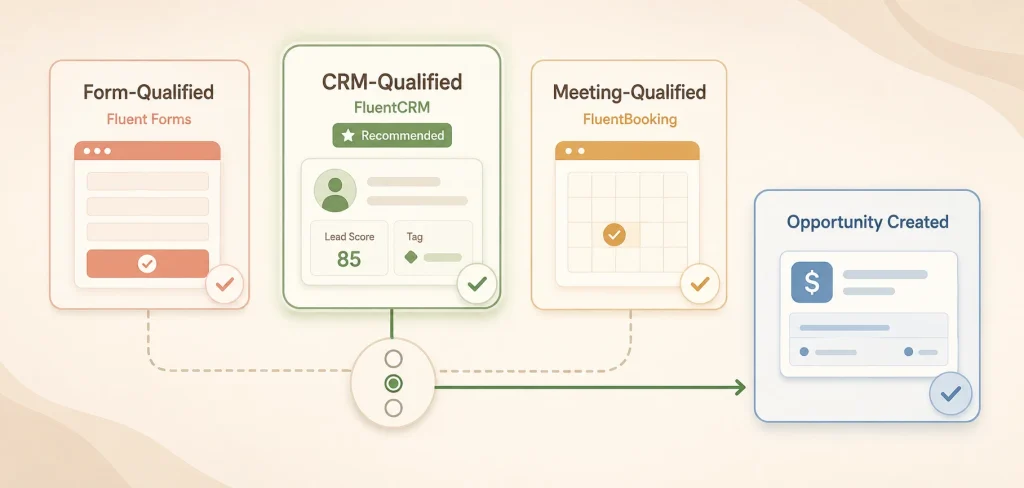
Choose One Opportunity-Creation Trigger
Fluent Forms, FluentCRM, and FluentBooking can all create a FluentBoards task. Enabling all three for the same journey can create duplicates.
Choose one of these models:
- Form-qualified model: A form submission creates the card when its answers meet defined conditions.
- CRM-qualified model: FluentCRM creates the card when the contact becomes Sales-Ready.
- Meeting-qualified model: FluentBooking creates the card when a qualified discovery meeting is booked.
The CRM-qualified model is the strongest default for most businesses because qualification rules remain centralized. The other plugins capture signals, while FluentCRM decides when the person becomes an active opportunity.
Sales Pipeline Management: Keep Deals Moving
Sales pipeline management is the discipline of maintaining accurate information and deciding whether to advance, hold, nurture, or close each opportunity.
Make the Next Action Non-Negotiable
Every active deal should have a specific next step, owner, and date. This prevents opportunities from becoming passive reminders of conversations that happened weeks ago.
In FluentBoards, use the due date for the next-action deadline and record the action itself in a dedicated custom field or at the top of the card description.
Use Stage Criteria Consistently
Stage changes should be based on evidence, not optimism. If an opportunity no longer meets the criteria for its current stage, move it back, return the contact to nurture, or close the card.
FluentCRM can respond to a FluentBoards stage change. That makes stage movement useful beyond visual organization: it can start an appropriate email automation when a card enters a relevant stage.
Run Useful Pipeline Reviews
Regular pipeline reviews should focus on risks and decisions rather than reading every field aloud. For each important opportunity, ask:
- What changed since the last review?
- What evidence supports the current stage?
- Who is involved in the decision?
- What could prevent the deal from closing?
- What is the next action?
- Is the expected close date still realistic?
Weekly reviews work well for many active sales teams, although the right rhythm depends on deal volume and the typical sales cycle.
Remove Dead Deals
An inflated pipeline creates false confidence. Define inactivity thresholds based on comparable won deals and close opportunities that no longer have a credible next step.
Closing a card does not always end the relationship. A good-fit contact with poor timing can return to a FluentCRM sequence until a new buying signal appears.
Sales Pipeline Metrics That Matter
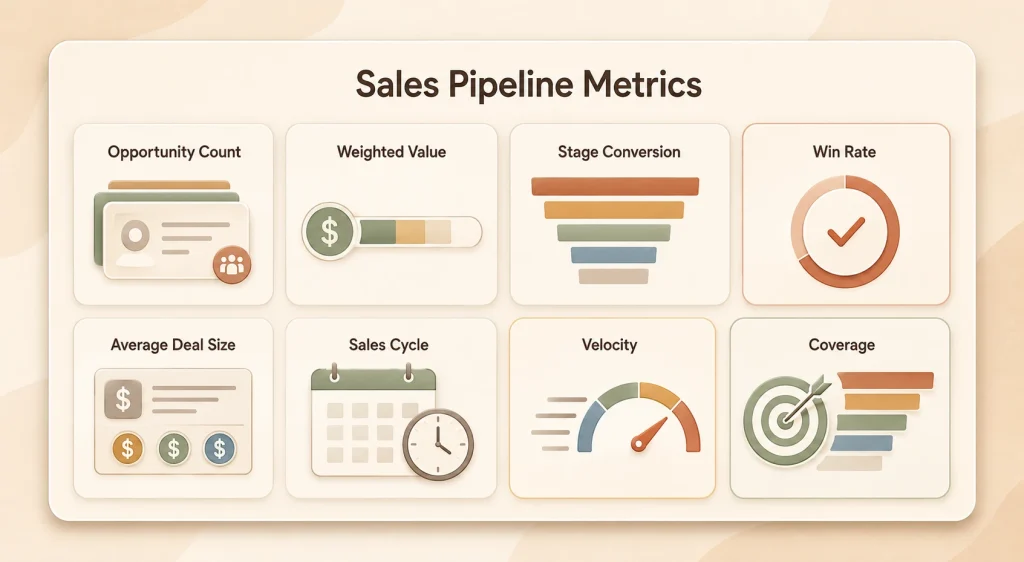
Pipeline metrics should reveal where to focus, how pipeline performance is changing, and whether sales targets are achievable.
Qualified Opportunity Count
Count active opportunities overall and by stage. A shortage near the beginning may become a revenue gap later, while a buildup in one stage can reveal a bottleneck.
Total and Weighted Pipeline Value
Total value adds the estimated value of every open deal. Weighted value multiplies each opportunity by an evidence-based probability of closing.
Weighted pipeline value = deal value x stage probabilityWeighted value can support a sales forecast, but it is not certainty. Use historical conversion data where possible rather than arbitrary confidence percentages.
Stage Conversion Rate
Measure the percentage of opportunities that advance from one stage to another. A sharp drop after discovery may indicate weak qualification. A drop after proposal may point to pricing, value communication, stakeholder access, or follow-up.
Win Rate
Win rate = closed-won deals / total closed deals x 100Segment the result by source, offer, sales rep, customer type, or deal size to find useful patterns.
Average Deal Size
Average deal size = revenue from won deals / number of won dealsThis metric supports targets and forecasting, although dependence on a few unusually large deals can increase risk.
Average Sales Cycle Length
Average sales cycle length = total days required to close measured deals / number of closed dealsTrack it by deal type. A standard service package and a complex enterprise agreement should not share one benchmark.
Pipeline Velocity
Pipeline velocity = opportunities x win rate x average deal size / sales cycle lengthImprove velocity by creating more qualified opportunities, raising the win rate, increasing average value, or shortening the process without sacrificing deal quality.
Pipeline Coverage
Pipeline coverage = open pipeline value / sales targetThe ratio alone is not enough. Consider deal quality, stage, timing, and historical conversion alongside the headline number.
Deal Age and Forecast Accuracy
Deal age exposes opportunities stuck in the pipeline. Forecast accuracy compares expected revenue with actual closed revenue for the same period. Repeated misses can reveal inconsistent stages, unrealistic dates, poor qualification, or emotional forecasting.
Understand the FluentBoards Reporting Boundary
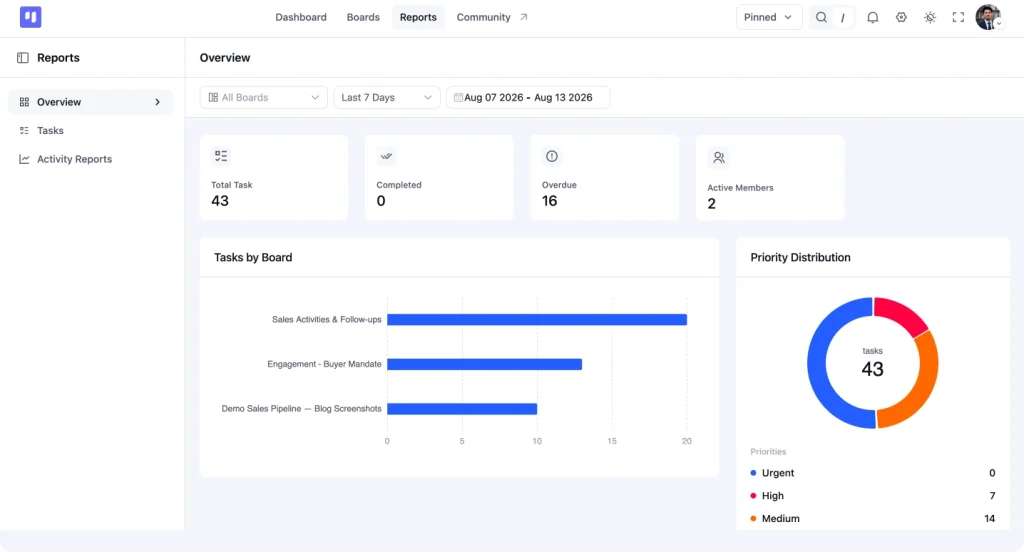
FluentBoards helps teams maintain the clean opportunity data required for analysis, but its documented native reports focus primarily on task completion, incomplete and overdue tasks, priority, and time tracking.
Advanced sales metrics such as weighted pipeline value, stage conversion, win rate, velocity, coverage, and forecast accuracy may require exported data, a connected reporting tool, or custom development. Keep the metrics in your management process, but do not assume FluentBoards calculates all of them automatically.
Common Sales Pipeline Mistakes
Even the best sales pipeline software cannot repair a poorly defined process. Watch for these common problems:
- Adding every new lead: Keep subscribers and early-stage contacts in FluentCRM until they meet the opportunity criteria.
- Creating duplicate cards: Choose one trigger for opportunity creation across Forms, CRM, and Booking.
- Using vague stages: Replace labels such as Warm or Follow-Up with observable buyer milestones.
- Moving deals without evidence: Record the commitment supporting every stage change.
- Ignoring stale opportunities: Close, requalify, or recycle old deals before they distort the forecast.
- Confusing activity with progress: Calls and emails matter, but buyer commitments show actual movement.
- Collecting metrics without acting: Investigate falling conversion, longer cycles, and poor-fit sources.
How to Evaluate Sales Pipeline Software
The right software should make your agreed process easier to follow. Evaluate whether it supports:
- Custom stages that match how you sell
- Clear opportunity ownership
- Deal values and expected close dates
- Contact context and activity history
- Tasks, reminders, and next actions
- Filters, search, labels, and priorities
- Won and lost outcomes
- Relevant custom information
- Pipeline-health reporting
- Integrations with lead capture, CRM, and scheduling tools
- Appropriate permissions and data export
Ease of use matters as much as the feature list. If updating an opportunity takes too much effort, adoption falls and the data becomes unreliable.
FluentBoards is a strong fit when a small WordPress-based team needs a visual, flexible workflow and already uses the Fluent ecosystem. A dedicated sales CRM may be more appropriate when the business requires complex forecasting, quota and territory management, advanced attribution, or extensive revenue analytics out of the box.
How to Evaluate Your Sales Pipeline
Use this short audit during your next review:
- Does every open opportunity meet the qualification rule?
- Does every stage have a clear entry and exit condition?
- Does every deal have one owner and a dated next action?
- Are expected close dates supported by the buyer’s decision process?
- Can you identify deals older than comparable won opportunities?
- Are lost reasons recorded consistently?
- Can you calculate conversion, win rate, deal size, and cycle length?
- Does the forecast reflect evidence rather than optimism?
- Are unready prospects returned to nurture instead of left open?
- Is only one automation responsible for creating each opportunity card?
If several answers are no, refine the process before adding more automation. A good sales process empowers the team because its rules are clear, not because its setup is complicated.
Sales Pipeline Audit Checklist
Use these ten questions to find gaps in qualification, ownership, deal movement, reporting, and automation.
Your progress is saved automatically in this browser.
Frequently Asked Questions
Can FluentBoards Be Used as a Sales Pipeline?
Yes. A small team can use a FluentBoards board as a visual pipeline, configure stages around the sales process, and represent each qualified opportunity as a task card. Assignees, due dates, custom fields, comments, attachments, and CRM-linked contacts provide the essential operating context.
What Should Each Opportunity Card Include?
Include the prospect, owner, current stage, estimated value, expected close date, next action, next-action due date, lead source, decision-makers, and relevant notes. Capture only data that influences an action or decision.
When Should a Lead Enter the Pipeline?
A lead should enter when it meets your qualification standard and there is a credible sales opportunity. Fit, need, timing, and willingness to take a next step are stronger signals than general interest.
Should Fluent Forms or FluentBooking Create the Card?
Either can create the card, but not both for the same journey. Use Fluent Forms when form answers establish qualification. Use FluentBooking when booking a qualified meeting establishes qualification. For most businesses, letting FluentCRM create the card after applying a Sales-Ready tag provides the cleanest central rule.
Does FluentBoards Calculate Sales Forecasts?
Its documented reports focus on task and project activity rather than full sales forecasting. You may need exported data, a reporting connection, or custom development for weighted forecasts and advanced revenue metrics.
How Often Should the Team Review the Pipeline?
Many teams benefit from a weekly review, but the right frequency depends on opportunity volume and deal length. Review often enough to catch stalled opportunities and unreliable dates before they affect the forecast.
Build a Sales Pipeline Your Team Can Trust
A strong sales pipeline does more than display deals. It creates a shared operating system for deciding which opportunities matter, what buyers have committed to, and what the team should do next.
Start with a clear qualification rule. Build stages around real buyer progress. Give every opportunity one owner and a dated next action. Then use regular reviews and reliable metrics to refine the system over time.
For WordPress businesses, the workflow can remain focused: capture interest with Fluent Forms, qualify and nurture contacts with FluentCRM, manage active opportunities with FluentBoards, and schedule important conversations with FluentBooking.
The goal is not to create the largest pipeline. It is to build one your team can act on, measure, and trust.
Ready to organize qualified opportunities inside WordPress?
Build your visual sales workflow with FluentBoards, FluentCRM, Fluent Forms & FluentBooking.





WordPress, automation, eCommerce and growth marketing specialist, a WordPress Core Contributor and Media Corps member blending storytelling with technology to craft strategies in SEO, email marketing, and beyond.
-

How to Create Non Disclosure Agreement (WordPress Guide)
Create a professional NDA form in WordPress with Fluent Forms. -

How to Build a RevOps Service With the Best Free CRM Software
Learn how to build a RevOps service using free CRM -

Single-Step Form vs. Multi-Step Form: Which One Is the Best and Why
Single-step vs multi-step form, which format converts better? Learn how



Leave a Reply
You must be logged in to post a comment.