


A data table with editable fields is one of the many aspects users want to have. Frontend editing in WordPress tables lets the table users or audience edit the table from the frontend. Similarly, the user role for editing can also be restricted.
Some quality WordPress table plugins offer this facility and make it easier to edit data tables online. So, why do you need it?
If you create an employee table for your website that can be edited by every employee on their own, there’s less possibility of having inaccurate data. For example, if an employee’s last name is showing the wrong spelling in the “Last Name” column, they can change it right away. As for the user role, you can specify who can add/delete/edit the table data.
How to use frontend editor in WordPress tables? We will be explaining the feature further with the table plugin that fits all of the criteria.
Using frontend editing in a WordPress table: Ninja Tables
Here we have one of the best table plugins with all the out-of-the-box features. Ninja Tables is user-friendly from every aspect. In case you want a dynamic editable data table where users can edit from the frontend, go for it!
Create a table in Ninja Tables, navigate to the Frontend Editing panel, and follow these steps below.
First of all, click the select-box to enable editing data tables in the frontend. The image underneath is showing an “Employee Table”.

1. Data Editing Permissions
Once you enable editing in the frontend, “Data Editing Permissions” settings will appear with three separate options.
Each option has distinct use, and the user edits will depend on what you determine from the backend.

Note: This feature is only available for the default style Ninja Tables. Other tables are not editable on the frontend.
a) User Roles for Edit/Add Table Rows
This option has multiple select-boxes for user roles.
- Editor
- Author
- Contributor
- Subscriber
- Translator
- Customer
- Shop Manager
- SEO Manager
- SEO Editor
- Public Users (Only add data)

We have selected “Author” so that editing or adding table rows is only permissible for the table author. At the same time, “Public Users” can only add data in the rows.
Note: If you hover over the tiny blue “i”, you will see a message- “Your selected user roles can edit this table rows from the frontend. Please note, Administrators will have this access by default”.
b) User Roles for Deleting Table Rows
The option next to the previous one is to decide who can delete the rows. This option is accessible from the admin area too. As a result, if anyone deletes a row that wasn’t supposed to be deleted, admins can take over.
The nine user roles are similar to the last ones.
- Editor
- Author
- Contributor
- Subscriber
- Translator
- Customer
- Shop Manager
- SEO Manager
- SEO Editor

You can see we have selected “Authors” only. Multi-select is also possible.
c) Own Data Only
It’s the last option for the user role. If it’s enabled, users can see and edit/delete only the rows created by them.
After selecting the box, you will get a new shortcode that you can use to display the table data to all users. This code is auto-generated by Ninja Tables.

2. Editing Column Options
The “Employee Table” in the demonstration has three columns. You can decide which column should be editable by the individual at the frontend and select whether any column requires editing.

In this case, it’s only editable for the authors at the frontend since we have determined the user role before. Public users can also add data.
All three columns of the tables have been made “Editable”. Although, there’s no change in the “Required” and “Default Value” parts.
3. Appearance Settings
Finally, after all the edit options, you can also change the style of the table components’ labels.
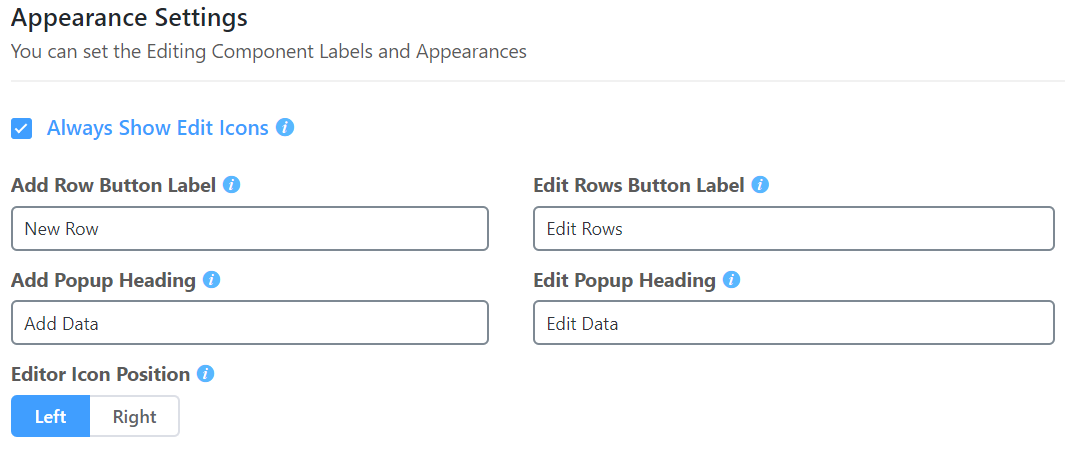
Select if you want to show the edit icon always and choose the icon’s position too. Enabling edit icons, in this case, means only selected user roles can see the edit button.
The four box fields are for labels and headings. All default labels and headings are editable.
- Add Row Button Label: The default label to add new data is “New row”.
- Add Popup Heading: Title for adding new data. It’s “Add Data” by default.
- Edit Rows Button Label: “Edit Rows” as the label for editing rows.
- Edit Popup Heading: To edit the existing data, the popup panel’s heading is “Edit Data”.
Click on the green “Update Settings” button when you are done with data editing permission, column options, and appearance.
Here is how the table will appear on a post.

Following the settings, the edit icons are on the left, columns are editable, and users can add a “New Row” with the button below.
Simply click on the shortcode and paste it on any post or website so that the table appears with all data.
Now that you know all about editing in the frontend, use your skills, and make your Ninja Tables data table more interactive!
Final notes
Frontend editing in online data tables is basically for users to edit individual fields. If this feature is enabled, your WordPress table can show the users’ edited data since they will be the frontend editors.
Ninja Tables has some additional features that make it stand out. With this plugin, you can also select specific user roles (one or more) for who can edit the table data. Further configuration and customization are easy as well. Check out the documentation on frontend editing to get it right.
-

Popular WordPress Affiliate Plugins: Manage Affiliates Inside Your Dashboard
Compare WordPress affiliate management plugins for tracking referrals, commissions, affiliates, -

The Best AI Plugins for WordPress (2026 Picks by Use Case)
Discover The best WordPress AI plugins to connect WordPress dashboard -

Single-Step Form vs. Multi-Step Form: Which One Is the Best and Why
Single-step vs multi-step form, which format converts better? Learn how


Comments
-
how is the Frontend Editing for Your Online Data Tables possible by Customer option?
How can we do this with a login customer? -
Thanks for your comment. When you enable frontend editing, you can set who can edit from the frontend. Set options for “Customer” or “Logged in” customers.



Leave a Reply
You must be logged in to post a comment.