

Gravity Forms vs. Fluent Forms: Which Form Builder Should to Choose?

Picking a WordPress form builder seems easy until you realize how much depends on the decision. The plugin you choose today will shape how you collect leads, guide users, process payments, automate follow-ups, and more for years to come.
Gravity Forms and Fluent Forms consistently appear at the top of every shortlist. Both are well-regarded, actively maintained, and packed with functionality. But they take completely different approaches to pricing, feature bundling, and extensibility. And you need to know what those differences mean as your business grows to make the right decision.
This guide walks you through the Gravity Forms vs. Fluent Forms comparison honestly. You’ll find a quick verdict up top, a detailed feature-by-feature breakdown in the middle, and “best for” recommendations at the end so you can match each plugin to your actual situation.
Quick verdict
Short on time? Here’s the winner between Gravity Forms and Fluent Forms in different scenarios.
- Best value for your money: Fluent Forms. A generous free tier plus a single, all-inclusive Pro plan keeps costs predictable.
- Best for beginners or non-developers: Fluent Forms. Intuitive builder, richer built-in styling & a lower learning curve make it easy for beginners to navigate through the plugin.
- Best for payment forms: Fluent Forms. Stripe integration is in the free version (1.9% transaction charge), with 7 more in Pro. Gravity’s payment integrations start from the Pro (pricing tier 2) plan.
- Best for agencies managing many sites: Fluent Forms. Unlimited-site licensing and lifetime pricing options reduce long-term expenses significantly.
- Best for developers with niche requirements: Gravity Forms. Its mature third-party add-on marketplace can solve very specialized problems, unless you mind paying extra.
- If you’re a legacy license holder: Gravity Forms. Migrating a legacy site isn’t always practical if you’re content with the existing features (the legacy license doesn’t cover new features).
- Best all-rounder for most WordPress users: Fluent Forms. More built-in functionality, a modern editor, and lower total cost of ownership tip the scales for the majority of use cases.
Now, if you want the why behind each of these, keep reading.
Side-by-side feature overview
Before going into the details, here’s a comparison table of the two plugins regarding features important for day-to-day form building.
| Feature | Gravity Forms | Fluent Forms |
|---|---|---|
| Free version available | No | Yes |
| Drag-and-drop editor | Yes | Yes |
| Input field types | 50+ | 60+ |
| Pre-built templates | 20+ | 150+ |
| Multi-column layouts | Up to 4 columns | Up to 6 columns |
| Visual form styler | Limited (block-based) | Comprehensive (container, inputs, buttons, labels) |
| Conditional logic | Basic plan | Free (form building); Pro (settings-level) |
| Conversational forms | Elite plan only | Free |
| Multi-step forms | Basic plan | Pro |
| Quiz & personality tests | Elite (no personality quiz) | Pro (includes personality quizzes) |
| Calculations | Basic plan | Pro |
| Payment gateway integration | Pro plan | Free (Stripe with 1.9% fee) + Pro |
| User registration/login | Elite plan | Pro |
| Reporting dashboard | Not built-in | Free + Pro |
| PDF generation | Third-party add-on | Free add-on |
| Inventory management | Third-party add-on | Pro |
| Coupon codes | Elite plan | Pro |
| AI form generation | Third-party add-on | Free |
| Landing Page | No | Pro |
| Spam protection | Basic plan | Free |
| Lifetime license | Not available | Available |
Many capabilities that require Gravity Forms’ higher-tier plans or paid third-party add-ons come in Fluent Forms’ core, often in the free version. Now, let’s break some of those features down so you can see how those features are in use.
Ease of use & the editing experience
A form builder’s editor is where you’ll spend most of your time, so it needs to feel fast, flexible, and intuitive. Let’s look at how Gravity Forms and Fluent Forms handle the core building experience, from dragging fields into place to fine-tuning layouts and styling.
Building Forms
Both plugins use a drag-and-drop interface, so adding and reordering fields feels intuitive regardless of which one you choose.
Where they diverge is in layout flexibility. Gravity Forms supports up to four side-by-side columns. Fluent Forms uses dedicated column containers that accommodate up to six columns in a row. This is helpful when you’re designing dense applications or registration forms.
Both also include repeater fields, letting respondents duplicate a group of inputs (comes in handy for listing multiple attendees, line items, or addresses).
No code styling
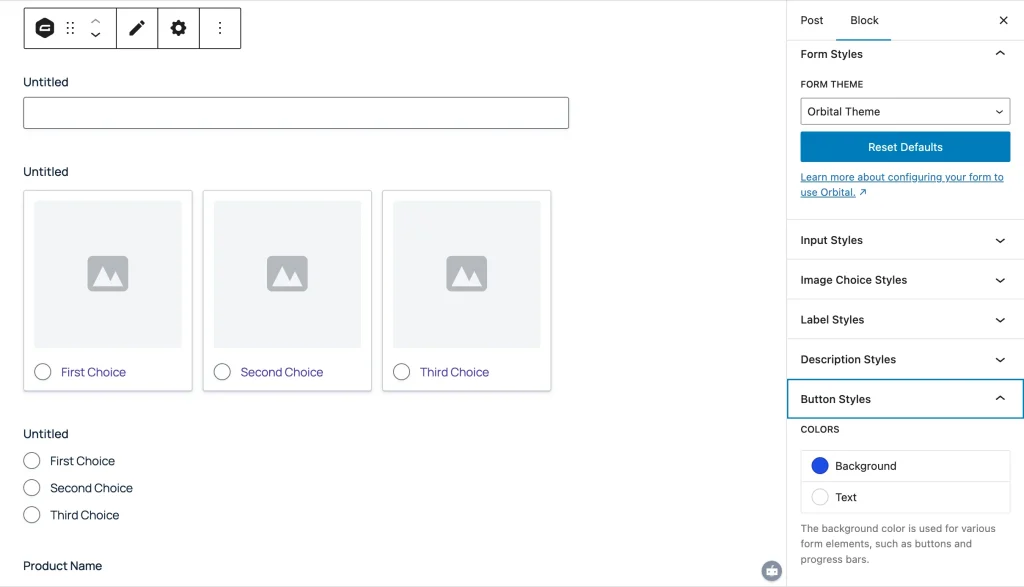
Gravity Forms provides two preset themes and a block-based styler that covers label colors, font sizes, button colors, and input-field accents. It’s enough to keep things on-brand, but it doesn’t extend to the form container itself. You’ll need to wrap the form in a WordPress Group block or write custom CSS to control backgrounds, padding, and shadows.
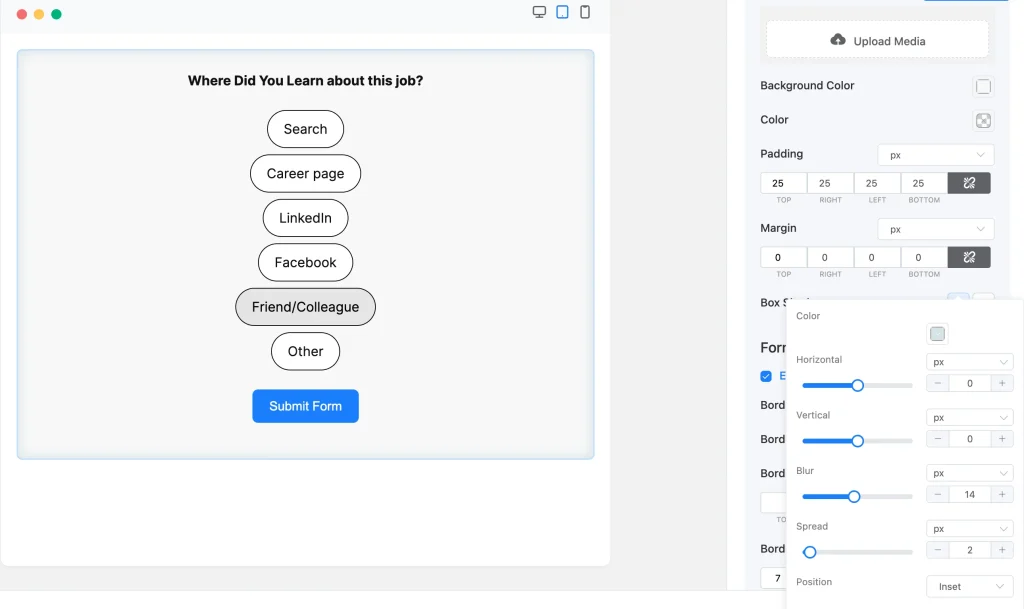
Fluent Forms’ visual styler goes considerably further. You can control the form container’s background (including gradients and images), border, shadow, padding, and margin. Individual elements like labels, inputs, checkboxes, radio buttons, and the submit button each have their own styling panels with separate normal and hover/focus states. Typography options include letter spacing, text transforms, and font style. Fluent Forms’ styler is a lifesaver if you’re handing a site off to a client who needs to tweak the design without touching code.
Both plugins support custom CSS for anything the visual tools don’t cover.
Pre-built templates
Starting every form from a blank canvas is time-consuming. Form templates solve that inconvenience. They are easy to download, customize, and use anywhere on your site.
Gravity Forms includes 20+ starter templates covering common scenarios like contact forms, surveys, and event registrations.
Fluent Forms offers over 150 form templates across lead generation, job applications, booking requests, feedback surveys, order forms, institutional use, and many more niche categories. All the templates are well-thought-out, styled, and easy to fill in. This larger template library gives you a head start, no matter what kind of form you need.
Features that shape your decision
Beyond the core building experience, both plugins include a range of features designed to handle more complex use cases. The difference often isn’t whether a feature exists, but how it’s implemented, which plan it’s included in, and whether you need a third-party add-on to access it. Let’s walk through some features that tend to influence buying decisions.
Conditional logic
Conditional logic hides or shows a dependent field based on the user’s input in another field. It makes any form adapt to user input: showing follow-up questions, routing notifications, or displaying personalized confirmation messages.
Both plugins handle single-layer conditional logic well. You define a trigger field, set a relationship (equals, contains, greater than, etc.), and choose what happens when the condition is met.
The differentiator is condition grouping. Gravity Forms supports “any” or “all” matching, but doesn’t natively allow grouped condition sets. Fluent Forms’ conditional logic includes a “Group” option, letting you combine multiple condition clusters with independent logic. This is invaluable for complex enrollment, diagnostic, or qualification forms where simple any/all logic isn’t sufficient.

Worth noting: third-party add-ons can bring grouped conditions to Gravity Forms, but that means another plugin to install, maintain, and pay for.
Quizzes and assessments
Both tools cover the fundamentals: letter grading, point-based scoring, percentage results, and weighted/advanced scoring, where different answer options carry different point values.
Fluent Forms adds a personality quiz mode. In a personality quiz, there are no wrong answers, and the result reflects which “personality archetype” the respondent aligns with based on their selections. For example, “What is your travel personality? – explorer, adventurer, culture seeker, or relaxer.” This is a great way to engage your audience or take a quick psychology evaluation.
Reporting and analytics
Both plugins track form views, submissions, and conversion rates. Beyond that, Fluent Forms includes a built-in reporting dashboard with three tabs:

- Overview: Aggregated metrics across all forms, total submissions, unread entries, completion rates, traffic heatmaps, top-performing forms, and API logs.
- Payments: Payment timeline graph with status breakdowns (paid, pending, refunded, revenue), payment analysis (by form, gateway, or payment type), etc.
- Submissions: Read/unread tracking, spam monitoring, and grouping options to spot patterns in your data.
Gravity Forms doesn’t offer an equivalent centralized dashboard. You’ll see individual form analytics, but pulling together a cross-form picture of your submissions and revenue requires additional tools or manual work.
Payment
Payment features and getaways allow you to accept payment right from your form. It comes in handy if you need to accept payments for product orders, donations, event fees, or consultation deposits.
Gravity’s payment features start from its Pro plan. You get item, quantity, price, and custom donation amount fields. Besides, Gravity offers integration with Stripe, PayPal, Square, Mollie, 2Checkout, and authorize.net.
Fluent Forms’ payment features start from its free plan. You get payment item, quantity, price, custom payment amount, subscription payment, and payment summary fields in the free version, along with Stripe integration. Note that there’s a 1.9% charge per transaction if you accept Stripe payment via Fluent Forms’ free version. This charge doesn’t apply when you upgrade to Fluent Forms Pro.
Fluent Forms Pro unlocks coupons and inventory features. Additionally, it integrates with PayPal, Square, Mollie, Paddle, Razorpay, Paystack, and authorize.net.
Spam protection
Both plugins offer solid defenses against form spam, but they package them differently.
Gravity Forms includes a honeypot and reCAPTCHA v2 as built-in features. Official add-ons (available on all plans) extend coverage to reCAPTCHA v3, Cloudflare Turnstile, and Akismet. Elite license holders also get a Moderation Add-On that uses machine learning to detect toxic or abusive language in submissions, a unique layer beyond standard bot-filtering.
Fluent Forms offers more anti-spam tools in its free version: honeypot, token-based verification, empty submission blocking, and integrations with Turnstile, Akismet, CleanTalk, reCAPTCHA v2 & v3, and hCaptcha. Pro adds double opt-in confirmation, IP/country restrictions, and advanced validation rules. All submitted data is sanitized by default, stripping malicious scripts before anything reaches your database.
Now that we’ve compared the basic features, let’s see how easy each plugin makes it to create automated workflows inside WordPress.
Integrations and ecosystem
A form builder on its own handles data collection (and analysis to some extent). Connected to your email marketing platform, CRM, payment gateway, or project management tool, it becomes the starting point for automated workflows that actually run your business. Both plugins offer integrations, but the difference lies in how they deliver them and what’s included versus what costs extra.
Fluent Forms: the WPManageNinja Ecosystem
One of Fluent Forms’ less obvious advantages is that it’s part of a family of plugins built by the same team. That means first-party, maintained integrations with:
FluentCRM: email marketing and automation funnels inside WordPress
FluentSMTP: reliable email delivery for form notifications
Ninja Tables & Ninja Charts: display submission data in sortable tables or visual charts
FluentBooking: let users schedule appointments right from the form
Fluent Support: helpdesk ticketing
FluentBoards: project management (auto-create tasks from form submissions)
And more.
Beyond its own ecosystem, Fluent Forms connects with 60+ external tools: Mailchimp, ActiveCampaign, HubSpot, Salesforce, Trello, Notion, Google Sheets, Slack, Discord, Telegram, and more. Webhook support and a Zapier integration extend that reach to thousands of additional platforms.
Gravity Forms’ add-on marketplace
Gravity Forms takes a different approach. Its core plugin handles form building, and a marketplace of official and community add-ons extends it into CRM syncing, advanced calculations, mapping, analytics, and more. Some of these add-ons are impressively powerful. GravityKit, for instance, lets you display submitted data on the front end in sophisticated ways.
However, each add-on is a separate plugin with its own pricing, update cadence, and support channel. Stack several together, and you’re adding weight to your site, complexity to your work, and recurring costs to your budget.
For agencies and developers who’ve already built workflows around specific Gravity Forms add-ons, the ecosystem is a genuine asset. For someone starting fresh, it’s worth asking whether built-in functionality (like what Fluent Forms offers) would get you to the same place more efficiently.
Pricing
Pricing deserves thoughtful consideration, especially when add-on fees and renewal costs enter the picture. Here’s what each plugin actually costs when you lay the plans side by side.
Gravity Forms (premium only)
| Plan | Annual Price | Sites | Notable Inclusions |
|---|---|---|---|
| Basic | $59/year | 1 | Core features + basic add-ons |
| Pro | $159/year | 3 | payment add-ons, more integrations |
| Elite | $259/year | Unlimited | all official add-ons (conversational forms, user registration, coupons, etc.) |
Third-party add-ons carry separate subscription fees. No lifetime license is currently offered.
Fluent Forms (Generous Free Plan + Single Pro Tier)
| Plan | Annual Price | Lifetime Price | Sites |
|---|---|---|---|
| Free | $0 | — | Unlimited |
| Pro (Single Site) | $79/year | $349 | 1 |
| Pro (5 Sites) | $159/year | $599 | 5 |
| Pro (Unlimited) | $299/year | $899 | Unlimited |
Pro license includes all features and add-ons, no tier-gated functionality. The lifetime option is especially attractive for agencies and developers who want to eliminate recurring costs.
Which plugin is best in different scenarios
Freelancer or solo creator building a personal site:
Start with Fluent Forms Free. You get conditional logic, Stripe payments, conversational forms, and pre-built templates at zero cost.
Small business collecting leads and processing orders:
Fluent Forms Pro (single site) at $79/year gives you everything: payments without transaction fees, coupons, inventory, PDF invoices, and CRM integration via FluentCRM. Although the PDF module and FluentCRM integration are available in the free version.
Agency managing 10+ client sites:
Fluent Forms Pro (unlimited), especially the lifetime license at $899 (eliminates per-site and per-year costs). Built-in features mean fewer plugin conflicts across diverse client environments.
E-commerce or membership site:
Fluent Forms Pro. Payment gateway integrations, product fields, inventory tracking, user registration, custom amount payment, subscription payment, and coupon support handle the full checkout and onboarding flow without add-ons.
Developer with a heavily customized Gravity Forms setup:
Stay with Gravity Forms if migrating would break existing workflows tied to specific third-party add-ons. But for new projects, evaluate whether Fluent Forms’ built-in capabilities (plus its CSS/JS and hook support) can achieve the same result at lower complexity.
Frequently Asked Questions
Is Fluent Forms really free?
Yes. The free version on WordPress.org includes 35+ fields, conditional logic, Stripe integration, conversational forms, multi-column layouts, spam protection, and more. It’s a fully functional form builder, capable of creating basic to advanced-level forms.
Which plugin is better for agencies?
Fluent Forms, in most cases. Unlimited-site licensing, lifetime pricing, a lightweight footprint, and all-inclusive features mean lower costs and fewer complications across client projects.
Can I migrate from Gravity Forms to Fluent Forms?
Fluent Forms offers a one-click migration tool that imports your existing forms and entries, making the switch straightforward.
The bottom line
Both Gravity Forms and Fluent Forms are capable, well-supported WordPress form plugins. Gravity Forms earned its reputation over many years, and its third-party add-on network gives developers access to highly specialized tools. That ecosystem is a real strength, if you need it and don’t mind managing it.
But for the majority of WordPress users, whether you’re launching your first site, scaling a business, or managing client projects, Fluent Forms delivers more out of the box, at a lower cost, with less complexity. The free version alone outperforms many paid form plugins, and Pro eliminates the need to piece together functionality from multiple sources.
The best way to decide is to experience both plugins firsthand. Since Fluent Forms offers a fully featured free version, there’s zero risk in giving it a spin on your site today. Install Fluent Forms, explore the editor, and build your first form in minutes.

When you’re ready for advanced features like payment processing without transaction fees, user registration, calculation, quizzes, and 60+ integrations, upgrading to Pro is a single click away.
-

Top 10 BookingPress Alternatives: WordPress Booking Plugins (2026)
Discover the best BookingPress alternatives for WordPress. Compare features, pricing, -

FluentSMTP Review: Whats Inside this 700K+ WordPress SMTP Plugin?
Check our FluentSMTP review blog to Discover whats inside this -

7 Best Ecommerce Plugins for WordPress in 2026 (Tested And Compared)
Compare the 7 best ecommerce plugins for WordPress in 2026



Leave a Reply
You must be logged in to post a comment.