


It seems that countless tasks that go into managing a business website — blogging, coding, updating products, tracking inventory, maintaining servers, and listings, to name just a few — can cost a company a significant amount of time and money.
Hiring talent could be a tough job if you follow the traditional way these days. So, what could be an optimal way that small businesses do to balance some of those expenses?
Well, one of the best ways could be creating an online job board. Let’s
Why do you need a job board?
Hiring talents could be a daunting task if you still need any third party to make it happen. These days most of the business websites hold a page that intitles with Career, Job, or Join US as a job board.
A job board can act as an add-on content page for your website that also helps draw traffic. This allows employers to connect employees directly and manage the recruiting process easy and smoother.
Nowadays, people search for jobs online while applying to their expected position. Searching jobs online using a job board is a handy way for both employers and employees to get their expected person and position. Moreover, as an employer, you can save time and money while the recruiting process is going on in your company.
In this article, I will show how to create a job board on your website. To make it possible, I’m going to use the Ninja Job Board plugin, a quality free WordPress job board plugin. Without further ado, let’s move forward.
How to create a job board

Using the Ninja Job board plugin for creating a job board and placing it on your website is like publishing blog posts on your website. At first, you can create it as a draft then publish it after having a final review.
To start things off, you need to install the Ninja Job Board plugin first. Then click on the WP Job Board located in the left sidebar of the plugin’s dashboard. Next, click on the Create a new Job Circular button.
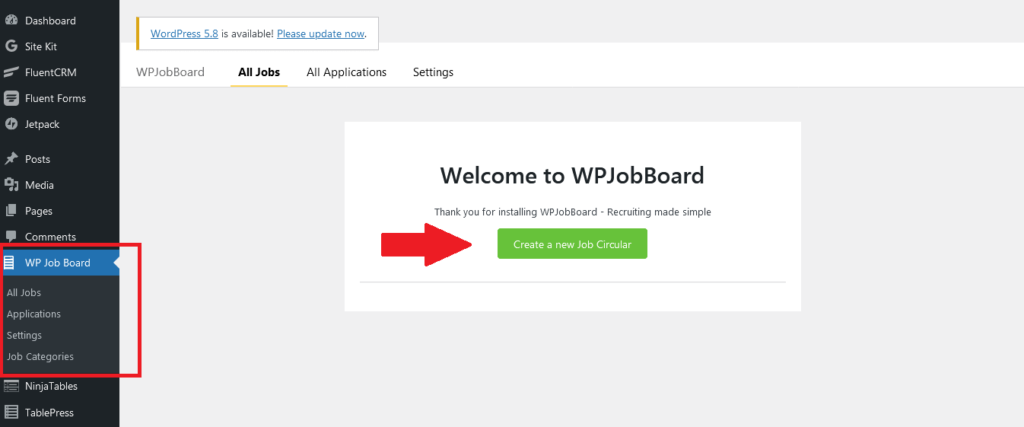
Once you will click on the button, a pop up will appear with an input field to put the job title.
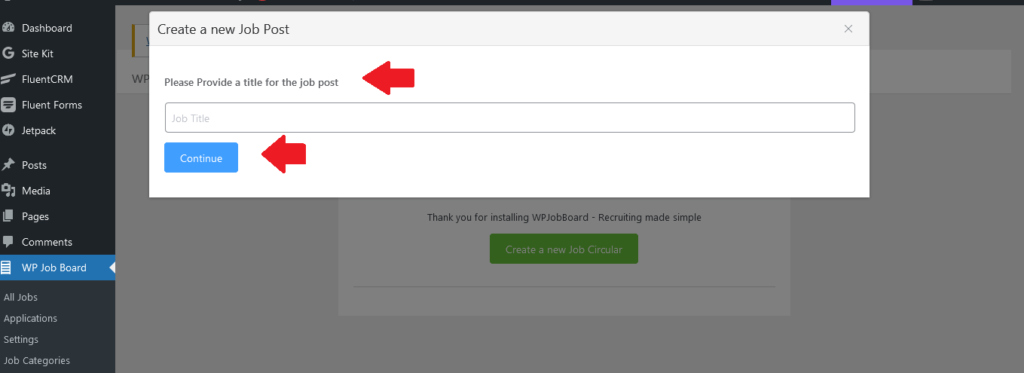
Once, you click on the Continue button, you will be taken to the dashboard of the plugin where you will have options to create the job boards on your website.
In the dashboard, you will have 5 different tabs located on top of the page to configure your job board plugin while creating a job board on your website. Each tab comprises of unique features and functionalities to enhance your job board.
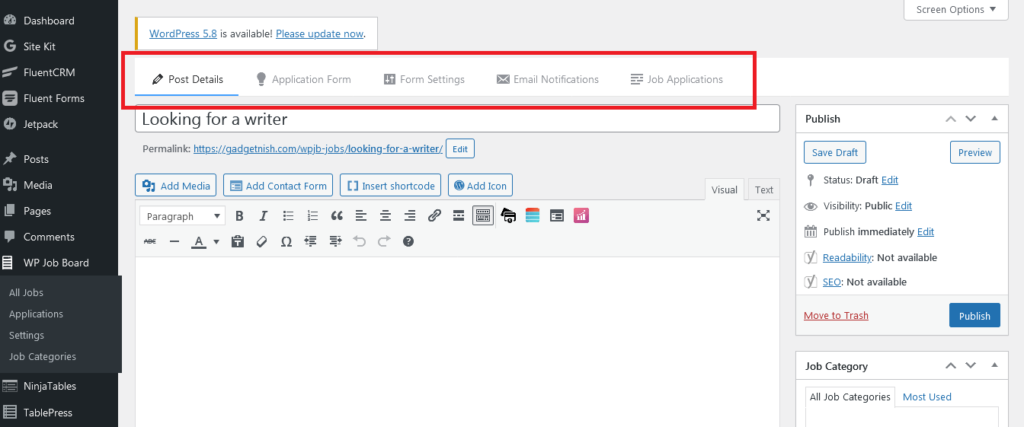
By default, you will find the Post Details tab where you’ll get options to provide a detailed job description. You will get a WordPress classic editor to put the information about your job circular.
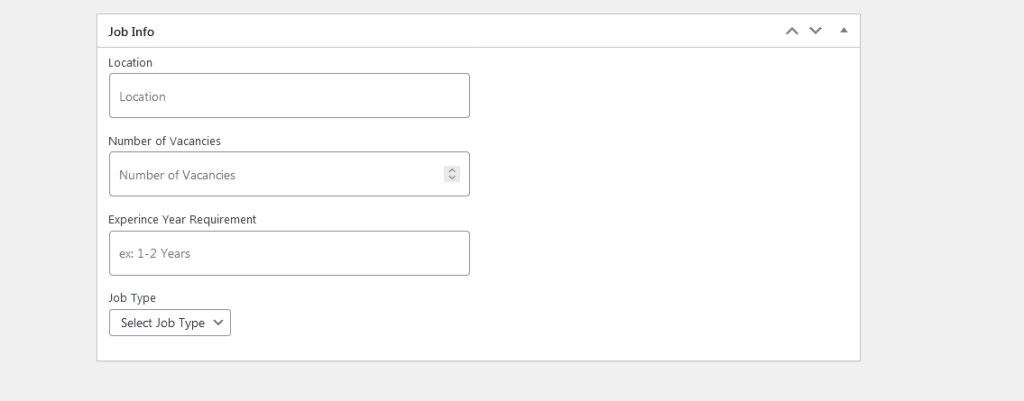
Below the editor section, you will get another section for putting information about the Location, Number of Vacancies, Experience in Years, and Job Type.
After providing the detailed texts, click on the Save Draft to see the preview of the page. In the preview, you’ll see that an apply button(Apply for this position) is available in order to provide the applicants a way to apply for the respective job. Take a look at the preview of the page for better understanding:

This is how you can show a circular page on your site, then you need to create an application form to provide applicants a way to submit additional information.
After filling all the requirements of the Job Details tab, click on the Application Form tab to set up the further procedure with a job application form.
To create and set up an application form, click on the Application Form tab, then you will find a basic application form built-in to put your data in it.
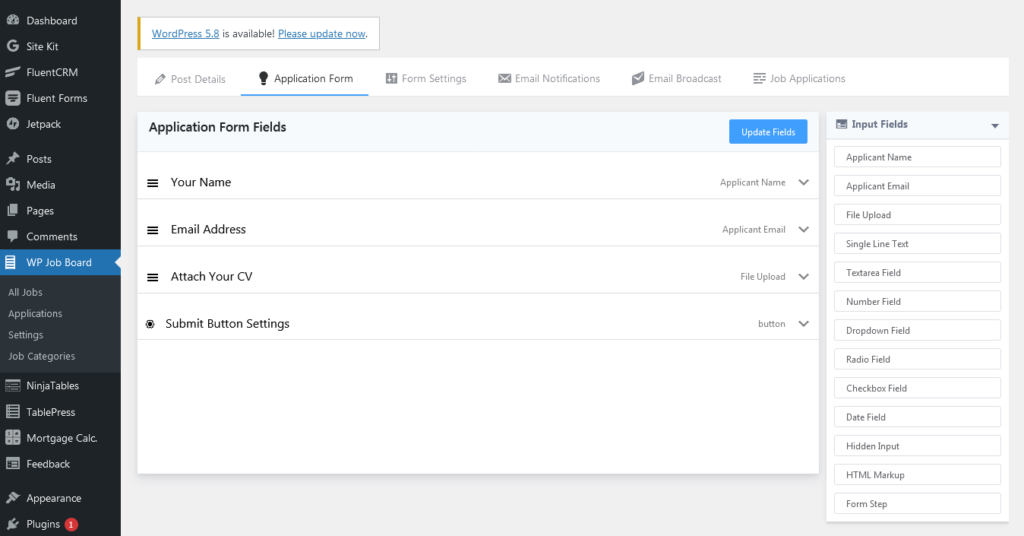
You can customize the built-in set up as you need. There are 13 input fields available to configure the application form. For demonstration purposes, here I’m keeping all 4 input fields. Here, take a look at the preview of the application form.
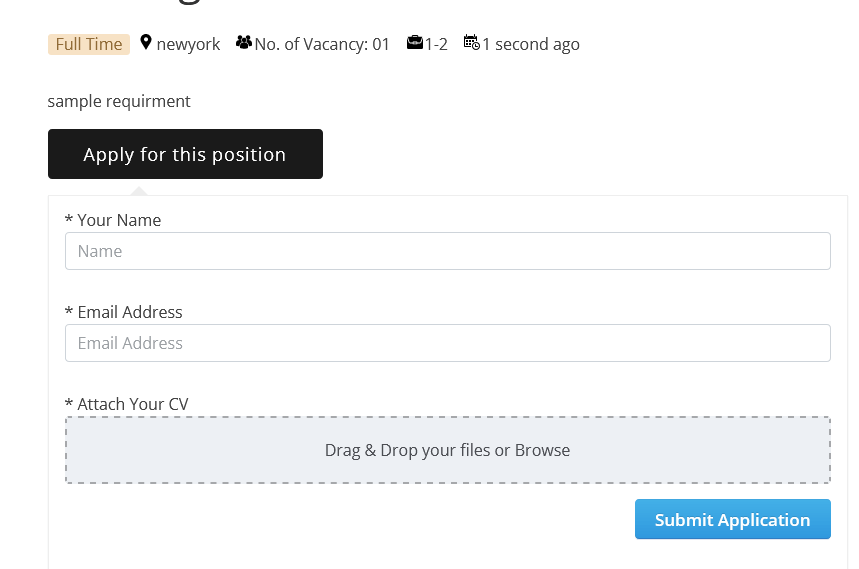
This application page will appear when applicants click on the Apply for the position button. By default, this page will appear on the same page beneath the circular or job details. You can also show a confirmation message when the form gets submitted. To enable this feature, click on the Form Settings option, next, define the Confirmation Type.
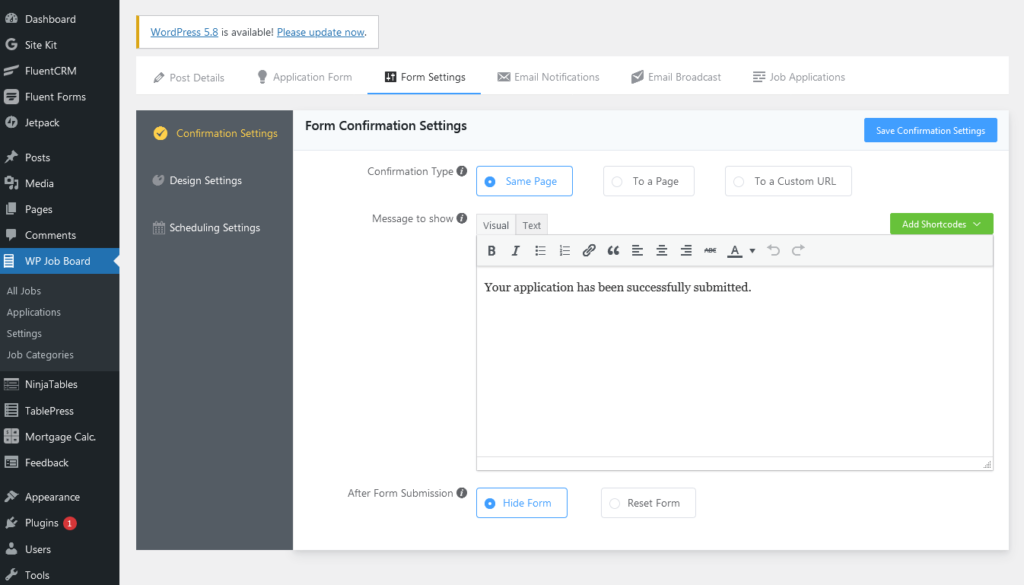
You can show the message confirmation on the same page, to another page, or you can create a custom URL to show the message separately.
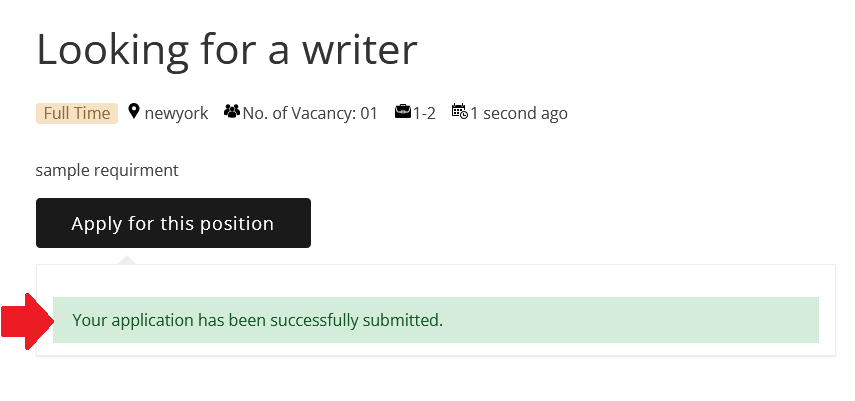
Now, if you submit the application after filling the application form, you will see the submission notification is shown after the form is submitted.
Now, you can see the submitted entries in the dashboard by clicking on the Application button.
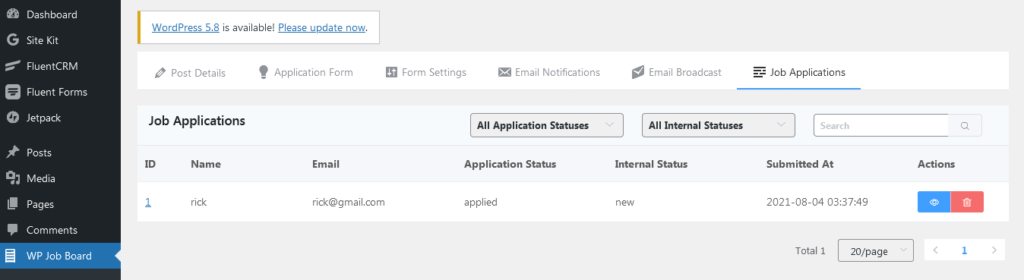
Once you click on the Applications button, you will find the submitted entries in the respective form.
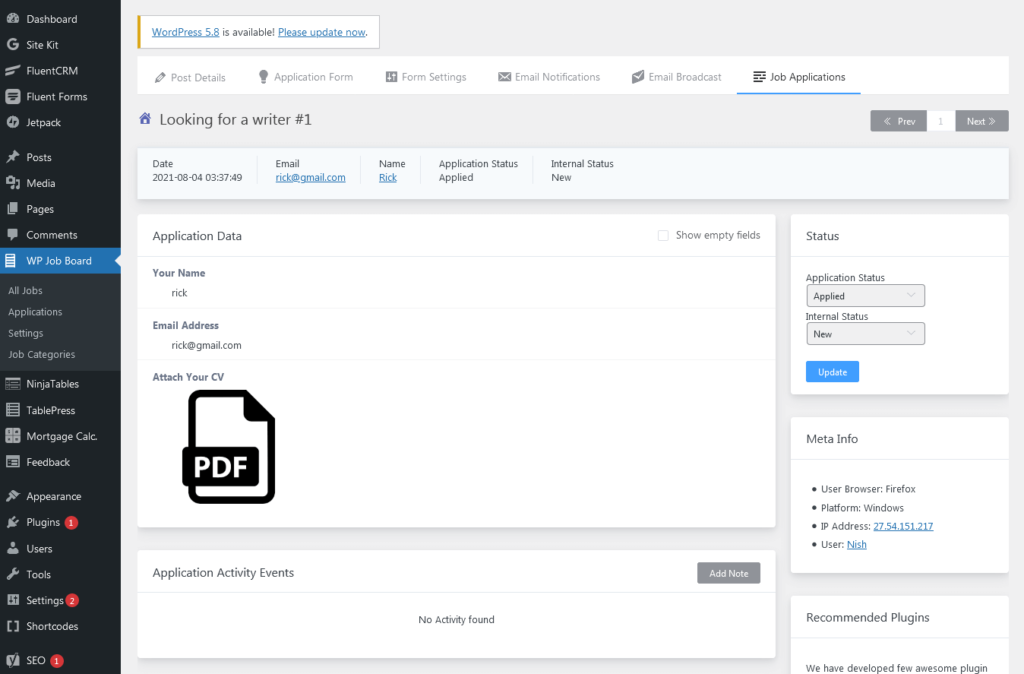
In the entry page, click on the eye icon to view the submitted data by the respective applicant.
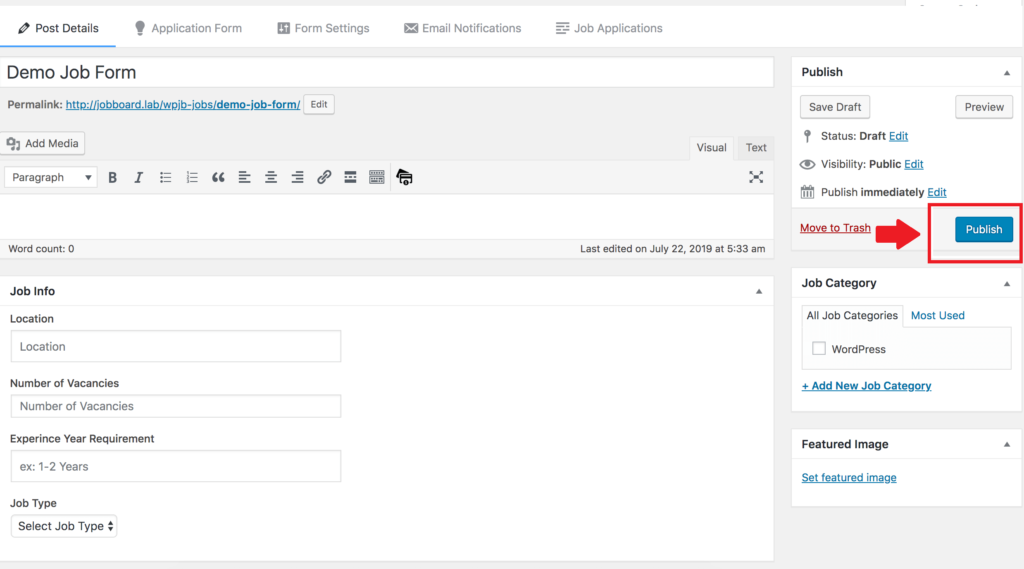
I think you got it, now it’s a matter of time to create a job board plugin and publish it on your website. After making sure, click on the publish button on the top right corner of the page.
This is how you can add the job board to your website using a quality WordPress plugin. I hope, this article helped you to know how to create and add a job board for showing circular on your website. If you still have any queries, feel free to share anything you want in the comment section below.
-

Top 10 BookingPress Alternatives: WordPress Booking Plugins (2026)
Discover the best BookingPress alternatives for WordPress. Compare features, pricing, -
FluentSMTP Review: Whats Inside this 700K+ WordPress SMTP Plugin?
Check our FluentSMTP review blog to Discover whats inside this -

7 Best Ecommerce Plugins for WordPress in 2026 (Tested And Compared)
Compare the 7 best ecommerce plugins for WordPress in 2026


Comments
-
Hello,
Thanks for your great job board plug-in. I have some questions about it.
Do you still support the plug-in? (last update was year agoo)
Is it possible to send the applications automaticaly to the e-mail of employers?
Is it possible to change the url from /wpjb-jobs/ into /jobs/?
I changed the submit button settings, but they don’t change in the front end.
The featured image is not shown in the front end.
Is it possible to add company logos and company information to jobs?
Do you give personal (paid) supportThanks a lot, Vincent Vreeken
-
Hello Vincent!
We are working on an update as we speak.
Yes, with WP Job Board, it is possible to automatically email the employers when a job application is submitted.
1. Go to the job editor
2. Click on the Email Notification tab (top bar)
3. Enable “Email Notification to Admin”> Edit
4. Name the “Notification Title”, Enter the email address (employer’s email address) you want the email notifications sent to, Set the email subject as “New Job Application Submitted for {wp:post_title}”
5. In the email body, don’t forget to add the shortcode {submission.all_input_field_html} along with other information and shortcodes
6. Save the notification by clicking on “Update”. -
Hi Vincent…
We have released an update to Ninja Job Board. Please update your plugin and enjoy the following features.– Added feature to show other job applications by the same applicant
– Added a new feature to send bulk emails to the applicants.
– Fixed text-domain issues
– Fixed email sending issues
– Few other performance improvements
-
-
Dear all,
Two more questions: Is it possible to show jobs with featured image on a page?
Do you have a comprehensive manual about your plug-in, with all possible shortcodes?Thanks a lot, Vincent
-
Hello,
Do you still support this plugin, as the last update was about two years ago?
Thanks.-
Hi there.
An update will be released soon. FYI, the plugin still works fine. In fact, we are using it in our own recruitment process! -
Hi Hadi…
We have released an update to Ninja Job Board. Please update your plugin and enjoy the following features.– Added feature to show other job applications by the same applicant
– Added a new feature to send bulk emails to the applicants.
– Fixed text-domain issues
– Fixed email sending issues
– Few other performance improvements
-
-
Hi.
I’m using the platform in my company, everything is working fine, however, the e-mail that is coming to People Management is messed up and the formatting is wrong, I would like to know if there is a way to fix this?
I’m trying to understand the code and modify it but I’m not succeeding.-
You can contact our support team and they are going to look into it.
-



Leave a Reply
You must be logged in to post a comment.