

WooCommerce vs Wix: Pros, Cons, and Which One Actually Fits Your Store
WooCommerce gives you full ownership and unlimited room to grow. Wix gets you live in an afternoon. That’s the core of the WooCommerce vs Wix debate, and most comparisons get it wrong by treating it as a features race when it’s really a question of what kind of business you’re building.
The real problem isn’t that both platforms are bad. It’s that they’re built for fundamentally different kinds of businesses. Choosing the wrong one doesn’t just cost you money upfront; it costs you when you try to scale, customise your checkout, add a subscription product, or move away from a platform that’s locking you in.
TL;DR
- Wix is an all-in-one hosted builder; fast to launch, no technical setup required
- WooCommerce is a free WordPress plugin; powerful but needs hosting, configuration, and maintenance
- Wix pricing is predictable ($29–$159/month); WooCommerce’s total cost varies based on hosting and plugins
- WooCommerce wins on customisation, scalability, and SEO flexibility
- Wix wins on ease of use, customer support, and speed to launch
- WooCommerce is the stronger long-term bet for stores planning to grow
What You’re Actually Choosing Between
These two platforms aren’t really competing on the same terms. Wix is a website builder that added eCommerce. WooCommerce is an eCommerce engine built on top of the most widely used CMS on the planet.
That distinction matters more than any feature comparison table.
With Wix, you’re renting a fully managed setup. Hosting, security, updates, SSL, CDN; all handled. You don’t touch a server. Don’t worry about a plugin breaking your checkout at 2 am. You just build and sell.
With WooCommerce, you own the stack. WordPress + WooCommerce + a hosting provider you chose + plugins you vetted + updates you manage. More moving parts. More responsibility. But also: your data, your code, your rules.
Here’s what’s actually happening when people get this wrong: someone launches a Wix store, gets traction, then hits the ceiling. They want wholesale pricing tiers, or a custom checkout flow, or multi-currency billing, and Wix simply can’t do it. Migration time. Real cost, real disruption.
Or the opposite: someone builds a WooCommerce store because it seems like the “serious” choice, underestimates the setup and ongoing maintenance overhead, and ends up paying a developer for every small change they want to make.
Neither situation is inevitable, but both are common.
Ease of Use: Where the Gap Is Widest
This is Wix’s strongest card, and it’s not close.
Getting Started on Wix
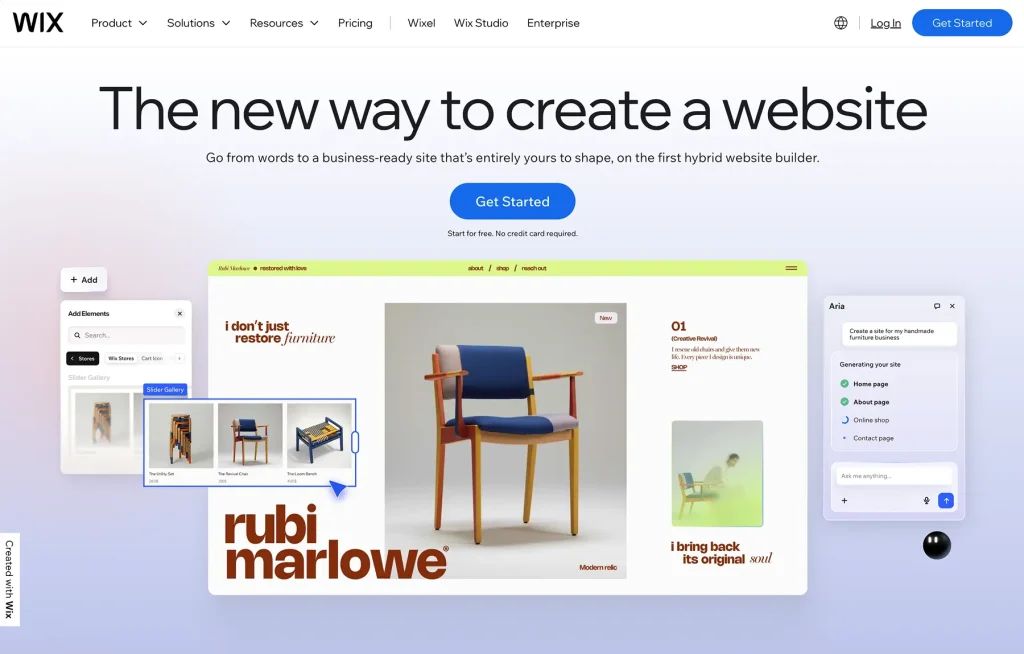
You sign up, pick a template, drag elements around, and you have a store. No hosting research, no WordPress dashboard orientation, no plugin compatibility checks. The setup is genuinely beginner-friendly, and their AI website builder can scaffold a basic storefront from a text prompt.
A small business owner launching their first online store, handmade candles, a few dozen SKUs, needs to be live this week, Wix is genuinely the right call. The friction is low. The results are fast. The ongoing maintenance is handled for them.
Getting Started on WooCommerce
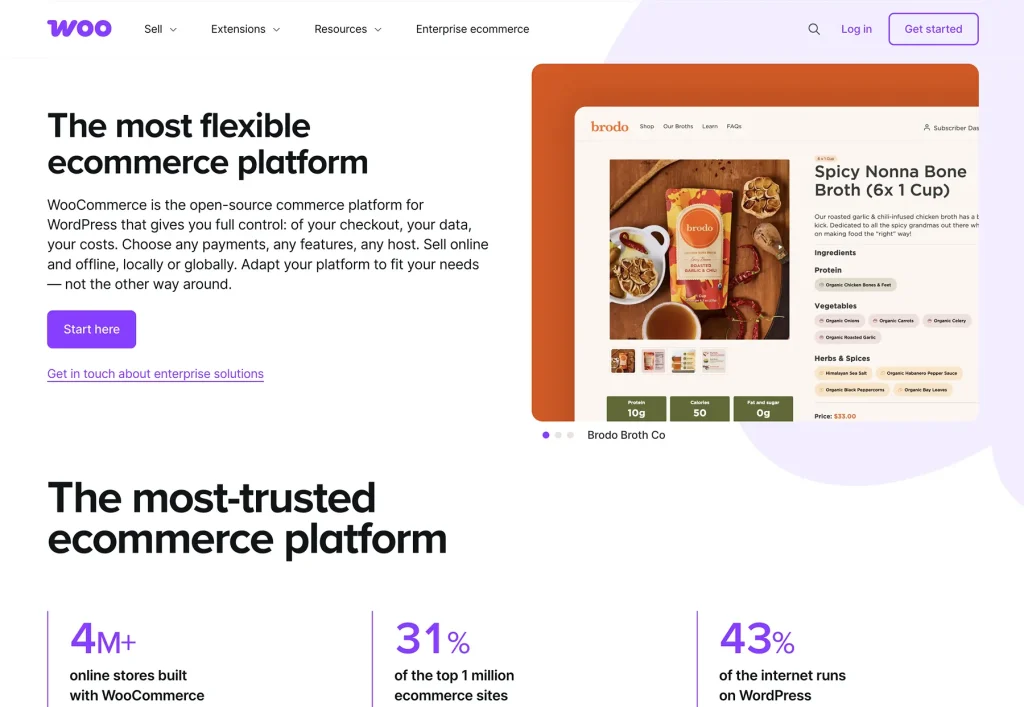
Choose and configure a hosting provider, WooCommerce requires you to first set up WordPress, install WooCommerce, go through the setup wizard, configure payment gateways, and then actually start building your store. None of these steps is particularly hard, but there are a lot of them, and the learning curve is real for someone who hasn’t used WordPress before.
That said, once you’ve got a WordPress site you’re comfortable with, WooCommerce setup is straightforward. The barrier isn’t technical sophistication; it’s familiarity with the ecosystem.
Customisation and Flexibility: WooCommerce by a Wide Margin
This is where the WooCommerce vs Wix comparison becomes one-sided. And it’s not just about the number of options; it’s about the fundamental architecture of each platform.
Plugin Ecosystem
WooCommerce has access to over 60,000 free plugins in the WordPress Plugin Directory, plus its own extension library of hundreds of eCommerce-specific tools. Payment gateways, loyalty programs, subscription billing, wholesale pricing tiers, and advanced shipping rules; all of it is either built in, available as a free plugin, or available as a premium extension. If something doesn’t exist, you can build it because you have full access to the source code.
Wix has an app market with over 800 apps. That’s a decent selection for standard needs, but the ecosystem is fundamentally smaller and more curated. You’re also bound by what Wix allows in their closed environment; you can’t access or modify the underlying code, and you can switch to a different hosting provider, but the steps aren’t that straightforward.
Design and Templates
Both platforms give you templates to start from. WordPress has thousands of free ones in the official repository, premium options from third-party developers, and WooCommerce-specific themes built around store layouts. You can switch themes at any time without losing your content.
Wix has over 2,000 templates, many of them genuinely well-designed. The catch: you can’t switch templates on an existing site. If you want to change your store’s look down the line, you’re rebuilding from scratch on a new site instance, and your store data doesn’t transfer cleanly.
Store Functionality Limits
A few concrete things Wix can’t do that WooCommerce handles natively or via plugins: wholesale selling with role-based pricing, actually charging customers in multiple currencies (Wix can display multi-currency but can’t process it), and custom checkout flows.
Wholesale and B2B
If you’re selling to both retail customers and trade buyers, WooCommerce can run separate pricing tiers, role-based discounts, and B2B-specific payment and shipping rules. Wix has no native wholesale functionality, and the workarounds are clunky at best. If dropshipping is part of your model, WooCommerce’s open plugin ecosystem handles that considerably more cleanly too.
Multi-Currency
Wix lets you display prices in local currencies. But when a customer checks out, they’re billed in your store’s base currency. That’s a meaningful friction point for stores with an international audience. WooCommerce handles true multi-currency natively via plugins, including currency-specific pricing and gateway routing.
On the flip side, for most small stores those limits never matter. If you’re selling a single product line to a domestic audience with no complex B2B needs, you might never bump into Wix’s ceiling.
WooCommerce vs Wix: Pricing Breakdown
Here’s where things get counterintuitive.
What Wix Actually Costs
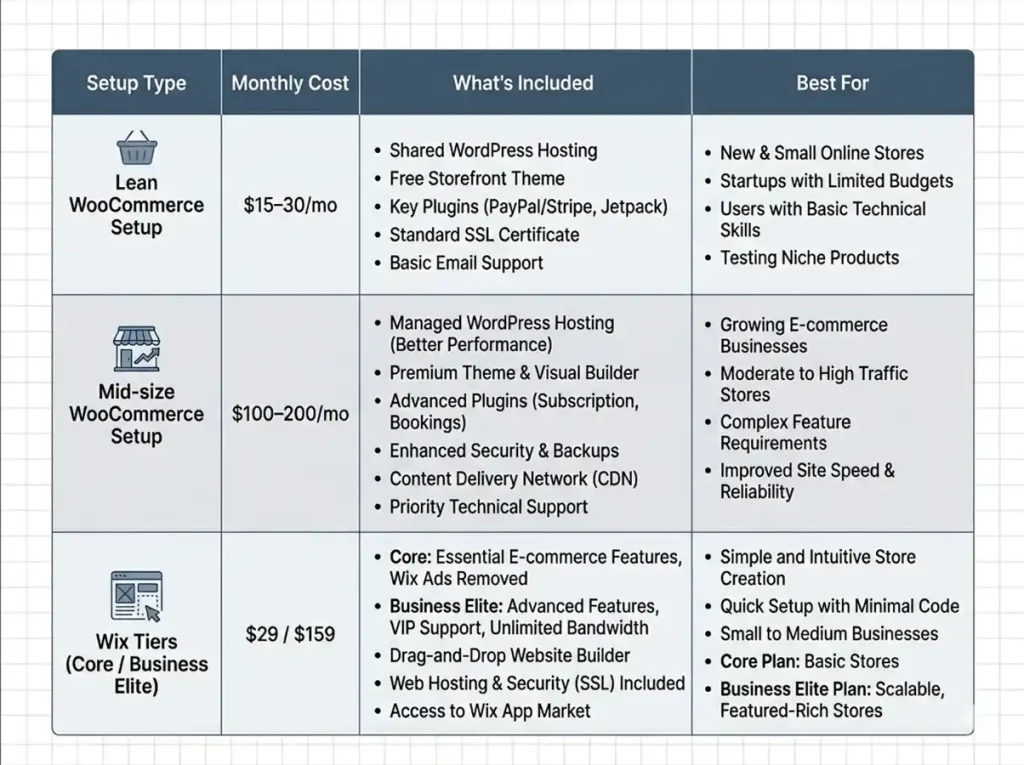
Wix pricing is transparent: eCommerce plans run from $29/month (Core) to $159/month (Business Elite), billed annually. Everything is included: hosting, SSL, a domain for the first year, and support. No surprises, no separate invoices for infrastructure, and you know what you’re paying every month.
The downside of this model is that you’re paying for features you may not use yet. The Business Elite plan at $159/month unlocks advanced eCommerce features that most small stores simply don’t need, but if you want a specific feature that’s locked behind it, you’re paying the full tier price to get it.
What WooCommerce Actually Costs
WooCommerce is free to install. But that number is misleading.
You’ll need: a hosting provider (typically $10–50+/month depending on traffic and quality), a domain name, likely a premium theme, and some paid extensions for the features that matter to your store.
The Lean Setup
A no-frills WooCommerce store, shared hosting, a free or low-cost theme, only the core plugin, can run as little as $15–30/month all in. For a brand new store with low traffic and simple product requirements, this is genuinely cost-effective. If you’re mapping out how startup costs actually stack up before launch, this comparison is worth running in full.
The Properly Configured Setup
A mid-size store with quality managed hosting (think Hostinger or Kinsta), a premium theme, and a handful of essential paid plugins, subscriptions, a page builder, an SEO plugin, a backup solution, lands closer to $100–200/month. That’s comparable to Wix’s higher tiers, but you’re paying only for what you actually need.
The Honest Framing
Wix is predictably priced but capped. WooCommerce is variably priced but scales with what you actually need. For stores that only use a fraction of Wix’s plan, they’re often overpaying compared to a lean WooCommerce setup. For stores that need enterprise features on Wix’s Business Elite plan, they might pay more than a well-configured WooCommerce store doing the same job.
SEO: A Real Difference for Growth-Focused Stores
Both platforms can rank. Neither is fundamentally bad for SEO. But the ceiling on WooCommerce is significantly higher.
On-Page SEO Tools
Wix handles the basics automatically: sitemaps, meta tags, mobile optimisation, and structured data. Their SEO wizard walks you through the essentials. For a local business or a small store competing in a low-difficulty keyword space, it’s enough.
WooCommerce on WordPress gives you access to tools like Yoast SEO and RankMath, which go substantially deeper: keyword-level content analysis, schema management, indexing controls, canonical URL management, and granular redirect handling. For stores investing in content-driven acquisition or competing in high-volume commercial search terms, these tools matter.
Content and Blogging
There’s also the content side. WordPress was built for publishing. Its block editor, category taxonomy, and internal linking architecture are all more capable than Wix’s blog tool for serious content marketing. Stores that rely on organic traffic as a primary acquisition channel should weigh this heavily.
Scalability: The Question That Changes Everything
This is where most WooCommerce vs Wix comparisons bury the lead.
Where Wix Hits Its Ceiling
Wix scales reasonably well for smaller stores. But the hard ceiling is real: proprietary hosting you can’t control, a platform that won’t let you modify its core, and an app ecosystem that’s good but finite. When you outgrow Wix, migration is painful; there’s no clean export of your entire site, and you’ll lose the design work you built.
Most businesses don’t figure this out until they’re mid-migration, frustrated, and wishing they’d started on the right stack.
Why WooCommerce Doesn’t Have That Problem
WooCommerce doesn’t have a ceiling in the conventional sense. The platform runs stores with hundreds of thousands of products and millions of monthly customers. The constraint becomes hosting; if you grow, you upgrade your server resources. The software itself is designed for it.
If you’re building something you expect to grow, and you want to understand what serious eCommerce execution actually looks like, browsing what the best eCommerce websites have in common is a good calibration exercise before choosing your stack.
Security and Support: One Trade-off Worth Knowing
Security
Wix handles security entirely on their end. SSL, DDoS protection, PCI compliance, automatic updates; none of that is your problem.
WooCommerce’s security is only as good as your choices. A reputable hosting provider with managed WordPress support does the heavy lifting. But you’re accountable for choosing that provider, keeping plugins updated, and configuring backups. If you’re running WooCommerce on cheap shared hosting with a free theme and no maintenance plan, you’re exposed.
Support
Wix’s support is responsive: 24/7 callback for English speakers, live chat during business hours. WooCommerce has no official support line. You rely on community forums, documentation, and the support teams behind individual plugins. For developers and technically comfortable users, that’s fine. For someone who just needs an answer fast, Wix’s direct support is a genuine advantage.
The Checkout and Conversion Layer
The quality of the checkout experience matters enormously for conversion, and on WooCommerce you have real control over it.
Wix Checkout
Wix’s checkout is functional but fixed. You can adjust some cosmetic elements and settings, but the structural flow isn’t something you can meaningfully redesign.
WooCommerce Checkout Flexibility
WooCommerce lets you build multi-step flows, single-page checkouts, add order bumps, upsells, and custom fields, either natively or via plugins. For stores actively working to reduce cart abandonment or test upselling mechanics, that flexibility translates directly to revenue.
When Plugins Start to Stack Up
One real downside: achieving a polished checkout on WooCommerce often means layering multiple plugins, one for the layout, one for order bumps, one for subscriptions, one for analytics. It works, but the plugin stack grows.
If you’re already on WordPress and want something that handles this without that overhead, something like FluentCart builds checkout control in natively, subscriptions, order bumps, and analytics in one place, without the bloat of cobbling it together from separate plugins.
WooCommerce vs Wix: Who Should Use Which
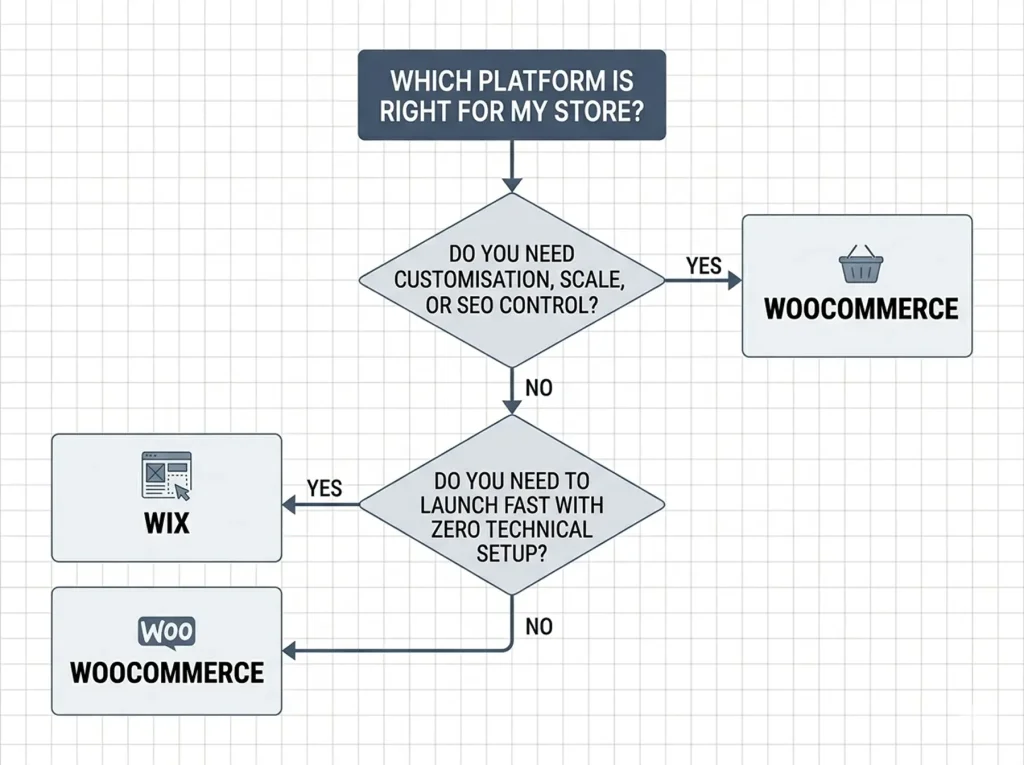
Choose Wix if:
- You want to launch quickly with no technical setup
- Your store has straightforward product requirements and a domestic audience
- You don’t have (or don’t want to hire) any technical support
- You’re testing an idea or side business before committing to a proper stack
Choose WooCommerce if:
- You’re building something you plan to grow seriously
- You need customisation beyond templates, checkout flows, pricing logic, subscription models
- SEO and content-driven growth is part of your strategy
- You’re already on WordPress or comfortable with it
- You want to own your data and your platform rather than rent it
If Shopify is also on your shortlist, the full Shopify review breaks down where it sits between these two on price, flexibility, and ease of use.
The Bottom Line
WooCommerce and Wix solve the same surface-level problem, how do I sell things online, but they’re built for different ambitions. Wix is a capable, polished tool for stores that want convenience and speed over control. WooCommerce is a platform for stores that plan to grow, customise, and own their stack for the long term.
The WooCommerce vs Wix question ultimately comes down to one thing: how much do you expect your store to evolve? If the answer is “not much,” Wix is genuinely fine. If the answer involves scale, complexity, or serious investment in organic growth, the right foundation is WooCommerce, and building on it properly from the start costs a lot less than migrating later.

Hi, I’m an experienced web designer, and WordPress core contributor. Creating interesting content and products that ensure a 360-degree customer experience is my daily job.
-

Ecommerce SMS Marketing: Strategies, Examples & Best Practices
Learn ecommerce SMS marketing strategies, campaigns, and best practices to -

Omnichannel Marketing: 7 Steps to a Connected Shopping Experience
It’s never too late to upgrade your marketing plan. Whether -

7 Best Ecommerce Plugins for WordPress in 2026 (Tested And Compared)
Compare the 7 best ecommerce plugins for WordPress in 2026


Leave a Reply
You must be logged in to post a comment.