

Taking a Closer Look at Common WordPress Errors and How to Fix Them
While WordPress-powered websites are quite easily managed, there are some frustrating WordPress errors you can encounter. Do you see an error message on your screen?
Don’t panic; the good news is that someone else before you has already encountered, reported, and solved the same error. Keep reading to learn about the most common WordPress errors and ways to solve them.
Before fixing any of the errors below, make sure to have a backup copy of your WordPress website. It’s helpful to research WordPress plugins for backing up your website.
Key takeaways
- Most WordPress errors come from a plugin or theme conflict, a low PHP memory limit, a database connection problem, or a corrupted core file.
- Back up your site before changing any file. A wrong edit can turn a small error into a bigger one.
- You do not need to be a developer to fix most of these. FTP or file manager access, plus a few careful steps, is usually enough.
- Some errors, like a corrupted database or a DNS issue, are best handled with your hosting provider.
Before you start: Back up and turn on debugging
Take a full backup before touching any file, even for a “quick fix.” A plugin like UpdraftPlus or Duplicator, or a backup tool from your host, covers this in a few minutes.
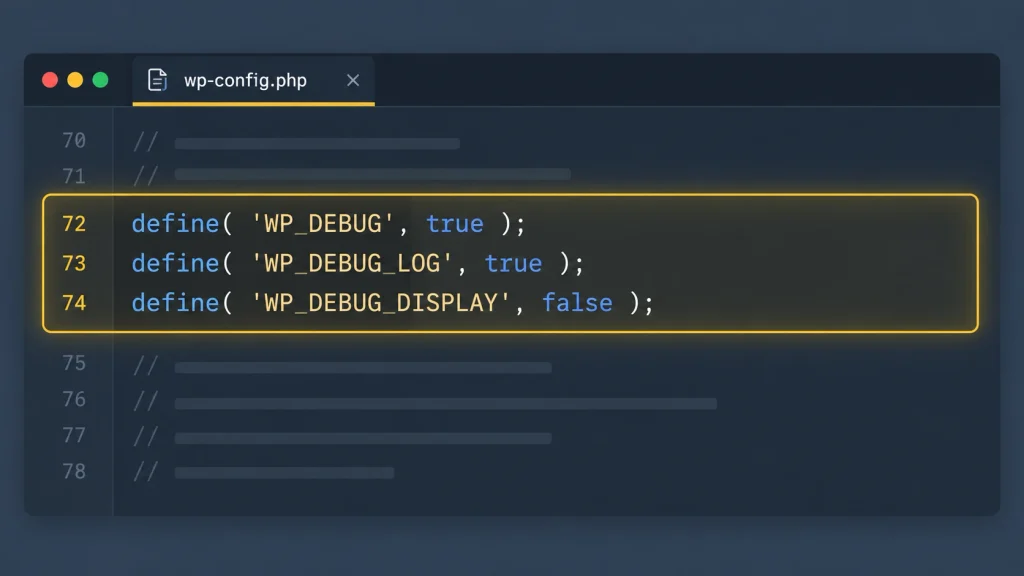
Next, turn on WordPress debugging so you can see what is actually failing instead of guessing. Add this to your wp-config.php file:
define( 'WP_DEBUG', true );

define( 'WP_DEBUG_LOG', true );

define( 'WP_DEBUG_DISPLAY', false );
This logs errors to a debug.log file inside wp-content instead of showing them to site visitors. Turn it back off once you have fixed the issue. For the full list of debugging constants, see the official WordPress debugging documentation.
Plugin and theme conflict errors
These are the most frequent WordPress errors, and they almost always start right after installing, updating, or activating a plugin or theme.
WordPress white screen of death
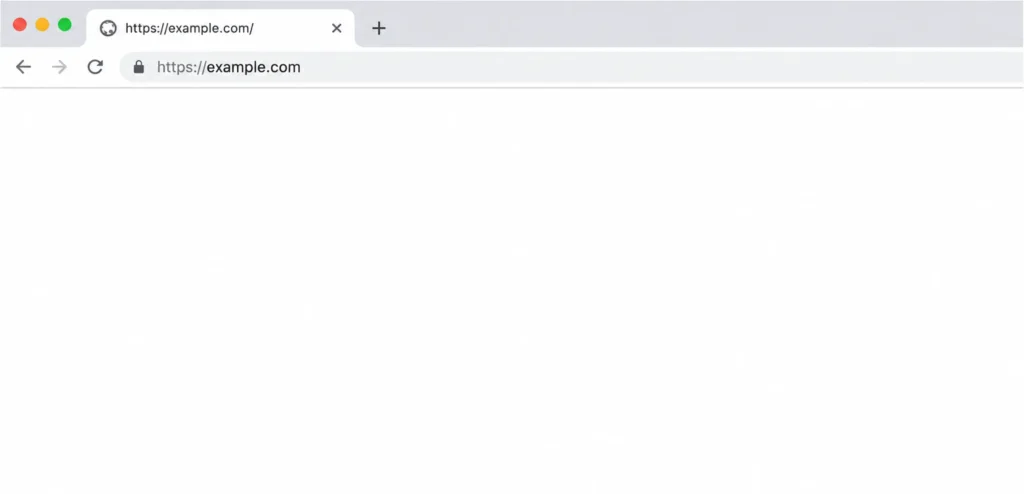
The white screen of death is a blank page with no error text, usually caused by a plugin or theme conflict, a fatal PHP error, or an exhausted memory limit.
How to fix the white screen of death?
If you can access wp-admin, go to Plugins and deactivate them all, then reactivate one at a time to find the culprit. If you are locked out:
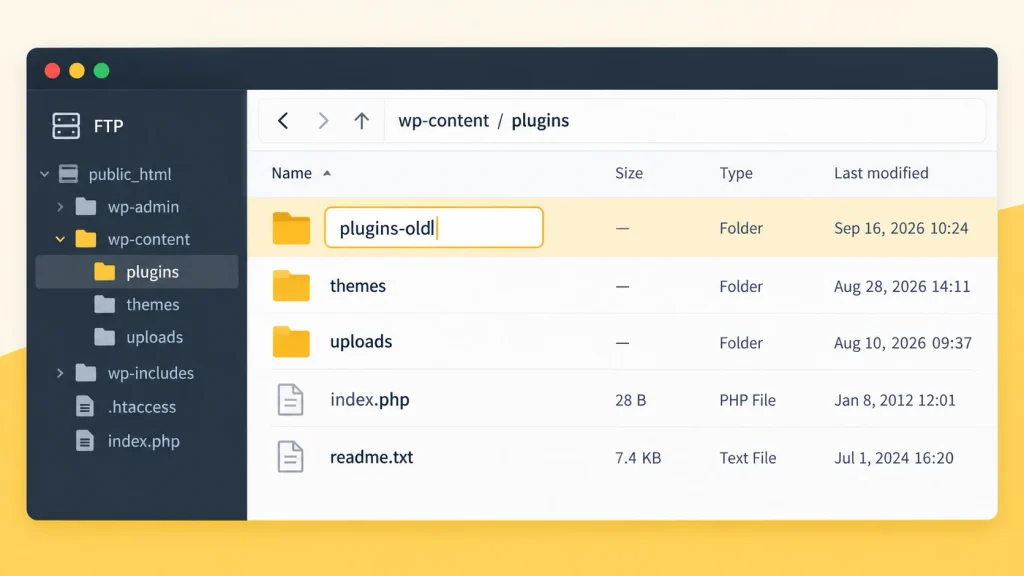
- Connect via FTP or your host’s file manager.
- Open wp-content/plugins and rename the folder to plugins-old.
- Reload your site. If it comes back, a plugin was the cause.
- Rename the folder back to plugins, then reactivate each plugin individually through wp-admin until the white screen returns, isolating the problem plugin.
When deactivating plugins does not fix it, repeat the same rename process on your active theme’s folder inside wp-content/themes to rule out a theme conflict.
WordPress syntax error (parse error)
A syntax error means a mistake in your PHP code, usually a missing semicolon, an extra bracket, or a typo introduced while editing a theme file, plugin file, or a custom code snippet.
How to fix syntax error?
The error message tells you the exact file and line number. Open that file via FTP, correct the syntax, and save. If you added the code yourself through a snippets tool, remove or fix the snippet directly rather than editing core files by hand.
A plugin such as FluentSnippets lets you test PHP, CSS, and JS snippets safely and disable a broken one instantly without touching FTP, which is a faster recovery path than hunting through raw files.
WordPress login redirect loop
This happens when your browser keeps bouncing you back to the login screen instead of into wp-admin. Common causes include a mismatched Site Address (URL) setting, a caching plugin serving stale cookies, or a corrupted .htaccess rule.
How to fix login redirect loop?
Clear your browser cookies and cache first. If that does not work, log into phpMyAdmin through your hosting dashboard, open the wp_options table, and confirm that the siteurl and home values match exactly, including https. Deactivate any caching or security plugin through FTP if the loop continues.
Server and resource errors
These errors point to the server running out of resources or hitting a limit, rather than a specific plugin being broken.
500 internal server error
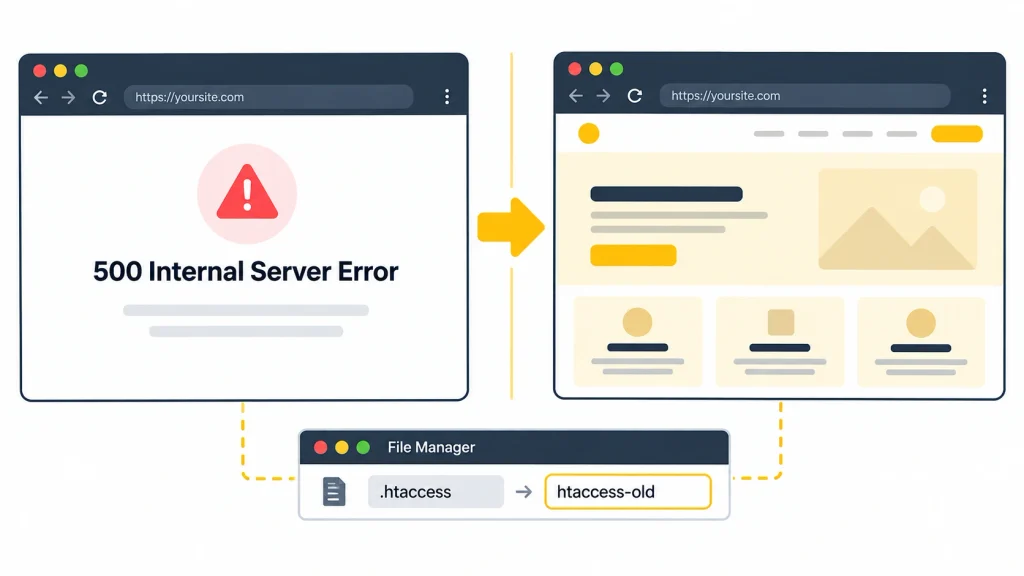
The 500 internal server error means the server hit a problem it cannot identify, most often from a corrupted .htaccess file, a plugin conflict, or an exhausted PHP memory limit.
How to fix internal server error?
- Rename your .htaccess file to htaccess-old via FTP, then reload your site.
- If that fixes it, go to Settings > Permalinks in wp-admin and click Save to regenerate a clean .htaccess file.
- If the error remains, deactivate all plugins, then switch to a default WordPress theme like Twenty Twenty-Five.
- Increase your PHP memory limit (see the memory exhausted section below).
- As a last step, re-upload fresh wp-admin and wp-includes folders from a clean WordPress download. This does not affect your content or media.
502 bad gateway
A 502 error appears when a request to your server takes too long or the server sends back an invalid response, often from a traffic spike or a poorly coded plugin or theme.
How to fix bad gateway error?
Reload the page first, since temporary traffic spikes resolve on their own. If it persists, clear your browser cache and try again. If the error continues across devices, contact your host, since it usually points to a server-side timeout.
504 gateway timeout
A 504 error means the server acted as a gateway but never got a timely response from the upstream server, which usually points to a resource-heavy plugin, a slow database query, or an overloaded shared hosting plan.
How to fix gateway timeout error?
Deactivate resource-heavy plugins (import tools, backup plugins running during peak hours) one at a time and monitor if the timeout clears. If your site regularly hits 504 errors under normal traffic, it is usually a sign your hosting plan needs more server resources.
WordPress memory exhausted error
This error means your site’s PHP process ran out of the memory WordPress was allowed to use, often triggered by a plugin-heavy site or a low default limit set by your host.
How to fix memory exhausted error?
- Open wp-config.php via FTP.
- Add this line above the “stop editing” comment: define( ‘WP_MEMORY_LIMIT’, ‘256M’ );
- Save and reload your site.
- If the error persists, ask your hosting provider to raise the server-level PHP memory limit, since wp-config.php cannot exceed what the server allows. For a full walkthrough, see WPManageNinja’s guide on how to increase the PHP memory limit.
Connection timed out
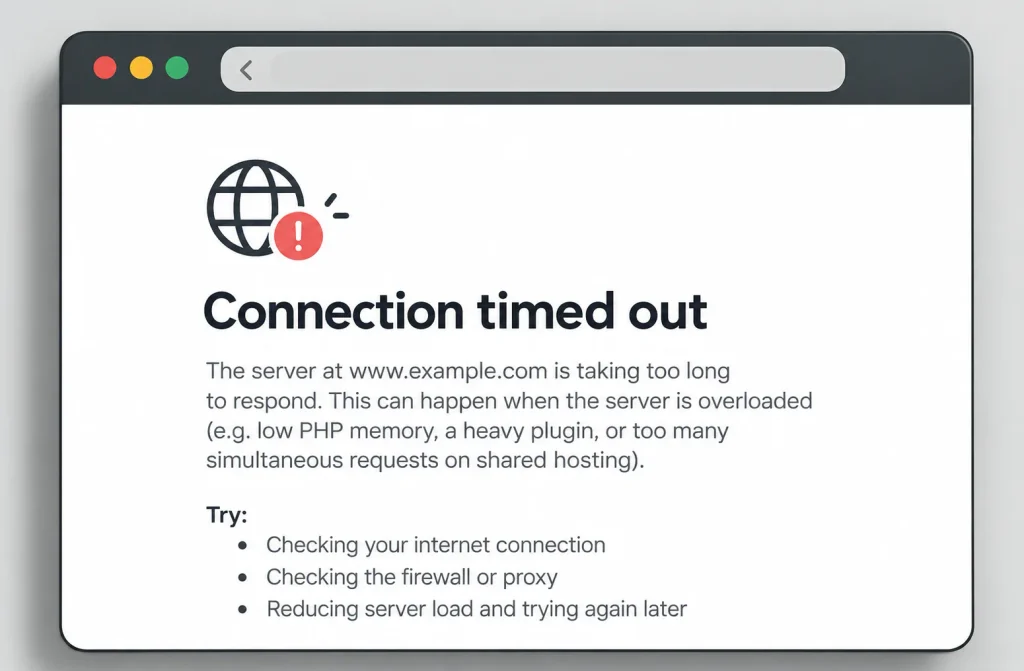
A connection timeout usually means your server is overloaded, often from a low PHP memory limit, a heavy plugin, or too many simultaneous requests on shared hosting.
How to fix connection timed out error?
Deactivate all plugins and reactivate them one at a time to find the resource hog. Switch to a default theme to rule out theme scripts. Increase your PHP memory limit as described above. If none of this helps, ask your host to raise the maximum execution time in php.ini, since that file is outside WordPress’s control.
Database errors
Database errors are more serious than most on this list, since they usually mean WordPress cannot talk to the database that stores your content.
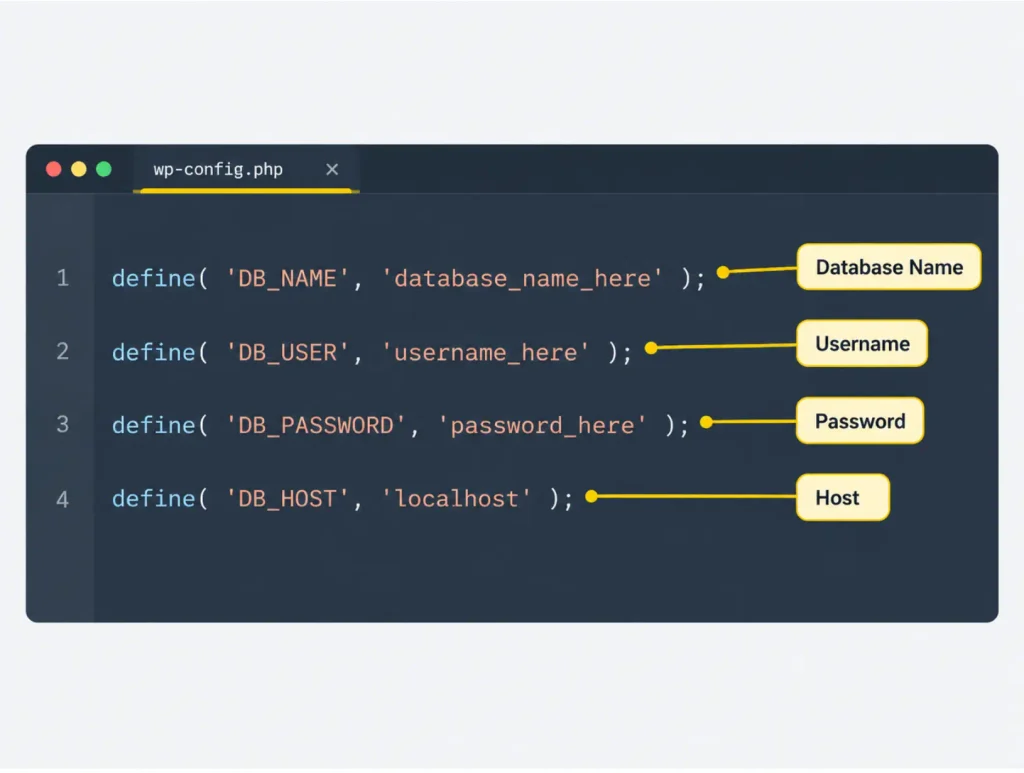
Error establishing a database connection
WordPress shows this message when it cannot connect to your MySQL database, whether from wrong credentials, a database that hit its resource quota, or, less often, a compromised site.
How to fix database connection error?
- Check that the database name, username, password, and host in wp-config.php match what your hosting dashboard shows.
- If the credentials are correct, contact your host. The database server may be down or over its resource quota.
- If your host confirms everything is fine on their end, scan your site for malware. A compromised database is a less common but real possibility, and if confirmed, restore from a clean backup and change all login credentials immediately.
Content and permalink errors
These errors affect how visitors reach your pages, often after a URL, permalink, or SSL change.
404 page not found
A 404 error means WordPress cannot find the page a visitor requested, most often from a broken permalink structure, a moved or deleted page without a redirect, or a corrupted .htaccess file.
How to fix 404 error?
Go to Settings > Permalinks and click Save without changing anything. This regenerates your permalink rules. If the error continues, manually confirm your .htaccess file contains the standard WordPress rewrite rules, or ask your host to enable the mod_rewrite Apache module.
Too many redirects
This error puts your browser in an endless redirect loop, usually from a mismatch between your site’s HTTP and HTTPS settings, or a caching or security plugin enforcing conflicting redirect rules.
How to fix too many redirects?
Check Settings > General in wp-admin and confirm both the WordPress Address and Site Address use https:// consistently. If you recently added an SSL certificate, check your caching plugin’s SSL or “force HTTPS” setting, since an outdated cache can keep serving old HTTP redirects.
Mixed content error (HTTP and HTTPS)
A mixed content warning appears when a page loads over HTTPS but pulls in images, scripts, or styles over HTTP, which browsers flag as insecure.
How to fix mixed content error?
Run your homepage through your browser’s developer console (Inspect > Console) to identify which HTTP resources are loading. Update hardcoded HTTP links in your database using a search-and-replace tool, or a dedicated SSL plugin, to convert them to HTTPS.
HTTP error when uploading images
This error appears in the Media Library when an image upload fails partway through, commonly from a low PHP memory limit, a server timeout, or a plugin conflict with the image editor.
How to fix HTTP error?
Try uploading a smaller image first to confirm it is not a file-size issue. Deactivate plugins that touch media (image optimizers, CDN plugins) one at a time. If the error remains, increase your PHP memory limit using the steps in the memory exhausted section above.
Email and maintenance errors
WordPress not sending email
By default, WordPress sends email through your server’s PHP mail function, which most hosts either block or flag as spam, so contact forms, password resets, and notifications quietly fail to arrive.
How to fix email not sending error?
The reliable fix is switching to SMTP, which authenticates outgoing mail properly instead of relying on PHP mail. FluentSMTP connects your site to providers like Gmail, Brevo, or Amazon SES for free and logs every email your site sends, so you can see exactly what failed and why instead of guessing.
Briefly unavailable for scheduled maintenance error
This message appears when a WordPress update gets interrupted before it finishes, leaving the site stuck in maintenance mode even though nothing is actually broken.
How to fix Briefly unavailable for scheduled maintenance error?
Connect via FTP, navigate to your site’s root folder, and delete the file named .maintenance. Reload your site. If the update itself failed partway through, re-run it manually from Dashboard > Updates.
Wrapping up
WordPress is extremely easy to use and comes with a lot of useful features, but as every content management system, it has its flaws. Nearly every WordPress error on this list comes down to a plugin conflict, a resource limit, or a broken file, and each one has a clear, repeatable fix. Keep a recent backup on hand, work through the steps methodically, and most errors are solved in minutes rather than hours.Stay calm and fix these errors permanently using the tips above!
Frequently asked questions
Is it safe to edit wp-config.php myself?
Yes, as long as you back up the file first and only edit within the marked sections. A single misplaced character can break your site, so always keep the original file to restore if something goes wrong.
Do I need a developer to fix WordPress errors?
Most of the errors on this list are fixable with FTP access and careful step-by-step changes. Database corruption, DNS issues, or repeated server-level errors are the cases where a developer or your hosting provider’s support team is worth bringing in.
Why do WordPress errors keep coming back after I fix them?
A recurring error usually means the root cause was not fully addressed, such as a plugin that keeps auto-updating into a broken state, or a server resource limit that is too low for your site’s actual traffic. Track the pattern before assuming it is fixed for good.
What is the fastest way to find which plugin is causing an error?
Deactivate all plugins at once, confirm the error is gone, then reactivate them one at a time, reloading your site after each one. The plugin active when the error returns is the cause.

This is Madhobi, a Marketing Strategist at WPManageNinja with expertise in technical writing and email marketing. Outside of work, she likes traveling and exploring new places.
-
Styling Beautiful CSS Forms with Fluent Forms’ Advanced Form Styler
Learn styling Fluent Forms using built-in templates, Gutenberg, custom CSS, -
Meet 5 Remarkable Women Changing the WordPress World
Meet 5 inspiring women in WordPress who are shaping its -
FluentSMTP Review: Whats Inside this 700K+ WordPress SMTP Plugin?
Check our FluentSMTP review blog to Discover whats inside this


Comments
-
I thoroughly enjoyed reading your blog post as it provided me with valuable insights and information. Additionally, I would like to contribute some supplementary points that could benefit your readers:
1. Error Establishing a Database Connection
2. Syntax Error
3. Memory Exhausted Error
4. Plugin Compatibility Issues
5. File and Folder Permissions
6. Missing Stylesheet Error
7. Mixed Content Error (HTTP/HTTPS)
8. Error 502 – Bad Gateway
9. Error 504 – Gateway Timeout
These points offer additional perspectives on the discussed topic. On a personal note, as someone without a technical background, I understand the challenges of website development. If you are facing similar difficulties, I have found it helpful to seek assistance from professional companies that specialize in web development and website design and redesign, such as Alakmalak Technologies


Leave a Reply
You must be logged in to post a comment.