

FluentPlayer Introduction: Video Player for WordPress Built for Outcomes
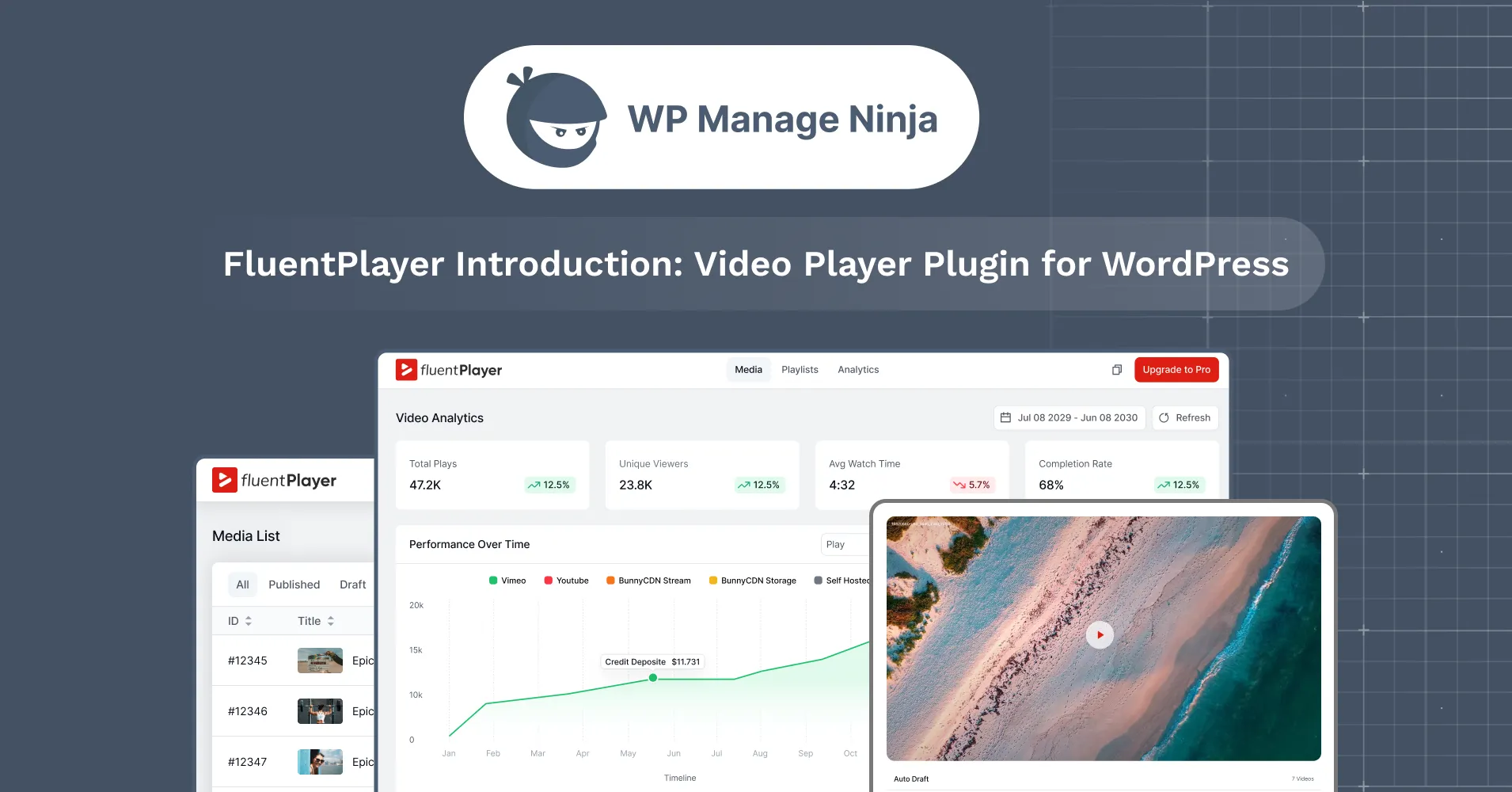
Video is one of the most powerful tools on your WordPress site, and the one you can measure the least. You can track form drop-offs, email clicks, and page behavior. But video usually leaves you with a vague “view” count and a pile of assumptions.
FluentPlayer is here to change that. FluentPlayer is the new video player for WordPress from WPManageNinja, built to close the gap between watching and measurable outcomes: engagement insight, conversion context, and the ability to turn attention into action.
Key Takeaways
- FluentPlayer is a fast, native video and audio player for WordPress that lets viewers fill out forms, capture leads, and take action without leaving the video.
- It is built inside the Fluent ecosystem, with native connections to Fluent Forms, FluentCRM, and FluentCommunity that work on the free plan.
- The free version covers self-hosted, YouTube, Vimeo, and audio playback, player presets, chapters, custom branding, and in-video forms and email capture.
- Pro unlocks the conversion and analytics engine: CTA, hotspot, and ad layers, timed content, video analytics, playlists, custom subtitles, and extra sources like BunnyCDN, MUX, and HLS.
- It is engineered for speed and Core Web Vitals, loading only what each page needs so video does not drag down performance.
- Best fit for course creators, marketers, small businesses, ecommerce brands, and agencies who expect video to drive measurable results.
What Is FluentPlayer?
FluentPlayer is a fast, native video and audio player for WordPress that does more than embed a file. A viewer can fill out a form or subscribe without leaving the video, because FluentPlayer is built inside the same Fluent ecosystem as Fluent Forms, FluentCRM, and FluentCommunity.
Built From Real User Needs, Not Trends
The result is a genuine user-generated feature list, shaped by real workflows, real frustrations, and real needs from people who publish, teach, market, and sell with video.
FluentPlayer Features, Organized by How You Actually Use Video
Playback & Viewing Control
Define exactly how videos behave on the page, across devices, and during playback. No guesswork, no surprises.
- Multiple media sources: self-hosted videos, YouTube, Vimeo, audio files, external URLs, and HLS adaptive streaming, all embedded the same way and managed from one place.
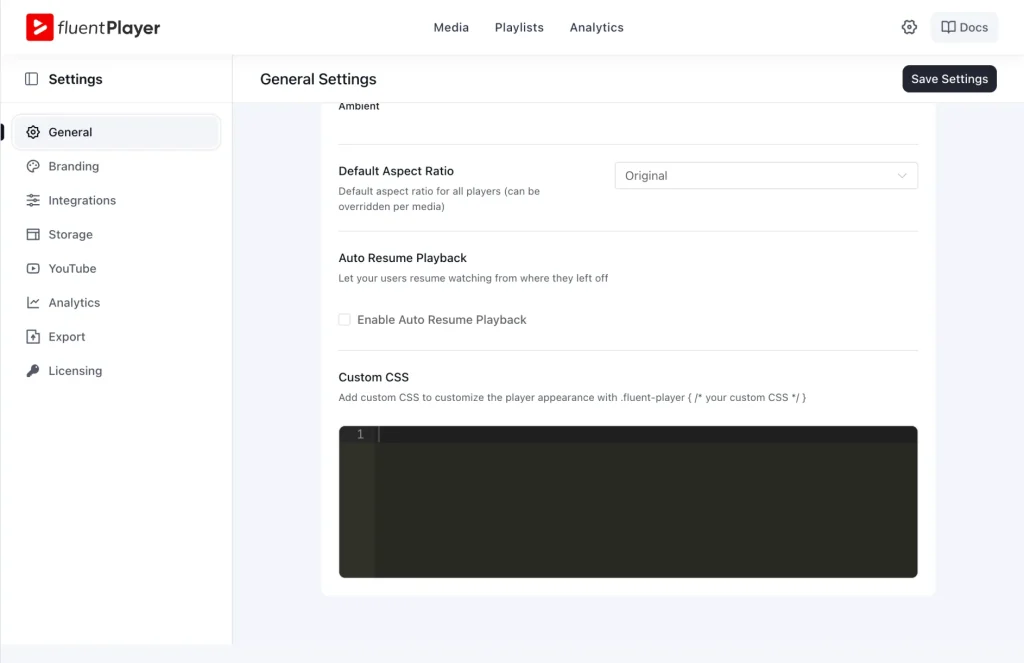
- Customizable player presets: build your controls, branding, and behavior once, then reuse them across pages and videos in one click.
- Remember playback position: viewers continue from where they stopped, which naturally lifts completion on tutorials and long lessons.
- Plus: autoplay (muted or with sound), inline mobile play, picture-in-picture, speed control (0.5x–2x), progress bar, poster image and aspect-ratio controls, title and logo overlays, shortcodes, and flexible load strategy.
Structure & Navigation
Make long videos and multi-video series easier to follow and finish.
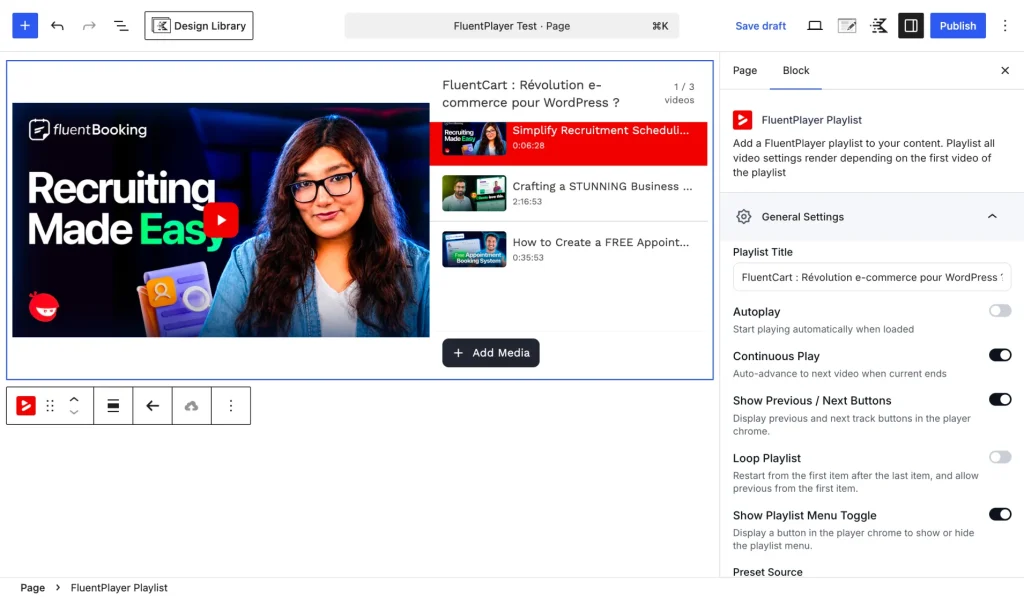
- Video playlists: organize videos into structured playlists pulled from your media library, with progress tracking across videos. Ideal for courses, onboarding, and tutorial series. Available in list and grid layouts.
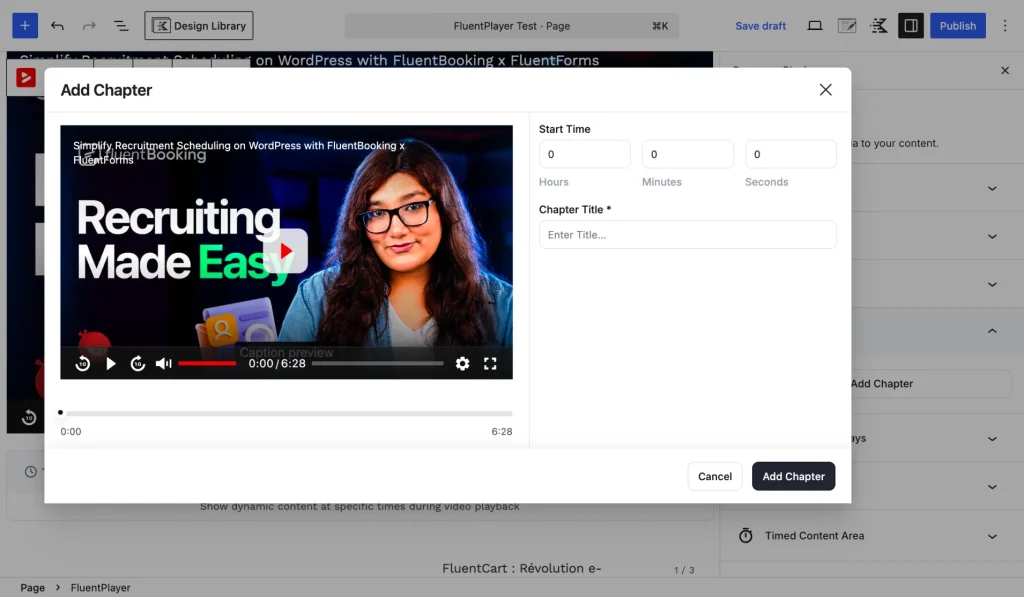
- Video chapters: split long videos into clickable chapters so viewers jump straight to what they need.
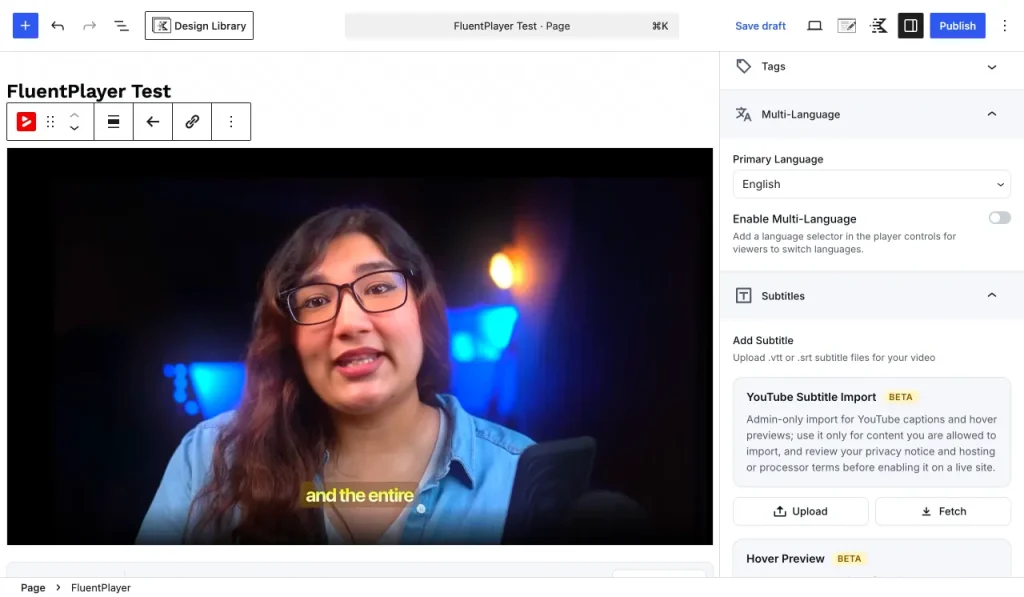
- Subtitles & language switching: add subtitle files and let viewers switch languages inside the player for better accessibility and broader reach, no duplicate uploads.
Interaction & Engagement
Turn passive playback into an active experience that captures leads and drives action.
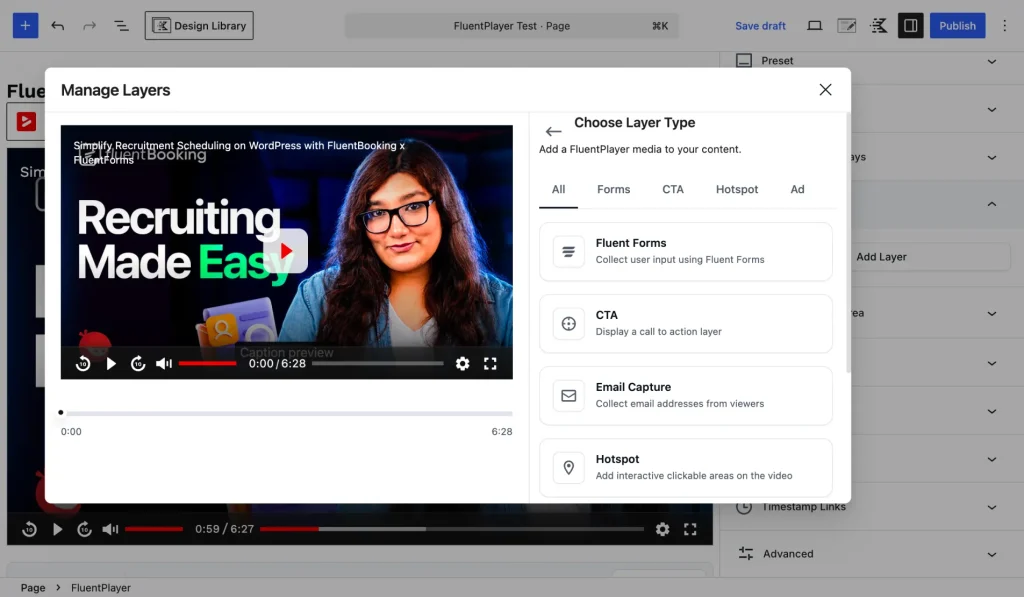
- In-video layers: add time-based interactive layers that appear at exactly the right moment, not just after the video ends. Layer types include Fluent Forms or custom forms, email capture, CTA banners, hotspots, ads, and shortcodes.
Example use cases:
- Show an email capture form at 2:30, right after the hook
- Drop a “Buy Now” CTA during the value moment
- Embed a contact form when viewers hit a decision point
- Gate a section to collect leads before continuing
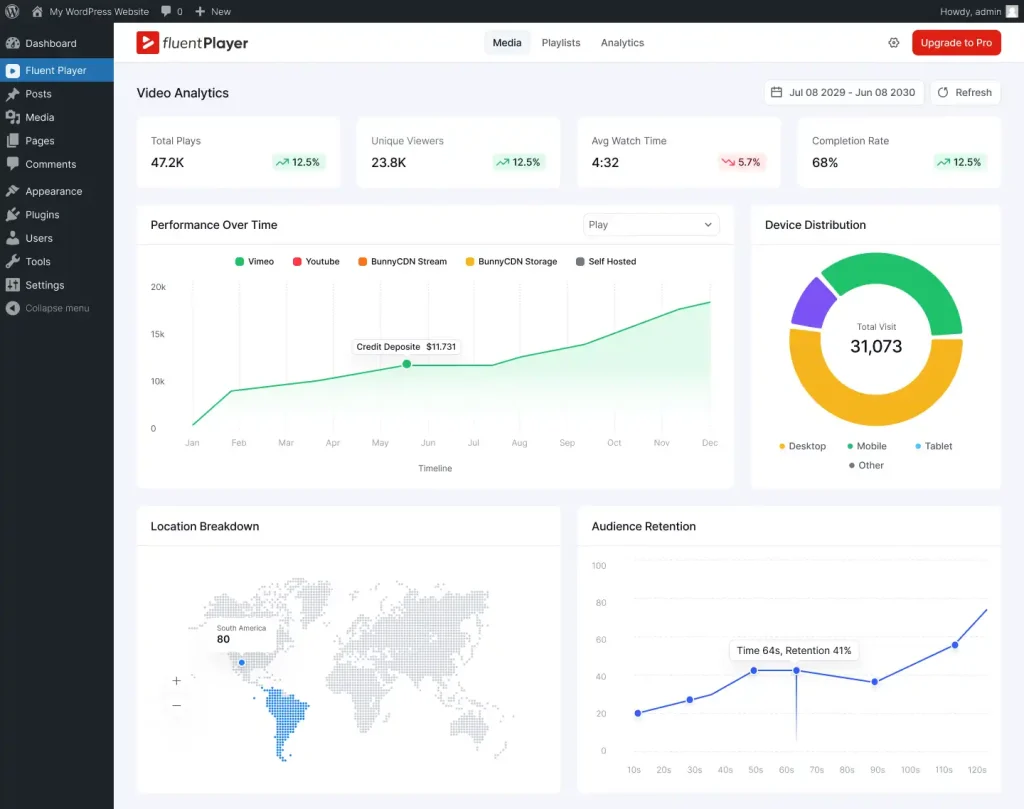
- Video analytics: track views and unique viewers, watch time and trends, completion rates, top-performing videos, top viewers, audience retention signals, and device distribution, with export options and GA4 connectivity. Stop guessing and see what content does the real work.
The Technicalities of FluentPlayer (For Developers)
FluentPlayer is engineered like a modern product, not a classic WordPress “blob plugin.”
Architecture. FluentPlayer uses Vidstack (a modern Web Components media player framework) paired with a custom WPFluent PHP backend inspired by Laravel’s elegance. The philosophy is simple: load only what’s needed, when it’s needed.
The plugin is split into isolated modules:
- Admin dashboard (Vue 3): loads only in wp-admin
- Block editor (React): loads only while editing
- Frontend player (Vanilla JS): loads only on pages that contain video
- Playlist system: a separate optional bundle for users who need it
No bloat. No shared dependency soup. Each context gets exactly what it needs.
Frontend asset loading. FluentPlayer is obsessive about what hits your visitors’ browsers. The critical path prioritizes an inline aspect-ratio CSS container to prevent layout shift, an eager-loaded poster image so something appears immediately, progressive-enhancement controls, and lazy player initialization.
Asset highlights:
- Player JS ~951 KB (Vidstack + controls)
- Player CSS ~80 KB (modular SCSS, optimized)
- CSS delivered via print media + onload callback (non-blocking)
- Scripts loaded with defer + type=”module”
- Resource hints (dns-prefetch, preconnect) for YouTube/Vimeo/CDN only on first use
- Vite-based build with content-hash versioning
Core Web Vitals. FluentPlayer is built specifically to respect LCP, CLS, and INP thresholds, so video doesn’t wreck your page experience or your rankings.
Who Benefits Most From FluentPlayer
FluentPlayer isn’t for everyone. It’s for people who expect video to do real work:
- Course creators who want to see where learners drop off and which lessons underperform
- Marketers who want to tie engagement to outcomes instead of guessing
- Small business owners using video to sell services without losing visitors to third-party distractions
- Ecommerce brands running product demos who want clarity on what converts
- Developers & agencies tired of patchwork embeds, inconsistent behavior, and front-end bloat
Why FluentPlayer Is a Game-Changer
Most video tools are playback utilities. FluentPlayer is a video infrastructure:
- One player across formats: self-hosted, external URLs, HLS, YouTube, Vimeo, audio
- Navigation that makes long content watchable: chapters, playlists, progress
- Interaction that turns attention into action: layers, CTAs, forms, hotspots
- Analytics that turn content into insight: watch time, completion, retention
- A foundation that connects video engagement to the rest of your site
The FluentPlayer Roadmap
WPManageNinja is treating FluentPlayer as a long-term platform, not a one-off release.
Near-term: deeper analytics (retention detail, cohort comparisons, per-video journeys), player UX refinements, enhanced playlist control, an expanded developer surface (hooks, filters, event outputs), and better reporting exports.
Fluent ecosystem integration (high priority): video engagement events flowing into the Fluent ecosystem: watch behavior feeding segmentation, completion and retention triggering automations, and interaction clicks becoming measurable funnels.
Longer-term: structured dynamic-content patterns that adapt to viewer behavior, smarter multi-video progress tracking, and rich multimedia that stays lightweight and server-efficient.
The goal in one line: a lightweight, server-efficient media player deeply integrated with the Fluent ecosystem, delivering rich multimedia and dynamic content without server bloat.
FluentPlayer Free vs Pro
FluentPlayer ships with a capable free core, and the features that turn video into a real conversion and analytics engine live in Pro. Here’s the full feature breakdown.
| Feature | Free | Pro |
|---|---|---|
| Autoplay | ✅ Yes | ✅ Yes |
| Play Inline on Mobile | ✅ Yes | ✅ Yes |
| Player Presets | ✅ Yes | ✅ Yes |
| Customizable Player Presets | ❌ No | ✅ Yes |
| Video Chapters | ✅ Yes | ✅ Yes |
| Remember Playback Position | ❌ No | ✅ Yes |
| Picture-in-Picture | ✅ Yes | ✅ Yes |
| Multiple Media Sources (Core) | ✅ Yes | ✅ Yes |
| Multiple Media Sources (BunnyCDN, MUX) | ❌ No | ✅ Yes |
| Speed Control | ✅ Yes | ✅ Yes |
| Progress Bar | ✅ Yes | ✅ Yes |
| Subtitles | ❌ No | ✅ Yes |
| Language Switching | ✅ Yes | ✅ Yes |
| Shortcodes | ✅ Yes | ✅ Yes |
| Load Strategy | ✅ Yes | ✅ Yes |
| AJAX Compatibility | ❌ No | ✅ Yes |
| Interactive Layers (Core) | ✅ Yes | ✅ Yes |
| Interactive Layers (CTA, Hotspot, Ad, Shortcode) | ❌ No | ✅ Yes |
| Custom Branding | ✅ Yes | ✅ Yes |
| Video Analytics | ❌ No | ✅ Yes |
| Timed Content | ❌ No | ✅ Yes |
| Media Tagging | ❌ No | ✅ Yes |
| Poster Image | ✅ Yes | ✅ Yes |
| Aspect Ratio | ✅ Yes | ✅ Yes |
| Title Overlay | ✅ Yes | ✅ Yes |
| Text / Button Overlay | ❌ No | ✅ Yes |
| Video Playlist | ❌ No | ✅ Yes |
| Playlist Layout Customization | ❌ No | ✅ Yes |
| Playlist Appearance Customization | ❌ No | ✅ Yes |
FluentPlayer Integrations
FluentPlayer connects with the tools you already use. Some integrations are available on the free plan, while others are part of Pro.
| Integration | Plan |
|---|---|
| FluentCRM | ✅ Free |
| Fluent Forms | ✅ Free |
| FluentCommunity | ✅ Free |
| BunnyCDN | ⭐ Pro |
| MUX Video | ⭐ Pro |
| Mailchimp | ⭐ Pro |
| Webhook | ⭐ Pro |
| Google Analytics | ⭐ Pro |
FluentPlayer Pricing
1 Domain License
Lifetime License
5 Domain License
Lifetime License
25 Domain License
Lifetime License
50 Sites License
Looking for a flexible payment plan? Grab our exclusive split-payment option and enjoy 9 easy installments of just $89/month!
$89/Month
(For 9 Months)
$799
*Lifetime License
Frequently Asked Questions
What is FluentPlayer?
FluentPlayer is a next-generation video player for WordPress from WPManageNinja that combines playback, navigation, in-video interaction, and analytics into one connected system, so video becomes visible, actionable, and measurable.
What video sources does FluentPlayer support?
Self-hosted videos, BunnyCDN Stream and Storage, MUX, YouTube, Vimeo, external URLs, and HLS adaptive streaming, all embedded the same way and managed from one place.
Can FluentPlayer capture leads from inside a video?
Yes. In-video layers let you show forms, email capture, CTA banners, and hotspots at precise time-based moments during playback, not just after the video ends.
Does FluentPlayer slow down my site?
It’s built to respect Core Web Vitals (LCP, CLS, INP). Modules load only when needed, CSS is delivered non-blocking, and scripts are deferred, so video doesn’t drag down performance.
Does FluentPlayer integrate with other Fluent tools?
Yes. FluentPlayer connects with FluentCRM, Fluent Forms, FluentBooking, and FluentCommunity, so video engagement feeds segmentation, automation triggers, and measurable funnels.
Ready to Fix the Visibility Gap?
If video is a serious part of your business, it shouldn’t be the one channel you can’t measure, improve, or connect to outcomes. FluentPlayer makes video finally behave like the rest of your WordPress stack: visible, actionable, and connected.
Join the waitlist to get an early look at FluentPlayer.

WordPress, automation, eCommerce and growth marketing specialist, a WordPress Core Contributor and Media Corps member blending storytelling with technology to craft strategies in SEO, email marketing, and beyond.
-
Security incident on 31 July 2026: What Happened and What You Should Do
Fluent Forms Pro 6.2.7 and Ninja Tables Pro 5.2.11 were -
WPManageNinja July 2026 Roundup: One Ecosystem, More Connected Than Ever
Explore the WPManageNinja July 2026 roundup featuring 24 updates, FluentHub -
WPManageNinja June 2026 Roundup: Reinventing Variations & a Player Lands
See what happened in WPManageNinja during June 2026. Roundup blog



Leave a Reply
You must be logged in to post a comment.