

Why Browsing History Is Important for Ecommerce Personalization
A customer rarely buys in a straight line. They land in your store, check a product, read a blog post, compare a few options, maybe visit your refund policy, leave, come back from email, and finally buy. Most ecommerce tools only show the order. They miss the story that led there.
That is the gap browsing history fills. It shows what people did before they bought, which pages mattered, where they hesitated, and what likely pushed them over the line. That makes ecommerce personalization much smarter, because you are not guessing from a receipt. You are reading the journey.
With the new Browsing History add-on for FluentCart, store owners can see that journey directly inside each order. That is the useful kind of context.
- Browsing history helps ecommerce stores understand what customers did before they bought, not just what they finally purchased.
- It reveals important buying signals like product interest, hesitation, comparison, trust checks, referral sources, and return visits.
- Ecommerce personalization becomes more effective when it is based on real customer behavior instead of guesswork.
- Store owners can use browsing history to improve product recommendations, browse abandonment emails, follow-up campaigns, upsells, bundles, landing pages, and content strategy.
- FluentCart’s Browsing History add-on brings this customer journey data directly inside the order screen, so merchants can see the path behind each sale.
- The add-on tracks useful details like page-by-page browsing trail, dwell time, first and last referrer, landing page, exit page, session status, and converted order snapshots.
- For WordPress ecommerce stores, this means less dashboard hopping and more clarity about what actually drives conversions.
Ecommerce Personalization Starts Before the Purchase
Personalization is not just, “what should we recommend after checkout?” It starts much earlier. Every browse, search, scroll, and return visit is a clue.
Salesforce puts it bluntly: ecommerce analytics helps brands understand how shoppers interact with a site and where conversion opportunities are hiding.
A few simple examples:
- If someone views the same product three times, they are probably serious.
- If they check the refund policy before checkout, they may need trust.
- If they read a comparison post before buying, they want validation.
- If they come from a blog post and later purchase, content just helps revenue.
That is why browsing history matters. It turns vague traffic into behavior you can actually use.
What is Browsing History in eCommerce?
Browsing history is the record of what a shopper explored before buying. In ecommerce, that can include product pages, category pages, blog posts, cart and checkout pages, policy pages, landing pages, exit pages, referral sources, page sequence, dwell time, and session length.
On its own, that data looks messy. Put together, it tells a story. A browse path shows intent, hesitation, comparison, and sometimes frustration. That is what makes it valuable for personalization and decision-making.
Browsing History vs Search History vs Purchase History
These signals are related, but they are not the same.
- Browsing history shows what shoppers explored.
- Search history shows what they actively looked for.
- Purchase history shows what they already bought.
- Cart history shows what they almost bought.
The strongest personalization happens when these signals work together. But browsing history is the clearest window into the pre-purchase journey, which is where most buying decisions are shaped.
Why browsing History Matters for eCommerce Personalization
It reveals customer intent before checkout
A completed order tells you what sold. Browsing history tells you what the customer considered before they decided. That matters because the decision was often shaped by more than the product page.
If someone visits a product page, reads a comparison article, checks the refund policy, and then buys, you now know what mattered: maybe pricing, trust, or proof. That is much better than staring at an order total and pretending that is the whole story.
It helps you understand what convinced customers to buy
Sometimes the page that closes the sale is not the product page. It may be a blog post, a pricing page, a feature explanation, a documentation page, a review page, or a return policy page.
Retail Touchpoints makes the same point from a different angle: search and browsing behavior help brands find the hooks that move shoppers toward purchase.
If you know which pages show up again and again in converting journeys, you can improve those pages and use them more intentionally.
It makes product recommendations smarter
Recommendation engines are only as good as the signals behind them. Browsing history gives you those signals.
For example:
- Someone who reads beginner content can be shown beginner-friendly products.
- Someone who views several items in one category can be shown bundles or upgrades.
- Someone who checks a product but does not buy can be shown alternatives.
That is better than spraying random “you may also like” blocks everywhere and hoping for magic.
It helps recover abandoned sessions better
Not every session ends in an order. Some people leave from a product page. Some leave from checkout. Some leave after comparing options.
FluentCart’s Browsing History add-on tracks sessions as active, abandoned, or converted. That gives store owners a cleaner view of where shoppers drop off and which journeys deserve follow-up.
It connects traffic sources to real orders
Traffic is nice. Buyers are better.
The add-on records first and last referrer, so you can see whether people came from Google, email, social, affiliates, or ads before purchasing. That helps you stop rewarding traffic that looks busy but does not convert.
The Problem with Relying Only on External Analytics Tools
External analytics tools are useful, but they often keep the story split across dashboards. Pageviews live in one place. Sales live in another. Email clicks live somewhere else. Ad data lives in another tab you forgot to open.
That creates a dumb little scavenger hunt every time you want to understand one sale.
FluentCart’s approach is simpler. The browsing trail sits inside the order itself, so the context lives where the decision already happened.
Introducing the Browsing History add-on for FluentCart
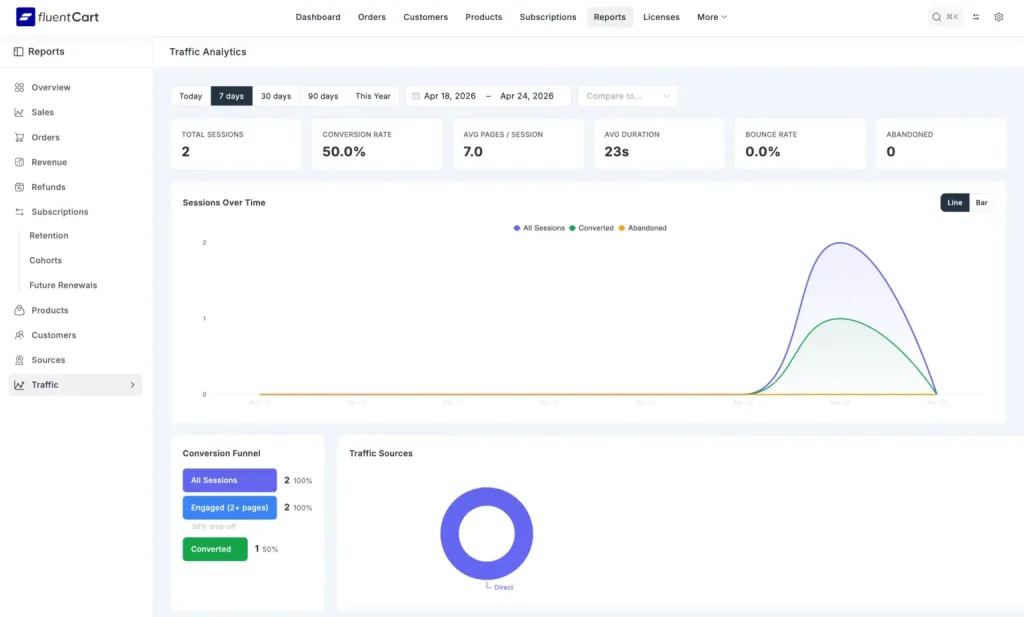
The Browsing History add-on helps store owners see what happened before an order was placed. According to the FluentCart announcement, it tracks the page-by-page browsing trail, dwell time, first and last referral source, landing page, exit page, session duration, session states, and a permanent order-level snapshot of the converted journey.
That means the order screen becomes more than a receipt. It becomes a customer story.
How the Browsing History add-on Works Inside FluentCart
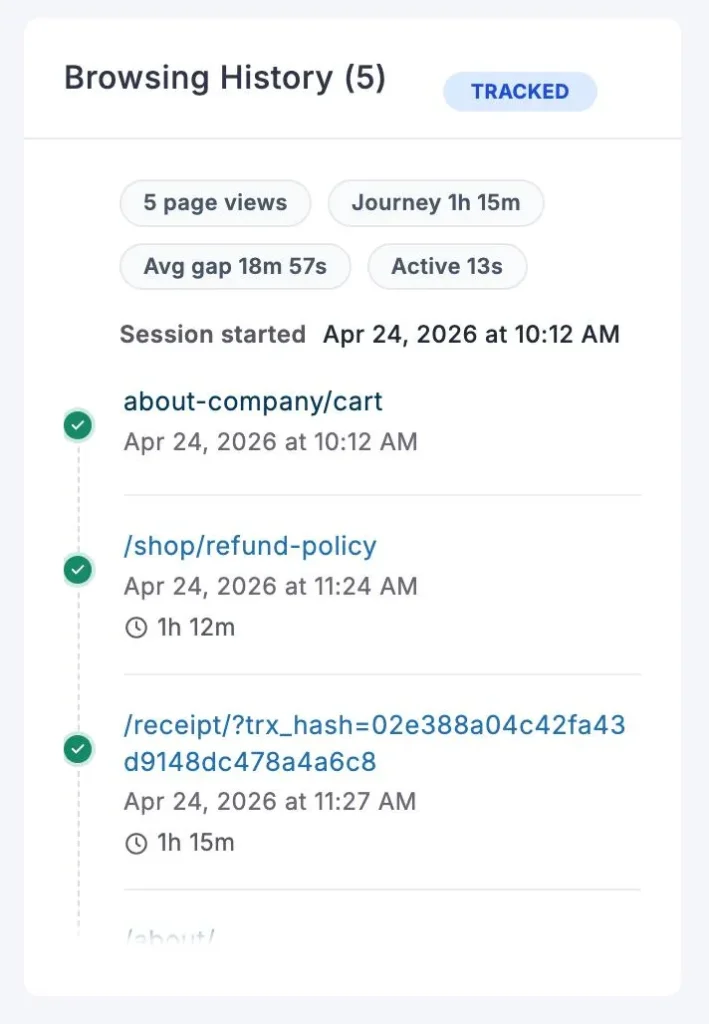
- A visitor lands on your store.
- FluentCart tracks the session using an anonymous cookie.
- The visitor browses pages, products, categories, cart, checkout, or content.
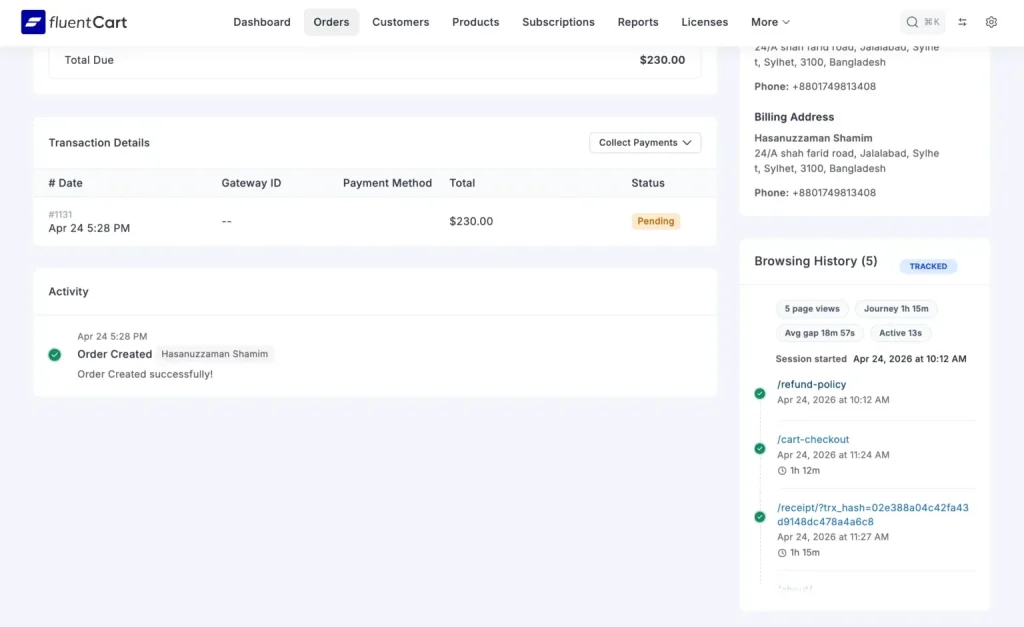
- If the visitor places an order, FluentCart attaches that browsing session to the order.
- You open the order and see the journey behind the sale.
The key detail is permanence. The converted session is saved as an order-level snapshot, so the context stays attached to the purchase.
What Store Owners Can Learn from Customer Browsing History
Which pages help customers decide
If people keep visiting a comparison page before buying, that page matters. If they check your refund policy every time, trust is a buying factor. If your blog shows up repeatedly in converting journeys, content is doing more than SEO.
Which products need better positioning
If people keep coming back to a product page but do not buy, the page may need clearer copy, stronger visuals, better pricing cues, or better trust signals. Browsing history helps you spot that pattern early.
Which traffic sources bring serious buyers
A small source that sends buyers is more valuable than a big source that sends tourists. Referrer data helps you see that difference without pretending all traffic is equal.
Where customers hesitate before buying
Dwell time can show where people linger. FluentCart’s add-on tracks it carefully and avoids inflated time from inactive tabs. That makes the data much more useful.
How Browsing History Improves eCommerce Personalization
Personalized follow-up emails
Browsing history can shape better follow-up emails. That includes product view follow-ups, browse abandonment emails, category-based recommendations, and post-purchase suggestions.
Better bundles and upsells
If customers often view certain products together, that is a clue. It can inform bundles, upsells, and cross-sells that feel natural instead of forced.
Better landing pages
If people bounce after a landing page, that page may be doing a bad job of moving them forward. If it keeps showing up in converting journeys, it deserves more attention and more traffic.
Better content strategy
When blog posts and tutorials appear in converting journeys, they are not “just content.” They are sales support. That is worth knowing.
Privacy Matters: Personalization Should Feel Helpful, not Creepy
Browsing history is powerful, but it has to be handled responsibly. FluentCart’s approach is privacy-friendly: a single anonymous cookie, no IP collection, no device fingerprints, no personal data pulled from browsing history, and no third-party data dependency. Converted order histories stay because they belong to real orders. Non-converted sessions are cleaned up later.
That matters because the goal is not spying. The goal is understanding the buying journey with clean, useful context.
Why this Matters for WordPress eCommerce Stores
WordPress store owners usually want more control over their data. They do not want half their customer story scattered across tools they barely trust.
FluentCart keeps ecommerce inside WordPress. The Browsing History add-on makes that even better by connecting products, orders, customers, and browsing context in one place.
That is the point. Less dashboard hopping. More clarity.
Who Should use FluentCart’s Browsing History add-on?
This is useful for:
- Digital product sellers
- Course creators
- WordPress product companies
- SaaS sellers
- Membership site owners
- Physical product stores
- Agencies managing client stores
- Content-led ecommerce brands
- Stores running ads
- Stores using email marketing
- Stores getting traffic from SEO, social, affiliates, or campaigns
How to Install the Browsing History add-on in FluentCart
- Make sure FluentCart Pro is active.
- Download the Browsing History add-on.
- Go to WordPress Dashboard.
- Go to Plugins > Add New > Upload Plugin.
- Upload the fluent-cart-page-history.zip file.
- Activate the add-on.
- Open a new FluentCart order to see browsing history inside the order screen.
No weird setup marathon after activation.
What Comes Next for Browsing History in FluentCart?
Today, this helps merchants understand individual orders better. Next, it can feed deeper reporting, conversion path analysis, top-converting pages, drop-off insights, and better ecommerce decisions.
That is the right direction. Start with useful context. Build the bigger reporting layer after.
Final Thoughts: Every Order Has a Story
Every ecommerce order has a story behind it. Someone landed somewhere, clicked something, compared something, hesitated, returned, trusted, and finally bought.
Without browsing history, most of that story disappears.
With FluentCart’s Browsing History add-on, store owners can finally see the journey behind the sale directly inside the order.
That is where better ecommerce personalization starts.
See The Story Behind Every Order with FluentCart
Your customers are already leaving clues before they buy. FluentCart’s Browsing History add-on helps you capture those clues, connect them to real orders, and understand what actually drives sales.
If you want a cleaner view of buyer behavior inside WordPress, this is a very good place to start.
FAQ
1. What is the Browsing History add-on for FluentCart?
It is an add-on that records a shopper’s browsing journey and shows it inside the FluentCart order screen.
2. Why is browsing history important for ecommerce personalization?
Because it shows what customers considered before they bought, not just what they bought.
3. Does FluentCart show browsing history inside orders?
Yes. The browsing trail is attached directly to the order.
4. Does the Browsing History add-on require FluentCart Pro?
Yes, it is meant to work with FluentCart Pro.
5. Does the add-on collect personal data?
No personal browsing identifiers are the point here. It is built around anonymous session tracking.
6. Can browsing history help improve product recommendations and follow-up emails?
Yes. It gives you the behavior signals needed for smarter recommendations, follow-ups, and browse abandonment flows.

WordPress, automation, eCommerce and growth marketing specialist, a Core Contributor and Media Corps member blending storytelling with technology to craft strategies in SEO, email marketing, and beyond.
-
Ecommerce SMS Marketing: Strategies, Examples & Best Practices
Learn ecommerce SMS marketing strategies, campaigns, and best practices to -

Omnichannel Marketing: 7 Steps to a Connected Shopping Experience
It’s never too late to upgrade your marketing plan. Whether -
FluentSMTP Review: Whats Inside this 700K+ WordPress SMTP Plugin?
Check our FluentSMTP review blog to Discover whats inside this



Leave a Reply
You must be logged in to post a comment.